
Open source workflow automation tools let you run unlimited automated workflows on your own server, with OSI-approved licenses and no per-task billing, while Zapier and Make keep ownership of your logic and charge you more every time your business grows.
Zapier's billing model has a specific failure mode that catches teams off guard. A 9-step workflow processing 200 orders per day consumes 54,000 tasks per month. Zapier's Starter plan covers 750 tasks for $29.99/month. Scaling to 54,000 monthly tasks pushes you into the Professional plan at $73.50/month and beyond, with usage-based overages above plan limits. A misconfigured loop runs the counter to its ceiling in hours. One manufacturing team reported a monthly bill jump from 400 to 1,200 GBP from exactly this scenario. Trustpilot reviewers rate Zapier 1.4 out of 5, with billing surprises as the most common complaint.
The problem is structural: Zapier's business model requires charging by the unit, and every step in a multi-step Zap counts as a separate unit. There is no export, no versioning, no way to move your workflow logic off the platform.
Self-hosted open source workflow automation solves this directly. You run on infrastructure you control. Workflows are code or configuration you own. Billing is fixed at your hosting cost. I evaluated four OSI-licensed tools across ease of setup, integration depth, code-vs-no-code flexibility, and license compliance.
TL;DR: Activepieces is the best open source Zapier replacement for teams that want familiar trigger-action workflows without writing code: MIT licensed, 280+ integrations, Docker setup in under 30 minutes. Windmill is the right choice for developers who want real code behind their automations, with Python, TypeScript, Go, and SQL support plus auto-generated UIs. Node-RED handles event-driven and IoT workflows on minimal hardware. Automatisch is the lightest-weight option for teams that need something running this afternoon.
Key Takeaways:
- Best open source Zapier replacement (no-code): Activepieces: MIT license, 280+ integrations, AI-native with MCP support, easiest setup of any OSI-licensed automation tool
- Best for developers: Windmill: write Python, TypeScript, Go, or SQL; auto-generates UIs and schedulers from your code
- Best for IoT and event-driven workflows: Node-RED: Apache 2.0, runs on a Raspberry Pi, 4,000+ community nodes
- Simplest no-code setup: Automatisch: AGPL-3.0, zero configuration beyond Docker Compose, best for teams migrating a handful of Zaps
- What about n8n: n8n uses the Sustainable Use License, which is not OSI-approved. It appears in the Open Source Alternatives directory but does not qualify under OSI-only editorial standards. See the FAQ.
Open Source Workflow Automation: Quick Comparison
| Tool | License | Self-Hosted | Best For | Setup Difficulty |
|---|---|---|---|---|
| Activepieces | MIT | Yes (Docker) | Zapier replacement, AI workflows | Easy |
| Windmill | AGPLv3 + Apache 2.0 | Yes (Docker, K8s) | Developers, script orchestration | Intermediate |
| Node-RED | Apache 2.0 | Yes (Node.js, Docker) | IoT, event-driven, homelab | Easy-Intermediate |
| Automatisch | AGPL-3.0 | Yes (Docker) | Simplest trigger-action replacement | Easy |
How I Evaluated These Tools
I scored each tool on four criteria relevant to developers and small teams:
- Integration breadth: How many services can you connect without writing a custom connector?
- Self-hosting complexity: How long does it take to get a working instance from scratch?
- Code flexibility: Can you drop into a script when the visual builder hits its limits?
- License compliance: Is the license OSI-approved, with no restrictions on internal or commercial use?
1. Activepieces: Best Open Source Zapier Replacement
Activepieces is the best OSI-licensed workflow automation tool for teams that want Zapier-style trigger-action flows without writing code.
Activepieces is the closest structural equivalent to Zapier among OSI-licensed tools. You build automations by selecting a trigger (a new row in a spreadsheet, a webhook, a schedule) and chaining actions (send a Slack message, create a GitHub issue, call an API). The visual builder is polished and readable. The setup is a single docker-compose up command.
With 22,200+ GitHub stars and v0.83.0 shipping in May 2026, Activepieces is actively developed. The community has contributed 60% of the 280+ available pieces, which means the integration library grows faster than any one team could sustain. G2 reviewers consistently rate Activepieces higher than n8n on ease of setup, citing simpler onboarding and a cleaner interface for non-technical users.
The AI-native angle matters for 2026. Activepieces ships a native MCP (Model Context Protocol) toolkit with support for 280+ MCP servers, which means you can build workflows that coordinate LLM agents with human-in-the-loop approval steps. If your automation stack needs to work alongside AI pipelines, this is the only OSI-licensed tool in the category that treats AI as a first-class workflow trigger and action.
Key Features
- 280+ pre-built pieces covering Slack, Gmail, GitHub, Notion, Google Sheets, Postgres, and 270+ more
- AI-native MCP toolkit with 280+ MCP server integrations for LLM-based workflow automation
- Human-in-the-loop approvals: workflows can pause and wait for a human decision before continuing
- MIT license for the Community Edition, with no restriction on internal use or commercial deployment
- Docker Compose setup that runs against embedded SQLite or external Postgres
- REST API and webhooks for embedding workflow triggers in external applications
- Visual flow builder with branching, looping, and error handling
Pros
- Best setup experience of any OSI-licensed automation tool: Docker Compose and running in under 30 minutes
- Genuinely no-code: non-technical team members can build and modify workflows without engineering help
- MIT license means no licensing complexity for commercial deployments or SaaS products
- AI-first design with MCP support puts it ahead of every comparable tool in the category
- Active community with frequent new pieces and a responsive maintainer team
Cons
- Integration library (280+) is smaller than n8n's 400+: some niche services require a custom HTTP connector
- No built-in scripting layer: when a visual action hits its limits, you drop to HTTP calls rather than arbitrary code
- Enterprise features (SSO, audit logs, custom roles) require the commercial plan
License and Hosting
- License: MIT (Community Edition): fully OSI-approved
- Self-hosting: Docker Compose, single or multi-container. Embedded SQLite for low-volume, Postgres for production. Easy difficulty.
- Managed option: Activepieces Cloud from $100/month
Best For
Activepieces is best for small teams and technical founders who want a self-hosted Zapier replacement with a familiar no-code interface, MIT licensing, and native AI workflow support. If you are currently spending more than $100/month on Zapier or Make, and your team does not want to write automation code, Activepieces is the migration target.
View Activepieces on Open Source Alternatives
2. Windmill: Best for Developers Who Want Real Code
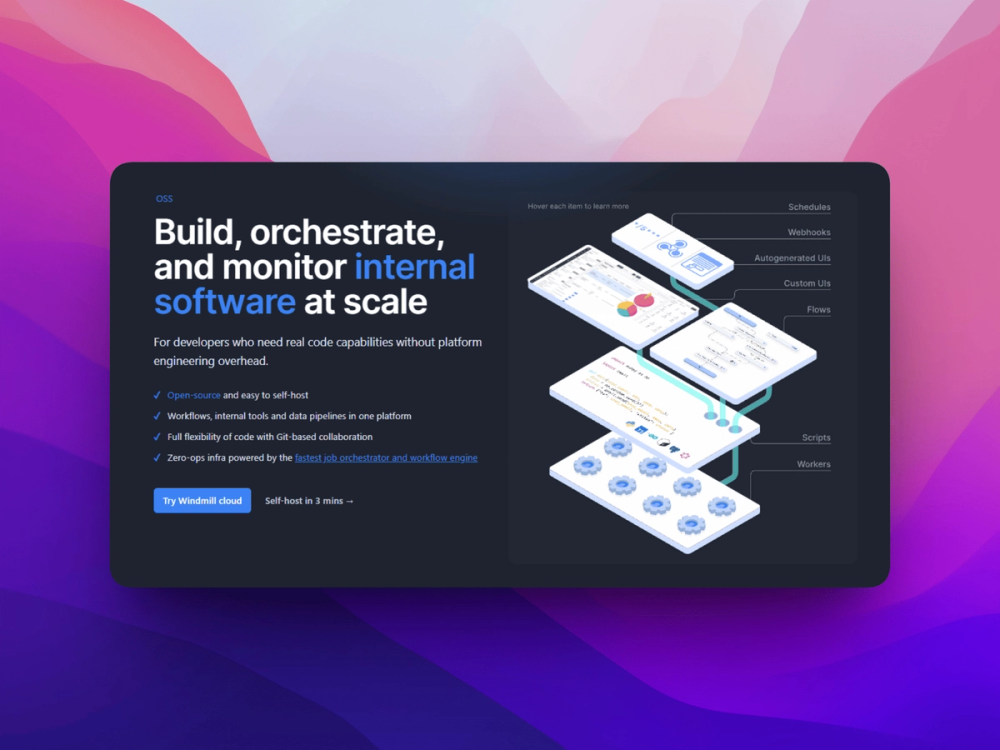
Windmill is the best open source workflow automation platform for developers who want to write real scripts and have a scheduler, UI generator, and orchestration layer wrap around them automatically.
Windmill occupies a different position from Activepieces. It is not a Zapier replacement. It is a developer platform where you write Python, TypeScript, Go, SQL, Bash, Rust, or GraphQL scripts and Windmill handles the rest: scheduling, dependency management, secret storage, auto-generated UIs, and execution history. The gap it fills is the space between running a cron job in a GitHub Action and buying Retool for internal tooling.
With 16,500+ GitHub stars and an extraordinary release cadence (v1.702.1 shipped May 14, 2026), Windmill is one of the most actively developed tools in the category. Over 3,000 organizations self-host it.
The script-to-UI feature is the standout capability. Write a Python function that takes parameters, and Windmill generates an input form for it automatically. Any team member can trigger that script from a browser without knowing Python. This eliminates the overhead of building internal dashboards for data operations, admin actions, or one-off reports.
Windmill also handles durable execution: workflows survive process restarts, retries happen automatically, and state is persisted across long-running jobs. For teams that need data pipelines with branching and error recovery, it handles those workflows more reliably than a cron-based script runner.
Key Features
- Multi-language scripts: write in Python, TypeScript, Go, SQL, Bash, Rust, GraphQL, or PowerShell
- Auto-generated UIs: function signatures become web forms: no frontend code required
- Workflow orchestration with durable execution: workflows survive restarts and handle failures gracefully
- Scheduler with a visual cron editor for recurring jobs
- Secret management built-in: credentials stored and injected at runtime, not hardcoded
- VS Code extension and CLI for a local development workflow that syncs to the hosted instance
- Git sync: workflows and scripts stored as versioned code in a repo
Pros
- Any language that developers already know works as a workflow step: no new DSL to learn
- Auto-generated UIs give non-technical teammates access to scripts without a frontend investment
- Git sync means automation logic is version-controlled alongside application code
- Windmill's own benchmarks show 13x faster execution than Airflow on comparable Python workloads (methodology in their docs)
- Dual license (AGPLv3 + Apache 2.0 for the worker component) means the core execution layer has no copyleft requirements for deployment
Cons
- Not a no-code tool: building useful automations requires writing actual code
- UI is more complex than Activepieces: there is a learning curve before you feel productive
- AGPLv3 on the main application has implications for embedding Windmill inside a product you distribute (consult your legal team)
- Enterprise features (multi-team support, SSO, audit) require the commercial plan
License and Hosting
- License: AGPLv3 (main application) + Apache 2.0 (worker component): both OSI-approved
- Self-hosting: Docker, Kubernetes with official Helm charts. Intermediate difficulty.
- Managed option: Windmill Cloud from $20/month
Best For
Windmill is best for engineering teams and technical founders who want to replace ad-hoc cron scripts, internal admin tools, and data pipeline jobs with a version-controlled, durable execution platform. If your team maintains a folder of Python scripts that run on a schedule and you want observability, retries, and a web UI, Windmill is the right choice.
View Windmill on Open Source Alternatives
3. Node-RED: Best for Event-Driven and IoT Workflows
Node-RED is the best open source automation tool for event-driven workflows, IoT integrations, and any scenario where automation is triggered by hardware, sensors, or real-time data streams rather than SaaS events.
Node-RED comes from IBM's research lab and is now maintained by the OpenJS Foundation under the Apache 2.0 license. It has 23,000+ GitHub stars and a deeply established community. It runs as a Node.js process on anything from a Raspberry Pi to a Kubernetes cluster.
Where Activepieces and Automatisch focus on SaaS trigger-action automation (new Salesforce contact triggers a Slack message), Node-RED focuses on data flows and event processing. An IoT sensor publishes to MQTT; Node-RED subscribes, transforms the reading, compares it against a threshold, and sends an alert or writes to a database. A webhook arrives from a payment processor; Node-RED parses it, routes it to three different services based on the event type, and logs the result.
The 4,000+ community nodes cover MQTT, HTTP, WebSockets, TCP, serial ports, home automation protocols, every major cloud provider, and most common APIs. If you are running a homelab, Node-RED is the standard.
Key Features
- Flow-based visual editor: connect nodes by drawing wires between inputs and outputs
- 4,000+ community nodes covering hardware protocols, APIs, databases, and cloud services
- MQTT, WebSocket, TCP, serial port support for hardware and IoT integration
- Runs on minimal hardware: a Raspberry Pi with 512MB RAM handles significant workloads
- Apache 2.0 license with no commercial use restrictions
- OpenJS Foundation governance for long-term maintenance and security
Pros
- Most deployment-proven tool in this category: the IoT and homelab community has tested this in production for a decade
- Runs on any hardware, including very low-cost edge devices
- Apache 2.0 license has no copyleft implications: embed, modify, distribute freely
- 4,000+ nodes means almost any integration exists without writing a custom connector
- OpenJS Foundation backing provides a stable maintenance path
Cons
- Not designed for business process automation in the Zapier sense: trigger-action flows between SaaS apps require more manual wiring than Activepieces
- The flow editor becomes hard to navigate for complex workflows with many branching paths
- No built-in scheduler UI as polished as Windmill's
- Less suited to teams that primarily need to automate business workflows (email, CRM, spreadsheets)
License and Hosting
- License: Apache 2.0: fully OSI-approved, no commercial restrictions
- Self-hosting: Node.js or Docker. Very easy: runs on a Raspberry Pi in under 10 minutes.
Best For
Node-RED is best for IoT developers, homelab operators, and engineering teams building event-driven data pipelines that process real-time events from hardware, MQTT brokers, or webhook streams. If your automations involve physical devices, sensor data, or real-time event routing, Node-RED is the established standard. For SaaS business automation, use Activepieces instead.
4. Automatisch: Simplest Self-Hosted No-Code Automation
Automatisch is the most direct, least-configuration self-hosted automation tool for teams that need simple trigger-action workflows with minimal setup time.
Automatisch makes a deliberate tradeoff: fewer integrations, simpler architecture, faster time-to-running. Where Activepieces focuses on integration depth and AI-native features, Automatisch focuses on getting something working this afternoon. It has 13,800+ GitHub stars and uses AGPL-3.0 for the Community Edition.
The integration library covers around 40+ services. This is not a weakness for small teams who only need to connect five or six tools. If you need to sync new HubSpot contacts to a Google Sheet and trigger a Slack notification, Automatisch handles this with less surface area to configure than any other tool in this list.
Automatisch is the right choice for teams that are currently running a handful of Zaps, want to get off Zapier, and do not need the full feature surface of Activepieces or the code-first architecture of Windmill.
Key Features
- Docker Compose setup with minimal configuration: the simplest first-run experience in this comparison
- 40+ integrations covering common business tools: Slack, Gmail, GitHub, Google Sheets, Trello, HubSpot
- Trigger-action model matching Zapier's conceptual model exactly: no new paradigm to learn
- AGPL-3.0 Community Edition with no feature limits on self-hosted deployments
- Webhook support for custom triggers from external services
Pros
- Fastest setup of any tool in this comparison: Docker Compose and running in under 10 minutes
- No-code: accessible to non-technical team members
- Minimal resource requirements: runs on a $5/month VPS for low-volume automations
- Clear conceptual model: if you understand Zapier, you understand Automatisch immediately
Cons
- Narrower integration library (40+) compared to Activepieces (280+): niche services require manual HTTP calls
- Less actively developed than Activepieces: last release v0.15.0 in August 2025
- No AI-native features or MCP support
- AGPL-3.0 has copyleft implications for embedding in distributed software (consult legal for commercial use cases)
License and Hosting
- License: AGPL-3.0: OSI-approved
- Self-hosting: Docker Compose. Very easy difficulty.
Best For
Automatisch is best for small teams migrating a handful of Zaps who want the simplest possible self-hosted setup and do not need the integration breadth of Activepieces or the code flexibility of Windmill. If you have fewer than 20 automations and your integration needs fit within the 40+ services covered, Automatisch gets you running in an afternoon.
What About n8n?
n8n appears in almost every comparison of open source workflow automation tools, and for good reason: it has 188,000+ GitHub stars, 400+ integrations, and a polished visual builder that many developers prefer.
The license situation requires a direct answer. n8n changed from Apache 2.0 to the Sustainable Use License (SUL) in October 2022. The SUL is not an OSI-approved license. It restricts offering n8n as a service to your customers or embedding it in a product that provides automation to external users who do not supply their own credentials.
For internal automation on your own infrastructure for your own team, the SUL restrictions do not apply. Many teams self-host n8n under these terms without issue.
The n8n directory listing exists on Open Source Alternatives because the tool is widely used and frequently searched. Under this site's OSI-only editorial standard, n8n is not included in the primary recommendations above. If your use case is strictly internal, n8n is worth evaluating alongside Activepieces. If you need an OSI-approved license for compliance, legal, or open source compatibility reasons, use Activepieces or Windmill instead.
How to Choose: Open Source Workflow Automation Decision Guide
Use this framework to match your team's situation to the right tool:
| Your situation | Best choice |
|---|---|
| Want Zapier UX, no code, OSI license | Activepieces |
| Write code, want scripts + scheduling + UI | Windmill |
| IoT, hardware, MQTT, event streams | Node-RED |
| Fewest automations, fastest setup | Automatisch |
| Internal use, need 400+ integrations, SUL is acceptable | n8n (see caveat above) |
| Complex durable workflows in application code | Temporal (MIT, 19k stars) |
On Huginn: Huginn (MIT, 49k stars, agent-based model) is frequently cited in this category. Its development has been stalled since August 2022, with no releases in nearly three years and 611 open issues with no recent merges. It is in the Open Source Alternatives directory as the Huginn directory listing for reference. For new deployments, the maintenance risk is high enough that Activepieces is a better choice in almost every scenario Huginn would cover.
Open Source Workflow Automation: Frequently Asked Questions
What is the best free open source alternative to Zapier?
Activepieces is the best free open source Zapier replacement available today. It has 280+ integrations, a visual trigger-action builder, MIT licensing, and an active development team. Self-host it on Docker for free with no per-task limits.
Can I self-host workflow automation tools?
Yes. All four tools in this comparison (Activepieces, Windmill, Node-RED, and Automatisch) run on Docker or Node.js and can be self-hosted on any server you control. Setup takes 10-30 minutes depending on the tool. Your workflow logic, credentials, and execution history stay on infrastructure you own.
Is n8n open source?
n8n is source-available, not open source by OSI definition. It uses the Sustainable Use License (SUL), which restricts offering n8n as a service to your customers. For internal automation on your own infrastructure, the restrictions do not typically apply. For OSI-approved alternatives with similar functionality, use Activepieces.
What is the difference between workflow automation and workflow orchestration?
Workflow automation (Zapier, Activepieces, Automatisch) handles trigger-action flows between services: when X happens in one tool, do Y in another. Workflow orchestration (Temporal, Windmill, Prefect) handles the execution lifecycle of complex multi-step processes: retries on failure, state persistence across restarts, parallel execution, and coordination between services. Windmill covers both: it handles simple scheduled scripts and complex durable workflows.
How much does it cost to self-host workflow automation tools?
The tools themselves are free. Infrastructure costs depend on scale: a $5-10/month VPS handles low-volume automations with Automatisch or Node-RED. Activepieces and Windmill at medium volume work on a $20/month VPS with 2 CPU and 2GB RAM. At high volume (thousands of workflow executions per day), budget for a $40-100/month server or use a managed cloud plan.
What is the easiest open source automation tool for non-developers?
Activepieces has the best non-developer experience: the visual builder is polished, the terminology matches what Zapier users already know (triggers, actions, filters), and the 280+ integrations cover most common tools. Automatisch is simpler still if you only need a handful of automations from a narrow set of services.
Can open source tools replace Zapier for small businesses?
Yes, for most use cases. Activepieces covers 280+ integrations and handles all the trigger-action workflows that most small businesses run on Zapier. The main tradeoff is ongoing server maintenance: you own the infrastructure, which means updates and backups are your responsibility. The upside is a fixed hosting cost (typically $10-40/month) versus Zapier's per-task billing that grows with your business.
What open source automation tools support AI agent workflows?
Activepieces has the most complete AI-native integration: a native MCP toolkit with 280+ MCP server integrations, plus human-in-the-loop approval steps for AI workflows. Windmill supports AI workflows through its scripting layer: write Python functions that call LLM APIs, and Windmill handles scheduling, retries, and UI generation around them.
Does Windmill replace Temporal?
Windmill and Temporal solve overlapping but distinct problems. Windmill is best for teams who want to run scripts with scheduling and UI generation on top. Temporal (MIT license, 19k stars) is best for teams building distributed systems that need durable execution guarantees: workflow state that survives server crashes, compensating transactions, and complex multi-service coordination.
Which tools support team-based access control?
Activepieces supports role-based access and workspace separation in the Enterprise plan. Windmill supports multi-team workspaces with workspace-level permissions in both open source and cloud editions. Node-RED has minimal built-in access control: teams typically proxy it behind an authenticated reverse proxy. Automatisch has no team access controls beyond server-level authentication.
Is Huginn still maintained?
Huginn's last release was August 2022. The project has 49,000+ stars and an active issue queue, but merges have effectively stopped. For new deployments, the maintenance risk is high. The Huginn directory listing exists on Open Source Alternatives for reference. For a maintained alternative, use Activepieces with webhook triggers and HTTP action nodes.
What are the best open source alternatives to Make (formerly Integromat)?
Activepieces is the closest OSI-licensed equivalent to Make's multi-step scenario model. Both use a visual canvas to connect trigger and action modules, both support branching and filtering, and Activepieces is adding AI-native steps that Make is beginning to support as well. The key difference: Activepieces is self-hosted and MIT-licensed, Make is SaaS-only with per-operation billing.