

Who Arcmark is for#
Mac users leaving Arc
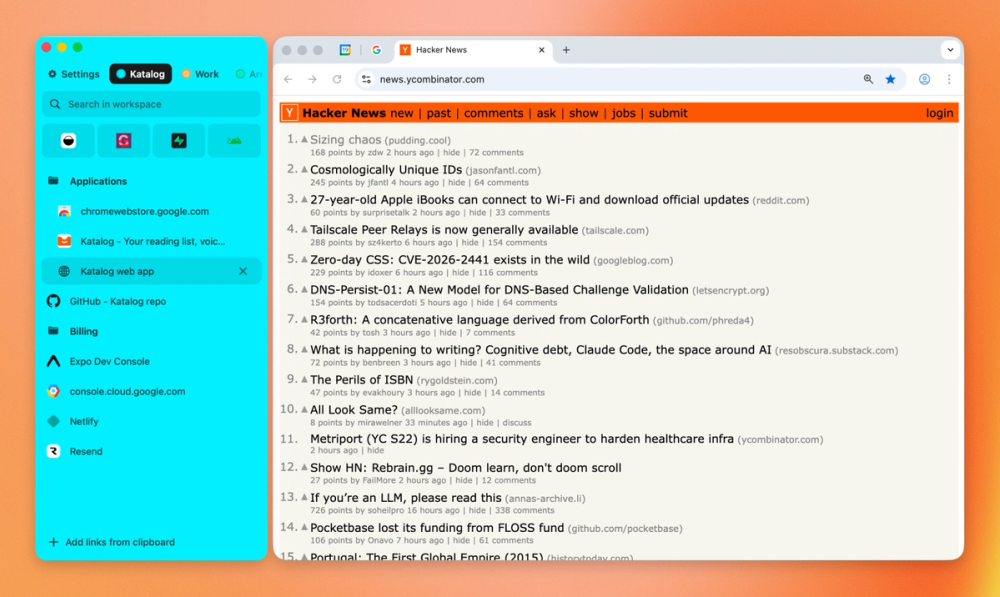
Arcmark fits users who like Arc's sidebar organization but want to use Chrome, Safari, Brave, or another browser.
Skip if:
You need bookmark sync across Windows, Linux, and mobile devices.
Local-first bookmark organization
The local JSON storage model helps users keep bookmark data inspectable and outside a hosted bookmark service.
Skip if:
You want team collaboration, hosted sync, or browser-extension based sharing.
The problem it solves#
Browser bookmarks are usually trapped inside one browser's sidebar and organization model. That becomes frustrating when a user wants Arc-style workspace organization without staying inside Arc or manually duplicating bookmarks across browsers.
Power users also need bookmarks to stay local and searchable. A simple browser folder tree can break down when links need to be grouped by workspace, moved quickly, and accessed beside whichever browser is active.
How it solves it#
Browser-attached sidebar
Arcmark can float alongside supported browser windows and follow them across spaces while still offering a standalone window mode.
Workspace organization
Users can organize bookmarks into multiple workspaces with custom colors, nested folders, and drag-and-drop movement.
Local JSON storage
The README says bookmarks are stored in a single local JSON file under the user's Application Support directory.
Strengths and trade-offs#
Strengths
- Browser-independent organizationArcmark is useful for people who want Arc-like sidebar organization while keeping freedom to use another browser.
- Native macOS feelBecause it is built with Swift and AppKit, Arcmark can behave like a focused local macOS utility rather than a web app.
Trade-offs
- -Mac-only utilityArcmark targets macOS and requires accessibility permissions for browser attachment. Cross-platform teams should not treat it as a shared bookmark platform.
What it's built on#
- Languages
- JavaScriptSwift
FAQ#
What browsers does Arcmark support?
The README lists Chrome, Arc, Safari, Brave, and similar browser windows for sidebar attachment.
Where does Arcmark store bookmarks?
Arcmark stores bookmarks in a local JSON file in the user's macOS Application Support directory.
What license does Arcmark use?
GitHub metadata reports MIT licensing for Arcmark.
Similar open-source tools#

rakazo
AI teammates you own: your keys, your model, your machine.

tinycast
One hotkey, everything you reach for all day.

JellyBoxPlayer
Native Jellyfin and Emby music player for every platform
winmux
Project-based window manager for macOS with sidebar and tab groups

FckSignups
Open-source tools that work instantly, no signup required

chippytea
Free up Mac disk space with no account and no telemetry.