

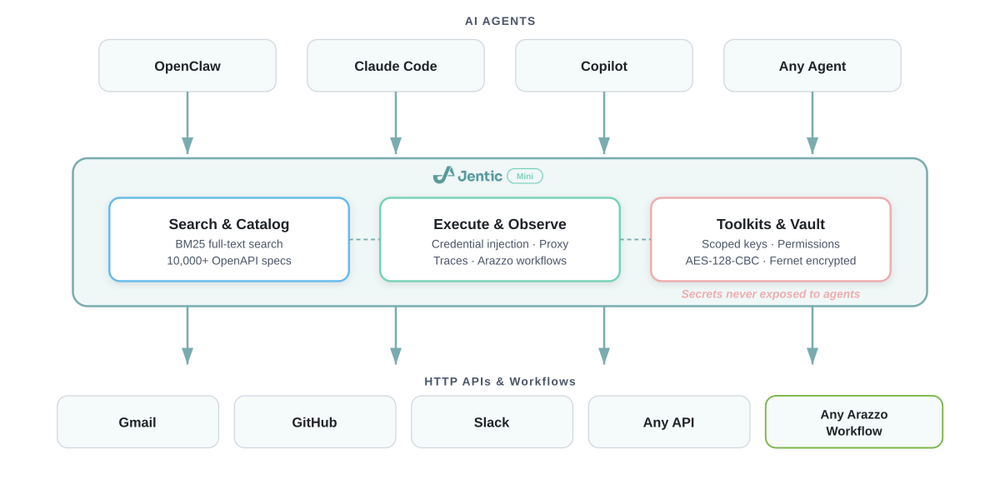
Who Jentic Mini is for#
Agent developers calling external APIs
Use Jentic Mini when an AI agent needs to search, inspect, and execute operations across multiple APIs while reducing direct handling of raw credentials.
Skip if:
Skip if your agent only calls one internal API through code you already maintain.
Platform teams testing credential boundaries
Jentic Mini is useful for evaluating how toolkit scopes, OAuth registration, and runtime secret injection change the agent security model before a managed rollout.
Skip if:
Skip if you need a production SLA or enterprise credential-vault integrations today.
Researchers evaluating API agent workflows
The built-in connection to OpenAPI and Arazzo catalog data makes it useful for testing how agents discover operations and workflows from structured API definitions.
Skip if:
Skip if you only need a static API catalog and no local execution broker.
The problem it solves#
AI agents often need to call APIs, but each provider brings its own auth model, operation schema, and credential-handling risk. Teams end up exposing too many tools to the agent, copying credentials into unsafe places, or writing custom request glue for every service.
That gets harder when the agent needs more than one API. Developers need a local broker that can search a catalog, import specs, inject credentials at runtime, and keep the agent away from raw secrets where possible.
How it solves it#
Local API execution broker
Runs a FastAPI service on your infrastructure so agents can search, inspect, and execute API operations through one local API. The standalone Docker command exposes the app on port 8900.
Credential vault
Stores API keys, OAuth tokens, and other secrets in a local vault and injects them during execution. This is designed to reduce direct credential exposure, but the project remains early access and not production-recommended.
Toolkit scoped access
Uses toolkit keys or OAuth registration so agents can receive limited access to selected credentials and policies. Toolkit grants can be revoked without replacing every credential.
Public catalog import
Connects to Jentic's public catalog of OpenAPI specs and Arazzo workflows. Adding credentials for a catalog API imports the relevant specs and workflows into the local registry.
Strengths and trade-offs#
Strengths
- Self-hosted evaluation pathJentic Mini can be deployed in your environment with Docker or Docker Compose, which helps teams evaluate credential and trace boundaries before deciding whether to use managed infrastructure.
- Apache-2.0 application sourceThe product code lives in jentic/jentic-mini under Apache-2.0, which supports commercial use, modification, and redistribution. That is a better OSA fit than the separate CC0 public API catalog alone.
- Local path before managed scaleThe README describes Mini as API-compatible with hosted and VPC editions. Developers can start locally, then evaluate managed scaling only when the workload needs it.
Trade-offs
- -Early access maturityThe README says Jentic Mini is early access and not recommended for production use yet. Use it for personal, development, or evaluation environments until the security model has more operating history.
- -Agent stack fitThe quickest setup path is built around OpenClaw and Jentic's agent workflow. Teams using a different agent framework should expect extra integration work around auth, tool registration, and deployment.
- -Catalog is separate dataThe local catalog import relies on the separate jentic-public-apis repository. That catalog is useful evidence for API coverage, but it is data and content rather than the application source for this listing.
Jentic Mini vs alternatives#
Jentic Mini vs hosted Jentic
Jentic Mini is the open source self-hosted execution layer. It gives developers local API search, execution, credential injection, traces, toolkit keys, and catalog import. Hosted Jentic and VPC editions add managed scaling, enterprise security integrations, advanced search, and deeper sandbox capabilities.
Choose Jentic Mini when you want to test agent API execution locally, keep credentials on your own infrastructure, and accept early access maturity. Choose hosted or VPC Jentic when you need managed operations, stronger enterprise controls, or production support.
Quick start#
Self-host Jentic Mini with Docker on a separate host from the agent when possible so the agent process cannot directly read the credential database.

```bash
docker run -d --name jentic-mini -p 8900:8900 -v jentic-mini-data:/app/data jentic/jentic-mini
```

Open the local Jentic Mini setup UI to create the admin account and finish configuration.What it's built on#
- Languages
- GoPythonTypeScript
- Frameworks
- FastAPIReact
- Databases
- PostgreSQL
- Cache
- Redis
- Tooling
- OpenAPI
FAQ#
Is Jentic Mini open source?
Yes. The Jentic Mini application source is public at github.com/jentic/jentic-mini and the repository reports Apache-2.0 licensing with a root LICENSE file.
Is Jentic Mini the same as hosted Jentic?
No. Jentic Mini is the self-hosted open source implementation. The hosted and VPC editions add managed search, scaling, sandbox, and enterprise credential features.
Does Jentic Mini expose secrets to agents?
Jentic Mini is designed to reduce direct credential exposure by storing credentials locally and injecting them at execution time. Operators still need to deploy and configure it carefully because the project is early access and not recommended for production use.
What role does jentic-public-apis play?
jentic-public-apis is the catalog data source used by Jentic Mini for OpenAPI specs and Arazzo workflows. It should be cited as catalog evidence, not as the application source for the OSA item.
Similar open-source tools#

servers
Open reference servers for connecting AI to external tools and data

treg
One token for 2,600+ agent tools across 47 providers

GenericAgent
Autonomous agent that evolves skills over time

Switchyard
LLM proxy with API translation and multi-backend routing

Embabel
Agentic AI framework for the JVM

N8N2MCP
Bridge n8n automations into MCP tools for Claude and Cursor