

Who orca is for#
Best fit
Orca is best for developers and technical leads who already use coding-agent CLIs and need a desktop control plane for parallel work. It fits teams that want stronger workflow organization without moving every agent interaction into one proprietary model vendor.
Consider alternatives when
Use it when you routinely run several agents or worktrees at once. A simpler editor or terminal is enough if you only ask one agent for small local changes.
The problem it solves#
AI coding agents are useful, but running several of them in the same checkout creates branch conflicts, lost context, and hard-to-review changes. Developers end up juggling terminals, worktrees, issue tabs, and pull requests while trying to remember which agent did what.
That workflow creates infrastructure overhead for teams adopting coding agents seriously. A normal IDE can edit files, but it usually does not treat agent sessions, worktrees, GitHub tasks, and remote machines as one operating surface.
How it solves it#
Worktree isolation keeps parallel agent tasks
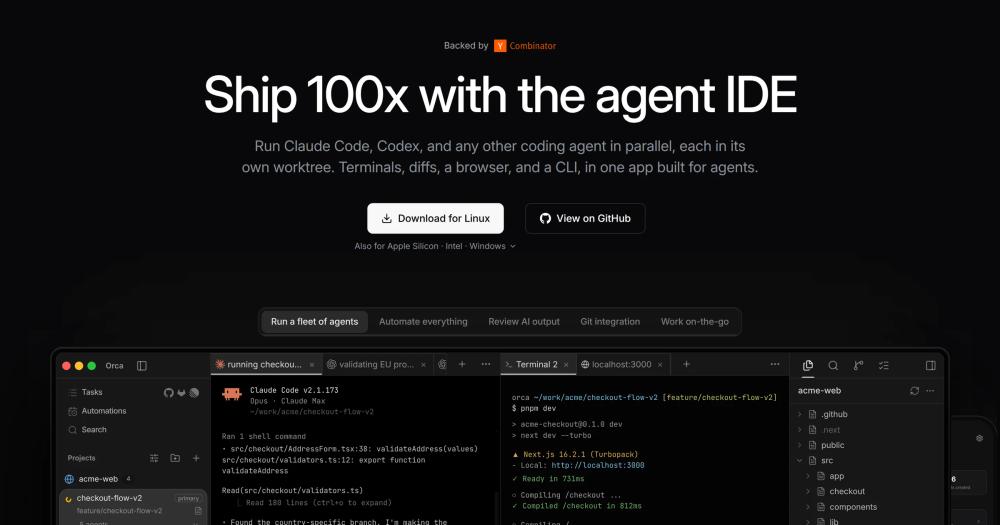
Worktree isolation keeps parallel agent tasks from overwriting each other's files.
Multi-agent terminals let developers compare different
Multi-agent terminals let developers compare different CLIs and models in one workspace.
Built-in source control helps review generated
Built-in source control helps review generated diffs before they become commits or PRs.
GitHub and Linear context keeps issue
GitHub and Linear context keeps issue work close to the agent session that produced it.
Remote and mobile support make long-running
Remote and mobile support make long-running agent tasks easier to monitor.
Strengths and trade-offs#
Strengths
- Orca is an agent development environmentOrca is an agent development environment for running CLI agents side by side across isolated git worktrees.
- The repository is MIT licensed, shipsThe repository is MIT licensed, ships desktop builds for macOS, Windows, and Linux, and includes support for agents such as Claude Code, Codex, Grok, Gemini, OpenCode, and related CLI tools.
- This approach belongs in Developer ToolsThis approach belongs in Developer Tools because it manages the workspace around AI agents rather than acting as a model provider.
Trade-offs
- -When to choose another pathUse it when you routinely run several agents or worktrees at once. A simpler editor or terminal is enough if you only ask one agent for small local changes.
orca vs alternatives#
Unlike Cursor's proprietary IDE, Orca is focused on orchestrating fleets of CLI agents across separate worktrees and repositories. Compared to paid commercial tools in this category, Orca is better for developers coordinating multiple autonomous coding runs.
Quick start#
Install Orca on macOS with Homebrew when you want the desktop agent orchestrator managed as a cask.
brew install --cask stablyai/orca/orcaWhat it's built on#
- Languages
- JavaScriptTypeScript
- Frameworks
- Next.jsReact
- Tooling
- esbuild
FAQ#
What is orca best for?
Orca is best for developers and technical leads who already use coding-agent CLIs and need a desktop control plane for parallel work. It fits teams that want stronger workflow organization without moving every agent interaction into one proprietary model vendor.
How does orca compare to paid tools?
Unlike Cursor's proprietary IDE, Orca is focused on orchestrating fleets of CLI agents across separate worktrees and repositories. Compared to paid commercial tools in this category, Orca is better for developers coordinating multiple autonomous coding runs.
How do I install orca?
Install Orca on macOS with Homebrew when you want the desktop agent orchestrator managed as a cask. brew install --cask stablyai/orca/orca
Similar open-source tools#

prime-agent
Automate coding workflows with a self-improving agent

Agent Skills
Structured workflows for AI coding agents.

Flue Framework
Build powerful, autonomous agents with TypeScript.
Superlearn
Interactive study boards for any topic, no new subscription needed
garden-skills
Production-ready agent skills for Claude Code, Cursor, and Codex

fx
Native Zig CLI coding agent, 7.8 MiB, any AI model.