

Who Zed is for#
Performance-sensitive developers in large codebases
Zed is a strong fit when editor latency affects daily work: monorepos, long sessions, multi-pane layouts, and frequent file navigation. The native Rust base and GPU rendering target developers who feel slowed down by heavier editor runtimes.
Skip if:
Stay with VS Code or a JetBrains IDE if a specific extension, refactoring tool, or language plugin is mandatory and has no Zed equivalent yet.
Engineering teams that pair program often
Zed suits teams that want real-time editing, shared project rooms, private sessions, and voice chat in the same editor. It reduces the gap between solo coding and collaborative debugging.
Skip if:
Skip it for pairing with untrusted external collaborators, because shared projects expose files inside the project to participants.
Developers running multiple AI agents
Zed works well for users who want agent threads, inline edits, edit prediction, MCP tools, and external CLI agents inside one editor. It is especially useful when a developer switches between hosted models, local models, and terminal-based agents.
Skip if:
Skip it if your team wants a single vendor-managed AI workflow with no provider setup, model choices, or agent permissions to manage.
VS Code users testing a native editor
Zed gives VS Code users a documented migration path for common settings, project opening, terminal usage, Git status, and keybinding differences. It is a practical trial path for developers who want speed without losing familiar editing basics.
Skip if:
Skip it if your VS Code setup depends on many custom extensions or keybindings that you cannot replace or remap in Zed.
The problem it solves#
Modern code editors often make teams choose between speed, collaboration, and AI. VS Code gives teams a huge extension catalog, but Electron overhead can make large projects feel slower than a native editor, and real-time pairing usually means adding extra services or extensions. AI-first editors add agent workflows, but many teams still want clearer control over model providers, data handling, and local editor performance. Developers who care about open source also want to inspect how editor AI features and collaboration flows work instead of treating the editor as a black box.
How it solves it#
Native Rust editor with GPU rendering
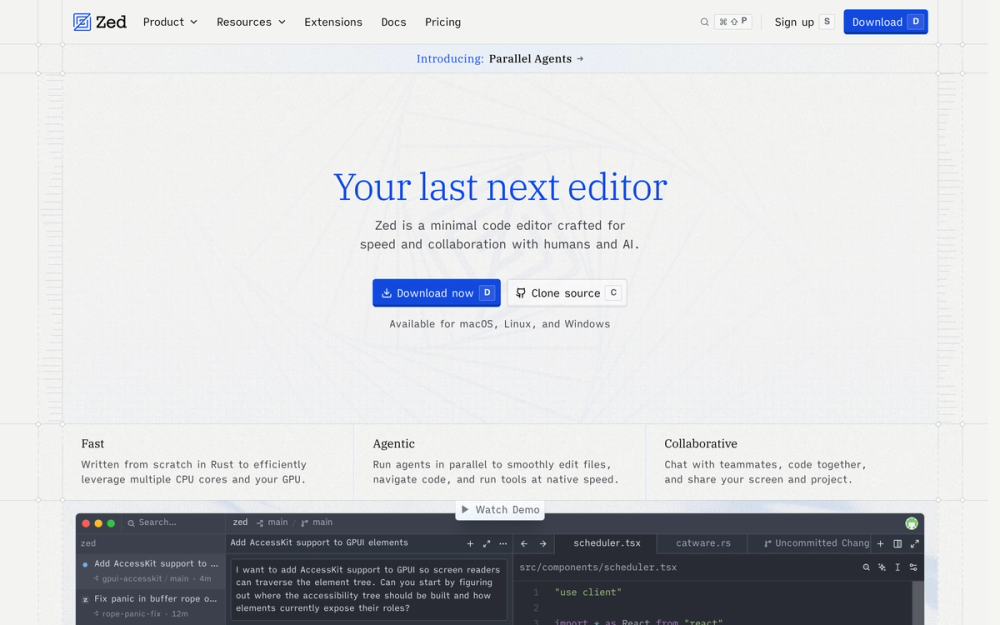
Zed is written from scratch in Rust and uses GPU acceleration for the editor UI. That gives performance-sensitive developers a native path instead of an Electron-based runtime, especially when editing large files or working across multiple panes.
Built-in multiplayer collaboration
Multiple people can edit the same project in real time, with shared cursors and edits visible as they happen. Zed includes channels for persistent project rooms, contacts for private sessions, and voice chat inside the collaboration flow.
Agent workflows inside the editor
The Agent Panel lets agents read, edit, and run code in the current project. Zed also supports inline transformations, edit predictions on every keystroke, MCP servers, and external agents such as Claude Agent, Gemini CLI, Codex, and other Agent Client Protocol tools.
Multi-provider AI configuration
Use Zed-hosted models or bring API keys from Anthropic, OpenAI, Google, Ollama, and other providers. Teams can switch models per task, mix local and hosted providers, and avoid tying every AI workflow to one vendor.
VS Code migration support
Zed can import core VS Code settings such as fonts, tab size, word wrap, autosave, terminal settings, Git decorations, and several workspace preferences. It also documents shared and different keybindings so switching does not require rebuilding every habit at once.
Strengths and trade-offs#
Strengths
- Faster native base than Electron editorsZed's Rust and GPU architecture removes the Electron layer between the developer and the editing surface. That matters most for developers who keep large projects, terminals, AI threads, and multiple panes open all day.
- Collaboration is part of the editorReal-time project sharing, channels, contacts, private calls, and voice chat are built into Zed. Teams do not need to assemble a separate pairing stack before two developers can work in one project.
- Open source AI implementationZed states that the editor and its AI features are open source, so developers can inspect how model calls, tool calls, and provider integrations work. That is a stronger control story than closed AI editors for teams with security or data-flow concerns.
- Flexible AI provider modelZed supports hosted models, user-supplied API keys, local providers, and external agents. A team can use its existing Anthropic, OpenAI, Google, or Ollama setup instead of moving every coding workflow to Zed-hosted billing.
Trade-offs
- -Smaller extension ecosystem than VS CodeZed supports extensions, but the VS Code migration guide is clear that Zed does not import VS Code extensions or keybindings. If your workflow depends on a specific VS Code extension, verify the Zed equivalent before switching.
- -Collaboration requires account trustZed collaboration requires signing in, and project sharing gives collaborators access to files within the shared project. The docs explicitly warn users to collaborate only with people they trust.
- -Linux builds need the right system baseThe official Linux install works best with a Vulkan-compatible GPU and a system-wide glibc. Some distributions, older enterprise Linux releases, non-x86_64 or non-aarch64 architectures, and Alpine or NixOS setups may require source builds or compatibility layers.
- -Hosted AI has paid usage pathsThe editor is free to use, but Zed-hosted AI features move into Pro or Business plans for heavier usage. Developers can bring their own API keys or external agents, but hosted model convenience is not the same as an unlimited free AI tier.
Zed vs alternatives#
Zed vs VS Code and Cursor
Zed overlaps with VS Code and Cursor as a daily code editor, but its main bet is a native Rust editing surface with collaboration and AI built into the core workflow. VS Code still wins when extension breadth is the deciding factor; Cursor is the more familiar choice for teams that want a VS Code-style AI editor with minimal migration.
| Feature | Zed | VS Code / Cursor |
|---|---|---|
| Runtime | Native Rust editor with GPU rendering | Electron-based editor family |
| Collaboration | Built-in multiplayer editing, channels, and private calls | Extension or product-specific collaboration path |
| AI | Hosted models, BYO keys, local models, MCP, and external agents | Strong AI workflows, usually tied to the editor's product model |
| Extension ecosystem | Growing Zed extension system | Much larger VS Code-compatible ecosystem |
Choose Zed when editor responsiveness, inspectable AI plumbing, and built-in pairing matter more than maximum extension coverage. Stay with VS Code or Cursor when a mature extension stack, exact VS Code compatibility, or an already-standardized AI editor workflow is more important than moving to a native editor.
Quick start#
# macOS
brew install zed-editor/zed/zed

# Linux stable
curl -f https://zed.dev/install.sh | sh

# Linux preview
curl -f https://zed.dev/install.sh | ZED_CHANNEL=preview sh

# Open the current project
zed .What it's built on#
- Languages
- PythonRust
FAQ#
Is Zed open source?
Yes. The Zed repository is public on GitHub and includes GPL-3.0, AGPL-3.0, and Apache-2.0 license files. GitHub currently reports multiple licenses for the repo, so teams should review the license file that applies to the specific component they plan to modify or deploy.
Can Zed replace VS Code?
Zed can replace VS Code for many daily editing workflows, especially if you want a faster native editor with built-in collaboration and AI. The main caveat is extension coverage: Zed does not import VS Code extensions, so teams should verify required language tooling before switching.
Does Zed include AI coding features?
Yes. Zed includes an Agent Panel, inline assistant, edit predictions, MCP support, and external agent support. You can use Zed-hosted models or bring keys for providers such as Anthropic, OpenAI, Google, Ollama, and others.
How do I install Zed on Linux?
The fastest official Linux path is curl -f https://zed.dev/install.sh | sh. Zed also documents a preview channel, manual tarball install, source builds, and third-party package options for several distributions.
Does Zed collaboration require an account?
Yes. Zed's collaboration docs say you need to sign in to use collaboration features. Shared project sessions can expose files inside the project to collaborators, so only invite people you trust.
Similar open-source tools#

vscode
193,798 GitHub starsOpen source AI code editor for multi-agent development
Alternative to Cursor

context-mode
30,475 GitHub starsCuts LLM context use by up to 98% per session via local MCP sandbox
Alternative to Tokenade

monocode
3,096 GitHub starsOne desktop UI for all your AI coding agents.
Alternative to Conductor

Superlearn
123 GitHub starsInteractive study boards for any topic, no new subscription needed
Alternative to OpenAI Codex
garden-skills
12,922 GitHub starsProduction-ready agent skills for Claude Code, Cursor, and Codex
Alternative to GitHub Copilot

fx
3,468 GitHub starsNative Zig CLI coding agent, 7.8 MiB, any AI model.
Alternative to Claude Code