
- Best Slack replacement for teams? Mattermost is the closest channel-based Slack clone with channels, threads, and webhooks you can fully self-host on your own servers. It leads for mature deployments with documented compliance paths; AGPL-3.0 source stays free to self-host, though the current free edition (Mattermost Entry) is evaluation-only, not the old unlimited Team Edition.
- Quieter conversations for async teams? Zulip organizes messages by topic inside channels, cutting notification noise significantly for distributed teams across time zones.
- Federated or compliance-first? Matrix provides a decentralized messaging protocol that bridges to Slack and Discord, with end-to-end encryption across independently hosted servers.

Open-source alternatives guide
Best Open Source Slack Alternatives
If you are here, you have probably already hit Slack's message history limit, or watched the per-seat bill grow past what the conversation is worth. I wrote this guide for teams who need the chat to stay theirs: regulated environments, self-hosted infrastructure, or simply a preference for owning the data. I compared 8 open source alternatives on how close they come to Slack's day-to-day feel, how much work self-hosting actually turns out to be, and whether the licence lets you use them commercially without surprises. Some are near drop-in replacements you can run on a single VPS. Others are federated networks that ask you to think differently about identity and hosting. I have noted which is which, and who each one suits, so you can skip the ones that will not fit.
TL;DR
Pain points
Why people leave Slack
The practical reasons teams compare Slack with open-source alternatives before they migrate.
Slack's pricing structure hits teams hard as they grow. The free plan caps message history at 90 days, locking older conversations behind a paywall. Pro costs $7.25 per user per month billed annually, while Business+ runs $12.50 per user per month. A 25-person team pays $2,175 per year just for message history and basic admin controls.
The best open source alternative to Slack is Mattermost because it replicates Slack's channel-based workspace model while giving you complete control over data storage and message retention. Its source is AGPL-3.0 licensed, with official compiled binaries released under MIT; a free evaluation edition is available for self-hosting, and it includes a built-in Slack import tool.
Slack's pricing history has not been stable. In 2022, Slack removed unlimited message history from the free plan, replacing it with the 90-day cap. Teams that had used Slack's free tier as a lightweight archive lost access to months or years of conversations overnight. Retrospective access to that history now requires upgrading to a paid plan.
Data residency is a second driver for exits. Slack stores all messages, files, and integrations on its own servers, subject to its terms of service and pricing decisions. Teams in healthcare, finance, or government sectors often face data residency requirements that Slack's standard tiers cannot satisfy. Slack Enterprise Grid offers data residency options but requires negotiated contracts at a price well above the standard tiers.
Vendor lock-in compounds the problem. Slack's export feature on free and Pro plans produces JSON-format data that requires custom tooling to parse. Standard paid plans export public channel history; private channel and direct message exports require Enterprise Grid or specific compliance plans. Teams that built workflows around Slack's hundreds of integrations face significant engineering work to replicate those connections elsewhere.
Notification fatigue is Slack's design limitation, not a per-tier restriction. Channel-first architecture creates high interrupt rates for anyone in more than five or six active channels. The threading model appends replies to channels rather than removing them from the main feed. Teams that grow past 20 members frequently report that Slack's notification model becomes a productivity drain rather than an aid.
These pain points stack over time: per-seat pricing that grows with headcount, message history locked behind higher tiers, no path to self-host, and a notification model that scales poorly. Self-hosting a Slack alternative eliminates the first three entirely and gives you control over notification policies you could not configure in Slack.
At a glance
Quick comparison
| Name | License | Best For |
|---|---|---|
| Mattermost | AGPL-3.0 | Closest drop-in Slack replacement for self-hosted teams |
| Rocket.Chat | MIT | Teams needing internal chat and customer omnichannel in one tool |
| Zulip | Apache-2.0 | Async-first teams that need organized, low-noise conversations |
| Macro Chat | AGPL-3.0 | Channels wired into the docs, tasks, and email around them |
| Matrix | AGPL-3.0 | Federated, cross-organization, or multi-platform migration scenarios |
| Wire | AGPL-3.0 | Regulated industries requiring auditable end-to-end encryption |
| Stoat (formerly Revolt) | AGPL-3.0 | Developer teams wanting a modern Discord-like UX with self-hosting |
| Buzz | Apache-2.0 | Engineering teams putting AI agents into chat with full audit trails |
Pricing model
Free: 90-day message history; Pro $7.25/user/month; Business+ $12.50/user/month
All tools in this guide can be self-hosted free of charge, though Mattermost's unlimited free edition is discontinued and the current free tier is an evaluation edition. For managed cloud, Zulip Cloud Standard costs $6.67 per user per month; Wire SMB is €7.45 per user per month. Mattermost, Rocket.Chat, and Element do not publish per-user cloud prices; pricing is quote-based. Self-hosting remains the clearest path to matching Slack's features without Slack's per-seat cost.
License
Proprietary; no self-hosting option
Mattermost: AGPL-3.0 source (MIT official binaries). Rocket.Chat: MIT with proprietary ee/ directories. Zulip and Buzz: Apache 2.0. Matrix/Synapse, Wire, and Stoat (formerly Revolt): AGPL-3.0. All are OSI-approved open source licenses.
Hosting
Slack-managed cloud only; no self-hosted option
All 6 can be fully self-hosted. Mattermost, Rocket.Chat, Zulip, and Matrix also offer managed cloud. Stoat (formerly Revolt) provides a free hosted instance at stoat.chat.
End-to-end encryption
No E2EE; messages accessible to Slack in transit
Wire and Matrix offer E2EE by default. Rocket.Chat offers optional E2EE (beta) for DMs and private channels. Mattermost and Zulip encrypt in transit (TLS) but not end-to-end; the server can read message contents.
Editorial ranking
8 Best Open Source Slack Alternatives (Ranked)

Rank 1
Mattermost
Closest drop-in Slack replacement for self-hosted teams
39.3K stars9K forksTypeScript
Mattermost is the most direct self-hosted replacement for Slack's workspace model. It replicates channels, direct messages, threads, and slash commands with a near-identical UX, making it the lowest-friction migration path for teams that want Slack's workflow without Slack's pricing or data handling.
Key Features
- Channels and threads: persistent channels, ad-hoc direct messages, and threaded replies all work the way Slack users expect.
- Webhooks and slash commands: incoming/outgoing webhook support and a slash command framework match Slack's integration surface closely.
- Built-in voice calls: Mattermost Calls uses WebRTC for voice and screen sharing without requiring a third-party conferencing plugin.
Pros
- Closest to Slack in channel UX, shortening onboarding time for migrating teams.
- AGPL-3.0 source with official compiled binaries released under MIT; the codebase is open for inspection and self-deployment, and AGPL copyleft applies to modified self-hosted versions.
- Strong compliance posture: HIPAA-compatible and FedRAMP-ready configurations documented for the Enterprise tier.
Cons
- Enterprise features including SSO, compliance exports, and advanced permissions require the paid Enterprise license.
- Plugin ecosystem is smaller than Slack's; not every Slack integration has a direct Mattermost equivalent.
- Mobile push notifications can be inconsistent compared to Slack when running a self-hosted deployment.
License & Hosting
Self-hosting: Docker, Kubernetes, or Linux AGPL-3.0 (source); official compiled binaries are MIT licensed. Self-host on Docker, Kubernetes, or bare-metal Linux. The unlimited free Team Edition is discontinued; the current free tier is Mattermost Entry, a limited-use evaluation edition. Mattermost Cloud offers a managed hosting option.
Best For
Security-sensitive teams in government, defense, healthcare, or finance that need a Slack-like UX with self-hosted data and a clear path to compliance certification.

Rank 2
Rocket.Chat
Teams needing internal chat and customer omnichannel in one tool
46.3K stars14K forksTypeScriptMIT
Rocket.Chat packs the widest feature surface of any self-hosted team communication platform. Beyond internal team chat, it covers omnichannel customer messaging with live chat, WhatsApp, email, and Telegram routed to one agent inbox. This makes it useful for companies that want both internal communication and customer support under one deployment.
Key Features
- Channels, threads, and direct messages: standard team chat with searchable history and file sharing.
- Omnichannel inbox: unify live chat, WhatsApp, email, Instagram, and Telegram into one agent queue per workspace.
- Video conferencing: built-in video calls via Jitsi or BigBlueButton integration.
- Native federation: connect Rocket.Chat workspaces across organizations via the built-in, Matrix-compatible native federation engine.
- Marketplace: 80+ integrations including GitHub, Jira, Trello, and custom webhook support.
- Bots and automations: native bot framework and Zapier-compatible webhooks for workflow automation.
Pros
- Highest total feature count of any open source team chat tool, matching and exceeding Slack on several dimensions.
- Omnichannel support adds customer-facing use cases beyond internal communication.
- MIT-licensed Community Edition is free to self-host, though it is capped at 100 concurrent users and 10,000 push notifications per month; the free Starter plan covers up to 50 users.
Cons
- Resource-heavy: a production deployment needs at least 4 GB RAM, and requirements scale with user count.
- UI can feel cluttered for teams that only need basic channel messaging.
- Community Edition updates lag behind the paid Enterprise Edition release schedule.
License & Hosting
Self-hosting: Docker or Kubernetes MIT licensed for Community Edition. Self-host on Docker or Kubernetes. Rocket.Chat Cloud managed hosting is available for teams that prefer not to manage infrastructure.
Best For
Teams that need both internal team chat and customer-facing omnichannel support without maintaining two separate tools. Particularly strong for customer support and sales organizations.

Rank 3
Zulip
Async-first teams that need organized, low-noise conversations
26K stars10.4K forksPythonApache-2.0
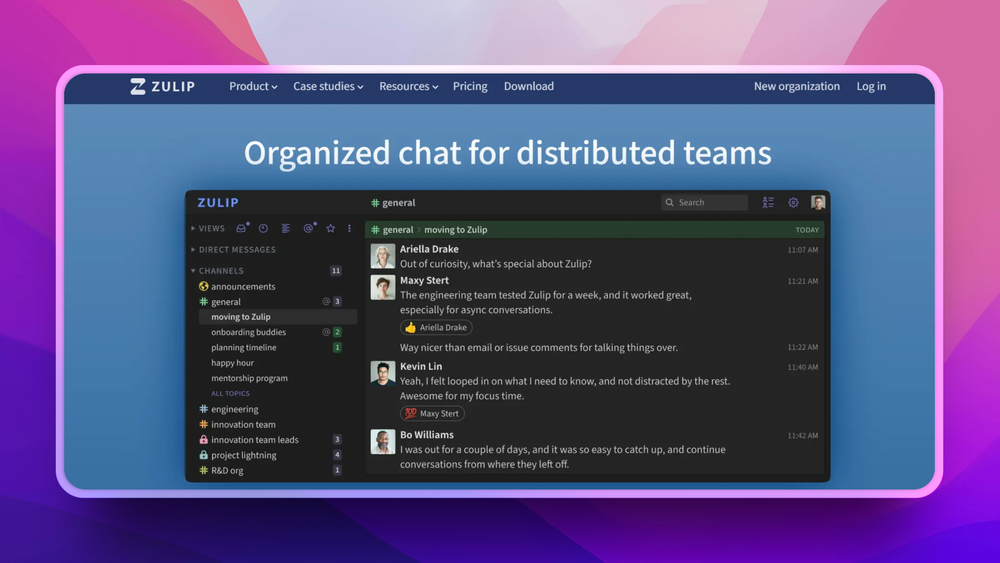
Zulip solves the notification overload problem that Slack creates. Its topic-threading model places every message inside both a stream (equivalent to a channel) and a named topic. You follow only the topics that matter to you and catch up on missed threads without scrolling past irrelevant messages.
Key Features
- Topic threading inside streams: every message belongs to a named topic within a stream, enabling selective follow rather than full-channel monitoring.
- Keyboard-driven navigation: full keyboard shortcuts for navigating between streams, topics, and messages.
- Powerful search: topic-level search returns results in context, not a flat list of matching messages.
- Email digest notifications: daily or weekly summaries for topics you have not checked, reducing FOMO without constant pings.
Pros
- Dramatically reduces notification noise for teams in 10 or more active conversations.
- Apache 2.0 licensed; self-hosted deployments have full message history with no tier restrictions.
- Zulip Cloud's free plan keeps 10,000 messages of search history; self-hosted Zulip has no message history limits. Cloud Standard adds unlimited history.
Cons
- Topic threading is a mental model shift: teams from Slack's channel-only UX typically need one to two weeks to adapt.
- Fewer native integrations than Slack or Rocket.Chat; the webhook-in approach covers most cases but requires more manual setup.
- Mobile push notifications require extra configuration on self-hosted deployments.
License & Hosting
Self-hosting: Docker or Ubuntu install Apache 2.0 licensed. Self-host on Docker or via the official install script on Ubuntu. Managed hosting through Zulip Cloud.
Best For
Distributed async-first teams with high message volume who need to manage conversations across many topics without constant interruption.

Rank 4
Macro Chat
Channels wired into the docs, tasks, and email around them
4.7K stars455 forksRustAGPL-3.0
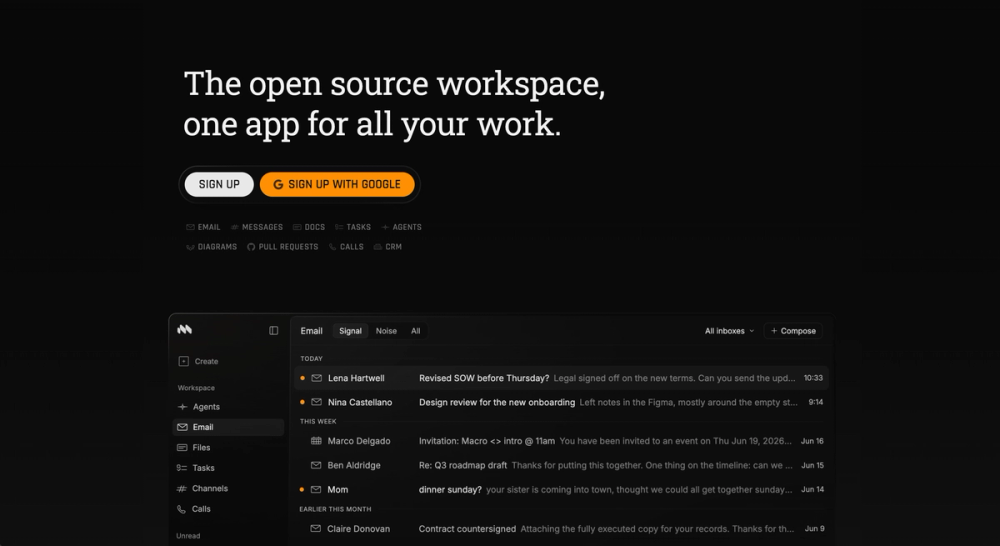
As an open source Slack alternative, Macro Chat keeps channels and threads but wires them into the docs, tasks, and email around them.
Key Features
- Channels, threads, and reactions: inline threads keep replies organized forum-style instead of burying them in the main flow.
- Sharing by @mention: mention a doc, task, or email thread to share it instantly, and access is granted automatically.
- Messages become work: turn a message into a task or a doc in one keystroke, auto-linked back to the thread it came from.
- Agents in every channel: type @Macro to summarize what you missed, draft a reply, or answer a question using workspace context.
Pros
- Search reaches past chat: one query covers channels, email, docs, and tasks, so answers are not stranded in whichever app holds them.
- Replaces more than chat: one seat covers messaging plus docs, tasks, email, calls, and CRM, cutting several subscriptions.
Cons
- No app directory: there is nothing to match Slack's thousands of third-party integrations, so existing Slack workflows may not transfer.
- Chat arrives with a whole workspace: the seat carries docs, tasks, and email too, so adopting channels means adopting the rest.
License & Hosting
Macro Chat is fully open source under AGPL-3.0, not open core, and you can self-host it under the AGPLv3. The Enterprise tier adds managed self-host deployment with SSO, HIPAA, and FedRAMP.
Best For
Teams replacing Slack and the tools around it at once. Teams that only want a proven self-hosted chat drop-in will find Mattermost a safer fit.

Rank 5
Matrix
Federated, cross-organization, or multi-platform migration scenarios
4.7K stars637 forksPythonAGPL-3.0
Matrix is an open protocol for decentralized, federated real-time communication. Unlike Slack, Mattermost, or Zulip, Matrix is not a single application: it is a specification that any server can implement, and messages between different Matrix homeservers work the way email between different mail servers does. Synapse is the reference homeserver implementation you run to participate in the Matrix network.
Key Features
- Federated architecture: your Matrix homeserver communicates with any other Matrix server globally; no central authority owns the network.
- End-to-end encryption: Matrix supports E2EE on all rooms by default when using Element or other modern clients.
- Bridges to Slack, Discord, and Teams: official and community bridge bots connect your Matrix homeserver to closed platforms during or after migration.
Pros
- No single vendor can shut down your communication network; federation distributes control across homeservers.
- Bridges let you consolidate Slack, Discord, and Teams into one Matrix homeserver during a multi-platform migration.
- E2EE by default on Element; messages are encrypted at the client before leaving the device.
Cons
- Synapse is resource-intensive; a production homeserver for 50 or more users needs 8 GB RAM and dedicated database tuning.
- The federation model can be confusing for teams that simply want a single private workspace.
- Message search in encrypted rooms is limited compared to plaintext search in Slack or Mattermost.
License & Hosting
Self-hosting: Docker or installation guide AGPL-3.0 (Synapse homeserver; dual-licensed with a commercial licence available from Element). Self-host on Docker or via the official installation guide. Element offers commercial hosting and support tiers.
Best For
Organizations that need cross-organization federation, are migrating off multiple closed platforms simultaneously, or require a vendor-independent protocol foundation for long-term compliance.

Rank 6
Wire
Regulated industries requiring auditable end-to-end encryption
2.8K stars332 forksHaskellAGPL-3.0
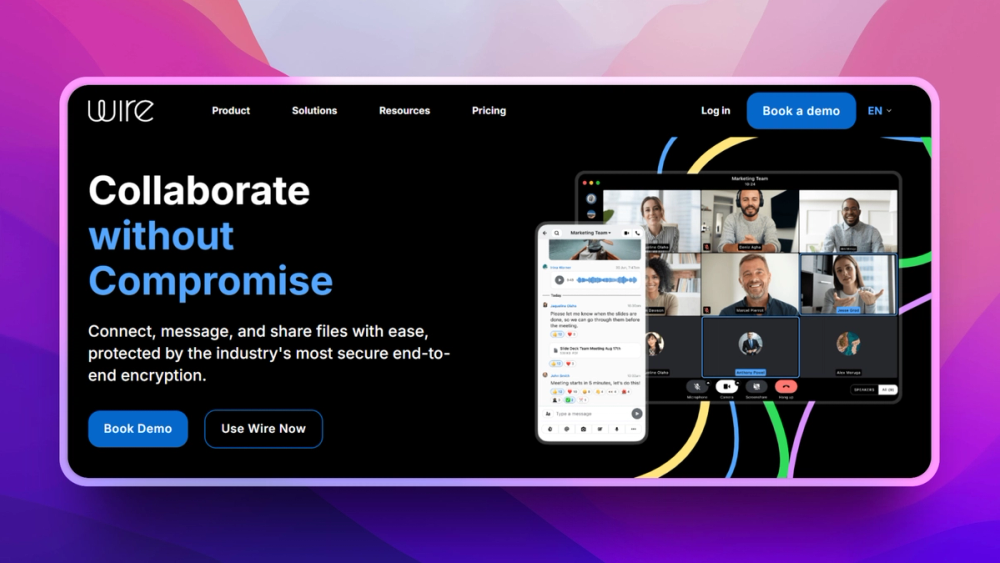
Wire takes a security-first approach to team communication. Every message, file, and call is end-to-end encrypted by default using the IETF MLS (Messaging Layer Security) protocol, now the default since April 2025, with Proteus as the legacy protocol. Wire was built for regulated industries and security-sensitive organizations that need to demonstrate to auditors that communications are protected in transit and at rest, without vendor access.
Key Features
- End-to-end encryption by default: all one-to-one and group conversations, voice calls, and file transfers are end-to-end encrypted using the IETF MLS (Messaging Layer Security) protocol, with Proteus as the legacy protocol.
- Self-hosted backend: on-premises deployment is available under Wire's Enterprise tier, keeping keys and metadata entirely under your control.
- Guest rooms: invite external collaborators to a secure conversation without requiring them to create a Wire account.
Pros
- Strongest encryption posture of any tool in this list; audit trail suitable for regulated industries.
- Guest rooms reduce friction for external communication without expanding your internal user count.
- On-premises deployment keeps metadata, message keys, and call logs fully under your control.
Cons
- The open source community edition has limited documentation and a smaller support community than Mattermost or Rocket.Chat.
- No rich app marketplace; fewer integrations than Slack or Rocket.Chat.
- Self-hosting Wire's backend is complex; Kubernetes and significant DevOps experience are typically required for production.
License & Hosting
Self-hosting: Self-hosted server AGPL-3.0 (server). The open source server repository is on GitHub. On-premises deployment is available under Wire's Enterprise tier.
Best For
Compliance-driven organizations in healthcare, legal, finance, or government that need auditable end-to-end encryption and full data sovereignty, with minimal tolerance for third-party data access.

Rank 7
Stoat (formerly Revolt)
Developer teams wanting a modern Discord-like UX with self-hosting
3.4K stars397 forksRustAGPL-3.0
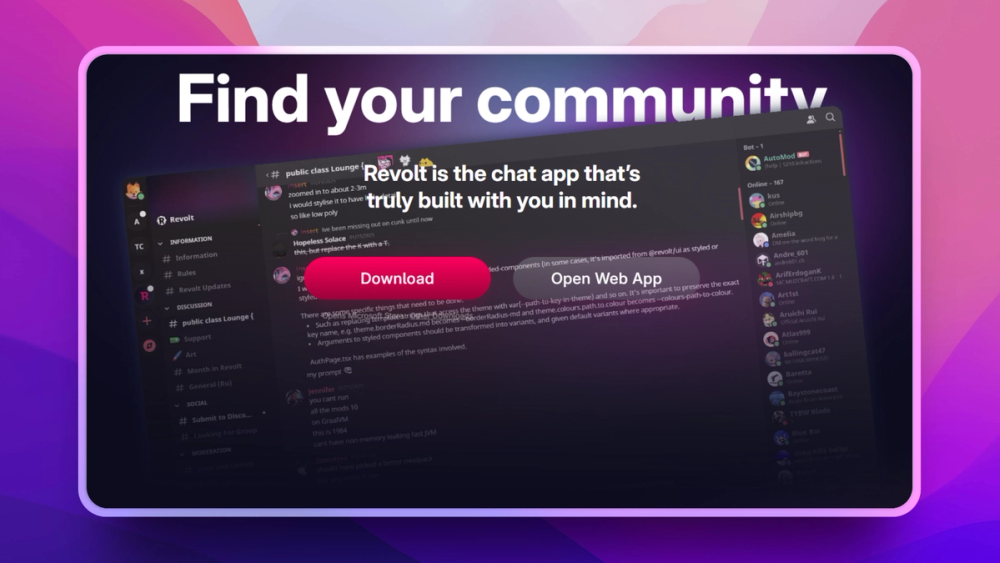
Stoat (formerly Revolt) is a modern Discord-and-Slack hybrid built in Rust with a clean, fast interface. It targets developer communities and technical teams that want Discord's server structure, a work-friendly UX, and the option to self-host the entire stack without sending data to a third party.
Key Features
- Server and channel structure: Discord-style servers with multiple text and voice channels per server, familiar for teams already using Discord.
- Roles and permissions: granular per-channel permission sets for roles and individual users.
- Bot API: Stoat's API supports custom bots with JavaScript/TypeScript and Python client libraries.
- Self-hostable full stack: the backend, web client, and file server deploy on Docker with no external service dependencies.
- No tracking or advertising: Stoat's business model is donation-driven; no ad network or analytics payloads in the client.
Pros
- Modern, fast UI with dark and light themes; feels contemporary compared to Mattermost's more corporate aesthetic.
- Zero third-party tracking; good posture for privacy-sensitive communities and developer teams.
- AGPL-3.0 licensed with an active development roadmap.
Cons
- Enterprise features including SSO, audit logs, and compliance exports are missing or early-stage.
- Smaller community and plugin ecosystem compared to Mattermost or Rocket.Chat.
- Voice chat quality on self-hosted deployments depends on your TURN server configuration.
License & Hosting
Self-hosting: Docker full stack AGPL-3.0. Self-host the full stack on Docker. Stoat's hosted service at stoat.chat (revolt.chat serves the same site) is available as an alternative to self-hosting.
Best For
Developer teams and technical communities that want a modern Discord-like UX, full self-hosting, and no vendor telemetry.

Rank 8
Buzz
Engineering teams putting AI agents into chat with full audit trails
35.9K stars4.8K forksRustApache-2.0
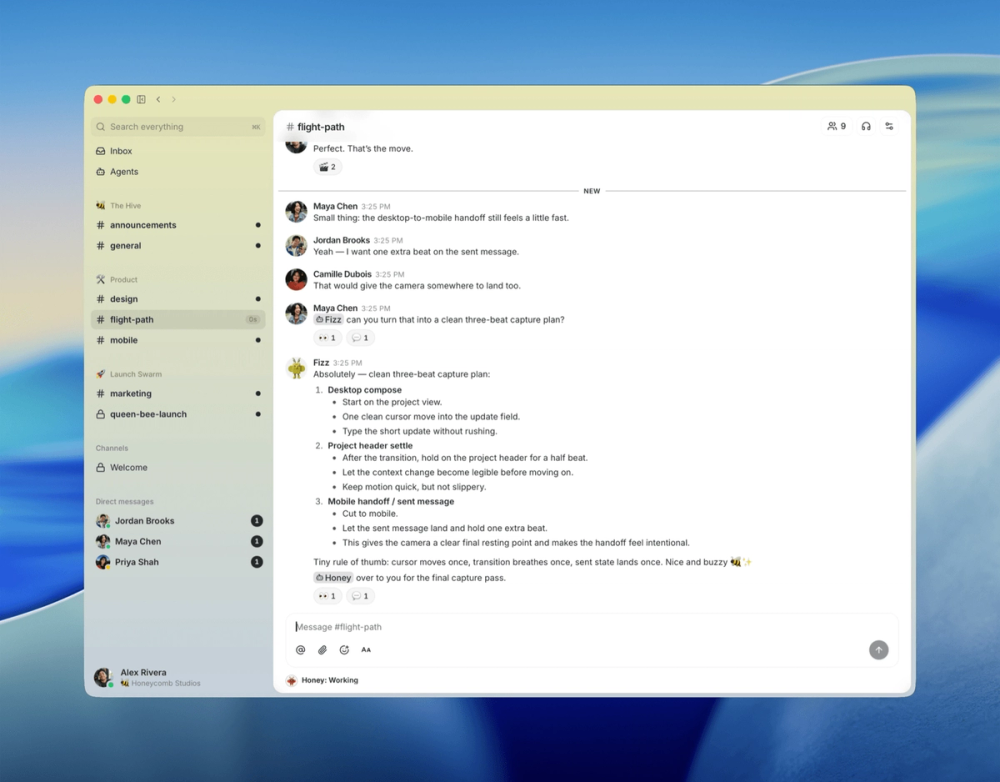
Buzz is an open source team workspace from Block where people and AI agents share the same channels. It is the newest tool in this list and targets engineering teams that want chat, code activity, and automation in one self-hosted, auditable event log.
Key Features
- Channels, threads, and DMs: Slack-style conversation with reactions and unified search across messages, code patches, and workflow runs.
- AI agents as members: agents join as first-class members with their own keys and audit trails, so every automated action is attributable.
- YAML workflow automation: trigger workflows from messages, reactions, schedules, or webhooks.
- Git activity in line: NIP-34 events surface patches and repository updates in the same timeline as chat.
- Media comments: pin feedback to specific frames of shared media.
Pros
- One auditable log ties human messages, agent actions, code patches, and workflow runs together.
- Apache-2.0 and self-hosted, so conversation and automation stay on infrastructure you control.
- Backed by Block, with active development and a fast-growing community.
Cons
- Early-stage: mobile clients are still in progress and there is no web client yet.
- No vendor-hosted SaaS; you self-host the full stack, though the README offers a one-click Railway relay deployment for teams that prefer not to manage servers directly.
- Smaller integration and app ecosystem than Mattermost or Rocket.Chat.
License & Hosting
Apache-2.0. Self-host with Docker Compose using Postgres, Redis, and MinIO, with optional Caddy and TLS. A Tauri desktop app covers macOS, Windows, and Linux.
Best For
Engineering teams building agent-driven workflows who want chat, code, and automation in one self-hosted workspace with every action logged.
Decision framework
How to choose
Use this section to narrow the Slack replacement by team size, hosting model, license, and migration difficulty.
Choose by your primary use case and technical capacity.
If you want the closest drop-in replacement for Slack's UX with minimal retraining, pick Mattermost. It maps directly to Slack's channel model, supports incoming webhooks, and has a built-in Slack import tool. Teams that need HIPAA-compatible or FedRAMP-aligned deployment have a clear path through Mattermost's compliance tier.
If your team handles customer communication in addition to internal chat, Rocket.Chat is the better fit. Its omnichannel inbox unifies live chat, email, WhatsApp, and Telegram into the same agent queue. A company that wants to replace both Slack and a customer chat tool with one self-hosted deployment finds the most overlap with Rocket.Chat.
If your team is async-heavy with high message volume across many topics, switch to Zulip. The topic-threading model converts chaotic channel scrolling into structured conversations you can catch up on at your own pace. Teams that work across time zones consistently report lower notification fatigue after switching from Slack to Zulip.
If you need cross-organization communication, federation with partners, or a path to consolidate Slack and Discord channels into one inbox, choose Matrix. The federation model lets your team communicate with any other Matrix user without centralizing control, and the bridge ecosystem covers most closed platforms during a migration period.
If your primary driver is security and regulatory compliance with the highest-assurance encryption, use Wire. The MLS (Messaging Layer Security) E2EE implementation covers all message types, files, and calls. Teams in healthcare, legal, or government that need to demonstrate communication security to auditors should evaluate Wire before anything else.
For developer-focused teams or communities that want a modern, fast interface and zero telemetry at minimal infrastructure cost, Stoat (formerly Revolt) is worth evaluating. It fills the Discord-shaped hole for technical communities that want self-hosted control without paying for Slack.
If your team is building AI agents into daily work and wants every automated action logged, evaluate Buzz. It treats agents as accountable members alongside human channels and keeps chat, code, and automation in one self-hosted event log, though it is the least mature option here.
Do not let feature lists drive the decision. Pick one tool, run a pilot with one team for two weeks, and evaluate the migration complexity on your specific Slack integration list before committing to a full transition.
If you want to replace Slack and the tools around it at once, Macro Chat folds channels, threads, and cross-object @mentions into an AI-native workspace that also carries docs, tasks, and email. It suits teams consolidating several subscriptions into one app rather than swapping Slack for a standalone chat server. Teams that only need self-hosted chat will find Mattermost lighter and more proven.
Complete directory list
All alternatives to Slack
Rocket.Chat
FreeSelf-hosted team chat with voice, video, and omnichannel support
Key differentiator
Teams needing internal chat and customer omnichannel in one tool
46.3K stars14K forksTypeScriptMIT
Mattermost
FreeTeam messaging for security-sensitive teams with air-gap support
Key differentiator
Closest drop-in Slack replacement for self-hosted teams
39.3K stars9K forksTypeScript
Buzz
FreeSelf-hosted team chat where people and AI agents work together
Key differentiator
Engineering teams putting AI agents into chat with full audit trails
35.9K stars4.8K forksRustApache-2.0
Zulip
FreeOrganized team chat with threaded conversations, self-hostable
Key differentiator
Async-first teams that need organized, low-noise conversations
26K stars10.4K forksPythonApache-2.0
Matrix
FreeOpen protocol for secure, decentralized messaging and VoIP
Key differentiator
Federated, cross-organization, or multi-platform migration scenarios
4.7K stars637 forksPythonAGPL-3.0
Macro Chat
FreeThe open source workspace, one app for all your work.
Key differentiator
Channels wired into the docs, tasks, and email around them
4.7K stars455 forksRustAGPL-3.0
Stoat (formerly Revolt)
FreeSelf-hosted open source Discord alternative with servers
Key differentiator
Developer teams wanting a modern Discord-like UX with self-hosting
3.4K stars397 forksRustAGPL-3.0

Converse.js
FreeSelf-hosted web-based XMPP chat client for any server
Key differentiator
An open-source, web-based XMPP chat client offering self-hosting, customization, and end-to-end encryption for secure messaging
3.3K stars832 forksJavaScriptMPL-2.0
Wire
FreeEnd-to-end encrypted messaging, voice, and file sharing
Key differentiator
Regulated industries requiring auditable end-to-end encryption
2.8K stars332 forksHaskellAGPL-3.0

SpacebarChat
FreeFree open source Discord reimplementation with full API parity
Key differentiator
Host Discord-style chat on your own infrastructure with an AGPL-licensed backend that works with many existing bots, apps, and clients
2.2K stars327 forksTypeScriptAGPL-3.0

dcts-shipping
FreeSelf-hosted Discord-style chat with encrypted DMs and voice
Key differentiator
Host a self-hosted Discord-style chat server with end-to-end encrypted DMs, voice chat, and screensharing
645 stars34 forksJavaScriptAGPL-3.0

Valour
FreeOpen source Discord alternative with flexible community tools
Key differentiator
Build community chat with open APIs, multi-window moderation, and self-hosted infrastructure instead of closed chat platforms
411 stars41 forksC#AGPL-3.0

Twake Chat
FreeMatrix team chat with a companion identity server
Key differentiator
Run Matrix-based team chat with an official Flutter client and ToM identity server companion
171 stars47 forksDartAGPL-3.0

Prose
FreeDecentralized open source workplace with chat and docs
Key differentiator
Secure team messaging on XMPP with an open source chat app built for self-hosting
59 stars6 forksVueMPL-2.0
Migration
Migration notes for leaving Slack
Exporting data from Slack depends on your plan tier. Free and Pro workspaces export only public channel message history for a date range you specify. Private channels and direct messages require a Business+ or Enterprise Grid account with compliance settings enabled. Export requests go through Settings > Import/Export Data and arrive as a ZIP file containing JSON-formatted message logs.
The JSON export format is well-documented but not universally importable out of the box. Each file represents one channel; messages reference user and channel IDs that must be cross-referenced against a users.json and channels.json manifest included in the ZIP.
Migrating to Mattermost: Mattermost includes a Slack import tool in the admin panel under System Console > Import. Point it at your export ZIP and it creates channels, imports message history, and maps Slack users to Mattermost accounts by email. Emoji reactions and file attachments migrate cleanly. Custom slash commands and Slack-specific app integrations require manual reimplementation in Mattermost's workflow builder.
Migrating to Rocket.Chat: Rocket.Chat has a built-in Slack importer under Administration > Import. It handles public channels and their messages. Private channels and DMs require the admin export permission from your Slack workspace. File attachments upload directly; custom integrations must be rebuilt using Rocket.Chat's webhooks.
Migrating to Zulip: The Zulip Slack importer converts Slack channels to Zulip streams and each Slack thread to a Zulip topic within that stream. The importer accepts the Slack export ZIP directly, mapping users by email and preserving message timestamps. Emoji reactions and standard formatting migrate cleanly.
Migrating to Matrix: Matrix has no direct Slack importer. Use the matrix-appservice-slack bridge during a transition period, which lets your team use both platforms simultaneously. Once the team is fully on Matrix, remove the bridge and archive the Slack workspace.
Integration parity: Slack's most-used integrations including GitHub, Jira, PagerDuty, and Google Drive all have webhook-compatible equivalents on Mattermost, Rocket.Chat, and Zulip. Dedicate one sprint to mapping your existing Slack integration list to equivalents before announcing a migration date.
Export before cancellation: Export your Slack archive before any plan downgrade or cancellation. Slack's free tier does not allow exporting message history older than 90 days. Export first, then cancel.
Migrating to Macro Chat: Macro Chat has no dedicated Slack history importer. Instead you connect Slack as an MCP connector so Macro Chat's agents can still search your old messages, while new conversation moves into Macro Chat's channels with threads and reactions.
FAQ
Slack alternatives FAQ
What is the best open source alternative to Slack?
Mattermost is the best open source alternative to Slack for most teams because it replicates Slack's channel-based workspace model, supports Slack's export format for import, and can be fully self-hosted. Its source is AGPL-3.0 licensed, with official compiled binaries released under MIT; a free evaluation edition is available for self-hosting, with paid tiers for production deployments. Teams with strict data residency or end-to-end encryption requirements should also evaluate Wire, which encrypts all messages by default using the MLS (Messaging Layer Security) protocol.
Is there a free open source Slack alternative?
Yes. Mattermost, Rocket.Chat, Zulip, Matrix, Wire, and Stoat (formerly Revolt) are all free to self-host. Self-hosting a team of 20 on a VPS with Mattermost or Zulip typically costs $5 to $20 per month in server fees, compared to $145 to $250 per month on Slack Pro. Zulip Cloud also offers a free managed tier with 10,000 messages of search history, while self-hosted Zulip has no message history limits.
Can I self-host a Slack alternative?
All six tools in this guide can be fully self-hosted. Mattermost and Rocket.Chat offer Docker-based deployment guides suitable for a single Linux server. Zulip has a documented install script for Ubuntu. Matrix (Synapse) requires more configuration and a dedicated PostgreSQL instance. Wire's self-hosted backend requires Kubernetes for production. Stoat (formerly Revolt) deploys with a single Docker Compose file.
How difficult is it to migrate from Slack?
Migrating public channel history from Slack to Mattermost, Rocket.Chat, or Zulip is straightforward using each tool's built-in Slack importer. Slack provides a JSON export of public channels that these importers accept directly. The harder part is migrating integrations: custom Slack apps and workflow automations need to be rebuilt on the destination platform. Allow one to two sprints for a complete migration including integration parity.
Do any Slack alternatives have end-to-end encryption?
Wire encrypts all messages, files, and calls end-to-end by default using the MLS (Messaging Layer Security) protocol. Matrix supports E2EE in all rooms when using Element or other E2EE-capable clients. Rocket.Chat offers optional E2EE (beta) for DMs and private channels, though files remain unencrypted and encrypted rooms cannot be searched. Mattermost and Zulip encrypt messages in transit using TLS but do not provide end-to-end encryption; their servers can read message contents.
What is the best Slack alternative for large teams?
Mattermost and Rocket.Chat scale best for large teams. Mattermost supports thousands of users in a single workspace and offers a Kubernetes deployment path for high availability. Rocket.Chat scales through microservices mode and handles enterprise-scale workloads. Both offer compliance and audit features in their paid Enterprise tiers that large organizations typically require.
Are these Slack alternatives suitable for regulated industries?
Mattermost is the most widely deployed alternative in regulated industries, with documented HIPAA-compatible and FedRAMP-aligned configurations. Wire provides the strongest encryption guarantee for industries where message content confidentiality is auditable. Matrix offers on-premises deployments suitable for government and defense contexts. All three have reference customers in healthcare, finance, or government.