

Who EmDash CMS is for#
Astro teams adding editor workflows
EmDash fits Astro teams that want an admin panel, media library, live content queries, typed models, and preview inside the same codebase as the frontend.
Skip if:
Your site is not built on Astro or you already have a headless CMS workflow that your team likes.
WordPress migrations to TypeScript
EmDash works well for teams moving blogs, pages, media, taxonomies, widgets, and familiar content concepts from WordPress into an Astro and TypeScript stack.
Skip if:
You depend on WordPress-specific plugins or WooCommerce-scale commerce features.
Cloudflare-first content sites
Teams deploying on Cloudflare can use D1, R2, Workers, KV, and Dynamic Workers to keep content, media, and plugins close to the deployment platform.
Skip if:
You cannot use paid Cloudflare features and need sandboxed plugin execution from day one.
AI-assisted CMS builders
EmDash fits teams experimenting with agent-managed content, schema, themes, or plugins because the project includes CLI workflows, skill files, and MCP support.
Skip if:
You want a no-code hosted CMS where nontechnical users never touch the deployment stack.
The problem it solves#
Modern sites often split content editing, frontend code, deployment, media, auth, and plugins across several services. That creates extra API glue, rebuild workflows, webhook failures, and a harder handoff between developers and content editors.
WordPress solves editing and plugins, but teams building in Astro inherit PHP hosting, same-process plugin risk, and a content model tied closely to rendered HTML. Headless CMS tools solve some of that, but they add a separate vendor, API layer, and deployment surface.
How it solves it#
Astro-native CMS integration
EmDash installs as an Astro integration, so content, admin routes, API behavior, and frontend rendering live inside the Astro project instead of a separate CMS application.
Portable structured content
The README says rich text uses Portable Text rather than serialized HTML. That keeps content separate from DOM output and makes reuse across pages, APIs, email, or future surfaces easier.
Sandboxed plugin model
On Cloudflare, plugins can run in Worker isolates with capability manifests. A plugin can request specific capabilities such as read:content or email:send instead of inheriting broad process access.
Cloud-portable data layer
Docs and README describe support for Cloudflare D1 and R2, plus SQLite, Turso or libSQL, PostgreSQL, S3-compatible storage, Redis, KV, and local filesystem options.
WordPress migration tooling
EmDash includes import paths for posts, pages, media, and taxonomies from WXR exports, the WordPress REST API, or WordPress.com, plus docs and agent skills for plugin and theme migration.
Programmatic AI-friendly operations
The README lists a CLI, agent skills, and a built-in MCP server, giving AI tools a documented way to manage content, schemas, plugins, and themes.
Strengths and trade-offs#
Strengths
- Better fit for Astro than generic headless CMSThe official docs state that EmDash is built specifically for Astro and is not a headless CMS. That matters when a team wants content updates, queries, and previews inside the same framework.
- MIT license with a TypeScript stackGitHub reports an MIT license, and the repository is TypeScript-first. Teams can fork the CMS, inspect how admin and content primitives work, and adapt it without moving to PHP.
- Practical WordPress migration bridgeEmDash keeps familiar concepts such as collections, taxonomies, menus, widgets, plugins, and media while moving implementation to Astro, SQL-backed content, Portable Text, and typed developer workflows.
- Deployment choices beyond one vendorAlthough Cloudflare is the best-supported path, the README describes Node.js, SQLite, PostgreSQL, S3-compatible storage, Redis, and local filesystem options for teams that need portability.
Trade-offs
- -Astro coupling is intentionalEmDash is tightly integrated with Astro. That is a strength for Astro sites, but it makes the CMS a poor fit for Next.js, Rails, Laravel, or existing headless architectures that already work well.
- -Plugin sandboxing depends on paid Cloudflare featuresThe README says secure sandboxed plugins depend on Cloudflare Dynamic Workers, which require a paid Cloudflare account. Teams can disable plugins or use safe mode, but that changes the plugin story.
- -Beta preview maturityThe README labels EmDash as beta preview. Teams should expect faster change, fewer battle-tested production patterns, and more need to validate upgrades before using it for critical content workflows.
- -Not a WooCommerce replacementThe official docs say EmDash may not be right for e-commerce because WooCommerce-scale features are not yet available. Content sites and marketing sites are a better fit than full storefronts.
Quick start#
npm create emdash@latest

# Generate TypeScript types from your content model
npx emdash typesWhat it's built on#
- Languages
- JavaScriptTypeScript
FAQ#
What is EmDash?
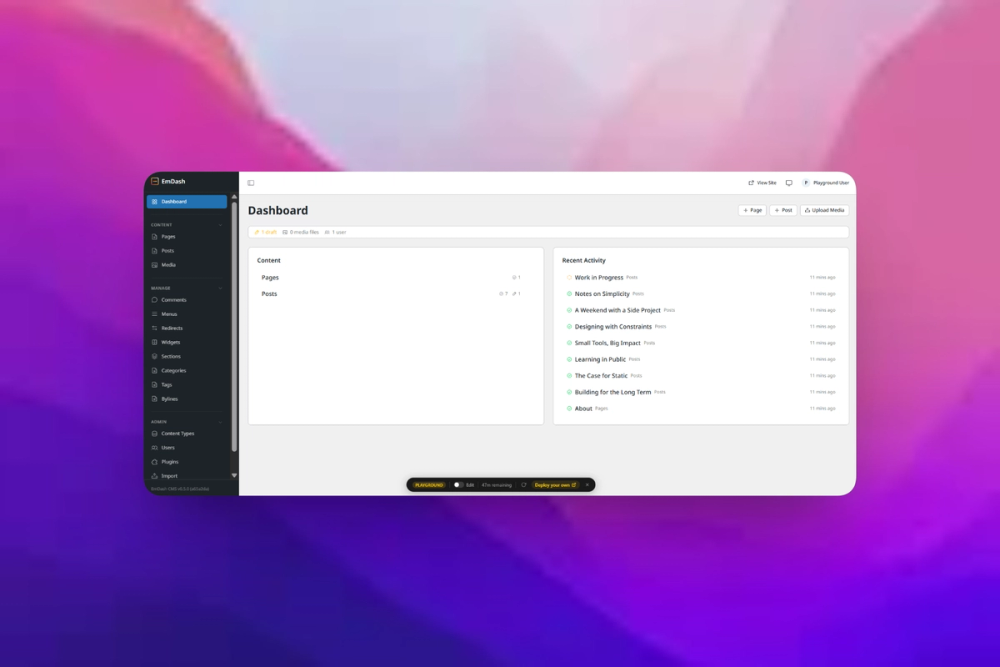
EmDash is a full-stack TypeScript CMS built for Astro. It provides an admin panel, content engine, REST API, media library, auth, plugin system, templates, and deployment paths for Cloudflare or Node.js.
Is EmDash a headless CMS?
No. The official docs say EmDash is not a headless CMS because it is tightly integrated with Astro. Content and frontend live together instead of being split across a separate CMS and API.
Can EmDash import WordPress content?
Yes. The README says EmDash can import posts, pages, media, and taxonomies from WXR exports, the WordPress REST API, or WordPress.com.
Does EmDash require Cloudflare?
No. EmDash runs best on Cloudflare, but the README says it can also run on any Node.js server with SQLite. The docs also mention libSQL, PostgreSQL, S3-compatible storage, and local filesystem options.
What license does EmDash use?
GitHub reports EmDash under the MIT License. That makes it permissive for commercial use, modification, and self-hosted deployments.
Similar open-source tools#

terminal-browser
Full Chromium browser rendering inside your terminal

VoidZero
Next-generation unified JavaScript tooling infrastructure

Zed
High-performance open source code editor with built-in AI

Obtainium
Android app updates direct from GitHub and F-Droid

Cloudflare Os
Open source AI workspace with sandboxed apps and Gatekeeper security

supervision
Python toolkit for computer vision detection, tracking, and annotation