

Who screenshot-to-code is for#
Frontend developers prototyping from design mockups
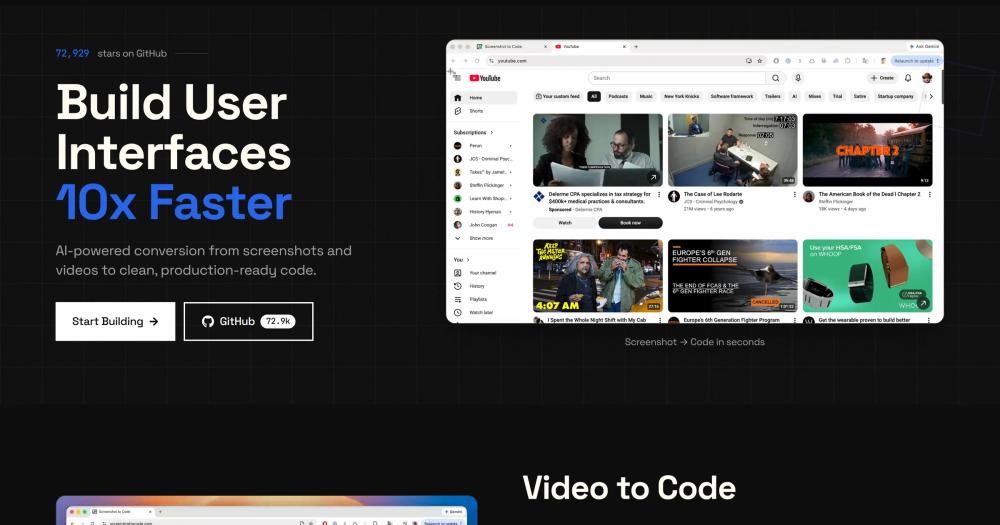
Drop in a Figma export or design screenshot and generate a working React or HTML scaffold in seconds. The output gives you the layout structure, Tailwind classes, and component hierarchy to refine, instead of writing it from scratch.
Skip if:
Skip if your designs rely heavily on complex animation states that static screenshots cannot represent. The tool works best on relatively clean, static layout compositions.
Indie developers building MVPs from reference designs
Convert a reference website screenshot or a rough wireframe into a starting HTML and Tailwind layout. For developers who are not designers, this collapses the gap between wanting a layout and having a working starting point.
Skip if:
Skip if you need production-ready accessible components with full ARIA attributes. The generated code is a structural scaffold, not a finished accessibility-reviewed component.
Designers converting Figma exports to component code
Export a frame from Figma and generate React and Tailwind code a developer can copy into a component file. Asset extraction with a Gemini API key pulls real images from the frame rather than substituting placeholders.
Skip if:
Skip if your Figma designs rely on auto-layout breakpoints or component variants that need design-system-aware generation. The tool reads the visual output, not the Figma layer structure.
Teams capturing reference UI patterns from live sites
Record a screen capture of a target website in action and generate a functional prototype. This is faster than reading the site's source HTML, especially when JavaScript-rendered content makes the DOM messy.
Skip if:
Skip if the site uses heavy animation frameworks with complex keyframe sequences. The generated code captures the static layout structure, not animation timing or motion choreography.
The problem it solves#
Translating a visual design into clean frontend code is a labor-intensive step that stalls prototyping. A designer hands off a Figma file or a screenshot, and the developer spends hours recreating margins, font weights, layout logic, and component hierarchy by hand. For teams iterating quickly on MVPs or redesigns, this handoff gap is one of the most reliable time sinks.
The alternatives are unattractive: manually copying CSS values from Inspect mode, paying for proprietary design-to-code subscriptions with per-seat or per-export pricing, or maintaining fragile design-token pipelines that break every time the design system changes. Screen recordings of interactive sites are even harder to translate, since capturing animation and state transitions manually requires significant extra effort on top of the static layout work.
How it solves it#
Multi-stack code generation
Outputs code in six stacks: HTML with Tailwind, HTML with CSS, React with Tailwind, Vue with Tailwind, Bootstrap, and Ionic with Tailwind. Choosing React and Tailwind is the most common path for teams that want output they can copy directly into a component library.
Multi-provider AI model support
Works with OpenAI (GPT-5.5, GPT-5.4 Mini), Anthropic (Claude Opus 4.6, 4.8), and Gemini (3 Flash, 3.1 Pro). Adding multiple API keys lets the app automatically pick the strongest model mix per generation; single-key setups use that provider's models only.
Asset extraction from screenshots
When a Gemini API key is supplied, the tool extracts real logos, images, and icons directly from the screenshot rather than substituting placeholders. This produces code that references the actual assets, cutting the gap between generated output and the finished design.
Screen recording to prototype conversion
Accepts video screen recordings of live websites and converts them into functional prototypes. Useful for replicating a reference site's layout and interactions without accessing its source code. Requires a Gemini API key.
Screenshot preview with AI self-verification
An optional Chromium-based preview mode renders the generated page in a headless browser and lets the AI model visually inspect its own output. Enabled automatically when Playwright installs Chromium, or included by default in the Docker image.
Image editing and background removal
When a Replicate API key is supplied, the tool adds image editing and background removal capabilities. Generated pages can reference edited or cleaned-up asset versions, reducing manual post-processing after code generation.
Strengths and trade-offs#
Strengths
- MIT license with no usage restrictionsMIT-licensed on GitHub, with no restrictions on commercial use, forking, or modification. Unlike proprietary design-to-code tools that charge per export or per seat, the self-hosted version costs only the AI API calls you make.
- Choice of three AI provider familiesMost design-to-code tools lock you to a single model. screenshot-to-code supports OpenAI, Anthropic, and Gemini simultaneously, letting you compare output across providers and fall back to an alternative when any one API is unavailable.
- Runs entirely on your own infrastructureThe backend is a standard FastAPI Python service and the frontend is a Vite/React app. Both run on any server with Docker Compose, keeping your screenshots and generated code off third-party infrastructure. This matters for client NDAs or regulated industries.
- Accepts screen recordings as inputBeyond static screenshots and image exports, the tool accepts video recordings of live websites. Paid alternatives in this category generally support static images only, making screenshot-to-code a better fit for capturing interactive flows.
Trade-offs
- -Requires external AI API keys to functionscreenshot-to-code does not bundle an AI model. You must supply at least one API key from OpenAI, Anthropic, or Google, meaning generation costs are usage-based and accumulate with volume. There is no fully offline or local-model path with reliable quality; the README notes that Ollama-based setups produce poor results.
- -Multi-service self-hosting setupRunning locally means standing up a FastAPI backend (with Poetry and optional Playwright and Chromium) plus a separate Vite frontend. This is a moderate-complexity deployment. Docker Compose simplifies it, but production setups still require managing environment variables and multiple API keys.
- -Output quality depends on input and model choiceFidelity depends heavily on screenshot clarity and the AI model used. Complex or dense layouts, small text, or low-resolution inputs produce lower-quality code that needs manual correction. The README recommends Gemini specifically for the best screenshot-to-code accuracy.
screenshot-to-code vs alternatives#
screenshot-to-code vs Locofy.ai
Locofy.ai is a paid AI design-to-code tool that integrates directly with Figma and converts designs into React, Gatsby, or Next.js code. It is a proprietary service with a subscription model; there is no self-hosted option.
| Feature | screenshot-to-code | Locofy.ai |
|---|---|---|
| License | MIT | Proprietary |
| Self-hosting | Yes (Docker Compose) | No |
| Input types | Screenshots, Figma exports, video recordings | Figma plugin integration |
| AI models | OpenAI, Anthropic, Gemini (your keys) | Proprietary model |
| Output stacks | HTML, React, Vue, Bootstrap, Ionic (Tailwind options) | React, Gatsby, Next.js |
| Pricing | Free self-hosted; AI API costs only | Subscription |
screenshot-to-code is the better pick when you do not use Figma as your primary design tool, when you want to control which AI model generates the code, or when you need to keep designs off third-party servers. Locofy.ai has an advantage for teams working exclusively in Figma who want native plugin integration that reads layer names and component structure, not just the visual output.
screenshot-to-code vs Builder.io
Builder.io is a visual development platform with a design-to-code feature that generates React and Angular code from designs. It is primarily a managed hosting and visual CMS tool; the code export feature is part of a broader paid subscription.
| Feature | screenshot-to-code | Builder.io |
|---|---|---|
| License | MIT | Proprietary |
| Self-hosting | Yes | No |
| Primary use case | Screenshot or recording to code | Visual CMS with code export |
| Output stacks | HTML, React, Vue, Bootstrap, Ionic | React, Angular, Vue |
| Cost model | Free self-hosted | Subscription platform |
Builder.io makes sense when you want a full visual CMS and content editing workflow alongside code generation. screenshot-to-code is a better fit when you only need the image-to-code step, without paying for a broader platform you will not use.
Quick start#
Self-hosting runs the frontend and backend together using Docker Compose.
```bash
git clone https://github.com/abi/screenshot-to-code.git
docker-compose up -d --build
```What it's built on#
- Languages
- PythonTypeScript
- Frameworks
- FastAPIReact
FAQ#
Is screenshot-to-code free to use?
The software is MIT licensed and free to run on your own server. You do need at least one API key from OpenAI, Anthropic, or Google Gemini, and those providers charge per token. At typical usage, generating code from a screenshot costs a few cents. A hosted version is also available at screenshottocode.com for teams who prefer not to self-host.
Which AI models does screenshot-to-code support?
It supports Gemini 3 Flash Preview and Gemini 3.1 Pro Preview, GPT-5.5 and GPT-5.4 Mini, and Claude Opus 4.6 and Opus 4.8. The README recommends Gemini as the best model for screenshot-to-code accuracy and requires Gemini specifically for asset extraction from screenshots and for the video (screen recording) input mode.
Can I self-host screenshot-to-code?
Yes. The tool has a React/Vite frontend and a FastAPI Python backend. The easiest path is Docker Compose: set your API keys in a .env file and run docker-compose up -d --build. The Docker image includes Chromium for the optional screenshot preview feature. Manual setup uses Poetry for the backend and pnpm for the frontend.
What code output formats does screenshot-to-code support?
It outputs HTML with Tailwind CSS, HTML with plain CSS, React with Tailwind, Vue with Tailwind, Bootstrap, and Ionic with Tailwind. The six stacks cover the most common frontend environments. You select the target stack before generating.
How does screenshot-to-code differ from Locofy.ai or Builder.io?
The primary differences are self-hosting, model choice, and cost model. screenshot-to-code is MIT licensed, runs on your own server, and lets you pick from three AI provider families. Locofy.ai and Builder.io are proprietary SaaS tools with subscription pricing. screenshot-to-code also accepts screen recordings as input, which most paid alternatives do not support.
Similar open-source tools#

Onlook
Visual React editor where every design change writes real code

TypeUI
CLI tool for managing design systems for Claude and AI tools

Puck
Open source drag-and-drop page editor for any React app

Fluent-Qt
Fluent UI component library for Qt Widgets in C++17 and Python

Neon-Vision-Editor
Native Apple text and Markdown editor with safe file sync

image-optimizer
Free desktop image optimizer. Files stay on your machine.