

Who WeKan is for#
Operations teams running private boards
Use WeKan for hiring pipelines, editorial calendars, procurement, or support triage where a visual board is enough and data should stay internal.
Skip if:
Skip if you need advanced dependency management, time tracking, or executive reporting across many projects.
Schools and volunteer groups coordinating tasks
Self-hosted boards let non-profits and education groups organize work without recurring SaaS seats for every participant.
Skip if:
Skip if your group needs a hosted tool with no server administrator.
The problem it solves#
Small teams often outgrow sticky notes but do not need a heavy project management suite. Trello keeps boards simple, but every card, comment, checklist, and attachment lives in a vendor account, and per-seat pricing can become hard to justify for internal operations, schools, or volunteer groups.
The core pain is control: teams need private boards that non-technical users understand, while administrators need predictable hosting, backups, and access rules.
How it solves it#
Kanban boards with swimlanes
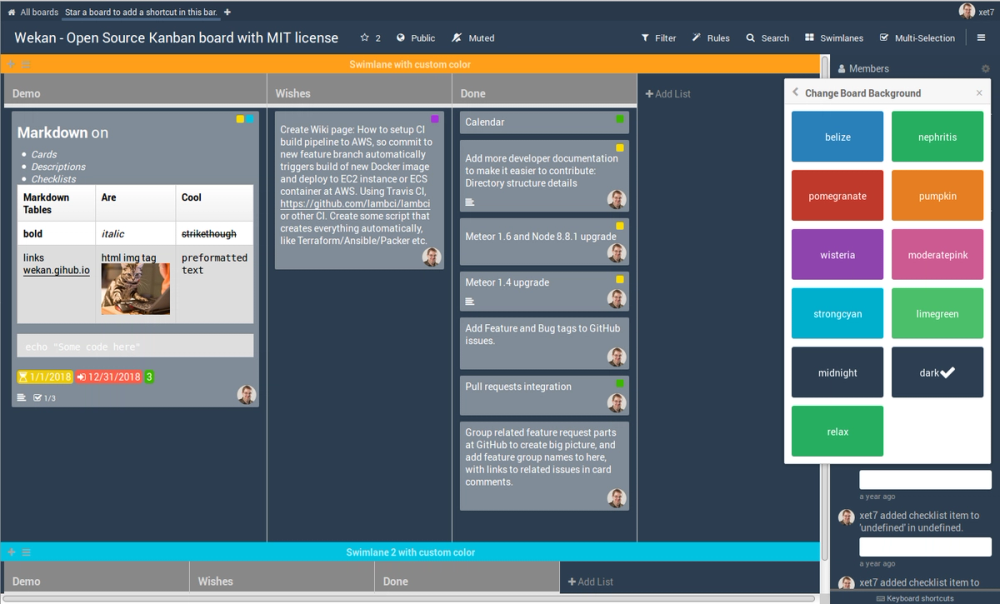
Organizes work into boards, lists, swimlanes, cards, labels, checklists, comments, and due dates so teams can model a practical Trello-style workflow.
Trello import path
Supports importing existing Trello boards, which lowers migration friction for teams moving private operations out of a SaaS account.
Multiple deployment paths
The project documents Docker, Snap, and other server install options, giving operators a choice between a containerized install and host-level packages.
Strengths and trade-offs#
Strengths
- Simple board modelWeKan keeps the workflow centered on cards moving through lists, which works for non-technical operations teams that do not want issue-tracker ceremony.
- MIT licensed self-hostingThe MIT license and self-hosted server option let teams run boards internally without paying per user or accepting SaaS data residency constraints.
Trade-offs
- -Limited enterprise workflow depthWeKan is strongest as a private Kanban board. Teams that need portfolio planning, advanced automation, or deep analytics may still prefer Jira, Asana, or Linear.
WeKan vs alternatives#
WeKan vs Trello
WeKan and Trello both organize work around boards, lists, and cards. The main choice is whether you want a managed SaaS workspace or a self-hosted board system.
| Criteria | WeKan | Trello |
|---|---|---|
| License | MIT | Proprietary |
| Self-hosting | Yes | No |
| Best fit | Private Kanban boards | Hosted team boards with many integrations |
WeKan is the better choice when board data needs to stay on your infrastructure or when per-seat pricing is hard to justify. Trello is still better when your team wants the lowest-maintenance hosted path and depends on Trello Power-Ups.
What it's built on#
- Languages
- JavaScriptPython
- Databases
- MongoDB
- Infrastructure
- AWS
FAQ#
Is WeKan open source?
Yes. WeKan is open source under the MIT license.
Can WeKan replace Trello?
WeKan can replace Trello for straightforward Kanban boards, card comments, labels, checklists, and self-hosted team workflows. Trello remains stronger for hosted convenience and its larger integration marketplace.
Can I self-host WeKan?
Yes. WeKan documents self-hosted installation paths including Docker and Snap.
Similar open-source tools#

Kaneo
Self-hosted project management without the bloat

Windshift
Self-hosted work management for teams leaving Jira

Plane
Modern project management for all teams

Gitea
Self-hosted GitHub alternative with CI, issues, and PRs

GitLab
Self-host Git, CI/CD, security scans, and planning

Leantime
Focus-first project management designed for neurodivergent teams