
- GitLab covers issue boards, sprint milestones, and native commit-to-issue automation for teams already hosting code on GitLab, at no added seat cost.
- OpenProject adds Gantt charts, time tracking, and full Scrum sprints for teams that need structured project management alongside issues, self-hosted under GPL-3.0.
- Taiga matches Linear's sprint-cycle workflow most closely with burndown charts, velocity tracking, and Kanban swimlanes, free to self-host under AGPL-3.0.

Open-source alternatives guide
Best Open Source Linear Alternatives
Linear is fast and opinionated, which is exactly what makes leaving it hard. I wrote this guide for teams who like the workflow but cannot keep the data in someone else's cloud, or who need to bend the process in ways Linear will not. I compared 8 open source issue trackers on keyboard-driven speed, how much ceremony they impose per issue, and whether the API is good enough to rebuild the integrations you rely on. Some come close on feel and are weak on reporting. Others are mature project management systems that will feel heavy if you arrived from Linear. I have been specific about which is which, and about the migration effort, since that is usually the part that decides it.
TL;DR
Pain points
Why people leave Linear
The practical reasons teams compare Linear with open-source alternatives before they migrate.
Linear charges $8 per user per month on the Standard plan and $14 per user per month on Plus. A 20-person engineering team pays between $1,920 and $3,360 per year for issue tracking alone. When Linear removed its legacy free tier and tightened plan limits, teams on grandfathered plans faced abrupt cost increases with no migration path within the tool itself. Adding non-engineering collaborators (designers, PMs, QA engineers who need occasional access) requires full paid seats, since lower plans offer no read-only tier.
Linear has no self-hosted option and no enterprise self-hosted tier, even for large customers. All workspace data resides on Linear's US-based servers. Teams in the EU working under GDPR, or in healthcare and fintech under data residency requirements, cannot accommodate a cloud-only issue tracker with no documented path to custom data processing agreements or on-premises deployment.
Linear's data export is functional but incomplete. Issues, statuses, assignees, and labels export as CSV. Cycle membership, sprint carry-over history, and velocity trends do not export cleanly. The CSV shows which sprint an issue was assigned to but not the chronological sprint sequence, carry-over events, or velocity metrics. Teams that built their planning cadence inside Linear's cycle system find that exporting means losing the planning structure, not just the raw data.
When Linear experiences downtime, teams find their sprint process stops entirely. Issue tracking embedded in daily standups and on-call workflows creates a single operational dependency on a cloud service that has no offline mode and no self-hosted fallback.
At a glance
Quick comparison
| Name | License | Best For |
|---|---|---|
| GitLab | MIT | Teams on GitLab for code hosting |
| OpenProject | GPL-3.0 | Teams needing Scrum boards, Gantt charts, and time tracking |
| Taiga | AGPL-3.0 | Agile teams wanting Scrum sprints without enterprise overhead |
| Gitea | MIT | Small teams wanting lightweight git hosting and issue tracking |
| Macro Tasks | AGPL-3.0 | Tasks that follow chat, email, and GitHub pull requests |
| Focalboard | MIT | Teams using Mattermost wanting board-centric visual project tracking |
| Leantime | AGPL-3.0 | Teams with neurodiverse members needing goal-first issue tracking |
| WeKan | MIT | Teams needing a simple self-hosted Kanban board |
Pricing
$8/user/month (Standard) to $14/user/month (Plus); no free tier
All 8 alternatives are free to self-host; infrastructure runs $10-40/month regardless of team size. Macro Tasks also offers a paid cloud plan at $40 per seat per month.
Self-hosting
Not available; all data on Linear's US-based servers
All 8 alternatives support Docker-based self-hosting; most have documented Docker Compose installs
Sprint and cycle management
Full native cycle model with carry-over tracking and velocity metrics
Taiga and OpenProject have the most complete sprint implementations; GitLab and Gitea use milestones as sprint equivalents
Git integration
GitHub and GitLab sync via Linear's integration layer
GitLab and Gitea have native git integration; OpenProject, Taiga, and Focalboard connect via webhooks
License
Proprietary; no source access
MIT (GitLab CE, Gitea, WeKan), GPL-3.0 (OpenProject), AGPL-3.0 (Taiga, Leantime, Macro Tasks), multi-license (Focalboard: compiled MIT, source AGPL-3.0, config Apache-2.0)
Data portability
CSV export for issues; cycle history and sprint structure not portable
Self-hosted alternatives give full database access; sprint history is never lost on migrations within the same tool
Editorial ranking
8 Best Open Source Linear Alternatives (Ranked)

Rank 1
GitLab
Teams on GitLab for code hosting
24.5K stars6K forksRubyMIT
GitLab bundles issue tracking, project boards, milestones, and workflow automation into the same instance as your git repositories. Issues close from commit messages using standard Closes #123 syntax, and merge request reviewers share user accounts with issue assignees, removing the identity-mapping problem common in migrations from standalone trackers.
Key Features
- Issue boards with configurable workflow states matching Linear's status model
- Milestones as sprint equivalents with due dates and progress tracking
- Labels, weight (story points), due dates, and assignees on every issue
- GitLab CI/CD ties deployments directly to issue lifecycle events
- REST and GraphQL API for workflow automation
Pros
- No added cost for teams already using GitLab for code hosting
- Native git integration: commits close issues with zero sync lag
- Mature access controls at project and group level
Cons
- Dense interface; Linear's keyboard-centric UI is faster for issue-only workflows
- Sprint velocity reports require the Premium tier, not available in Community Edition
- Self-hosted instances need at least 8 GB RAM for memory-constrained environments; 16 GB is the single-node baseline per GitLab's documented requirements
License & Hosting
Self-hosting: Docker, Kubernetes, or Linux package MIT license (Community Edition; open-core: documentation is CC BY-SA 4.0 and EE features carry a separate proprietary license). Self-hosted via Docker, Kubernetes, or official install scripts. GitLab also offers a managed SaaS tier.
Best For
Engineering teams already using GitLab for code hosting who want issue tracking with native git integration and no additional per-seat licensing cost.

Rank 2
OpenProject
Teams needing Scrum boards, Gantt charts, and time tracking
16.2K stars3.5K forksRubyGPL-3.0
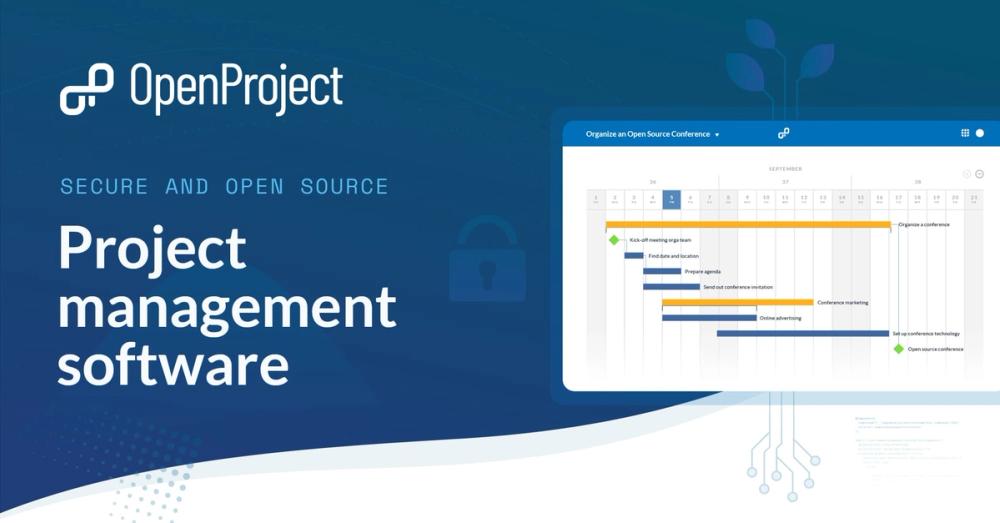
OpenProject is the most fully-featured project management tool in this list. It covers Scrum and Kanban boards, Gantt charts with dependency tracking, time tracking, work package hierarchies, and meeting notes in a single self-hosted instance running on Docker Compose with PostgreSQL.
Key Features
- Scrum and Kanban boards with sprint planning and backlog management
- Gantt charts with predecessor and successor task relationships
- Time tracking with budget and cost reporting per project
- Sub-issues (child work packages) with progress rollup to parent
- CSV and Jira import support for migrations
Pros
- Most complete feature set for project management at team scale
- Work package hierarchy supports nested epics, features, and tasks
- Active development with a strong European user base; EU-hosted SaaS option available
- GPL-3.0 permits unrestricted internal commercial use
Cons
- More complex UI than Linear; new users need onboarding time
- Full installation requires at least 4 GB RAM and 20 GB disk
- Advanced reporting and other Enterprise add-ons require a paid tier (Basic, Professional, Premium, or Corporate)
License & Hosting
Self-hosting: Docker Compose or all-in-one Docker GPL-3.0 (Community Edition). Docker Compose install with PostgreSQL backend. An EU-hosted SaaS option is also available.
Best For
Teams that need Gantt charts, time tracking, and enterprise project management alongside Scrum issue tracking, particularly in regulated industries requiring EU data residency.

Rank 3
Taiga
Agile teams wanting Scrum sprints without enterprise overhead
378 stars211 forksCoffeeScriptAGPL-3.0
Taiga is built specifically for agile software teams. Its sprint board, backlog, Kanban board, and issue tracker share a consistent data model with a clean interface. Taiga includes velocity tracking and burndown charts that match Linear's cycle model more closely than any other tool in this list.
Key Features
- Scrum sprints with backlog prioritization, velocity tracking, and burndown charts
- Kanban swimlanes with configurable WIP limits
- User stories, tasks, and issues as distinct object types with separate workflows
- Project wikis for documentation alongside sprint planning
- Docker Compose install with PostgreSQL and RabbitMQ
Pros
- Closest workflow match to Linear's opinionated sprint model
- Cleaner interface than OpenProject for teams focused on issue tracking
- AGPL-3.0 with no seat limits on self-hosted instances
- Kanban swimlanes with WIP limits cover a workflow Linear does not natively support
Cons
- No built-in git integration; requires webhooks to connect with GitHub or GitLab
- Fewer third-party integrations than Linear
- No native Linear CSV importer; manual column mapping required
License & Hosting
Self-hosting: Docker Compose production install AGPL-3.0. Docker Compose install with PostgreSQL and RabbitMQ. Taiga also offers a hosted SaaS tier.
Best For
Agile teams that want a clean Scrum or Kanban workflow without enterprise overhead, particularly teams migrating off Linear for sprint-cycle parity.

Rank 4
Gitea
Small teams wanting lightweight git hosting and issue tracking
58.2K stars7.2K forksGoMIT
Gitea is a self-hosted GitHub replacement: repositories, pull requests, code review, and issue tracking in a Go binary that runs on a $5 VPS with 512MB RAM. The issue tracker supports labels, milestones, assignees, and project boards with a GitHub-familiar interface that requires no retraining.
Key Features
- Project boards in Kanban style, per repository and cross-repository
- Issue templates matching GitHub's format for consistent reporting
- Milestones as sprint equivalents with due dates and completion tracking
- Gitea Actions: GitHub Actions-compatible CI/CD built in
- Single binary install; SQLite by default, PostgreSQL recommended for teams
Pros
- Fastest self-host setup in this list: one binary, running in under 10 minutes
- MIT licensed with no restrictions on commercial use or modification
- Very low resource requirements: a 50-user instance runs on 1GB RAM
- Gitea Cloud provides an official managed hosted option if self-hosting is not desired; Codeberg, sometimes cited for this role, now runs the Forgejo fork rather than Gitea
Cons
- No built-in sprint cycle management beyond milestones; not a close Linear workflow match
- No built-in Gantt or roadmap view
- Less mature project board compared to Linear's full cycle model
License & Hosting
Self-hosting: Single binary or Docker Compose MIT license. Single binary on any Linux host; Docker image also available. SQLite by default, PostgreSQL for production teams.
Best For
Small engineering teams that want git hosting and issue tracking in a single lightweight binary with no per-seat cost and minimal server requirements.

Rank 5
Macro Tasks
Tasks that follow chat, email, and GitHub pull requests
4.4K stars424 forksRustAGPL-3.0
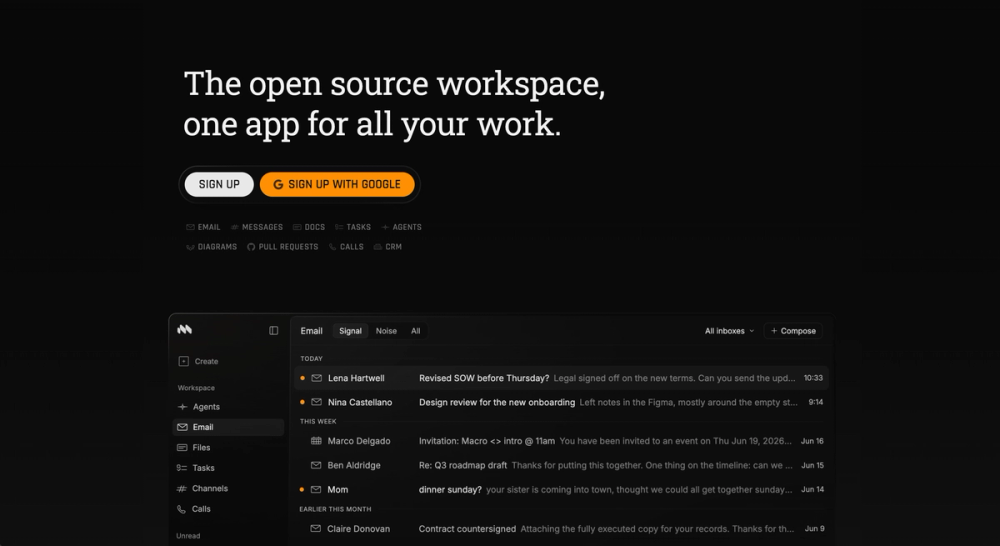
As an open source Linear alternative, Macro Tasks is not a standalone tracker. Tasks start from messages and email, then follow the code that closes them.
Key Features
- Tasks from any message: create a task from an email or a chat message with one keystroke.
- GitHub-linked status: link a task to a branch or pull request and the status follows the code, moving to In Review when a PR opens and closing on merge.
- Live task mentions: @mention a task in docs and channels and it stays in sync wherever it appears.
- Agents as teammates: assign a task to an agent that can do the work, open a pull request, and report back, while AI de-duplicates the queue.
Pros
- Tasks carry their context: the message, doc, and pull request behind a task are one click away, unlike a tracker holding only the ticket.
- Keyboard-driven with a fixed property set: status, priority, and assignee only; no custom properties or labels.
Cons
- No cycles, boards, or roadmaps: there is no sprint model, kanban view, or project planning layer to match Linear's.
- Tasks arrive with a whole workspace: one seat carries email, chat, docs, and calls too, so adopting the tracker means adopting the rest.
License & Hosting
Macro Tasks is fully open source under AGPL-3.0, not open core, and you can self-host it under the AGPLv3. The Enterprise tier adds managed self-host deployment with SSO, HIPAA, and FedRAMP.
Best For
Engineering teams who want tasks tied to chat and GitHub in one workspace. Teams needing sprint and roadmap planning will fit better with OpenProject or GitLab.

Rank 6
Focalboard
Teams using Mattermost wanting board-centric visual project tracking
26.5K stars2.6K forksTypeScript
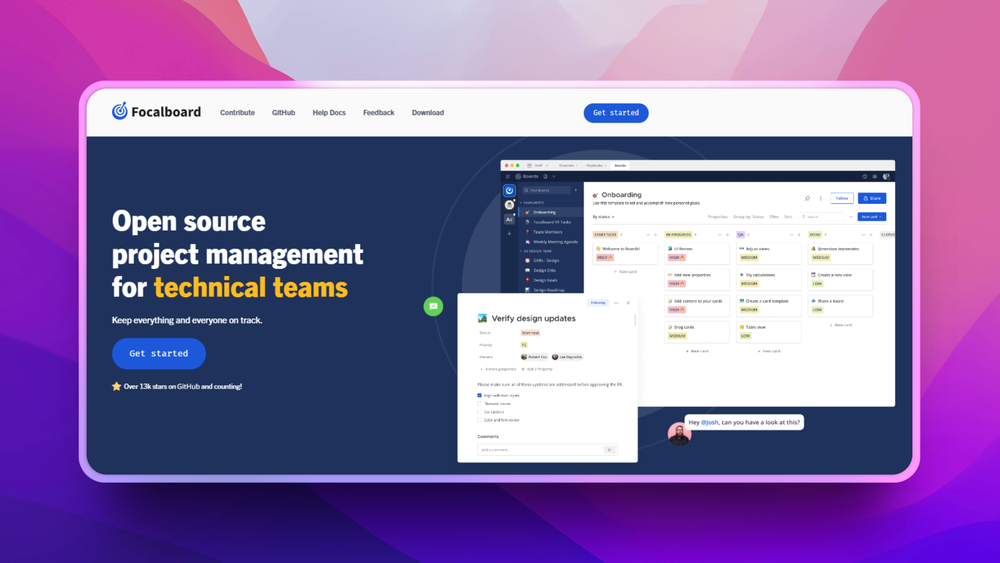
Focalboard is an open source project board tool from the Mattermost team, built for visual project management. It supports Kanban, table, gallery, and calendar views on a shared board with custom properties per card, making it closer to a Notion-style database than a Linear-style sprint tool.
Maintenance status: The standalone Focalboard repository (mattermost-community/focalboard) is no longer actively maintained. The README seeks volunteer maintainers; the last push was May 2026. Teams planning a production deployment should evaluate the separately maintained Mattermost Boards plugin (mattermost/mattermost-plugin-boards) or another tool in this list.
Key Features
- Multiple view types: Kanban, table, gallery, and calendar on the same dataset
- Custom properties with select, text, date, person, and checkbox field types
- Group-by any property for dynamic board reorganization
- Real-time collaboration across team members
- Available as unmaintained standalone Personal Desktop/Server builds; the Mattermost Boards plugin (mattermost/mattermost-plugin-boards) is independently maintained
Pros
- Flexible data model: any property can become the board grouping axis
- Mattermost integration routes notifications into team chat without a separate bridge
- CSV import for migrating card data from other tools
Cons
- Mattermost multi-license: compiled builds are MIT, source is AGPL-3.0 or commercial, admin/config files are Apache-2.0; self-hosting and commercial use are permitted under AGPL terms
- Standalone mode has fewer integrations than the Mattermost-embedded version
- No native git issue integration; requires API automation or webhooks
License & Hosting
Self-hosting: Standalone server or Docker Mattermost multi-license: compiled builds MIT, source AGPL-3.0 or commercial, admin/config files Apache-2.0. Self-hosting and commercial use are permitted under AGPL terms. Runs as standalone Personal Desktop/Server builds; the Mattermost Boards plugin (mattermost/mattermost-plugin-boards) is independently maintained.
Best For
Teams using Mattermost for communication who want board-centric visual project tracking with custom properties and flexible view types. Given the standalone repository's unmaintained status, evaluate the Mattermost Boards plugin before committing to a production deployment.

Rank 7
Leantime
Teams with neurodiverse members needing goal-first issue tracking
11.7K stars1.1K forksPHPAGPL-3.0
Leantime takes a different approach than the other tools in this list. It is built around goal-linked task management with intentional UI simplification to reduce cognitive overhead. Project goals appear prominently and every task connects to a goal, rather than existing as an independent backlog item.
Key Features
- Goal-linked tasks: every task connects to a project goal for context
- Timeboxing: schedule time blocks for tasks to reduce open-ended scope
- Kanban and list views per project with configurable workflows
- Time tracking with team capacity reporting
- Docker Compose install with PHP and MySQL or MariaDB
Pros
- Unique positioning for teams that find Linear's dense sprint interface overwhelming
- AGPL-3.0 with no per-seat cost when self-hosted; the hosted Pro plan is $8 to $10 per user per month
- Goal context on every task reduces the random-backlog-item problem in large projects
- Accessibility-first design for neurodiverse teams
Cons
- Smaller community and fewer third-party integrations than other tools in this list
- PHP and MySQL stack adds different maintenance overhead than Go or TypeScript backends
- Not a close Linear workflow match: no sprint cycle model, no native git integration
License & Hosting
Self-hosting: Docker Compose or package install AGPL-3.0. Docker Compose install with PHP and MySQL or MariaDB. A managed hosted option is available. The AGPL core covers core functionality; advanced features are distributed as separate paid plugins via Leantime's marketplace.
Best For
Teams with neurodivergent members or ADHD-heavy culture who need goal-first, reduced-noise issue tracking without Linear's sprint-centric cognitive density.

Rank 8
WeKan
Teams needing a simple self-hosted Kanban board
21.1K stars3K forksJavaScriptMIT
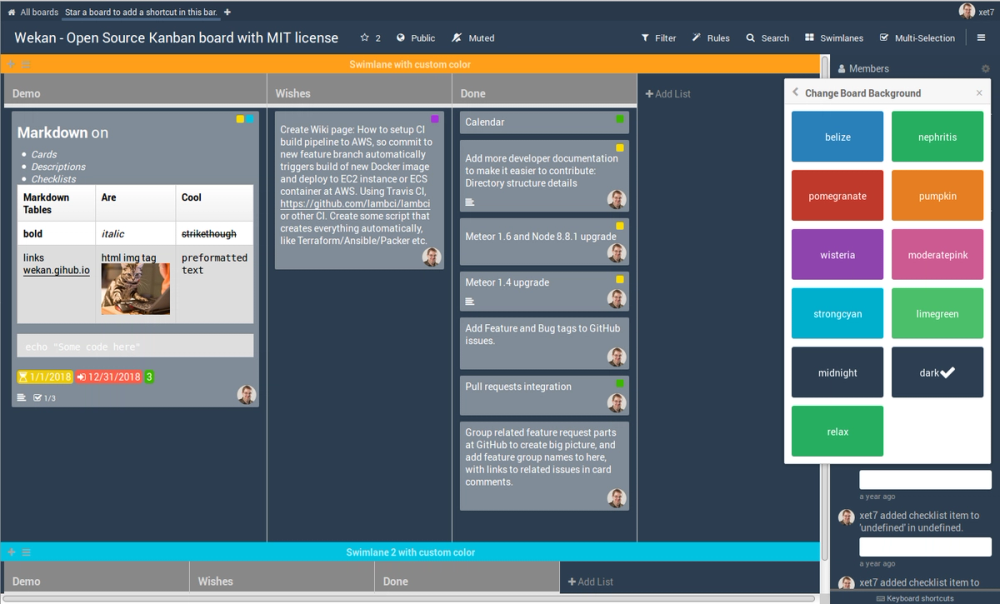
WeKan is a self-hosted Kanban board tool with a clean drag-and-drop interface. It runs as a web application built on Meteor and MongoDB and covers the core Kanban workflow: cards, lists, labels, assignees, due dates, and custom fields, without the project management overhead of larger tools.
Key Features
- Kanban boards with cards, lists, and swimlane support
- Custom fields on cards: text, dates, dropdowns, and checkboxes
- Card templates for repeatable task structures
- Activity log tracking all card and board changes
- Docker Compose install with MongoDB
Pros
- MIT licensed with no restrictions on commercial use or modification
- Simple interface suitable for non-technical team members
- Low resource requirements for self-hosting
- Active community with regular releases on GitHub
Cons
- No sprint or cycle management; Kanban-only workflow
- No built-in git integration
- Meteor and MongoDB stack adds specific maintenance knowledge compared to Go or TypeScript backends
- No native time tracking or roadmap view
License & Hosting
Self-hosting: Docker Compose / Docker container MIT license. Docker Compose install with MongoDB. No proprietary licensing tiers or seat restrictions.
Best For
Teams that need a simple self-hosted Kanban board for task visualization without sprint management, particularly where non-engineering collaborators find Linear's cycle model unnecessary overhead.
Decision framework
How to choose
Use this section to narrow the Linear replacement by team size, hosting model, license, and migration difficulty.
The right Linear replacement depends on what your team misses most and what workflow overhead you can absorb.
If your team already uses GitLab for code hosting, GitLab Issues covers 80% of what Linear does without a separate tool or added cost. Milestones serve as sprint equivalents, and issues close from commit messages natively. There is no identity-mapping gap because the issue tracker and git repo share the same user directory.
If sprint boards and velocity tracking are non-negotiable, choose Taiga for teams under 50 people or OpenProject for teams that also need Gantt charts and time tracking. Both have full Scrum implementations with carry-over, burndown, and backlog management built in.
If your primary concern is data residency or compliance, any self-hosted option resolves the hard constraint. OpenProject has the most mature EU-focused deployment story, with a German company behind it and an EU-hosted SaaS option if self-hosting is not feasible.
If setup simplicity matters, Gitea's single binary with SQLite is the fastest path to production. A Gitea instance serving a 50-person team can run on a $10 VPS and be live in under 10 minutes. The trade-off is no sprint cycle model beyond milestones.
If git integration is a hard requirement, choose GitLab or Gitea. The native integration in both tools means commit messages close issues instantly without a webhook configuration step.
If budget is the only driver, every tool in this list runs free at any team size on self-hosted infrastructure. The variable cost is a $10 to $40 monthly VPS, not per-seat licensing.
Teams that value a clean, low-noise interface for non-engineering collaborators should consider WeKan or Focalboard for boards-only use, or Leantime if the team includes members who find sprint-dense tools overwhelming.
If you want tasks living next to chat and code, Macro Tasks is an unusual pick: it is not a standalone tracker, but tasks are created from messages and stay linked to GitHub pull requests inside one AI-native workspace. It fits engineering teams consolidating discussion, tasks, and code, though teams that depend on Linear's cycles, boards, and roadmaps will find those planning views missing.
Complete directory list
All alternatives to Linear

Plane
FreeModern project management for all teams
Key differentiator
Manage tasks, sprints, docs, and product roadmaps in a self-hostable AGPL project management platform built as a Jira and Linear alternative
59.9K stars5.9K forksTypeScriptAGPL-3.0
Gitea
FreeSelf-hosted GitHub alternative with CI, issues, and PRs
Key differentiator
Small teams wanting lightweight git hosting and issue tracking
58.2K stars7.2K forksGoMIT
Focalboard
FreeOpen source project management: Kanban, Scrum, and lists
Key differentiator
Teams using Mattermost wanting board-centric visual project tracking
26.5K stars2.6K forksTypeScript
GitLab
FreeSelf-host Git, CI/CD, security scans, and planning
Key differentiator
Teams on GitLab for code hosting
24.5K stars6K forksRubyMIT
WeKan
FreePrivate self-hosted Kanban boards for Trello migration
Key differentiator
Teams needing a simple self-hosted Kanban board
21.1K stars3K forksJavaScriptMIT
OpenProject
FreePlan projects with Gantt, Scrum, and Kanban, all self-hostable
Key differentiator
Teams needing Scrum boards, Gantt charts, and time tracking
16.2K stars3.5K forksRubyGPL-3.0
Leantime
FreeFocus-first project management designed for neurodivergent teams
Key differentiator
Teams with neurodiverse members needing goal-first issue tracking
11.7K stars1.1K forksPHPAGPL-3.0

Kaneo
FreeSelf-hosted project management without the bloat
Key differentiator
Manage project backlogs, kanban boards, and GitHub issues with a self-hosted MIT-licensed tool built for teams who want less overhead, not more
9.2K stars820 forksTypeScriptMIT
Macro Tasks
FreeThe open source workspace, one app for all your work.
Key differentiator
Tasks that follow chat, email, and GitHub pull requests
4.4K stars424 forksRustAGPL-3.0
Taiga
FreeAgile project management for Scrum, Kanban, and hybrid teams
Key differentiator
Agile teams wanting Scrum sprints without enterprise overhead
378 stars211 forksCoffeeScriptAGPL-3.0

Orgnise
FreeCentralize wikis, docs, and project tasks in a self-hosted workspace.
Key differentiator
Build a self-hosted workspace for wikis, docs, and project tasks
247 stars37 forksTypeScriptAGPL-3.0

Windshift
FreeSelf-hosted work management for teams leaving Jira
Key differentiator
Manage sprints, milestones, and test runs on your own infrastructure with no per-seat fees
235 stars29 forksGoAGPL-3.0
Migration
Migration notes for leaving Linear
Go to Settings at the workspace level and select Export. Linear exports issues, comments, and project metadata as CSV. The export includes issue title, description, status, assignee, priority, labels, created date, and updated date. Cycle membership and custom workflow automation rules are not included.
Issue titles, descriptions, statuses, assignees, priorities, and labels export reliably. Comments export as a separate CSV with issue IDs as foreign keys, which most importers can reassemble. Sub-issues export with a parent issue ID column, allowing parent-child reconstruction in tools that support work package hierarchies.
Linear cycles have no clean export path. The CSV shows which sprint an issue was assigned to but does not capture carry-over history, sprint velocity, or the chronological sprint sequence. Teams migrating sprint history to OpenProject or Taiga need to reconstruct sprint structure manually from memory or external records. Attachments are not included in the CSV and require manual downloading per issue before migration.
Import paths by tool:
- GitLab: Project > Issues > Import CSV. Map Linear's status column to GitLab labels or to GitLab's open/closed state.
- OpenProject: Work Packages > Import from CSV. Supports parent-child relationships via a parent ID column.
- Taiga: Admin > Import/Export > CSV import maps user stories and issues from CSV columns.
- Gitea: No bulk CSV importer; use the Gitea API at
POST /repos/{owner}/{repo}/issuesfor programmatic migration. Community-maintained migration scripts are available on GitHub. - Focalboard: Accepts CSV import for board cards with column headers mapping to card properties.
A Linear workspace with 200 to 500 issues and no deep sub-issue hierarchies typically migrates in one working day including cleanup. Teams with complex sprint histories or sub-issue trees three or more levels deep should plan a two-to-three day migration window to reconstruct sprint structure the CSV export does not capture.
Before starting, export sprint-by-sprint velocity reports from Linear and archive them. This data does not exist in any importable format and will not be recoverable in the destination tool after migration.
Moving to Macro Tasks: Connect Linear under Settings and have an agent bring your open issues across; Macro Tasks suggests recreating active work rather than importing closed issues. New tasks then link to GitHub, so branches and pull requests keep moving status. Since Macro Tasks has no cycle or sprint model, plan to track sprints another way.
FAQ
Linear alternatives FAQ
Is there a free self-hosted alternative to Linear?
Yes. GitLab Community Edition, OpenProject, Taiga, Gitea, and Leantime are all free to self-host with no per-seat costs. Hosting a 20-person engineering team on a $20 VPS is a common setup. The variable cost is infrastructure ($10 to $40 per month for a VPS and storage) rather than per-user licensing.
Can I self-host these Linear alternatives?
All eight tools in this guide support self-hosting. GitLab, OpenProject, and Taiga have Docker Compose deployment guides. Gitea ships as a single binary and is the easiest self-host in this list. Focalboard runs as a standalone Docker container only; the Mattermost Boards plugin is maintained in a separate, independently maintained repository (mattermost/mattermost-plugin-boards). Leantime uses Docker Compose with PHP and MySQL. Macro Tasks is self-hostable under AGPL-3.0. None of these require Kubernetes for small-team deployments.
Which open source Linear alternative has the best sprint and cycle support?
Taiga and OpenProject have the most complete sprint implementations. Taiga's Scrum board includes sprint planning, backlog prioritization, burndown charts, and velocity tracking. OpenProject adds Gantt charts and dependency tracking on top of the Scrum model. GitLab milestones work as sprint equivalents but do not include velocity tracking in the Community Edition.
Do these alternatives integrate with GitHub or GitLab?
GitLab Issues has native git integration because the issue tracker and code hosting are the same system. Gitea has the same native integration. OpenProject, Taiga, and Focalboard connect to GitHub and GitLab via webhooks: configure a webhook on the git side to close issues when a pull request merges. The integration is functional but requires initial setup.
How do I import data from Linear?
Export issues from Linear at Settings > Export > Download all issues. You receive a CSV file with issues, statuses, assignees, and labels. The most direct import paths are GitLab via its Issues CSV importer, OpenProject via Work Package CSV import, and Taiga via Admin > Import. No tool has a native Linear-specific importer, so expect two to four hours of column mapping and cleanup for a workspace with several hundred issues.
Which Linear alternative is best for small teams under 10 people?
Gitea is the easiest starting point: one binary, minimal resource requirements, and a GitHub-familiar interface. GitLab Community Edition covers the same ground with more features but requires more server resources. For teams that want sprint management without git hosting, Taiga is the strongest small-team option.
Are these tools actually open source?
GitLab CE, Taiga, OpenProject CE, Gitea, Leantime, WeKan, and Macro Tasks use OSI-approved licenses (MIT, GPL-3.0, AGPL-3.0). Focalboard uses a Mattermost tri-license: compiled builds are MIT, source code is AGPL-3.0 or commercial, and admin/config files are Apache-2.0; self-hosting and commercial use are permitted under AGPL terms. All eight tools allow internal team use without restriction under their respective licenses.
What is the biggest risk when migrating from Linear?
Losing sprint history is the most common issue. Linear's cycle data captures velocity trends that no import target can reconstruct from a CSV export. Teams that use velocity data for capacity planning should export sprint-by-sprint reports from Linear before migrating and archive them in a shared document, because this data will not be recoverable in the destination tool after migration.