

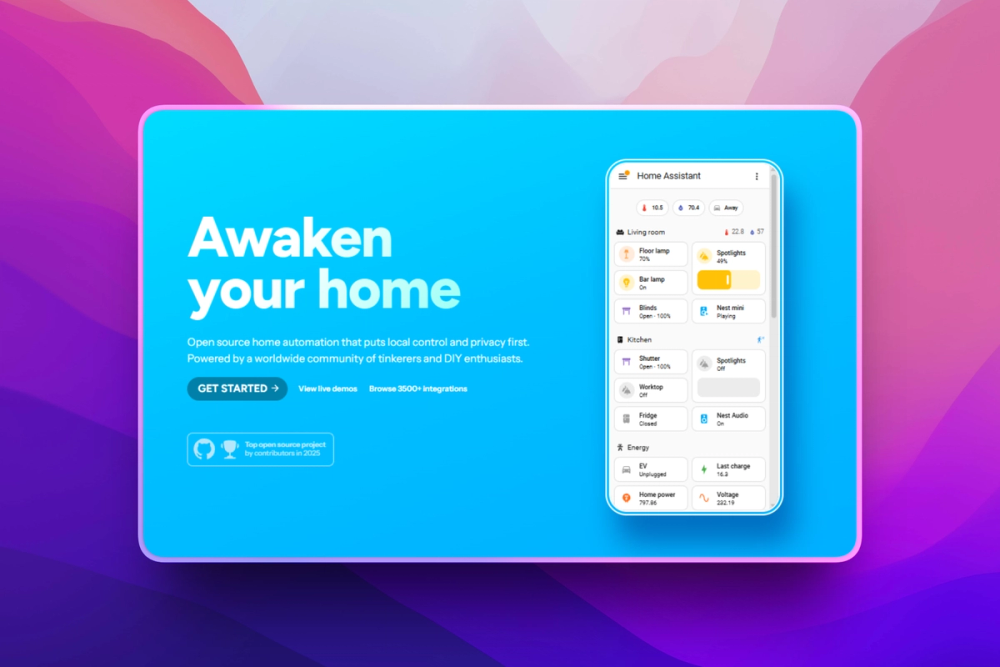
Who Home Assistant is for#
Homeowners replacing cloud smart home apps
Home Assistant fits users who want lights, sensors, climate, locks, cameras, and energy data controlled from one local hub instead of several vendor accounts.
Skip if:
You only use one vendor ecosystem and prefer a simple phone app over local server ownership.
DIY smart home builders with mixed devices
Home Assistant is useful when a home combines mixed protocols, consumer ecosystems, cameras, media devices, climate controls, sensors, and energy devices that need one automation layer.
Skip if:
Your devices are unsupported, cloud-locked, or already handled by a hub that meets every requirement.
Privacy-focused households
Home Assistant works for families who want device state, presence, voice, and automation data processed at home where possible, with cloud use limited to integrations that need it.
Skip if:
You need every device feature to work through a vendor cloud app with no local maintenance.
Tinkerers building advanced automations
Home Assistant gives technical users UI automations, YAML, templates, scripts, scenes, custom dashboards, and voice experiments for routines that consumer hubs cannot model cleanly.
Skip if:
You do not want to debug automation logic, read integration docs, or maintain a local controller.
The problem it solves#
Smart homes get fragile when devices, routines, and dashboards are split across separate vendor apps, cloud services, and account-specific integrations. A routine as simple as turning on a light at sunset can become harder to trust when an internet link is down, a device maker changes an API, or one ecosystem cannot cleanly coordinate another device.
The deeper problem is ownership. Many consumer smart home apps are easy to start with, but they leave the homeowner with less control over where automation logic, dashboards, voice flows, and device data live. That works for simple rooms, but it becomes painful when a home mixes sensors, locks, climate devices, energy monitors, cameras, media devices, and services from many brands.
How it solves it#
Local-first smart home control
Home Assistant runs on hardware you control and processes smart home data locally when device integrations allow it. Local storage is the default posture, with cloud fallback reserved for devices or services that do not expose a local control path.
Over 1000 brand integrations
Home Assistant works with over 1000 brands and automatically scans the local network for known devices after setup. The integrations directory includes device, service, voice, energy, utility, camera, climate, sensor, and automation categories.
Automation engine for real home routines
Home Assistant automations can react to device states, time, presence, sun events, conditions, templates, scripts, and scenes. Most routines can be built in the UI, while YAML gives advanced users deeper control.
Custom dashboards for every device type
Home Assistant dashboards let users build mobile and desktop control views with cards for lights, locks, thermostats, media, calendars, maps, energy data, weather, sensors, and custom markdown.
Assist voice control
Home Assistant includes Assist, a voice assistant built on an open voice foundation. Users can run local voice setups, mobile voice control, wake words, and custom sentences depending on their hardware and privacy goals.
Energy and companion app support
Home Assistant includes home energy management for monitoring usage and solar production, plus official companion apps for iOS, Android, Wear OS, and Apple Watch presence and notifications.
Strengths and trade-offs#
Strengths
- Clear privacy advantage over cloud-first hubsHome Assistant keeps device data local when possible and stores it on your hardware, which gives it a stronger privacy posture than smart home apps built around vendor-hosted accounts.
- Broad mixed-brand compatibilityHome Assistant spans consumer ecosystems, local network devices, Zigbee, Z-Wave, Matter, energy monitors, media devices, cameras, and developer services. That makes it a strong fit for homes that outgrow one vendor app.
- Apache-2.0 codebase with active releasesThe Home Assistant Core repository is Apache-2.0 licensed and has a long-running public release history. Teams and advanced users can inspect the Python code, contribute integrations, and run the software under an open license.
- Multiple deployment pathsHome Assistant can run through Home Assistant OS on a Raspberry Pi, mini PC, or VM, and the official Linux docs also provide a Docker-based Home Assistant Container path for users who manage their own host.
- Strong UI plus advanced configurationMost setup can happen through the UI, while advanced users still have access to YAML, templates, scripts, custom cards, and developer documentation when they need more control.
Trade-offs
- -You own the server workHome Assistant gives you local control, but you also manage hardware, backups, updates, network access, and device troubleshooting. A managed consumer app is easier if you only need a few mainstream devices.
- -Install type mattersChoose the install type carefully. Home Assistant OS is the best fit for most users because it includes Supervisor and apps. Home Assistant Container is useful for Docker admins, but it does not include apps and expects you to manage the host yourself.
- -Device quality varies by integrationHome Assistant supports many brands, but each integration depends on what the device or service exposes. Some devices still need a vendor cloud, and advanced behavior may require checking integration docs before you buy.
- -More control means more decisionsDashboards, automations, voice pipelines, add-ons, and integrations are highly configurable. That flexibility is the point, but households that want a fixed phone-app experience may find the setup process too involved.
Home Assistant vs alternatives#
Home Assistant vs SmartThings
Home Assistant and SmartThings both coordinate smart home devices and automations, but they make different ownership tradeoffs. Home Assistant runs on your hardware and prioritizes local control. SmartThings Rules can run locally on a hub when every involved device feature and service supports local execution; otherwise, those Rules run in the SmartThings Cloud.
| Criteria | Home Assistant | SmartThings |
|---|---|---|
| Software model | Apache-2.0 core repository | Samsung-managed smart home service |
| Hosting model | Runs on your Raspberry Pi, mini PC, VM, or Docker host | Uses the SmartThings app, SmartThings Cloud, and supported hubs |
| Local automation | Local-first when device integrations support it | Local on a hub when possible, cloud-run when required features or services lack local execution |
| Device strategy | Broad mixed-brand integrations and advanced configuration | App-led setup for supported SmartThings devices and services |
Home Assistant is the better fit when privacy, local execution, custom dashboards, and mixed-brand device control matter more than hands-off setup. SmartThings is still worth considering when you want a simpler Samsung-managed app experience, already own compatible SmartThings hardware, and do not want to maintain a local server.
Quick start#
docker run -d \
  --name homeassistant \
  --privileged \
  --restart=unless-stopped \
  -e TZ=MY_TIME_ZONE \
  -v /PATH_TO_YOUR_CONFIG:/config \
  -v /run/dbus:/run/dbus:ro \
  --network=host \
ghcr.io/home-assistant/home-assistant:stableWhat it's built on#
- Languages
- Python
- Messaging
- MQTT
FAQ#
Is Home Assistant free and open source?
Yes. Home Assistant Core is Apache-2.0 licensed, and the repository is public at home-assistant/core. You can run it on your own hardware under the open source license, though optional hardware, cloud access, and hosted services may cost extra.
Can Home Assistant run without the cloud?
Yes. Home Assistant runs locally on hardware you control and keeps data local when possible. Some device integrations still need a vendor cloud because the device maker does not expose a local control path.
What is the best way to install Home Assistant?
Choose Home Assistant OS for most installs because it includes the Supervisor and apps. Use Home Assistant Container when you are a Docker admin who wants to manage your own host and does not need the built-in apps path.
Does Home Assistant work with SmartThings devices?
Home Assistant has a SmartThings integration, and many Zigbee, Z-Wave, Matter, Wi-Fi, and cloud devices can also connect through their own integrations. The best path depends on whether the device exposes local control or only works through a vendor account.
Who should avoid Home Assistant?
Avoid Home Assistant if you want a fully managed smart home app with no server, backups, updates, or troubleshooting. It is strongest for users who accept some setup work in exchange for local control and broader automation depth.
Similar open-source tools#

Pulse
Read-only Windows diagnostics with a local AI assistant.

Xray-core
Open source proxy core with XTLS, VLESS, and REALITY protocols

Vela
OpenStreetMap and Google data, no account, no Play Services
Esp32 C3 Adblock
Pi-hole-style DNS ad-blocker on a $2 ESP32-C3 board

Obtainium
Android app updates direct from GitHub and F-Droid

mvt
Mobile forensics toolkit for detecting spyware on Android and iOS