Open Source Alternatives LogoOpen Source Alternatives
AlternativesBlogAdvertise
Open Source Alternatives LogoOpen Source Alternatives

Stay Updated

Subscribe to our newsletter for the latest news and updates about Alternatives

Open Source Alternatives LogoOpen Source Alternatives

Handpicked Open Source Alternatives to Paid Softwares

Product
  • Search
  • Categories
  • Tag
  • Sign In
Resources
  • Blog
  • Collection
  • Submit
  • Advertise your tool
Company
  • Privacy Policy
  • Terms of Service
  • Refund Policy
  • Sitemap
Copyright © 2026 All Rights Reserved.
Home/Categories/Security & Monitoring/Netdata
icon of Netdata

Netdata

Open source alternative to Datadog, Dynatrace and New Relic

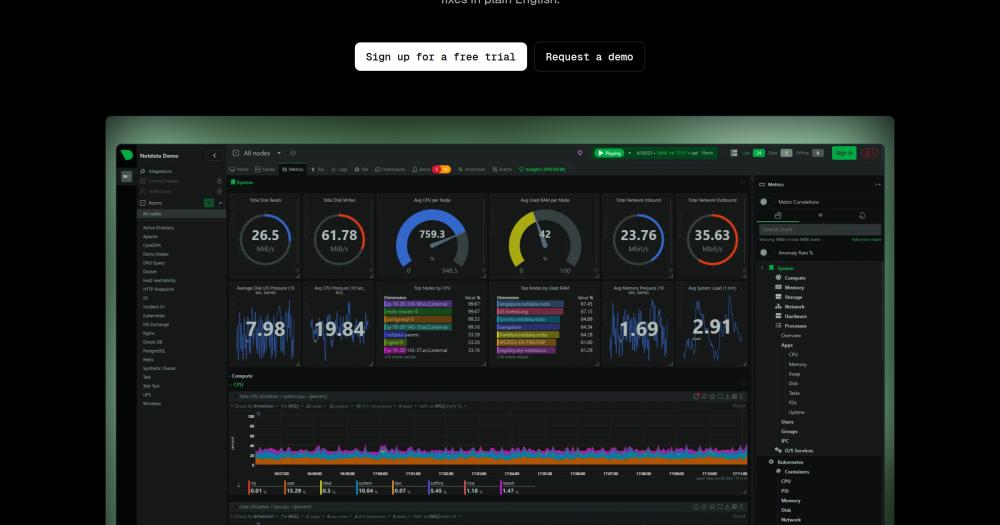
A real-time monitoring platform for systems, hardware, containers, and applications, providing comprehensive observability.

78.8K starsCGPL-3.0Active this month
Visit websiteGitHub repo
image of Netdata
Contents
  1. 01Who Netdata is for
  2. 02The problem it solves
  3. 03How it solves it
  4. 04Strengths and trade-offs
  5. 05Netdata vs alternatives
  6. 06Install and self-host
  7. 07Tech stack
  8. 08FAQ
  9. 09Similar open-source tools
TL;DR

Netdata gives DevOps teams real-time infrastructure monitoring with per-second metrics, auto-discovered dashboards, and optional Cloud collaboration while keeping agent data local by default.GPL-3.0 · C · 78.8K stars · Active this month

who it's for

Who Netdata is for#

SREs triaging production incidents

SREs can inspect per-second CPU, memory, disk, network, process, log, and container signals from generated dashboards during an outage. The anomaly and correlation views help narrow the failing subsystem without building a custom dashboard first.

Skip if:

Your incident process already depends on a mature Datadog setup with tuned monitors, ownership metadata, and escalation workflows. Replacing that may cost more than adding Netdata for node-level depth.

DevOps teams monitoring Docker and Kubernetes

DevOps teams can deploy Netdata agents on hosts or clusters to watch containers, cgroups, Kubernetes workloads, and node resources in real time. The Docker install path includes the mounts and privileges needed for container name resolution and host visibility.

Skip if:

Your security policy forbids host networking, host PID mode, Docker socket mounts, or SYS_ADMIN capabilities for monitoring containers. In that case, use a less privileged collector even if it gives less detail.

Infrastructure teams keeping metrics on premises

Teams with privacy or data residency requirements can run Netdata locally and use parent nodes for central views while keeping raw metrics inside their infrastructure. Netdata Cloud remains optional for remote collaboration and centralized management.

Skip if:

You need a fully managed SaaS that owns retention, alert delivery, identity, and operational support end to end. Netdata gives more control, but that also leaves more runtime responsibility with your team.

Operators replacing SSH-based troubleshooting

System administrators can use Netdata's live dashboards, logs views, alerts, and hardware sensors to inspect servers without jumping between shell commands during every investigation. It is especially useful when one person manages many Linux nodes or mixed infrastructure.

Skip if:

You only need occasional uptime checks or simple endpoint monitoring. Netdata's depth is overkill when a lightweight status monitor would answer the question.

the problem

The problem it solves#

Infrastructure monitoring gets expensive and slow when every host, container, log stream, and metric has to pass through a SaaS pipeline before engineers can troubleshoot. Teams pay for ingestion, learn query languages, and still miss short incidents because dashboards refresh too slowly or were never built for the failing component.

Lean DevOps teams feel this pain first. They need production visibility during an incident, but they do not have weeks to instrument every service, tune alerts, and maintain custom Grafana dashboards before the next outage.

how Netdata solves it

How it solves it#

Per-second metric collection

Collects and visualizes infrastructure metrics every second, which helps operators catch short CPU, memory, disk, and network spikes that lower-resolution monitoring can smooth over. The README positions this as Netdata's default operating model, not a premium mode.

Auto-discovered collectors

Detects systems, containers, VMs, hardware sensors, OpenMetrics endpoints, StatsD inputs, logs, and hundreds of packaged applications. Netdata documents 800+ integrations, so teams can get coverage without writing collectors for every service first.

Edge-based anomaly detection

Trains machine learning models per metric at the edge, then flags unusual behavior close to where the data is produced. This keeps anomaly detection available even when teams do not centralize all raw metrics in a remote SaaS account.

Generated dashboards with no query language

Builds interactive dashboards automatically from collected metrics, so operators can inspect live charts without learning PromQL, LogQL, or a vendor-specific query syntax. This is useful during incidents when speed matters more than dashboard craft.

Distributed parent-child architecture

Runs agents on nodes and can stream to Netdata Parents for central views, longer retention, and alert coordination. The README describes horizontal scaling to multi-node and multi-cloud environments while keeping metrics close to the monitored infrastructure.

strengths · trade-offs

Strengths and trade-offs#

Strengths

  • Useful dashboards immediately after installNetdata auto-discovers common systems, containers, applications, and hardware sensors, then generates dashboards from those metrics. Compared with a Datadog or Prometheus setup that often starts with agent config and dashboard work, Netdata is stronger for fast incident visibility.
  • Metrics stay local by defaultThe local agent collects, stores, analyzes, and visualizes metrics on the node or through a parent node. Netdata Cloud is optional for remote access, team views, SSO, and centralized configuration, so privacy-sensitive teams can start without shipping all metrics to a vendor.
  • High-resolution monitoring without a paid ingest meterPer-second metrics are part of the core agent workflow, not a special high-cardinality add-on. Teams watching noisy infrastructure can preserve detail locally instead of sampling aggressively to control SaaS ingestion bills.
  • Clear resource profile for production nodesThe README states that Netdata uses about 5% CPU and 150MiB RAM by default on production systems, and less than 1% CPU with about 100MiB RAM when ML and alerts are disabled with ephemeral storage. That makes its overhead easier to budget before rollout.

Trade-offs

  • -Docker install needs host-level accessThe official Docker guide requires host PID mode, host networking, several host mounts, SYS_PTRACE, SYS_ADMIN, and an AppArmor exemption for full monitoring. That is normal for deep node observability, but it is a serious permissions decision for locked-down container environments.
  • -Licensing is mixed across the ecosystemThe Netdata Agent is GPLv3+, while Netdata UI is free to use but not open source, and Netdata Cloud is closed source with free and paid tiers. Teams that require every visible component to be open source should review this before standardizing on Netdata.
  • -Team workflows may pull you toward Netdata CloudA single node can run with the local dashboard, but remote access, saved dashboard customizations, SSO, RBAC, centralized alert configuration, and multi-node collaboration are Cloud-oriented features. Self-hosted-only teams should validate which operations they can run without Cloud.
versus alternatives

Netdata vs alternatives#

Netdata vs Datadog

Both tools monitor infrastructure, containers, applications, and alerts, but they make different tradeoffs around data ownership and setup. Netdata is strongest when you want real-time node visibility, local metrics, and open agent code; Datadog is strongest when you want a managed SaaS workflow with vendor-operated retention and enterprise account controls.

FeatureNetdataDatadog
Core licenseGPLv3+ agentProprietary
Self-hostingYes, agent and parent nodesNo full self-hosted product
Metric resolutionPer-second by defaultSaaS-managed collection and retention
DashboardsAuto-generated, no query language requiredManaged dashboards and notebooks

Choose Netdata when incident responders need high-resolution metrics close to the machines they operate, especially for Linux hosts, containers, Kubernetes, and hybrid infrastructure. Choose Datadog when your team values a managed vendor workflow more than local control, or when you already rely on Datadog's account-level integrations, billing, and organization-wide incident process.

install · self-host

Install and self-host#

bash
docker run -d --name=netdata \
  --pid=host \
  --network=host \
  -v netdataconfig:/etc/netdata \
  -v netdatalib:/var/lib/netdata \
  -v netdatacache:/var/cache/netdata \
  -v /:/host/root:ro,rslave \
  -v /etc/passwd:/host/etc/passwd:ro \
  -v /etc/group:/host/etc/group:ro \
  -v /etc/localtime:/etc/localtime:ro \
  -v /proc:/host/proc:ro \
  -v /sys:/host/sys:ro \
  -v /etc/os-release:/host/etc/os-release:ro \
  -v /var/log:/host/var/log:ro \
  -v /var/run/docker.sock:/var/run/docker.sock:ro \
  -v /run/dbus:/run/dbus:ro \
  --restart unless-stopped \
  --cap-add SYS_PTRACE \
  --cap-add SYS_ADMIN \
  --security-opt apparmor=unconfined \
  netdata/netdata
tech stack · detected from GitHub

What it's built on#

Languages
CC++GoPythonRust
Databases
MongoDBMySQLPostgreSQL
Infrastructure
DockerKubernetes
frequently asked

FAQ#

Is Netdata open source?

Yes. The Netdata Agent is GPLv3+ and includes the core monitoring engine for collection, storage, machine learning, alerting, and APIs. The Netdata UI is free to use but not open source, and Netdata Cloud is closed source with free and paid tiers.

Can Netdata run without Netdata Cloud?

Yes. Netdata can run with a local dashboard on the monitored node, and Netdata Cloud is optional. Cloud adds remote access, team collaboration, SSO, RBAC, saved dashboard customization, and centralized alert configuration.

Can I run Netdata with Docker?

Yes. Netdata publishes an official Docker image and a Docker Compose example. Full host monitoring requires host PID mode, host networking, host filesystem mounts, Docker socket access, and extra capabilities, so review the security implications before using it in production.

How is Netdata different from Datadog?

Netdata focuses on real-time, per-second monitoring close to the infrastructure, with local storage and optional Cloud features. Datadog is a managed SaaS suite that is often a better fit when a team wants vendor-owned retention, integrations, billing, and enterprise workflow management.

Does Netdata use many system resources?

Netdata documents a modest default footprint for production systems: about 5% CPU and 150MiB RAM. If machine learning and alerts are disabled with ephemeral storage, the README lists less than 1% CPU and about 100MiB RAM.

also worth a look

Similar open-source tools#

Coroot

Coroot

Instant observability with no-code setup.

7.6KGoApache-2.0
ClawTrace

ClawTrace

Visualize agent execution trees and track token costs per step

35TypeScriptApache-2.0
Stakpak

Stakpak

Open source agent that automates app deployment and monitoring

1.5KRustApache-2.0
OpenObserve

OpenObserve

Self-hosted observability for logs, metrics, and traces

18.8KTypeScriptAGPL-3.0
Grafana

Grafana

Open source dashboards for metrics, logs, and traces

3KGoApache-2.0
SigNoz

SigNoz

Open source APM with logs, traces, metrics, and dashboards

27.2KTypeScriptMIT

Repository

Stars
78.8K
Forks
6.4K
License
GPL-3.0
Latest
v2.10.3
Last commit
26 days ago
Last verified
May 13, 2026
Repo
netdata/netdata ↗

Additional details

Language
C
Open issues
303
Contributors
676
First release
2013

Categories

Security & MonitoringIT ManagementDevOps & CI/CD

Tags

MonitoringObservabilityDevOps ToolsData VisualizationServer ManagementKubernetesDocker ManagementCloud Management