

Who Shotcut is for#
Educators and students editing videos
Shotcut gives classrooms and students a free editor for tutorials, presentations, and media projects across common desktop systems.
Skip if:
Use a commercial suite if the course requires professional color, motion graphics, or industry-standard workflows.
Small teams producing product clips
Teams can edit demos, webinars, social clips, and training videos locally without adding another subscription. Broad format support helps with mixed screen recordings and camera footage.
Skip if:
Skip it if your team needs cloud review, shared media libraries, or advanced multi-editor collaboration.
The problem it solves#
Video editing tools can become expensive and hardware-specific, especially for students, educators, nonprofits, and small teams. Proprietary suites also tie projects to vendor ecosystems, cloud accounts, and paid upgrade paths.\u000A\u000AMany creators only need reliable trimming, filters, audio editing, color controls, and export across common formats. Paying for a full commercial suite is hard to justify when editing is frequent but not the organization's core business.
How it solves it#
Cross-platform desktop editing
Shotcut runs on Linux, macOS, and Windows, giving mixed teams a common editor. Local desktop editing keeps source footage and project files under the creator's control.
Broad format support through MLT
Shotcut builds on the MLT multimedia framework and FFmpeg ecosystem for wide media format support. This reduces transcoding work for common camera and screen-recording files.
Timeline filters and exports
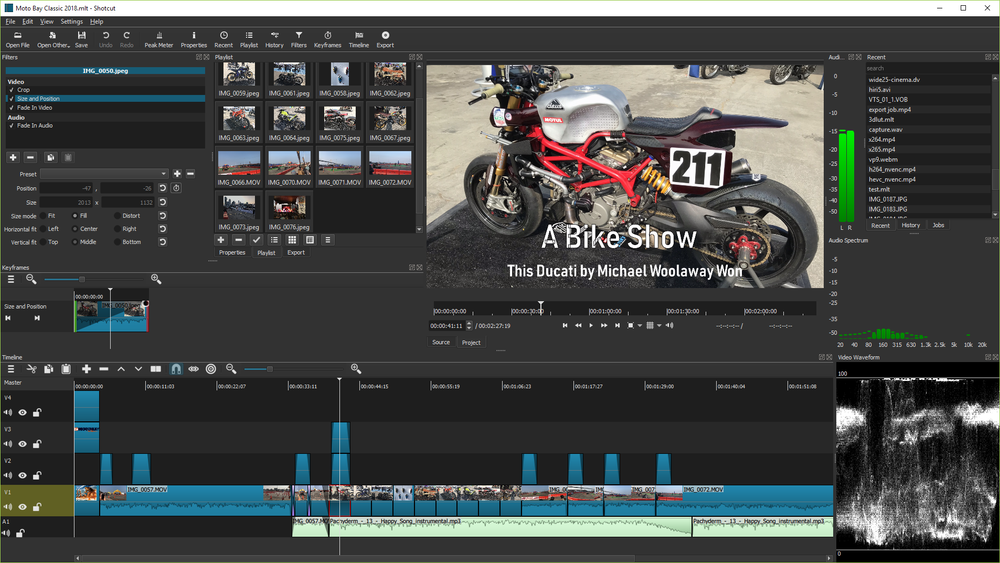
Users can trim clips, layer audio and video, apply filters, adjust color, and export finished videos from one timeline. It covers common tutorial, social, and education editing workflows.
Strengths and trade-offs#
Strengths
- No subscription for local editingShotcut gives creators a capable local editor without monthly licensing. That matters for schools, nonprofits, hobbyists, and small teams with occasional video production needs.
- Works across major desktop systemsCross-platform support helps teams with mixed workstations. A creator can edit on Linux without moving to a proprietary macOS or Windows-only workflow.
Trade-offs
- -Less polished collaboration ecosystemShotcut does not match Premiere Pro or DaVinci Resolve Studio for team collaboration, advanced color workflows, motion graphics ecosystems, or studio pipeline integrations.
- -Desktop app, not hosted workflowShotcut keeps editing local. Teams that need browser-based review, cloud asset management, and shared project collaboration will need additional tools.
Shotcut vs alternatives#
Shotcut vs Adobe Premiere Pro\u000A\u000AShotcut and Adobe Premiere Pro both edit video, but Shotcut is a free local desktop editor while Premiere Pro is a proprietary subscription product within Adobe's creative ecosystem.\u000A\u000A| Criterion | Shotcut | Adobe Premiere Pro |\u000A| --- | --- | --- |\u000A| License | GPL-3.0 | Proprietary subscription |\u000A| Hosting | Local desktop app | Local desktop app with Adobe cloud ecosystem |\u000A| Best fit | Cost-conscious local editing | Professional studio and collaboration workflows |\u000A| Platforms | Linux, macOS, Windows | macOS and Windows |\u000A\u000AShotcut is the better choice when creators need capable local editing without subscription cost. Premiere Pro is still better when teams depend on Adobe integrations, professional collaboration, and advanced post-production workflows.
What it's built on#
- Languages
- C++JavaScript
- Frameworks
- MLT Framework
FAQ#
Is Shotcut free and open source?
Yes. Shotcut is GPL-3.0 licensed and free to use. It is a desktop video editor available across major operating systems.
Can Shotcut replace Adobe Premiere Pro?
Shotcut can replace Premiere Pro for many basic and intermediate local editing workflows. Premiere Pro remains stronger for professional collaboration, motion graphics integrations, and studio pipelines.
Who is Shotcut best for?
Shotcut is best for creators, educators, nonprofits, and small teams that need capable local video editing without subscription costs.
Similar open-source tools#

OpenShot
Free open source video editor for Linux, Mac, and Windows

Pitivi
Non-linear video editor for Linux, powered by GStreamer

Kdenlive
Free non-linear video editor for Linux, Mac, and Windows

Cinelerra GG Infinity
Professional video editing software for Linux, fully free

LiVES
Live video editing and VJ performance tool for GNU/Linux

Flowblade
Free non-linear video editor for Linux with GPU support