

Who Focalboard is for#
Existing Focalboard users documenting the tradeoff
Use Focalboard when an existing deployment already works and the team understands the maintenance risk.
Skip if:
Skip it for new critical project management rollouts unless your team can maintain the codebase.
Personal or low-stakes self-hosted boards
Use Focalboard for personal boards, experiments, or small internal trackers where simple views matter more than active vendor development.
Skip if:
Skip it if mobile polish, long-term maintenance, and enterprise collaboration features are required.
The problem it solves#
Lightweight project management tools often start as convenient hosted boards, then become operational memory for engineering, content, and support teams. Once the board holds roadmap decisions, customer requests, and release planning, lock-in and export limits matter more. Teams that want a simple self-hosted board need to know whether the project is actively maintained before putting core work into it.
Focalboard offers the familiar board-based workflow with local and server options, but its maintenance status is now part of the evaluation. It can still be relevant for existing users, experiments, and teams comfortable maintaining their own fork or accepting project risk.
How it solves it#
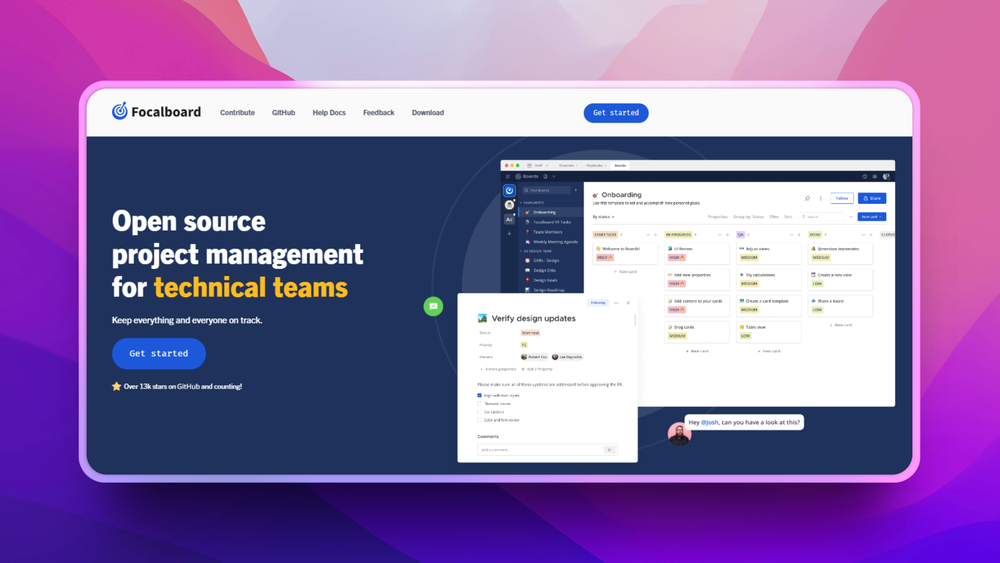
Board, table, gallery, and calendar views
Track tasks and project work in multiple views so teams can choose the layout that fits planning, content calendars, roadmaps, or personal task lists.
Desktop and personal server editions
Run Focalboard as a local desktop app or as a self-hosted personal server. That gives individuals and small groups options beyond a hosted SaaS board.
Templates and custom attributes
Start from project, roadmap, meeting, content, or goal templates and add custom card attributes. This supports lightweight process structure without a heavy project suite.
Open project files and source access
Teams can inspect and modify the codebase, but should weigh that control against the repository’s current maintenance warning.
Strengths and trade-offs#
Strengths
- Familiar Trello-style workflow without SaaS dependencyFocalboard is useful when a team wants self-hosted boards, simple task views, and local control rather than another hosted project management account.
- Honest fit for low-risk or existing deploymentsBecause the repository warns it is not maintained, the strongest fit is for existing users, internal experiments, or teams prepared to own maintenance.
Trade-offs
- -Standalone project is not actively maintainedThe GitHub README warns that the repository is currently not maintained. New teams should consider Planka, Wekan, OpenProject, or Huly if they need active roadmap momentum.
Focalboard vs alternatives#
Focalboard vs Trello
Focalboard is the better fit when a team wants a simple self-hosted task board and accepts the maintenance risk of the standalone project. Trello is stronger when a team wants a polished managed board product, mobile apps, automations, integrations, and vendor continuity. Choose Focalboard for low-risk self-hosted boards; choose Trello when product maturity and managed operations matter more.
What it's built on#
- Languages
- GoTypeScript
- Frameworks
- React
- Tooling
- Webpack
FAQ#
What does Focalboard replace?
Focalboard can replace lightweight Trello, Asana, or Notion board workflows for self-hosted task tracking. It does not replace full enterprise project portfolio management.
Is Focalboard self-hosted?
Yes. Focalboard has desktop and personal server options, and the README documents local server and Docker paths.
Is Focalboard still maintained?
The current community repository warns that standalone Focalboard is not maintained. Treat that as a major adoption factor before using it for critical team workflows.
Similar open-source tools#

Kaneo
Self-hosted project management without the bloat

Leantime
Focus-first project management designed for neurodivergent teams

Taiga
Agile project management for Scrum, Kanban, and hybrid teams

Windshift
Self-hosted work management for teams leaving Jira

OpenBug
Open source collaborative workspace for debugging issues

OpenProject
Plan projects with Gantt, Scrum, and Kanban, all self-hostable