

Who chippytea is for#
Developers reclaiming space from build artifacts
Active macOS developers accumulate gigabytes of Xcode DerivedData, node_modules trees, and cached build outputs over months of project work. chippytea surfaces these per folder with size estimates and lets you remove the ones tied to projects you no longer maintain.
Skip if:
You primarily work in cloud build environments or on machines where local build artifacts are pruned automatically. chippytea's value is in reviewing and removing accumulated local build clutter.
Privacy-conscious users avoiding cloud-connected cleaners
chippytea runs entirely offline with no account required and no telemetry. If you are unwilling to grant a commercial cleaning app network access or an account, chippytea offers the same core workflow (scan, review, remove) with zero cloud dependency.
Skip if:
You need a tool that scans your entire disk automatically and surfaces a ranked list of all large files. chippytea requires you to choose which folders to scan and does not cover all file categories.
Open source contributors studying SwiftUI plus Rust architecture
The repository demonstrates a SwiftUI front end over a Rust engine, with a SQLite index, a durable reward ledger, and native Trash and Finder integration. It is a concrete, working example of this hybrid architecture pattern on macOS that contributors can read, fork, and build on.
Skip if:
You are looking for a tool to use rather than study. The build process requires Xcode CLT, Python 3, and a Rust toolchain, which adds setup friction for non-developers.
The problem it solves#
Developer Macs accumulate gigabytes of build artifacts over time: Xcode DerivedData, old node_modules directories, cached dependencies, and stale installer files that were useful once and are now just consuming space. The problem is not that the files are hard to find; it is that deleting them manually requires knowing what each folder is and whether removing it is safe. Guessing wrong can break a project mid-build.
The paid tools that promise to solve this either scan your entire disk automatically and surface hundreds of items at once, or they bundle aggressive cleanup presets with limited transparency into what is being removed. Neither approach gives you the kind of targeted, file-by-file review that a developer actually wants before permanently deleting something from a production build environment.
How it solves it#
Menu-bar scan for build artifacts and dependencies
Scans folders you choose for old Xcode DerivedData, build outputs, cached dependencies, and installer files. Results appear directly in the menu-bar panel with estimated sizes, so you can work through cleanup items without opening a separate window.
Review-before-delete workflow
Every suggested removal shows the file path, estimated size, and what removing it would mean. chippytea changes nothing on your Mac until you choose to act. You can move items to Trash or skip them entirely at each step.
Permanent removal for eligible build files
Eligible developer build files and dependencies can be permanently deleted rather than moved to Trash, freeing storage immediately. Personal files, downloads, and app caches use the Trash path only, so they remain recoverable until you choose to empty the Trash.
Guided home-folder scan
A guided scan covers old app caches, logs, Xcode data, build folders, downloads, and large personal files across your home folder. Git and activity checks vary by category; the tool flags items that may still be in use rather than silently surfacing them for removal.
Bounded duplicate file check
When reviewing already-indexed old or large personal files, you can run a duplicate check that verifies file contents (not just names), lets you choose which copy to keep, and rechecks both before moving the selected copy to Trash. This is a bounded check on already-flagged items, not a whole-Mac duplicate scan.
Strengths and trade-offs#
Strengths
- No account, no telemetry, no automatic deletionchippytea runs entirely on your local machine with no outbound network calls required for cleanup features. It does not create an account, collect usage data, or delete anything on its own. You control every action, which is unusual among Mac disk-cleaning tools.
- MIT licensed and fully auditableThe entire codebase is MIT licensed and available on GitHub, covering both the SwiftUI interface and the Rust engine that handles discovery, safety checks, and cleanup. You can read every file-selection rule before running a cleanup, something no commercial cleaner allows.
- Rust core for safe, fast file operationsThe engine that indexes files, runs safety checks, and handles cleanup is written in Rust. Disk scanning and file content hashing run efficiently without blocking the SwiftUI interface, even on large folder trees. Memory safety is enforced at the language level.
- Transparent size estimates before any removalEstimated sizes are shown for every suggestion before you act. The cleanup history records actual outcomes separately from estimates, so you can verify the real space freed rather than relying on projections. Files still in Trash are noted as not yet freed.
Trade-offs
- -Build from source required: no prebuilt binaryThere is no downloadable .app or Homebrew formula. Running chippytea requires cloning the repository, installing Xcode command-line tools, Python 3, and a Rust toolchain, then running the build script. Local builds are ad-hoc signed, not notarized, so macOS may prompt on first launch.
- -Early software with permanent deletion capabilityThe README explicitly warns that this is early software that can permanently delete files. The authors recommend starting with a disposable test folder and keeping backups before using permanent removal on real projects. There is no undo for permanently removed files.
- -No whole-disk automatic scanchippytea does not scan your entire disk automatically or surface a ranked list of large files across all locations. You choose which folders to scan. This is a deliberate design choice, but it means you will not discover space usage in folders you have not explicitly directed it to check.
chippytea vs alternatives#
chippytea vs CleanMyMac
CleanMyMac is the dominant paid Mac disk-cleaning tool, covering junk files, malware scanning, app uninstalling, and one-click optimization across the whole system. chippytea covers a narrower scope: developer build artifacts, project dependencies, and installer files.
The key difference is transparency. CleanMyMac presents a Smart Scan that surfaces results across many categories at once and applies removal in bulk. chippytea shows each item individually with its estimated size and the consequences of removal, requiring approval at every step. For developers who want to understand what is being deleted before it is gone, chippytea's per-item review model is the stronger choice. For users who want broad, one-click cleanup without reviewing each file category, CleanMyMac's suite approach is more practical.
CleanMyMac is proprietary, subscription-priced, and closed-source. chippytea is MIT licensed, free to build and run, and fully auditable.
chippytea vs DaisyDisk
DaisyDisk is a disk-space visualization tool that renders your disk as a sunburst map, lets you drill into large folders, and collects selected files for deletion. It focuses on finding large files anywhere on the disk, not specifically on build artifacts or developer dependencies.
Compared to DaisyDisk, chippytea is more opinionated about what it targets. It knows about Xcode DerivedData, node_modules trees, and similar developer-specific folder patterns, and applies safety checks (Git checks, activity checks) before suggesting removal. DaisyDisk is the better choice when you want to find the single largest space consumer on your disk regardless of type. chippytea is the better choice when the space is in development artifacts and you want category-aware safety checks before removing them.
DaisyDisk is a paid app with no self-hosted or open source option. chippytea is MIT licensed and free to build from source.
chippytea vs CCleaner for Mac
CCleaner for Mac is a Windows-heritage tool ported to macOS, covering browser caches, app caches, and system junk. It does not focus on developer build artifacts and lacks the category-aware safety checks chippytea applies to build files and dependencies. For users who primarily want to clear browser caches or app caches across many installed apps, CCleaner for Mac covers more categories by breadth. For developers specifically targeting build clutter with reviewed, per-item control, chippytea is the better fit. CCleaner is proprietary and freemium; chippytea is MIT licensed with no commercial component.
Quick start#
Building chippytea from source requires Apple Silicon, macOS 14+, Xcode command-line tools, Python 3, and a Rust toolchain; install Rust via rustup.rs before running the build script.
```bash
git clone https://github.com/richiemcilroy/chippytea.git
cd chippytea
./scripts/build.sh
open build/chippytea.app
```What it's built on#
- Languages
- CPythonRustSwiftTypeScript
- Frameworks
- Next.jsReact
FAQ#
Is there a prebuilt download for chippytea?
Not at the time of writing. chippytea must be built from source. You need an Apple Silicon Mac running macOS 14 or later, Xcode with its command-line tools, Python 3, and a Rust toolchain. The build script (scripts/build.sh) compiles the app, which you then open directly from the build folder. Local builds are ad-hoc signed and not notarized by Apple.
Does chippytea permanently delete files automatically?
No. Every removal requires your explicit approval. Eligible developer build files and dependencies can be permanently deleted, but only after you review the item and choose to act. Downloads, personal files, and app caches go to Trash only, where they remain recoverable until you empty the Trash. The README describes this as early software and recommends keeping backups before using permanent removal.
How does chippytea compare to CleanMyMac or DaisyDisk?
CleanMyMac and DaisyDisk are commercial apps with broad, automated scan-and-clean workflows. chippytea is open source, MIT licensed, and takes a review-first approach: you choose which folders to scan, see each suggestion with its estimated size and consequences, and approve every removal individually. It covers developer build artifacts and dependencies specifically and does not bundle the wider set of cleanup categories those commercial tools offer.
What does the chip counter track?
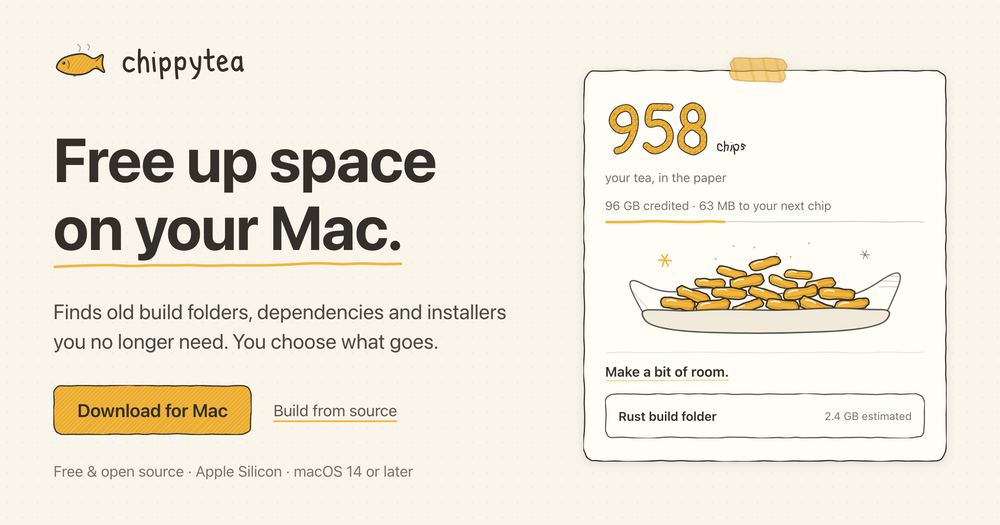
The chip counter is a decorative display of permanently freed storage. One chip is added per 100 MB of conservatively credited space from eligible permanent cleanup (build files and dependencies only). Moving files to Trash adds no chips, and estimated sizes never update the counter. Chips stay on your Mac and have no monetary value.
Is chippytea safe to use on a production Mac?
The tool is designed around review and transparency, so nothing is removed without your approval. That said, the README classifies it as early software capable of permanent deletion and recommends starting with a disposable test folder. Keep Time Machine or another backup current before using permanent removal features on projects you still need.
Similar open-source tools#

Blitzclean
238 GitHub starsmacOS menu-bar monitor and storage cleaner for developers
Alternative to CleanMyMac

Vorssaint Utils
27,734 GitHub starsOne menu bar icon replacing a dozen paid macOS apps
Alternative to iStat Menus

FckSignups
4,495 GitHub starsOpen-source tools that work instantly, no signup required

Huginn
50,069 GitHub starsSelf-hosted agents that watch the web and trigger automations
Alternative to Zapier

Joplin
56,770 GitHub starsOpen source note-taking app with Markdown and sync support
Alternative to Evernote

Trilium.cc
38,379 GitHub starsSelf-hosted hierarchical notes with backlinks and encrypted sync
Alternative to Notion