

Who hister is for#
Researchers and analysts managing web sources
Hister indexes the full text of every page you visit, including pages that may later change or disappear. Stored previews let you return to the exact version of an article you read, not just its URL. The query language supports field filters and phrases, so you can narrow results to specific sources or date ranges.
Skip if:
You primarily work with structured databases or academic citation managers. Hister focuses on full-text recall of general web content and local files, not structured bibliography management or citation workflows.
Developers building AI workflows with personal context
The MCP server makes your personal index queryable by any AI assistant or LLM tool that supports the Model Context Protocol. Rather than uploading documents to an AI provider's servers, you route queries through the Hister MCP server, which returns results from your locally indexed content.
Skip if:
You need a shared team knowledge base rather than a personal index. Hister's multi-user support keeps each user's index separate; it is not a shared organizational knowledge layer that all team members contribute to and search together.
Privacy-focused individuals replacing cloud knowledge tools
Hister's server has no telemetry and requires no cloud account. All indexed content stays on the server you configure. Unlike Guru or Glean, which ingest and store your data on external infrastructure, Hister keeps your reading history under your direct control.
Skip if:
You need enterprise features like team-wide knowledge curation, access controls by department, or integration with organizational directories. Hister targets individual and small-team recall, not organizational knowledge management at scale.
Power users searching across large local file collections
File watchers monitor local folders and index supported file formats automatically. The index is searchable from the terminal client or CLI, which fits scripting and editor workflows. Combined with the MCP server, file content becomes queryable from AI assistants as well.
Skip if:
Your files are primarily in proprietary binary formats such as CAD, PSD, or video that Hister cannot extract text from. The value is in full-text indexing, which applies only to formats with extractable text content.
The problem it solves#
Personal knowledge recall breaks by default. You read an article, take a note, or save a file, and then cannot find it again without retracing the exact path you used originally. Browser history gives you URLs but not the content you were actually reading. Filename searches miss anything embedded in document text or webpage body copy. Public search engines return current results, not the specific version of a page you read months ago.
The gap deepens when knowledge is split across local files and web pages in different formats. Tools that search across both sources either require a cloud sync service (which means your reading history lives on someone else's servers) or stop at filenames and titles rather than indexing the actual text inside each document.
How it solves it#
Full-text indexing of pages and files
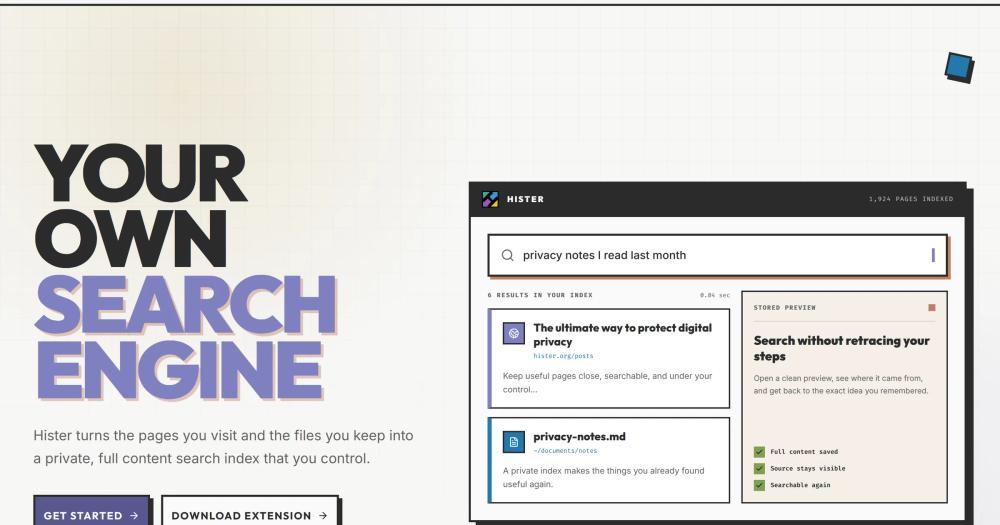
Hister extracts and indexes the complete text content of visited web pages and local files, not just titles and URLs. Content extractors handle structured data from supported formats. Stored previews let you read indexed content in context without returning to the original source.
Automatic browser indexing via extension
Browser extensions for Firefox and Chrome index pages as you visit them, sending extracted content to the Hister server you configure. File watchers monitor local folders for new and updated files. History imports and a built-in crawler add existing content to the same index.
MCP server for AI assistant access
Hister exposes an MCP (Model Context Protocol) server, allowing AI assistants and LLM tools to query your personal index directly. This makes your indexed content available as context to AI workflows without uploading documents to an external service.
Advanced query language with field filters and aliases
Full-text search supports field filters, quoted phrases, wildcards, negation, date ranges, and query aliases. Skip rules let you exclude categories of content from the index, and priority rules control result ranking.
Optional semantic search via configurable endpoint
Semantic search is available when you configure an embeddings endpoint. Document text is sent only to the endpoint you choose, so you decide what external connection is involved. When disabled, the index operates with no outbound connections.
Multi-user support with SQLite or PostgreSQL
Shared Hister servers support user-scoped document access, keeping each user's index and search results separate. The backend can be SQLite for personal setups or PostgreSQL for larger shared deployments.
Strengths and trade-offs#
Strengths
- Zero telemetry by designHister has no telemetry and requires no cloud service. The server does not make outbound connections beyond what you explicitly configure: a favicon download by the browser extension and an optional embeddings endpoint for semantic search. The privacy model is documented in the project's public source under AGPL-3.0.
- Multiple search interfaces from one indexThe same index is reachable from the web UI, a terminal client, CLI, an HTTP API, and an MCP server. Unlike proprietary knowledge tools that lock you into one interface, you can query your indexed content from a terminal, a browser, or an AI assistant using whichever path fits your workflow.
- No mandatory cloud service or external accountA complete personal Hister setup runs on a single local machine with a single binary and no external dependencies. Unlike Glean or Coveo, which operate as managed cloud services, Hister's full feature set is available with no subscription and no external account required.
- Content versioning and configurable index rulesVersioning can retain earlier document content so you can access how a page read at a previous point in time. Skip and priority rules let you tune what gets indexed and how results are ranked, without modifying source code.
Trade-offs
- -AGPL-3.0 license requires source disclosure for modified network servicesHister is licensed under AGPL-3.0, which requires distributing source code changes if you run a modified version as a network service. Teams embedding Hister in a commercial product or offering it as a hosted service need to review the license obligations before deploying.
- -Semantic search introduces an external dependencyThe semantic search feature sends document text to an embeddings endpoint you configure. If you choose a cloud-hosted embeddings provider rather than a self-hosted one, document text leaves your infrastructure. The feature is opt-in and off by default, but worth planning for if privacy is a hard requirement.
- -Early-stage project with 49 open issuesHister was created in January 2026 and has 49 open issues as of August 2026. Some features and edge cases may not yet be fully documented or stable. Budget time for setup and check the issue tracker before depending on specific capabilities in production.
hister vs alternatives#
Hister vs Glean
Glean is an enterprise search platform that indexes connected SaaS tools (Gmail, Slack, Confluence, Jira) and surfaces results across a team. It runs as a fully managed cloud service with no self-hosting option for most customers.
Hister addresses a different scope: the pages you personally visit and the local files you keep. There is no SaaS connector layer; the index lives on the server you deploy.
| Feature | Hister | Glean |
|---|---|---|
| License | AGPL-3.0 | Proprietary |
| Self-hosting | Yes | No |
| Primary scope | Personal pages and local files | Team SaaS integrations |
| Pricing | Free to self-host | Enterprise subscription |
| Telemetry | None | Managed service |
Hister is the better choice when the goal is private, personal recall of what you have already read or saved, with no data sent to a third-party. Glean is the better choice when a team needs to search across shared SaaS tools from a single interface with organizational access controls.
Hister vs Coveo
Coveo is an AI-powered enterprise search platform that indexes content across an organization's connected systems. It operates as a cloud service with relevance tuning, analytics, and support for large enterprise deployments.
| Feature | Hister | Coveo |
|---|---|---|
| License | AGPL-3.0 | Proprietary |
| Self-hosting | Yes | No |
| Primary scope | Personal pages and local files | Enterprise content repositories |
| Pricing | Free to self-host | Enterprise subscription |
Hister is the better choice for individuals or small teams who want a private, self-hosted index with no per-seat cost. Coveo is the better choice when an enterprise needs AI-powered search across dozens of connected content systems, with analytics and administrative controls for large teams.
Hister vs Guru
Guru is a knowledge management platform designed for teams to create, curate, and share verified cards of institutional knowledge. It is a SaaS product focused on sales and support teams maintaining canonical answers.
Hister indexes what you personally browse and store; it does not have a team curation or card-publishing workflow. The use cases only partially overlap.
| Feature | Hister | Guru |
|---|---|---|
| License | AGPL-3.0 | Proprietary |
| Self-hosting | Yes | No |
| Primary scope | Personal index of pages and files | Team knowledge cards |
| Pricing | Free to self-host | Per-seat SaaS subscription |
| MCP server | Yes | No |
Hister wins when you want private full-text recall of your own reading history and local documents with no subscription. Guru is the better fit when a team needs to publish and maintain canonical answers, with a workflow for verifying and expiring knowledge cards.
Quick start#
Deploy Hister from source using Go 1.26, npm, and a C compiler for build dependencies.

```bash
git clone https://github.com/asciimoo/hister.git
cd hister
./manage.sh build
```What it's built on#
- Languages
- GoJavaScriptTypeScript
- Frameworks
- Svelte
FAQ#
Does Hister require a cloud account or subscription?
No. Hister is self-hosted software with no mandatory cloud service. A complete personal setup runs on a single local machine using the downloaded binary with no external accounts required. You only need a remote server if you want to access your index from multiple devices.
What browsers does the Hister extension support?
Hister has browser extensions for Firefox and Chrome. The extension indexes pages as you visit them and sends extracted content only to the Hister server you configure, with no data going to any third-party service.
Can multiple people use one Hister server?
Yes. Shared Hister servers support user-scoped access, keeping each user's documents and search results separate. The backend can be SQLite for small setups or PostgreSQL for larger shared deployments.
Is Hister's optional semantic search private?
That depends on which embeddings endpoint you configure. If you use a cloud-hosted embeddings service, document text is sent to that service. If you configure a self-hosted endpoint, no document text leaves your infrastructure. The feature is disabled by default, so the standard Hister setup has no outbound data connections.
How does Hister differ from a standard bookmark manager?
Hister indexes the full text of pages and files, not just URLs or titles. You can search for a phrase you remember from inside an article, not just the page name. Stored previews let you read the indexed version of a page even if the original has since changed or been removed.
Similar open-source tools#

AnythingLLM
Chat with your documents using any LLM, private and self-hosted

Cloudflare Os
Open source AI workspace with sandboxed apps and Gatekeeper security

jentic-one
Self-hosted API broker that keeps AI agent credentials secure

Khoj
Self-hosted AI assistant that searches your notes and web

Metarank
Open source personalization and search ranking engine

Jina AI
Open source search APIs and MCP tools for RAG and agent workflows