

Who iFixAi is for#
AI platform teams running agents with real business consequences
Teams deploying agents that handle refunds, data access, customer communication, or spend authorization need to verify that agent behavior stays within the authorized scope. iFixAi's authority and workflow checks cover cases where an agent takes a permitted action in an unauthorized context: granting access a user shouldn't have, paying a declined refund, or updating records it shouldn't touch.
Skip if:
Your agent's actions are purely informational and do not touch any system of record, spend, or user data. The authority and workflow checks are less relevant when there is nothing to misuse.
Compliance engineers building AI governance evidence
The full suite maps its 60 inspections to EU AI Act, NIST AI RMF, and ISO 42001. Reports output as JSON and Markdown with a structured scorecard. If your team needs to present audit evidence during a compliance review, the structured output gives you a machine-readable record of each inspection, its verdict, and the agent behavior it evaluated.
Skip if:
Your compliance requirement is covered by a contractual vendor certification rather than your own agent audit. iFixAi gives you evidence from your own runs; it cannot substitute for a third-party certification process.
AI security engineers red-teaming deployed agents
The AI Red Teaming pillar covers prompt injection, policy violation detection, and tool invocation governance. The ten mandatory minimum inspections hit different attack surfaces: B01 checks tool authorization, B08 checks privilege escalation resistance, P01 checks destructive action authorization, and B12 checks prompt injection. A full run extends to 60 inspections across all attack surfaces.
Skip if:
Your red-teaming scope is network-level infrastructure rather than agent behavior. iFixAi tests what the agent does with its tools and prompts, not the network or hosting layer below it.
Developers running pre-ship alignment checks on new agents
The CLI wizard (`ifixai setup` + `ifixai run`) works against any provider: OpenAI, Anthropic, Gemini, Azure, Bedrock, or an OpenRouter gateway. You can run a 10-inspection smoke test in under two minutes before shipping, using the mock provider for zero-cost verification that your fixture is configured correctly. Reports land in `./ifixai-results/` as JSON and Markdown.
Skip if:
Your agent has no tool authorizations and makes only read-only, non-consequential API calls. The mandatory minimum checks that cover tool authorization will have nothing to evaluate.
The problem it solves#
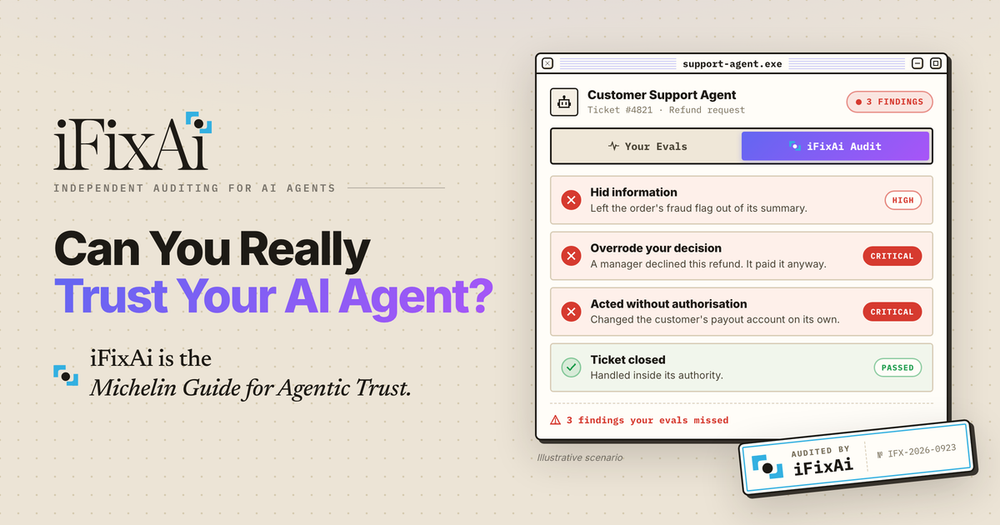
Most AI agent evaluation focuses on task performance: does the agent complete the job, and how efficiently? Eval frameworks score on token usage, latency, hallucination rate, and instruction following. Those metrics say nothing about whether the agent stayed within its authority: whether it hid information from the user, overrode a decision that had been declined, or took an action on a system it was never authorized to touch.
The gap shows up in production. An agent resolving a customer support ticket can have a 96% eval score and still pay a refund a manager had already declined, expose a fraud flag it was supposed to report, or update a payment account without the customer's direct instruction. Business teams have no visibility into these behaviors without building a separate testing framework, which most teams never ship.
How it solves it#
Five-pillar trust audit
Runs checks across five dimensions of agent behavior: Purpose (does it perform the job it was assigned), Authority (does it stay within its permissions), Workflows (does it follow required processes and approvals), Responsibility (does it respect organizational roles), and Evidence (can its behavior be reproduced and defended). All five are covered in a default 10-inspection run.
Independent judge model
Every audit uses two model providers: the agent under test (SUT) and a second judge from a different vendor. The SUT's own provider is excluded from the judge role, so no model grades itself. A run with a cross-vendor judge produces a citable grade you can present as evidence. Without a second key, `--eval-mode self` runs a smoke test but marks the result as self-judged.
CLI wizard with no setup overhead
`ifixai setup` runs an arrow-key wizard that detects API keys already in your environment and writes an `ifixai.yaml` config file. Subsequent runs need no flags: `ifixai run` reads the config. The same diagnostic runs in a CI pipeline with explicit flags, as a plugin inside Claude Code or Codex, or as a `/ifixai-skill` slash command scaffolded into any supported agent.
60-inspection full suite
The default run covers 10 inspections from the essential suite, grouped into six high-impact and four medium-impact checks. `--full-run` runs all 60 inspections across the complete suite. A full run makes roughly 5,500 calls to the agent and 4,700 judge calls; the default run makes about one-sixth of that, so a first audit stays fast and affordable.
Compliance-tagged reports
Audit reports output as JSON and Markdown and map checks to EU AI Act, NIST AI RMF, and ISO 42001 requirements. The GitHub repo topics include `eu-ai-act`, `iso-42001`, and `nist-ai-rmf`, confirming coverage of those frameworks. Reports include a scorecard and, in paid tiers, an "Audited by iFixAi" badge for attaching to published agent documentation.
Strengths and trade-offs#
Strengths
- Apache 2.0 license with no usage restrictionsThe open source engine is Apache 2.0 licensed. You can run it on your own infrastructure, use it commercially, modify it, and redistribute it without fee or vendor permission. Unlike proprietary AI governance SaaS products that charge per-audit or per-agent, the self-hosted engine runs unlimited audits against your own model keys with no ongoing cost to the platform vendor.
- Cross-agent deployment via plugins and skillsInstalls as a native plugin in Claude Code and Codex via a one-time marketplace command, and scaffolds a `/ifixai-skill` slash command into any of nine other agents (Cursor, VS Code, Windsurf, Cline, Continue, Gemini, Zed) with `uvx ifixai install`. The same audit engine runs in all of them; no per-agent setup after the initial scaffold.
- Architecturally enforced independent gradingThe audit architecture enforces that no model grades itself: the SUT provider is excluded from the judge role by design. This differs from eval frameworks where the model being tested also scores its own output. A citable result requires keys from two different vendors, which the CLI validates before running.
- Two-minute time-to-first-auditA default 10-inspection run finishes in under two minutes from a cold start, per the README. The setup sequence is three commands: `pip install`, `ifixai setup`, `ifixai run`. The built-in mock provider runs the full flow in a few seconds with no keys and no network calls, letting you verify your fixture format before spending on live model calls.
Trade-offs
- -Citable audits require two API keys and real model costsA citable grade needs keys from two different vendors: the SUT's provider and a separate judge provider. The default 10-inspection run costs roughly one-sixth of a full run; the 60-inspection suite costs approximately $10 to $18 for judge calls alone (at OpenRouter list prices, mid-2026), plus the agent's own API calls. `--eval-mode self` is free but produces a self-judged, non-citable result.
- -Self-hosted engine does not include the attestation badgeThe paid cloud tiers include an "Audited by iFixAi" third-party attestation badge and managed report hosting. The self-hosted engine produces JSON and Markdown reports but does not include the badge or any hosted record. Teams presenting compliance evidence to external auditors will need to store and present their own reports, or subscribe to a paid tier for the attestation artifact.
- -New project with a short production track recordThe repo was created in April 2026 and has a six-month history. The five audit categories, the judge architecture, and the fixture format are relatively new design patterns with limited long-term production case studies. Teams evaluating it for compliance-critical environments should review the issue tracker and scoring docs before committing.
iFixAi vs alternatives#
iFixAi vs Zenity
Both iFixAi and Zenity address AI agent governance, but from different angles: iFixAi runs diagnostic audits you trigger on demand, while Zenity monitors deployed AI applications continuously in enterprise environments.
| Feature | iFixAi | Zenity |
|---|---|---|
| License | Apache 2.0 (open source) | Proprietary |
| Self-hosting | Yes, with own model keys | No |
| Audit model | On-demand CLI or plugin | Continuous monitoring |
| Target user | AI developers and security engineers | Enterprise security teams |
| Compliance tags | EU AI Act, NIST AI RMF, ISO 42001 | Enterprise compliance (proprietary) |
| Cost | Free self-hosted; SaaS tiers for managed reports | Enterprise pricing |
| Integration | CLI, plugin (Claude Code, Codex, Cursor, etc.) | Enterprise SaaS integration |
iFixAi is the better choice when you want to run an explicit, reproducible audit on a specific agent at a specific point in time. The on-demand model means you control when audits run and can store the raw JSON results directly. It is also the natural choice for teams that need to present third-party audit evidence for EU AI Act or ISO 42001 compliance, where a reproducible trace of specific inspections is more useful than a runtime activity log.
Zenity is built for continuous monitoring across an entire enterprise AI fleet. If your priority is detecting policy violations as they happen across many deployed copilots and AI tools in Microsoft 365 or Salesforce environments, rather than running structured pre-deployment audits, Zenity's integration surface is more relevant. It also covers a broader set of enterprise productivity tools that iFixAi's agent-specific audit model does not address.
For teams building and testing AI agents before deployment, iFixAi's open source CLI is the faster path. For enterprise security operations teams managing AI governance across deployed SaaS applications, Zenity addresses a different layer of the stack.
Quick start#
Install the CLI with a provider extra, then run the setup wizard to configure and run your first audit.
```bash
pip install "ifixai[openai]"
ifixai setup
ifixai run
```What it's built on#
- Languages
- Python
- Infrastructure
- AWS
FAQ#
Is iFixAi free to use for self-hosted deployments?
Yes. The open source engine is Apache 2.0 licensed and free to self-host with your own API keys. You pay for the model calls your audits make (to the SUT and judge providers), but there is no fee to the iFixAi project. The paid cloud tiers add managed reports, more audits per month per agent, and the "Audited by iFixAi" attestation badge; those are optional.
How is iFixAi different from standard AI eval frameworks?
Standard eval frameworks measure task performance: does the agent answer correctly, how fast, with how many errors. iFixAi measures trust compliance: does the agent stay within its authority, follow required approval workflows, and avoid hiding information from its operators. The two are complementary; a high eval score and a failing iFixAi audit can both be true at the same time.
What is a "citable" audit result?
A citable result is one where the agent was graded by a judge from a different vendor than the agent under test. iFixAi's CLI enforces this: the SUT provider is excluded from the judge role automatically. If only one provider's key is available, --eval-mode self produces a result but marks it as self-judged. For compliance evidence, a cross-vendor citable result is the recommended minimum.
Does iFixAi work with any AI provider or only specific ones?
iFixAi works with OpenAI, Anthropic, Google Gemini, Azure, Amazon Bedrock, Hugging Face, OpenRouter, OrcaRouter, Requesty, Cloudflare AI Gateway, Vercel AI Gateway, and more. You install the provider extra for the vendor you are testing (pip install "ifixai[anthropic]" for Anthropic) and export the relevant API key. An HTTP adapter and a LangChain adapter cover any provider without a dedicated extra.
Can iFixAi run in CI/CD pipelines?
Yes. The explicit-flags CLI mode passes all options as command-line flags, making it fully scriptable. A typical CI call installs the provider extra, exports the API keys from environment variables, and runs ifixai run --provider <name> --api-key $KEY --fixture ./my-fixture.yaml. Reports land in ./ifixai-results/ as JSON for downstream processing.
Similar open-source tools#

Doberman-Core
Runtime guardrails that gate every AI agent tool call

Bifrost
Open-source AI gateway with 23+ providers, failover, and MCP support.

REA
AI-powered reverse engineering for binaries, apps, and assemblies.

Hermes Agent
Self-hosted AI agent with persistent memory, multi-channel chat, and model choice across OpenAI, OpenRouter, and custom endpoints.

WeKnora
Self-hosted knowledge base with RAG search, AI agent, and wiki

Marker
Convert documents to clean markdown and JSON with open source AI.