

Who Onefetch is for#
Developers onboarding to an unfamiliar local codebase
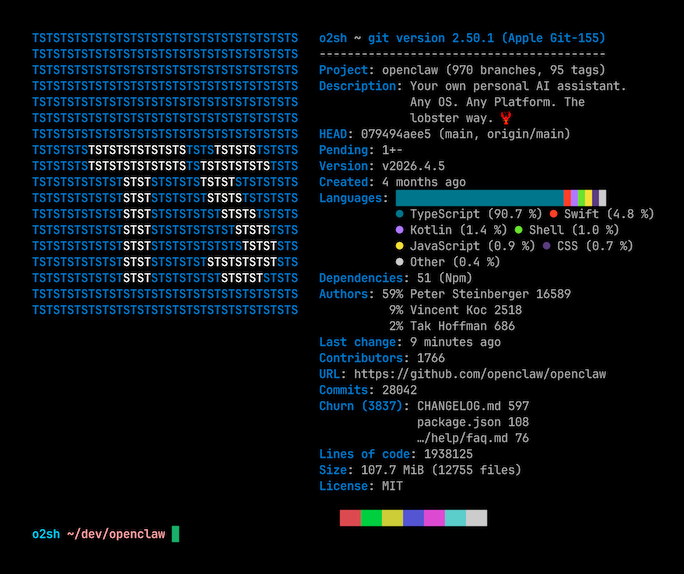
Running `onefetch` in a new repository gives you an instant overview: primary language, license, total contributors, and commit range. This replaces the steps of opening GitHub, navigating to the Insights tab, and cross-referencing the README for license information.
Skip if:
The repository is hosted on GitHub and you have browser access. GitHub's Insights tab covers the same stats visually with no installation required.
Engineers working in airgapped or offline environments
Onefetch requires no internet connection and no external services at runtime. In environments without outbound network access, it provides structured language statistics and project metadata from a local repository where hosted dashboards are unavailable.
Skip if:
You have reliable internet access and your repositories are on a public platform. In that case, the hosted platform's built-in stats are equivalent and require no installation.
CLI-native developers auditing multiple repositories
With `onefetch /path/to/repo` you can inspect multiple repositories quickly from a shell script or a loop. The JSON output mode makes it scriptable for batch analysis of repository metadata across a monorepo or a directory of projects.
Skip if:
You need centralized reporting across a team's entire codebase history. Tools like GitHub Insights or self-hosted GitLab analytics offer aggregated views that Onefetch, as a per-repo local tool, does not provide.
Developers adding project summaries to terminal dotfile setups
A common use case is calling `onefetch` from a shell configuration or project welcome script so that entering a repository directory automatically shows project stats. This fits workflows where developers use Neofetch-style terminal information displays.
Skip if:
Your team does not primarily work in terminals. Onefetch has no IDE integration, so its value is limited to terminal-centric workflows.
The problem it solves#
Getting a useful summary of a local Git repository usually means opening a browser and navigating to GitHub's web interface, which requires an internet connection and only works for repositories that have been pushed to a remote host. Running individual git commands (git log, git shortlog, git ls-files) gives fragments of information that you have to assemble manually; none of them show language breakdowns or project-level metadata in a readable format.
For developers working with multiple local repositories, reviewing a new codebase, or working in environments without internet access, this gap creates friction. There is no built-in way to get a quick, unified view of a local repository's language composition, contributor history, and license from the command line.
How it solves it#
Language detection for 100+ programming languages
Onefetch identifies the languages present in a repository and renders an ASCII art logo for the primary one, matched by file extension and content. The website lists 124 supported languages. By default only programming and markup types are counted; passing `--type prose data` adds Markdown, JSON, YAML, and TOML to the breakdown.
Fully offline operation
All data comes from the local `.git` directory. Onefetch makes no network requests at runtime, reads no external APIs, and requires no authentication tokens. This makes it usable in airgapped environments and on repositories that have never been pushed to a remote.
JSON and YAML output for scripting
Alongside the default terminal display, Onefetch outputs repository data as structured JSON or YAML via `--output json` and `--output yaml` flags. This fits CI pipelines and shell scripts that need machine-readable repository metadata without parsing terminal color codes.
Customizable terminal display
Command-line flags control which information lines appear, adjust text styling, set the color palette, and specify which file types to count. You can ignore specific directories, disable any section, and adjust the display to show exactly what you need in the space available.
Contributor history from Git log
Onefetch reads author data from the Git history and lists top contributors with commit counts. If the same person appears with different names or email addresses, adding a standard `.mailmap` file to the repository root merges the duplicate entries correctly.
Strengths and trade-offs#
Strengths
- MIT licensed with no runtime dependenciesOnefetch is MIT licensed, meaning you can use it in commercial environments, modify it, and distribute modified versions with no restrictions. At runtime it has no external dependencies beyond the local Git repository. No API keys, no accounts, and no analytics calls.
- Rust performance with 12,000 GitHub stars and active developmentWritten in Rust, Onefetch runs fast even on large repositories. With over 12,000 GitHub stars, active development since 2018, and a last push in October 2026, it has a stable community and a history of maintained releases across Linux, macOS, and Windows.
- Works on any local repository regardless of hostingBecause Onefetch reads the local `.git` directory directly, it works on any repository regardless of where it is hosted or whether it has a remote configured. GitHub's web stats require the repo to be on GitHub; Onefetch works on GitLab-hosted, self-hosted, or entirely local repositories the same way.
Trade-offs
- -CLI only, no GUI or shareable reportsOnefetch is strictly a terminal tool. There is no web dashboard, no IDE plugin, and no shareable report URL. If your workflow requires a visual interface or you need to share stats with non-technical stakeholders, you will need to export JSON or YAML and process the output yourself.
- -Duplicate contributor entries without .mailmapWhen contributors use different email addresses or display names across commits, Onefetch shows them as separate entries. This is a limitation of reading raw git history. Merging duplicates requires manually creating a `.mailmap` file in the repository, which not every project maintains.
- -Language detection excludes prose and data files by defaultBy default, Onefetch counts only programming and markup languages, hiding Markdown, JSON, YAML, TOML, and similar files from the stats breakdown. Repositories with significant documentation or configuration may show skewed language percentages unless you pass `--type prose data`.
Onefetch vs alternatives#
Onefetch vs GitHub Repository Insights
GitHub's built-in Insights tab shows commit activity, contributor breakdowns, traffic, and language composition for repositories hosted on GitHub. For developers already using GitHub, it requires no installation and the interface includes charts and graphs.
| Feature | Onefetch | GitHub Insights |
|---|---|---|
| License | MIT | Proprietary (GitHub product) |
| Works offline | Yes | No |
| Works on local-only repos | Yes | No |
| Installation | Package manager binary | No install required |
| Output formats | Terminal, JSON, YAML | Web interface only |
| Private repo access | Any local repo | Requires GitHub account and push |
Onefetch is the better choice when you need stats for a repository that is not on GitHub, or when you are in an environment without internet access. It also fits terminal-centric workflows where opening a browser is friction. GitHub Insights is the better fit when you want historical commit graphs, traffic data, or the polished visual charts that a web interface provides.
Onefetch vs GitLens Pro
GitLens is a VS Code extension that adds git history visualization and code authorship features. The free tier covers blame annotations and basic history; GitLens Pro adds team-level insights, workspace views, and organization-level analytics.
| Feature | Onefetch | GitLens Pro |
|---|---|---|
| License | MIT | Proprietary (paid tiers) |
| Works outside an IDE | Yes (terminal) | No (VS Code only) |
| Installation | Single binary | VS Code extension |
| Offline capability | Full | Partial (some features need network) |
| Language breakdown | Yes | No |
| Cost | Free | Free tier + paid Pro tier |
Onefetch is the better choice when you work outside VS Code, need a quick terminal summary without opening an IDE, or want language composition data. GitLens Pro is the better fit when you want inline blame annotations, a visual file history, or team-level analytics integrated directly into your editor.
Quick start#
Install Onefetch using your system package manager; binaries for Linux, macOS, and Windows are also available on the GitHub releases page.
```bash
brew install onefetch
```What it's built on#
- Languages
- Rust
- Frameworks
- Svelte
FAQ#
Does Onefetch require an internet connection or a GitHub account?
No. Onefetch reads entirely from the local .git directory and makes no network requests. It works on any local repository regardless of whether it has ever been pushed to a remote, and requires no accounts or API keys. This makes it usable in fully offline or airgapped environments.
Why does Onefetch not detect my programming language?
By default, Onefetch counts only programming and markup file types. Languages classified as prose (Markdown, Org mode, plain text) or data (JSON, YAML, TOML) are excluded from the default display. Pass --type programming markup prose data to include all file types in the language breakdown.
Why do some contributors appear more than once in Onefetch output?
Onefetch reads author data from the git log. If the same person committed with different names or email addresses across their commit history, git treats them as separate authors and Onefetch reflects that. To merge duplicate identities, add a .mailmap file to the repository root using the standard git mailmap format documented at git-scm.com/docs/gitmailmap.
Can Onefetch output repository data in a machine-readable format?
Yes. Onefetch supports --output json and --output yaml flags that print repository metadata as structured data instead of the styled terminal view. This is useful for shell scripts, CI pipelines, or any tooling that needs to consume repository statistics programmatically.
Is Onefetch free to use in commercial projects?
Yes. Onefetch is MIT licensed. You can use it in personal projects, commercial environments, internal tooling, and CI pipelines without restriction. The source code is on GitHub at github.com/o2sh/onefetch and modifications or forks are welcome under the same MIT terms.
Similar open-source tools#

Duckle
Self-hosted ETL on DuckDB with 385 connectors and no per-row billing.

Herdr
Agent runtime that keeps terminals alive across machines

CodeBoarding
Review code changes as architecture maps, not line diffs

ax
Declarative runtime for autonomous agent workloads

orbi
self-hosted, open-source (AGPL-3.0) AI coding agent

worktrunk
Git worktree management for parallel AI agents