

Who OpenCompany is for#
Small technical teams replacing per-seat AI workflow subscriptions
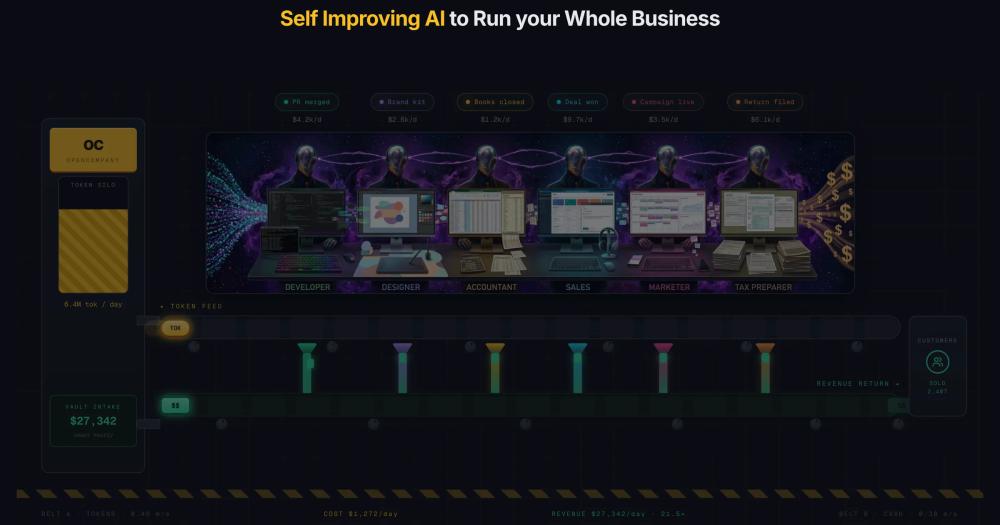
Teams automating sales outreach, code deployment, or bookkeeping who want AI agents handling those functions end to end without paying per-seat fees. Six pre-configured business roles (Developer, Designer, Accountant, Sales, Marketer, Tax preparer) give a starting point that teams can extend or replace on the canvas.
Skip if:
You need an enterprise SLA, vendor-managed uptime, or a commercial support contract. OpenCompany is fully self-hosted with no commercial backing, so production incidents are the deploying team's responsibility.
Developers building custom multi-agent pipelines on a visual canvas
Developers who want n8n-style visual workflow building with agents as first-class nodes rather than triggers and actions. The 146-node library covers messaging, cloud APIs, databases, web scraping, code execution, and payments. Agents delegate tasks through the AI Employee and Orchestrator nodes with durable task queues and parallel execution.
Skip if:
Your workflow is simple enough for a standard IFTTT-style trigger-action tool. OpenCompany's canvas adds power but also complexity for straightforward linear automations where a simpler tool would be faster to configure.
Privacy-focused teams keeping all data on their own infrastructure
Teams that cannot send customer records, financial data, or internal documents to a third-party AI vendor. OpenCompany runs entirely on your own servers, with no vendor-side copy of documents, customers, or books. Pair it with Ollama or LM Studio to keep all model inference on-machine with no external API traffic.
Skip if:
Your workflows require sharing data with external partners or integrating with services that enforce vendor-managed identity. The fully self-hosted model adds friction for cross-organization data flows.
The problem it solves#
Commercial AI workflow platforms charge per seat or per consumption unit, lock business data into vendor-managed infrastructure, and restrict model choice to their own providers. Teams that want AI automation for real business functions, such as bookkeeping, sales outreach, or code deployment, face a core pain: either pay escalating subscription fees to platforms like Microsoft Copilot Studio or Relevance AI, or build fragile custom integrations with no shared context between agents.
The coordination problem compounds the cost problem. A sales outreach agent and a coding agent need to share context and hand off tasks without manual supervision. Most workflow tools require teams to design every step of the graph themselves, with no built-in concept of role ownership, delegation, or token budget metering across agents.
How it solves it#
20 specialized agent node types
Includes AI Employee and Orchestrator for team coordination, Coding Agent for Python, JavaScript, and TypeScript execution in sandboxed workspaces, Web Agent for browser automation and Apify actor scraping, Social Agent for WhatsApp and Telegram, Productivity Agent for Gmail and Calendar, and Autonomous Agent mode that reduces token usage 80-98% through code-mode loops. Each type owns a specific function end to end.
146 workflow nodes across 31 categories
Build workflows on a visual canvas by connecting nodes from a searchable palette. Categories cover messaging (WhatsApp Business, Telegram, Discord, Twitter/X), cloud infrastructure (GitHub, Vercel, Cloudflare, Google Cloud), productivity (Gmail, Calendar, Drive, Microsoft 365), web research (DuckDuckGo, Brave, Serper, Crawlee), payments (Stripe with signed webhooks), and local data with vision.
13 AI providers including Ollama and LM Studio
Supports OpenAI, Anthropic, Google, xAI, DeepSeek, Kimi, Mistral, Groq, Cerebras, Sarvam, OpenRouter (200+ models via one API key), Ollama, and LM Studio. Local providers Ollama and LM Studio are first-class: context length, vision, and tool-use capability are auto-detected from the running server. No paid API key is required to run the full platform with local models.
Durable execution via Temporal
Long-running agent workflows retry transient failures with bounded backoff. Cron schedules carry a 24-hour catch-up window so missed ticks backfill automatically. Per-queue worker pools scale horizontally. Falls back to a local executor when Temporal is disabled, so the platform runs without external infrastructure on a single machine.
API credentials encrypted at rest
API keys and OAuth tokens live in a separate credentials.db, encrypted with Fernet (AES-128-CBC + HMAC-SHA256) and a PBKDF2-SHA256 key at 600,000 iterations. Nothing leaves the host machine. Runs on localhost by default; single-owner JWT auth or multi-user mode activates with the company deploy command.
77 built-in agent skills, editable in the UI
Skills are short markdown files that teach an agent how to use a tool, what arguments to pass, and common mistakes to avoid. 77 ship built in across 19 folders, covering Android control, Google Workspace, social messaging, web research, coding, terminal use (Bash, PowerShell, WSL, Nushell), payments, and deployment. Edit any skill in the UI and changes apply immediately without restarting.
Strengths and trade-offs#
Strengths
- MIT licensed with no subscription fees or vendor lock-inThe entire platform is MIT licensed and runs on your own infrastructure. Unlike Microsoft Copilot Studio (consumption-based, Azure-hosted) or Relevance AI (managed SaaS), there is no per-seat cost, no vendor copy of your data, and no usage cap beyond the tokens you buy from your chosen model provider.
- Model-agnostic: 13 providers including fully localOllama and LM Studio are first-class providers with automatic capability detection. OpenRouter gives access to 200+ models through one key. Commercial platforms lock you into their model stack or charge premium rates for GPT-4-class inference; OpenCompany lets you point at any OpenAI-compatible endpoint or run models entirely offline.
- One Python file adds a new node or integrationThe backend owns all node schemas; the frontend renders from them automatically. Adding a node, LLM provider, or skill requires one Python file and no frontend code. This makes the platform auditable and forkable for teams that need to connect proprietary internal APIs or build domain-specific agent types not covered by the 146 built-in nodes.
Trade-offs
- -Two-runtime prerequisite: Node.js 22 and Python 3.12The quick-start requires both Node.js 22+ and Python 3.12, which is more setup than a single Docker image. The Vite frontend on port 5678 proxies to the Python backend on port 5679, with optional daemons (WhatsApp, Temporal) spawned on demand. Not a zero-dependency install.
- -Young project with a small communityCreated in October 2025 with 494 GitHub stars at time of writing. Third-party tutorials, community plugins, and production case studies are limited compared to mature workflow tools like n8n. Teams adopting early should expect to read the architecture docs and contribute fixes rather than find answers in existing forum threads.
- -No managed hosting optionThere is no commercial managed tier. Database maintenance, upgrades, credential rotation, and scaling are fully the deploying team's responsibility. Teams without server experience will find this more demanding than a managed SaaS like Lindy AI or Relevance AI, which handle infrastructure on the user's behalf.
OpenCompany vs alternatives#
OpenCompany vs Microsoft Copilot Studio
Microsoft Copilot Studio is a managed, Azure-hosted AI agent builder with consumption-based pricing tied to a Microsoft 365 subscription. OpenCompany is self-hosted, MIT licensed, and runs on infrastructure you control.
| Feature | OpenCompany | Microsoft Copilot Studio |
|---|---|---|
| License | MIT | Proprietary |
| Hosting | Self-hosted | Azure (managed) |
| Pricing | Free (tokens + server cost) | Consumption-based, Microsoft 365 |
| Model choice | 13 providers, 200+ via OpenRouter | Microsoft and OpenAI models |
| Data location | Your own servers | Microsoft Azure |
OpenCompany is the better fit when data sovereignty matters, when you want model-agnostic deployment, or when consumption-based pricing would make AI automation expensive at scale. Microsoft Copilot Studio is the better choice when your organization already runs on Microsoft 365, when you need enterprise SLAs and vendor support, or when you want managed infrastructure with no server operations burden.
OpenCompany vs Lindy AI
Lindy AI is a no-code personal AI assistant builder focused on automating individual workflows (email triage, meeting summaries, CRM updates) through a managed cloud platform. OpenCompany targets multi-agent coordination across full business functions, self-hosted.
| Feature | OpenCompany | Lindy AI |
|---|---|---|
| License | MIT | Proprietary SaaS |
| Hosting | Self-hosted | Managed cloud |
| Agent scope | Multi-agent orchestration | Personal assistants |
| Node library | 146 nodes, 31 categories | Pre-built integrations |
| Local models | Yes (Ollama, LM Studio) | No |
Lindy AI is better when you want a no-code tool with no server management, or when your use case is individual productivity automation rather than business function ownership. OpenCompany fits better when you need teams of agents coordinating on shared business functions, local model support, or a platform you can fork and extend.
OpenCompany vs Relevance AI
Relevance AI is a managed AI agent platform for enterprise sales and support automation with proprietary hosting. OpenCompany covers similar automation territory but runs on your own infrastructure with no usage cap beyond model token costs.
| Feature | OpenCompany | Relevance AI |
|---|---|---|
| License | MIT | Proprietary SaaS |
| Hosting | Self-hosted | Managed cloud |
| Data location | Your servers | Relevance AI cloud |
| Model flexibility | 13 providers + local models | Managed model selection |
| Extensibility | Fork-friendly, one file per node | Closed platform |
Relevance AI is better when you want a managed platform with enterprise support, vendor-maintained integrations, and no infrastructure responsibility. OpenCompany is better when you need full data ownership, the ability to run models locally, or freedom to add custom nodes for proprietary internal APIs.
Quick start#
Install via npm then start the server.
```bash
npm install -g @zeenie-ai/opencompany
company start
```What it's built on#
- Languages
- JavaScriptPythonTypeScript
- Frameworks
- ExpressReact
- Tooling
- esbuild
FAQ#
Is OpenCompany free to use?
Yes. The source is MIT licensed and free to run on your own infrastructure. Your costs are the LLM tokens you consume through your own model provider keys and the server you run the platform on. Use Ollama or LM Studio to run models locally at zero API cost. There is no cloud subscription or usage-based fee.
How does OpenCompany differ from n8n?
n8n is a workflow automation tool where you design every step of a trigger-action graph and the tool executes exactly what you specified. OpenCompany builds on a similar visual canvas but treats AI agents as first-class nodes: you assign an outcome to an agent that owns a function and decides how to complete it. OpenCompany ships 20 agent types and 146 nodes; n8n ships no built-in agent roles. The website's comparison table states this directly: n8n gives you nodes in a graph, while OpenCompany gives you role-based AI agents that own their function end to end.
Can I run OpenCompany with local AI models?
Yes. Ollama and LM Studio are first-class providers. Context length, vision capability, and tool-use support are detected automatically from the running local server. Run the entire platform offline at zero API cost using models hosted on your own machine. The platform also supports 200+ models via OpenRouter if you prefer a cloud provider.
How difficult is it to self-host OpenCompany?
Moderate. You need Node.js 22+ and Python 3.12, then run npm install -g @zeenie-ai/opencompany followed by company start. The canvas opens at localhost:5678. For production or shared deployments, company deploy enables JWT auth automatically. Teams comfortable with self-hosted software find the setup manageable; teams without server experience will encounter friction.
Which AI models and providers does OpenCompany support?
Thirteen providers out of the box: OpenAI, Anthropic, Google, xAI, DeepSeek, Kimi, Mistral, Groq, Cerebras, Sarvam, OpenRouter (200+ models via one key), Ollama, and LM Studio. Every provider connects directly through its own vendor SDK with no translation layer. You supply your own API keys, and any OpenAI-compatible endpoint works through the existing provider path.
Similar open-source tools#

OpenBot
AI coworkers you can trust with real work

headlong
Bash microharness for agents that think continuously

OpenClaw
Self-hosted AI assistant for WhatsApp, Telegram, and more

rakazo
AI teammates you own: your keys, your model, your machine.

Hermes Agent
Self-hosted AI agent with persistent memory, multi-channel chat, and model choice across OpenAI, OpenRouter, and custom endpoints.

dify
Visual AI workflow builder with RAG, agents, and self-hosting