

Who Recall is for#
Solo developers resuming long-running projects
When work on a project spans days or weeks of Claude Code sessions, Recall provides a compact digest of what each session accomplished rather than requiring you to re-explain context from scratch. The `auto_save_context: "on_end"` option updates the digest automatically at the end of every session, so you never have to run `/recall:save` manually.
Skip if:
If your sessions are short and self-contained with no state to carry forward, maintaining a session log adds overhead without meaningful benefit.
Small teams sharing Claude Code context in git
When `.recall/` is committed, every team member resumes from the same shared session history. The log captures files touched, commands run, and decisions made, giving new contributors a quick read on recent work without requiring a separate handoff document.
Skip if:
If repo contributors include people you do not fully trust, committing `.recall/` introduces a prompt-injection surface. Keep `.recall/` git-ignored and treat session memory as personal in that case.
Developers managing Claude Code token consumption
Resuming from a 1-2K token context digest costs far less than replaying a full prior transcript or re-explaining a complex codebase at the start of each session. Recall's local summarizer generates the digest without spending any model tokens. Over many sessions on a large project, this difference in token consumption is material.
Skip if:
If you are on an API billing plan where per-session token differences are negligible, or if you need the full fidelity of the resume flag, the compact digest is a less important optimization.
opencode users sharing a project with Claude Code users
Because both tools write to the same `.recall/` files, a developer using opencode on one machine and Claude Code on another can share a single session history and context digest. The opencode installer sets up the integration once per project and requires no ongoing configuration.
Skip if:
The opencode path loads `context.md` through its `instructions` mechanism without untrusted-data fencing. If the repo is shared with contributors you do not fully trust, use the Claude Code path instead.
The problem it solves#
Claude Code starts every session without memory of previous work. Developers on multi-day projects spend the first minutes of each new session re-explaining the current state of the codebase, what was decided last time, and where to pick up. On longer projects this re-orientation compounds: the more context you need to carry forward, the more tokens you spend re-establishing it, which erodes the effective capacity of each session.
The built-in alternatives each cover part of the problem without solving it fully. CLAUDE.md holds hand-written instructions but requires manual upkeep and does not record what actually happened. The resume flag replays a prior conversation at full transcript cost, making it token-heavy and tied to a single machine. Context compaction condenses within a session but does not produce a portable record you can open days later. None of these leaves you with a compact, readable summary of what each session accomplished and where it stopped.
How it solves it#
Local TF-IDF + TextRank summarizer
Produces `context.md` using extractive summarization running entirely on your machine. The algorithm ranks sentences by TF-IDF cosine similarity and applies PageRank power iteration to select the most central ones. No LLM call is made; the summarizer is vendored Python with no runtime dependencies. If numpy is present it accelerates the matrix math; without it, a pure-Python fallback runs the same algorithm with identical results.
Automatic session capture via hooks
The `Stop` and `SessionEnd` hooks append session activity to `.recall/history.md` as you work, with no manual steps required. Capture is incremental: only new turns from the current session are appended, keeping the log append-only and the write footprint small. A `.capture-paused` file pauses logging for a project without editing any configuration.
Compact context digest for session resume
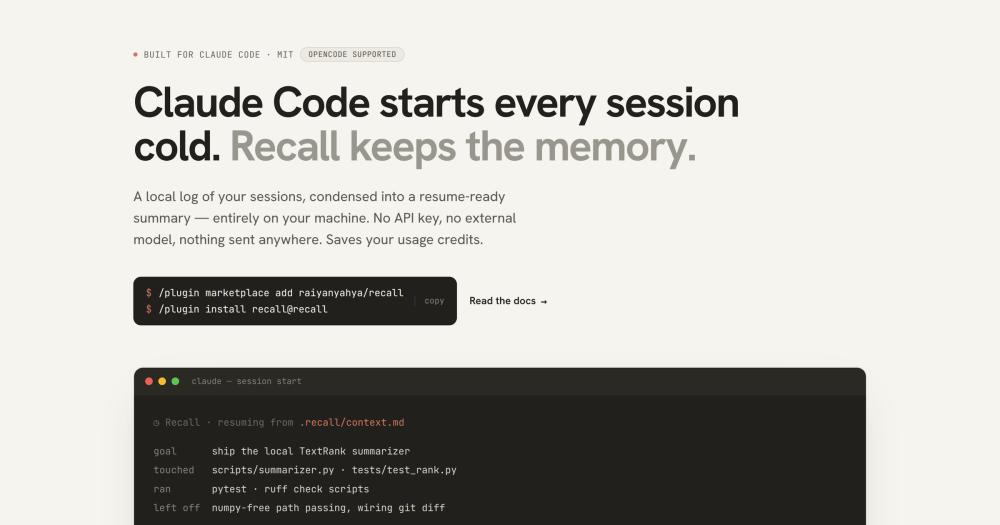
At the start of each session, the `SessionStart` hook surfaces `context.md` and asks whether to resume from it. The digest includes the project goal, files touched, commands run, next steps, and a `git diff --stat`, condensed to roughly 1-2K tokens. That is a fraction of the cost of replaying a full prior transcript, which reloads the entire conversation history.
Configurable secret redaction
Before writing `history.md` or `context.md`, Recall runs a best-effort pass stripping common secret shapes: API keys, tokens, `.env` assignments, and PEM keys. Redaction is enabled by default via `redact: true` in `recall.config.json`. The README notes this is best-effort, not a guarantee, and recommends reviewing before committing `.recall/` to version control.
OpenCode opt-in integration
The same `.recall/` files work with opencode via a one-time installer that generates a plugin shim, a `/recall-save` command, and an `opencode.json` entry pointing at `context.md`. Memory is shared across both tools: a Claude Code user and an opencode user on the same repo write to the same `history.md` and can resume each other's work.
Strengths and trade-offs#
Strengths
- Zero additional cost on a Claude Code subscriptionThe summarizer is a local algorithm, not an LLM call, so capturing and updating memory spends zero model tokens. Resuming from a compact `context.md` (~1-2K tokens) instead of re-explaining from scratch also reduces per-session token consumption, which stretches a subscription's usage limits without adding any separate charges.
- Nothing sent over the networkNo network call is made anywhere in Recall. Your session transcripts, which may contain code, file paths, and occasionally credentials, are summarized and stored only on your own machine. Unlike cloud-based AI memory services that send context to a remote model endpoint, the privacy guarantee is structural: there is no network path to violate.
- Plain-markdown output that is diffable and portable`history.md` and `context.md` are plain text files in `.recall/`. They are readable in any editor, diffable in git, and committable as shared team memory. Because they are not tied to a database or proprietary format, switching tools or archiving a project's session history requires no export step.
- No runtime dependencies to installThe TF-IDF + TextRank summarizer is vendored inside `summarizer.py`, with numpy as an optional accelerator that is never required at runtime. There is no `pip install` step for the plugin itself. The only system requirement is Python 3.9 or later, which is standard on most developer machines.
Trade-offs
- -Extractive summaries, not semanticThe TF-IDF + TextRank summarizer selects and ranks actual sentences from your session transcript; it does not generate new text or understand intent. Summaries are deterministic and reproducible, but may miss conceptual connections, carry boilerplate from low-signal turns, or surface sentences that ranked high statistically but are not the most editorially useful. An LLM-generated summary would surface intent more reliably, at the cost of tokens and network access.
- -Committed `.recall/` is a potential prompt-injection surfaceAt session start, `context.md` is fenced and labeled as untrusted reference data, not instructions. Claude asks before relying on its content. If `.recall/` is committed as shared team memory, any collaborator with write access can modify `context.md`, creating a prompt-injection vector. The README recommends keeping `.recall/` git-ignored if you do not fully trust all repo contributors.
- -OpenCode path lacks untrusted-data fencingIn the opencode integration, `context.md` is loaded through the `instructions` mechanism rather than fenced as untrusted data. This removes the protection the Claude Code path provides against a crafted context file. The README flags this difference explicitly and recommends the opencode path only with collaborators you trust.
Recall vs alternatives#
Recall vs Commercial AI Memory Services
Recall and commercial AI memory tools address the same underlying need (preserving context across sessions) but split on where summarization happens and what that costs.
| Feature | Recall | Commercial AI Memory |
|---|---|---|
| License | MIT | Proprietary |
| Summarization location | Local Python | Remote LLM via API |
| Network calls | None | Required |
| Cost per summarization | None (local algorithm) | API usage fees |
| Output format | Plain markdown files | Proprietary database |
| Summary type | Extractive (sentence selection) | Generative (LLM-written) |
| Self-hosting | Runs on your own machine | Typically not available |
Recall is the better choice when privacy matters (transcripts may contain code or credentials), when you want zero marginal cost for memory operations, or when you need output that is diffable and committable to version control. Because summarization is a local Python script, it runs offline, is reproducible, and adds nothing to an API bill. The plain-markdown files in .recall/ require no special tooling to read, archive, or share with teammates.
Commercial AI memory tools have an advantage in summary quality: a remote LLM can understand intent, make inferences, and write coherent prose rather than extracting the statistically central sentences from a transcript. If summary richness is the primary concern and network access, usage billing, and data residency are not constraints, a cloud-based tool such as mem.ai will produce more natural-reading summaries. Commercial tools also typically support a broader range of input types beyond coding session transcripts.
For the specific case of Claude Code session memory, Recall's focused scope and full local execution address the cold-start problem without adding a new service dependency or billing surface. For teams needing AI-generated, semantically rich summaries and who are comfortable with cloud data handling, a commercial memory service remains the better fit.
Quick start#
Install via the Claude Code plugin marketplace, or clone the repo to set up the opencode integration.

```bash
/plugin marketplace add raiyanyahya/recall
/plugin install recall@recall
git clone https://github.com/raiyanyahya/recall ~/recall
```What it's built on#
- Languages
- PythonTypeScript
FAQ#
Does Recall send my session data or code anywhere?
No. Recall makes no network calls and uses no API key. All summarization runs as a local Python script on your machine. Your session transcripts, which may contain code, file paths, and sensitive values, are read and written only within your project directory.
Does Recall replace Claude Code's built-in memory features?
Recall is complementary, not a replacement. CLAUDE.md holds hand-written instructions you curate; Recall automatically records what each session did. The resume flag replays a full prior transcript; Recall produces a compact digest (~1-2K tokens) for the start of a new session. The three tools cover different use cases and are designed to work alongside each other.
Is Recall free to use?
Yes. Recall is MIT licensed and free to run on your own machine. The summarizer is local Python with no runtime dependencies to pay for. The only cost is the standard Claude Code subscription you already have; Recall adds no usage charges of its own.
How do I install Recall in Claude Code?
Install it through the Claude Code plugin marketplace with two commands: /plugin marketplace add raiyanyahya/recall, then /plugin install recall@recall. No pip install step is needed; the summarizer is vendored. For opencode, clone the repo and run python3 ~/recall/scripts/install.py --opencode --project /path/to/your/project once per project.
What if the session summary misses something important?
The TF-IDF + TextRank summarizer selects actual sentences from your session transcript rather than generating new ones, so it cannot hallucinate facts not in the log. However, sentence selection is statistical: boilerplate or low-signal sentences may rank higher than intended. You can adjust the summary_sentences count in recall.config.json to keep more or fewer sentences, and you can always read history.md for the full unfiltered record.
Similar open-source tools#

hindsight
Self-hosted memory that makes AI agents smarter over time

ai-memory
Persist AI agent context across sessions and tool switches

mex
Persistent memory and code graph for AI coding agents

claude-mem
Stop re-explaining your codebase to every new agent session

rakazo
AI teammates you own: your keys, your model, your machine.
Pstack Claude
Structured coding workflows for Claude Code, Codex, and Pi