
Who Superfile is for#
Backend engineers and DevOps practitioners on macOS or Linux
Superfile fits a terminal-first workflow without requiring a context switch to a GUI file manager. The multi-panel layout and keyboard-driven operations handle tasks like copying build artifacts across directories, navigating deployment configs, or cleaning up log directories.
Skip if:
If you primarily manage remote filesystems over SSH on headless servers, a tool with better remote protocol support may fit better.
Developers building a cohesive terminal environment
With 20+ built-in themes and fully remappable hotkeys, Superfile integrates into any terminal setup. Users building a Catppuccin, Nord, or Gruvbox aesthetic can match Superfile to their existing color scheme without custom configuration.
Skip if:
If you prefer the smallest possible binary footprint and no visual polish, lighter alternatives like nnn or lf use less memory and start faster.
Power users managing local files across multiple directories
The multi-panel layout and bulk operations make repetitive file management tasks faster. Fuzzy search reduces manual directory navigation, and image preview avoids opening a separate viewer to verify file contents before moving or deleting.
Skip if:
If your file management needs are primarily remote (SFTP, S3, or cloud storage), Superfile does not include remote protocol support.
The problem it solves#
File management in the terminal typically forces a choice between two frustrating paths. Staying in the shell means using bare ls, cp, mv, and rm commands without visual context, multi-pane layout, or feedback when moving large numbers of files. Opening a GUI file manager like Finder or Windows Explorer breaks the keyboard-centric flow that most terminal work depends on.
For developers who spend extended periods in the terminal, these context switches compound. Tasks that take seconds with a visual file manager, like renaming a batch of files, comparing two directory trees side by side, or previewing an image before deciding to move it, require either memorized commands, custom scripts, or a GUI round trip.
How it solves it#
Multi-panel directory views
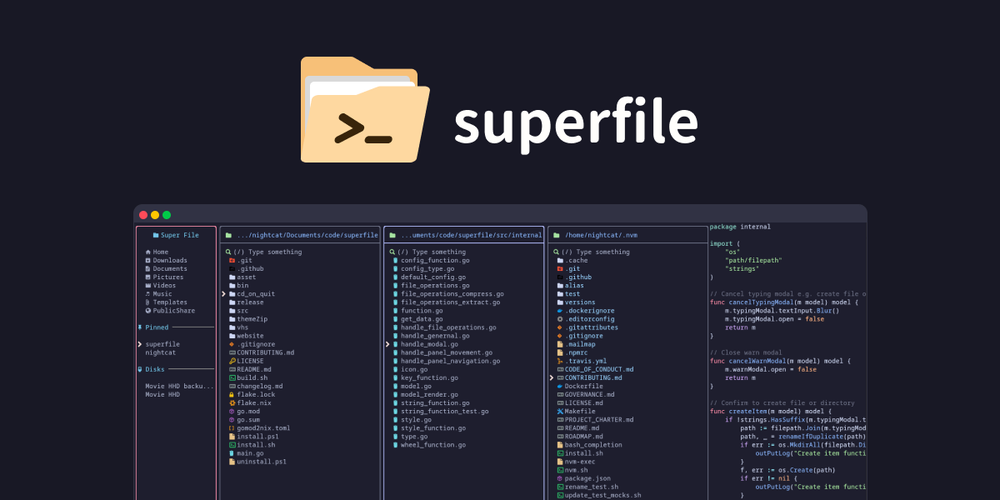
Split the terminal view into multiple directory panes simultaneously. Copy and paste files across panels with a few keystrokes, which makes side-by-side directory management and bulk transfers faster than switching between separate terminal windows.
Complete file operations with fuzzy search
Copy, move, delete, rename, and run bulk operations on selected files from the keyboard. Fuzzy search locates files by name across the current directory tree, and image preview lets you verify file contents before acting on them.
20+ built-in themes
Ships with over 20 themes including Catppuccin, Nord, Tokyo Night, Dracula, Gruvbox, and Rose Pine. Every border, color, and UI element is theme-configurable, so Superfile fits any terminal color scheme without custom work.
Fully remappable hotkeys
Every key binding can be remapped in the config file. The README notes that vim and nvim users should switch to the vim hotkey profile for comfortable navigation. The full remapping surface is documented at superfile.dev.
Plugin support
Extend Superfile with community plugins: Git status integration shows repository state in the file panel, system monitoring surfaces resource usage, and custom commands let you wire any workflow into the file manager.
Strengths and trade-offs#
Strengths
- MIT licensed with no usage restrictionsThe MIT license lets you use Superfile commercially, fork it, and modify it without any obligation to share changes. There is no dual-license tier, no proprietary cloud component, and no usage restriction for commercial teams.
- Active development and strong community uptake23,793 GitHub stars with a last push on 2026-10-10 indicate a project under active maintenance. Multiple community video reviews from channels like TechHut, Better Stack, and Seth Phaeno reflect real-world developer adoption.
- Single-binary install with no server requiredSuperfile runs as a local binary with no daemon, no database, and no network dependency. Install it with one command, run it with `spf`, and it is ready without further configuration. No Docker or server setup needed.
- Cross-platform package manager supportAvailable via Homebrew, Pacman (Arch Linux), Nix, Winget, Scoop, or a direct install script, covering the package managers most developers already use on macOS, Linux, and Windows.
Trade-offs
- -Windows support is partialThe README explicitly marks Windows as not fully supported yet. Core file operations work, but features available on macOS and Linux may be absent or unreliable on Windows. Windows-primary users should test their specific workflow before depending on it.
- -Plugin quality varies by maintainerThe plugin system is community-contributed with no official review or compatibility guarantee. Plugin documentation lives on the project wiki, and stability depends on each plugin's individual maintainer.
- -Young project with 289 open issuesCreated in March 2024 with 289 open GitHub issues, some edge cases and bugs are actively awaiting fixes. Users on less common terminal configurations may encounter undocumented issues.
Superfile vs alternatives#
Superfile vs Path Finder
Path Finder is a paid macOS file manager ($36 license) aimed at power users and developers. Both tools target developers who need more than the default OS file manager, but they serve completely different workflows.
| Feature | Superfile | Path Finder |
|---|---|---|
| License | MIT | Proprietary |
| Price | Free | $36 one-time (macOS only) |
| Interface | Terminal (TUI) | GUI |
| Platform support | macOS, Linux, Windows (partial) | macOS only |
| Plugin system | Community-contributed | Built-in extensions |
Superfile is the better fit when your workflow is entirely terminal-based. If you spend your day in a shell and want to handle file operations without switching to a GUI, Superfile keeps you keyboard-driven. Path Finder's strengths are tight macOS integration, tabbed browsing, folder comparison with diff output, and a built-in FTP/SFTP client. If you regularly need GUI previews, drag-and-drop, or direct macOS system integration, Path Finder is the stronger option.
Superfile vs Total Commander
Total Commander is a paid dual-pane file manager for Windows ($28 shareware) with decades of development. It covers remote protocols (FTP, SFTP, WebDAV), archive handling, and a plugin ecosystem that has grown over many years.
| Feature | Superfile | Total Commander |
|---|---|---|
| License | MIT | Proprietary (shareware) |
| Price | Free | $28 |
| Platform | macOS, Linux, Windows (partial) | Windows only |
| Remote protocols | No | FTP, SFTP, WebDAV |
| Plugin maturity | Community, active since 2024 | Extensive, 25+ years |
Total Commander is the stronger choice for Windows-primary users who need remote file management and a mature plugin ecosystem. Superfile is better for developers on macOS or Linux who want a modern TUI with active development and visual polish, and whose file management stays local.
Quick start#
Superfile installs on macOS and Linux via a setup script; Homebrew is also available on macOS.
```bash
bash -c "$(curl -sLo- https://superfile.dev/install.sh)"
```

```bash
brew install superfile
```What it's built on#
- Languages
- GoPython
FAQ#
Is Superfile free to use?
Yes. Superfile is MIT licensed and runs as a local binary with no cloud component, subscription, or usage fee. You can use it commercially, modify it, and distribute it with no restrictions under the MIT license.
Does Superfile work on Windows?
Partial support. The README marks Windows as not fully supported yet. macOS and Linux have full support. Windows users can install via Winget (winget install --id yorukot.superfile) or Scoop, but should verify their specific use case works before depending on it.
How do I install Superfile?
On macOS or Linux, run the install script with bash -c "$(curl -sLo- https://superfile.dev/install.sh)" or use Homebrew: brew install superfile. On Windows, use Winget or Scoop. After install, launch Superfile by typing spf in your terminal.
Can I customize Superfile's appearance and hotkeys?
Yes. Superfile ships with 20+ built-in themes including Catppuccin, Nord, Tokyo Night, Dracula, Gruvbox, and Rose Pine. Every hotkey can be remapped in the config file. The full customization surface is documented at superfile.dev.
What plugins are available for Superfile?
Community plugins add Git status integration, system monitoring, and custom command support to the file panel. The full plugin list is on the project wiki at superfile.dev/list/plugin-list. Plugin quality varies by maintainer, so review each plugin's documentation before installing.
Similar open-source tools#

Vorssaint Utils
One menu bar icon replacing a dozen paid macOS apps

Xray-core
Open source proxy core with XTLS, VLESS, and REALITY protocols

Steam Game Idler
Free Steam idler for trading cards, hours and achievements
Raddebugger
Native graphical debugger with custom debug info format

Obtainium
Android app updates direct from GitHub and F-Droid

Cloudflare Os
Open source AI workspace with sandboxed apps and Gatekeeper security