

Who crawl4ai is for#
AI engineers building RAG pipelines
crawl4ai converts documentation sites, knowledge bases, and product pages into clean markdown in a single async call. The BM25 content filter removes boilerplate before the text reaches your embedding model, reducing token waste and improving retrieval relevance.
Skip if:
Your knowledge sources are already available as structured exports (APIs, sitemaps, PDFs). crawl4ai's value is in extracting from unstructured HTML; if your sources don't require a browser to render, a simpler HTTP client is cheaper to operate.
Data engineers scraping at high volume
The async batch crawler with browser pooling handles hundreds of parallel URLs. Deep crawl with BFS strategy, configurable page limits, and crash recovery via resume_state lets you run long overnight jobs without restarting from scratch on failure.
Skip if:
You need a fully managed scraping service with proxies, CAPTCHAs, and IP rotation handled for you. crawl4ai gives you control, not convenience; heavy anti-bot targets require additional proxy configuration you manage yourself.
Developers building LLM agents that browse the web
The AsyncWebCrawler's hook system lets agents inject JavaScript, reuse authenticated sessions, and parse page content at each step of a multi-step workflow. The CLI (crwl) and Python API make it straightforward to wire crawl results into an agent loop.
Skip if:
Your agent only queries a small, known set of structured APIs. crawl4ai's complexity pays off when the agent must handle arbitrary websites, not pre-structured data sources.
Security and competitive intelligence teams
Stealth mode, proxy support, custom headers, and browser profile management let teams collect data from sites that actively detect automation. Full browser control including viewport adjustment and user agent configuration gives teams options that simpler tools cannot provide.
Skip if:
Your targets use sophisticated bot detection such as CAPTCHA farms or behavioral analysis. crawl4ai's stealth mode reduces detection risk but is not a guarantee; managed services with rotating residential proxies may be more reliable for high-security targets.
The problem it solves#
Web scraping for AI systems is expensive, fragile, or both. Commercial scraping APIs like Bright Data and Apify charge per-page or per-credit fees that multiply fast at the volumes AI training and RAG pipelines require. Managed services also run your data through third-party infrastructure, creating privacy and compliance risks for teams with sensitive data requirements.
The deeper challenge is output quality. Raw HTML is noise for LLMs: boilerplate navigation, ads, scripts, and style attributes drown the content a model actually needs. Most teams either spend engineering time cleaning output or pay a premium for a service that does it for them. Maintaining custom Playwright or Puppeteer scrapers is a third option, but those scripts break every time a target site updates its rendering or adds bot detection.
How it solves it#
LLM-ready markdown output
Crawls any page and strips it to clean, structured markdown with headings, tables, and code blocks preserved. A BM25-based content filter removes boilerplate, navigation, and ads to leave only the content an LLM needs. Fit Markdown mode applies heuristic pruning for even tighter output.
JavaScript rendering via headless Chromium
Runs headless Chromium server-side to render pages that depend on React, Vue, or other JavaScript frameworks before extracting content. The crawler waits for async content, handles lazy-loaded images, and simulates scrolling for infinite-scroll pages. No Playwright setup needed on the caller side.
Structured data extraction with CSS, XPath, and LLM strategies
Extracts repeated patterns to JSON using CSS selectors or XPath without an LLM call. For unstructured pages, LLM-based extraction with any supported model generates schema-conforming output. Define a schema once and apply it across thousands of pages.
Async batch crawling with caching and crash recovery
The AsyncWebCrawler runs parallel jobs across a browser pool and caches responses to avoid redundant fetches. Deep crawl mode supports BFS strategy with configurable page limits and crash recovery via resume_state callbacks, so long overnight jobs can restart from where they left off.
Full browser control for stealth and authenticated crawling
Supports persistent browser profiles, session reuse, cookie injection, custom headers, proxies with authentication, and stealth mode to reduce bot detection. Hooks let you inject custom JavaScript at any step in the crawl lifecycle.
Docker REST API with monitoring dashboard
The Docker image ships a FastAPI server with JWT authentication, a real-time monitoring dashboard showing browser pool status and system metrics, an interactive playground for testing requests, and multi-architecture support for AMD64 and ARM64.
Strengths and trade-offs#
Strengths
- No API keys and no usage capscrawl4ai runs on your own infrastructure with no account required and no rate limits imposed by a third party. Unlike Apify or Bright Data, you pay for your server once and crawl at whatever volume your hardware supports.
- 80,000+ GitHub stars with active maintenanceWith over 80,000 stars and 8,300 forks, crawl4ai has one of the largest communities of any open source crawler on GitHub. The repo received its most recent push in August 2026, with recent releases covering Docker API security hardening, crash recovery, and prefetch modes for faster URL discovery.
- Output built specifically for LLMs and RAG pipelinesMost crawlers return raw HTML or minimal plain text. crawl4ai was designed from the start to feed LLM pipelines: it generates link citations, applies BM25 filtering to isolate relevant content, and preserves heading structure so chunking strategies can operate on semantic boundaries.
- Adaptive crawling stops when it has gathered enoughThe adaptive crawler uses information foraging algorithms to determine when sufficient content has been gathered to answer a query. Instead of crawling a fixed page count, it explores proportionally to what it has already found, reducing unnecessary requests on large site crawls.
Trade-offs
- -Requires significant RAM for Chromium workersThe JavaScript-rendering path runs headless Chromium, which needs at least 1GB of shared memory per Docker container (the README recommends the --shm-size=1g flag). Low-memory VPS deployments under 1GB shared memory will encounter OOM errors on JavaScript-heavy pages.
- -Python-only SDK; no official Node.js or Go clientThe native async API and all advanced configuration options are Python-only. Developers working in Node.js, Go, or other languages must use the Docker REST API, which is fully featured but adds a network hop and a separate deployment dependency.
- -Production self-hosting requires active managementRunning crawl4ai at production scale means managing Docker containers, browser pool sizing, monitoring, and Playwright updates. The tool ships a monitoring dashboard and crash recovery, but there is no managed cloud option yet; a beta cloud API is announced but not launched as of the latest release.
crawl4ai vs alternatives#
crawl4ai vs Firecrawl
Both tools are built to feed LLM pipelines: they render JavaScript, clean output to markdown, and support structured JSON extraction. The key difference is deployment model and language ecosystem.
| Feature | crawl4ai | Firecrawl |
|---|---|---|
| License | Apache-2.0 | MIT (self-hosted) |
| Primary language | Python | TypeScript |
| LLM-ready markdown | Yes | Yes |
| Docker API server | Yes | Yes |
| Pricing | Free (self-hosted) | Free (self-hosted) / paid cloud |
crawl4ai is the better choice for Python-native teams that want deep integration with the Python ML ecosystem and full control over Chromium behavior via hooks and session management. Firecrawl's managed API is the better fit when you want to skip infrastructure management entirely and prefer a TypeScript or Node.js SDK.
crawl4ai vs Bright Data
Bright Data is a commercial web data platform with managed proxies, CAPTCHA solving, and a global datacenter network. crawl4ai is a self-hosted Python library with no managed infrastructure.
| Feature | crawl4ai | Bright Data |
|---|---|---|
| License | Apache-2.0 | Proprietary |
| Self-hosting | Yes | No |
| Pricing | Free (self-hosted) | Usage-based (paid) |
| Proxy management | You configure | Managed (included) |
| CAPTCHA handling | Stealth mode | Managed |
| Data residency | Your infrastructure | Bright Data's servers |
crawl4ai wins on cost and data ownership for teams scraping public websites at moderate volumes. Bright Data is worth considering when your targets use aggressive bot detection (residential proxies, CAPTCHA solving) or when you need a fully managed pipeline with no infrastructure to operate.
crawl4ai vs Apify
Apify is a cloud platform for web scraping with a marketplace of pre-built scrapers called Actors. crawl4ai is a single-purpose Python crawler optimized for LLM output.
| Feature | crawl4ai | Apify |
|---|---|---|
| License | Apache-2.0 | Proprietary |
| Self-hosting | Yes | No (cloud-only) |
| Pricing | Free (self-hosted) | Credit-based (paid) |
| Pre-built scrapers | No | Yes (Actor marketplace) |
| LLM-optimized output | Yes | Requires custom Actor |
crawl4ai is the better choice when you are building a custom pipeline and want clean LLM-ready output without writing an Actor or paying per-crawl. Apify is the better fit when you need a pre-built scraper for a specific website and want a managed cloud environment rather than self-hosting.
Quick start#
Deploy via pip for development or via Docker for a production server with monitoring dashboard and REST API.

```bash
pip install crawl4ai
crawl4ai-setup
```What it's built on#
- Languages
- JavaScriptPython
- Frameworks
- FastAPI
- Infrastructure
- Docker
- Cache
- Redis
- Tooling
- Playwright
FAQ#
Is crawl4ai free to use?
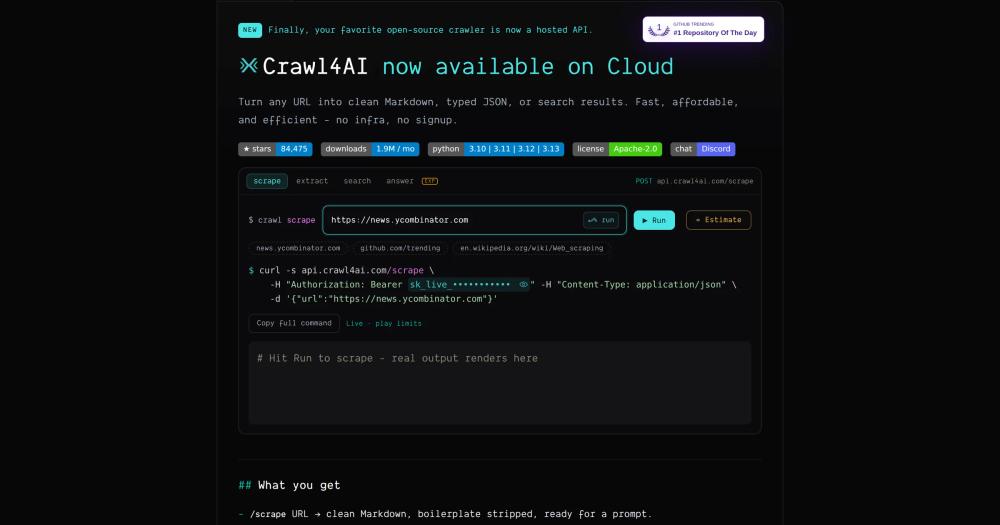
Yes. crawl4ai is Apache-2.0 licensed and free to use on your own infrastructure with no API keys required. A managed cloud API is in closed beta (announced as launching soon in the README), but the self-hosted library and Docker image carry no usage fees. For most development and production workloads, self-hosting is the primary path.
Does crawl4ai handle JavaScript-heavy pages?
Yes. crawl4ai runs headless Chromium to render pages that require JavaScript execution before content is visible. It handles React, Vue, and Angular SPAs, waits for async content, and simulates scrolling for infinite-scroll pages. This is the default mode when using AsyncWebCrawler; no separate Playwright configuration is needed on your end.
How does crawl4ai compare to Firecrawl or Bright Data?
Firecrawl and Bright Data are managed APIs: you send them a URL, they return content, and they charge per-page or per-credit. crawl4ai is a self-hosted Python library and Docker image: you run it on your own server, data stays on your infrastructure, and there are no per-page fees. The tradeoff is that you manage the deployment and browser resources yourself.
Can I extract structured JSON instead of markdown?
Yes. crawl4ai supports CSS-selector and XPath extraction to pull repeated patterns into JSON without an LLM call. For unstructured pages, you can configure an LLM-based extraction strategy with any supported model and a custom schema. Both modes are available via the Python API and the Docker REST API.
What are the server requirements for self-hosting crawl4ai?
The pip install has minimal requirements beyond Python 3.8+ and Playwright's Chromium dependency. For Docker deployment, the recommended configuration is 1GB of shared memory per container (--shm-size=1g). Low-memory VPS instances under 1GB shared memory may hit OOM errors on JavaScript-heavy pages. CPU and disk requirements scale with your browser pool size.
Similar open-source tools#

Agent Reach
Give any AI agent internet access, free and local
PyScrappy
AI-native web scraping toolkit + MCP server

Firecrawl
Turn any website into clean markdown or structured JSON for LLMs

ego-lite
AI agent browser with shared Chrome state, zero cost

FckSignups
Open-source tools that work instantly, no signup required

deer-flow
Build super agents with DeerFlow's powerful framework