
Who Markdown Preview Editor is for#
Developers writing and reviewing technical documentation
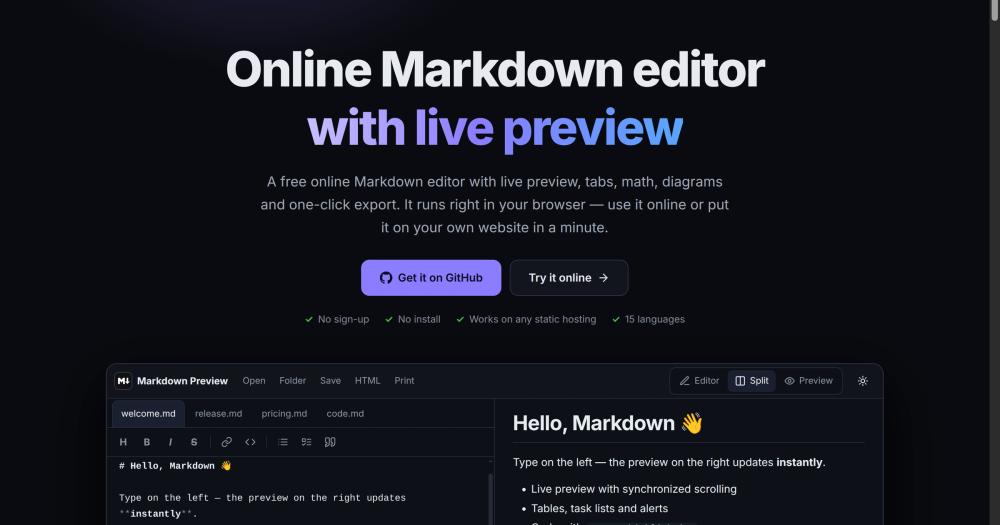
Write README files, architecture notes, and API docs in a live-preview environment that renders exactly what GitHub will show. KaTeX and Mermaid support covers math-heavy specs and system diagrams. The sandboxed preview confirms that embedded content is safe before committing.
Skip if:
If documents need to be shared or co-authored in real time, a collaboration tool like HackMD or a shared Git-based workflow is a better fit.
Privacy-conscious individuals taking private notes
Every note stays in the browser tab and on local disk. The CSP prevents analytics or external fetches, and the sandboxed preview blocks tracking pixels. Sensitive notes, personal journals, or regulated content can be edited without any data leaving the device.
Skip if:
If notes need to sync across multiple devices automatically, a local-first sync tool such as Obsidian with a self-hosted sync plugin handles that use case more directly.
Technical writers self-hosting an internal editing environment
Deploy the prebuilt release to an internal server once and give team members a URL. No per-seat licensing, no accounts, and no cloud subscription. Supports 15 interface languages, which suits distributed teams with mixed language preferences.
Skip if:
If the primary need is publishing Markdown to a website or CMS, a static site generator with its own preview server is a better fit for that publishing pipeline.
Students and researchers editing math-heavy notes
KaTeX renders LaTeX math inline and in display blocks client-side with no external render service. Mermaid covers simple graphs and flowcharts. Multi-tab editing keeps related reference documents open alongside the note being written.
Skip if:
If the workflow requires importing from or exporting to Word or LaTeX with precise layout control, a dedicated document editor such as Overleaf or Pandoc handles those requirements more thoroughly.
The problem it solves#
Writing Markdown with a live preview typically means either installing a paid desktop application or trusting a cloud service to store your files. Typora requires a one-time purchase and runs only on your local machine. Collaboration services like HackMD keep documents on their own servers, which creates privacy and data-portability concerns for sensitive notes, internal documentation, or regulated content.
The deeper problem is that most tools conflate convenience with data exposure. A hosted service handles rendering, but it also logs your content, IP address, and editing behavior. A strict self-hosted option usually requires a database and an authentication layer before you can open a single file. What is missing is a browser-native tool that renders Markdown locally with zero server-side infrastructure and no installation overhead.
How it solves it#
Live Preview with Synchronized Scrolling
The editor and preview panes scroll together, keeping the source and rendered output aligned. Both light and dark themes are available, and the layout adapts for phone screens without a separate mobile app.
GitHub-Flavored Markdown with KaTeX and Mermaid
Supports GitHub-flavored Markdown with syntax highlighting, KaTeX for math equations, and Mermaid for diagrams and flowcharts. All rendering runs client-side, so no external service is called when a formula or chart updates.
Multi-Document Tabs with Per-Tab Undo History
Multiple `.md` files open as separate tabs, each with its own independent undo stack. Wikilinks between open files switch tabs directly, which makes it useful for linked note-taking and documentation with cross-references.
Drag and Drop for Files, Folders, and Images
Drop multiple files, entire folders, or images directly onto the editor. Dropped images embed inline; dropped `.md` files open as new tabs. Folder drops open all Markdown files in the folder at once.
Sandboxed Preview with XSS and Phishing Protection
The preview renders inside a sandboxed iframe. External images, media, and links are blocked by default and can only be allowed individually. DOMPurify sanitizes every document before rendering, and a lightweight offline heuristic checks allowed links for phishing patterns and local-network addresses.
Export to HTML, PDF, and Standalone Files
Documents can be saved as `.md`, exported to a self-contained HTML file, or printed and saved as PDF. The HTML export bundles styles inline, so the exported file renders correctly without a server or any additional dependencies.
Strengths and trade-offs#
Strengths
- Zero-Infrastructure Self-HostingThe prebuilt release archive deploys to any static host by extraction with no Node.js runtime, no database, and no environment variables required. Apache, nginx, Caddy, and Docker configs are bundled in the repository. The included `.htaccess` enables HTTPS and security headers on Apache and LiteSpeed automatically.
- Strict Content Security Policy Enforced by DesignThe CSP is not an opt-in privacy setting; it is enforced at the HTTP header level and blocks the page from contacting any external origin. This makes it auditable: a CSP audit tool will confirm the restriction without requiring trust in the application's own self-reporting.
- WCAG 2.2 AA Accessibility Verified by CIAxe-core accessibility checks run as part of the automated test suite across light and dark themes, the preview pane, all open panels, and the phone layout. Tabs, the pane divider, and menus are keyboard-navigable. WCAG 2.2 AA with zero violations is a passing gate in the test suite, not a checkbox claim.
- MIT License with No Backend DependencyMIT means you can fork, modify, and deploy it commercially with no restrictions. Because there is no backend component, there is nothing to self-host beyond a static file server: no license server, no telemetry endpoint, and nothing to call home.
Trade-offs
- -No Real-Time CollaborationMarkdown Preview Editor is a single-user, browser-only tool with no shared editing, comment threads, or multiplayer presence. Teams that need to co-author documents in real time must share files manually or choose a collaboration-first service like HackMD.
- -Very Early-Stage Project with Low Community ActivityThe repository was created in September 2026 and has 29 stars and zero forks as of October 2026. As a solo-maintained project with limited community history, it carries early-stage risk: breaking changes, delayed bug responses, or abandonment. Production deployments should monitor the repository activity.
- -No Cross-Device Sync or Native Mobile AppDocuments are saved as local `.md` files or exported. There is no built-in sync across devices, no cloud storage integration, and no native mobile application. Users who switch between machines must move files manually or set up their own sync layer.
Markdown Preview Editor vs alternatives#
Markdown Preview Editor vs Typora
Both editors focus on Markdown writing with a rendered preview, but they serve different deployment and pricing models. Typora is a paid desktop application that installs locally; Markdown Preview Editor is a free, MIT-licensed static website that runs in any browser on any device that can serve static files.
| Feature | Markdown Preview Editor | Typora |
|---|---|---|
| License | MIT | Proprietary (paid) |
| Price | Free | $14.99 one-time |
| Self-hosting | Yes (static files) | N/A (desktop app) |
| Requires installation | No (browser-based) | Yes (macOS, Windows, Linux) |
| Live preview | Yes (split pane) | Yes (inline) |
| Mermaid diagrams | Yes | Yes |
| KaTeX math | Yes | Yes |
| Data privacy | Strict CSP, no data leaves browser | Local only, no cloud |
Markdown Preview Editor is the better fit when you need a no-install, browser-based writing environment that can be shared via a URL on an internal server or accessed from any device. Typora is worth choosing when you prefer a native desktop experience with fluid inline editing (source and preview in the same pane) and do not need web-based deployment.
Markdown Preview Editor vs HackMD
HackMD is a collaboration-first Markdown service with real-time co-editing, commenting, and cloud storage. Markdown Preview Editor is a single-user browser editor with no server-side storage.
| Feature | Markdown Preview Editor | HackMD |
|---|---|---|
| License | MIT (self-hosted) | Proprietary (cloud) / AGPLv3 (CodiMD self-hosted) |
| Pricing | Free | Free tier; paid plans for teams |
| Real-time collaboration | No | Yes |
| Data storage | Browser and local disk | HackMD servers |
| Self-hosting | Yes (static files, no DB) | Yes (CodiMD, requires Node.js and DB) |
| Offline support | Yes | No |
HackMD is the right choice when teams need to co-author documents in real time with commenting and version history. Markdown Preview Editor is the better alternative to HackMD when documents are private, single-author, or need to stay entirely off external servers without the overhead of setting up a database-backed service.
Quick start#
Deploy on any static server with no build step, or clone the repository and run locally with npm.
```bash
git clone https://github.com/ovasendin/markdown_preview_editor
cd markdown_preview_editor && npm ci && npm run build
npm run dev
```What it's built on#
- Languages
- JavaScriptTypeScript
FAQ#
Does Markdown Preview Editor store or transmit my documents?
No. The tool runs entirely in the browser as a static website. A strict Content Security Policy forbids the page from making any external network request. Documents exist only in your browser tab and on your local disk when you save them. There is no backend, no analytics, and no telemetry.
Can I self-host Markdown Preview Editor on my own server?
Yes. Download the prebuilt site archive from the GitHub Releases page, extract it into your web root, and it works without further configuration. Docker Compose, nginx, and Caddy config files are included in the repository for teams that prefer those deployment paths. No database or runtime is required.
How does Markdown Preview Editor compare to Typora?
Typora is a paid desktop application with a polished inline writing experience. Markdown Preview Editor is free, MIT licensed, and runs in a browser on any static host. Typora has more refined typography and document export options; Markdown Preview Editor has stricter privacy guarantees and zero installation overhead for browser-based or internal-server use.
Is Markdown Preview Editor accessible for keyboard users?
Yes. The editor meets WCAG 2.2 AA with zero violations as verified by axe-core in the automated test suite. Tabs, the pane divider, and all menus are keyboard-navigable. The accessibility check runs across light and dark themes, the preview pane, and the phone layout as part of CI.
What Markdown features does it support beyond basic formatting?
In addition to GitHub-flavored Markdown and syntax-highlighted code blocks, it supports KaTeX for math equations, Mermaid for diagrams and flowcharts, and drag-and-drop image embedding. Documents can be exported as self-contained HTML or saved as standard .md files.
Similar open-source tools#

neo
Novel writing app: local files, no subscription, EPUB export

showmd
The most readable way to preview any .md file on macOS.

Obtainium
Android app updates direct from GitHub and F-Droid

JellyBoxPlayer
Native Jellyfin and Emby music player for every platform

FckSignups
Open-source tools that work instantly, no signup required

limen
Composable authentication for modern Go backends