

Who OneDev is for#
Teams building AI-assisted development workflows
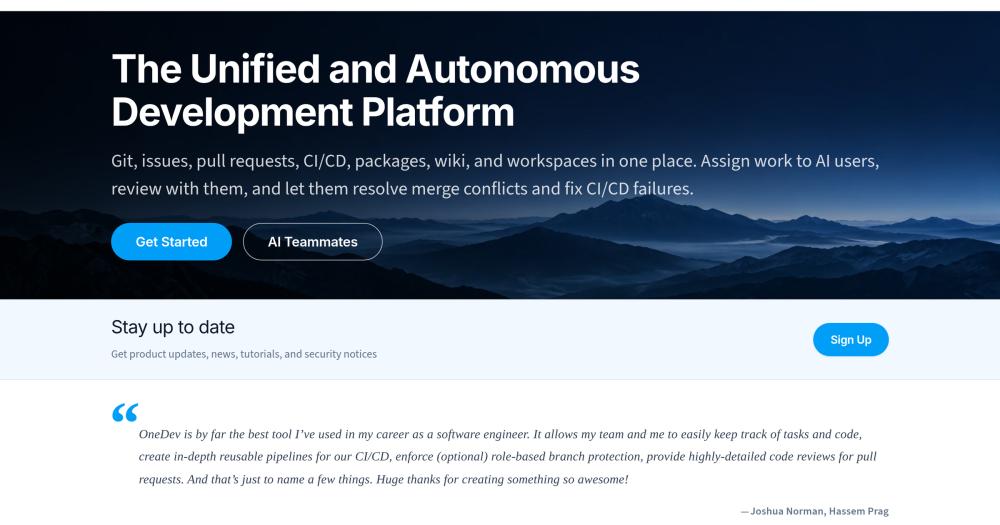
OneDev's AI users plug into the native issue and PR flow: assign issues to AI for implementation, let AI review PRs, trigger AI to fix CI failures. The workspace feature runs coding agents (Claude Code, OpenCode, Codex) headlessly in browser-accessible dev containers on the OneDev server. This is the most integrated setup for teams adopting AI-pair programming at the workflow level.
Skip if:
Teams that want to use a managed AI coding product without operating their own DevOps server. OneDev's AI integration requires a self-hosted instance with a configured AI provider; there is no cloud-hosted path.
Organizations with compliance or data-residency requirements
All code, CI logs, package artifacts, issue history, and AI interaction traces stay on infrastructure you control. OneDev's MIT license permits deployment in air-gapped environments with no phone-home dependencies beyond whatever AI provider you configure. Audit trails across code, builds, and issues are all searchable within the same system.
Skip if:
Organizations without an existing server or cloud infrastructure team. If you cannot run and maintain a Linux or Windows server, the operational overhead outweighs the compliance benefit.
Mid-sized engineering teams replacing per-seat SaaS
At team sizes where GitHub Teams or GitLab Premium per-user costs become significant, OneDev's self-hosted MIT model makes the economics straightforward: pay for the server once, not per developer per month. The full feature set (CI/CD, issue tracking, packages, wikis, code review) is available on the self-hosted version without a paid tier.
Skip if:
Teams of 2-3 developers where a managed service is cheaper than the time cost of operating a server. OneDev pays off at the point where per-seat fees materially exceed infrastructure costs.
Teams integrating Renovate for dependency management
OneDev has native Renovate integration to open pull requests for dependency updates and auto-merge them when required reviewers approve and CI passes. Combined with the built-in package registry and security scanning (dependencies, binaries, container images), teams get a full dependency lifecycle inside one system.
Skip if:
Projects with simple, infrequently-changed dependency trees where Renovate automation adds configuration overhead without clear benefit.
The problem it solves#
Engineering teams running separate tools for code hosting, CI/CD, issue tracking, package management, and documentation spend significant time maintaining integrations between those systems. When a commit triggers a build that fixes a bug, tracing that chain across three different dashboards is slow and error-prone. Cloud-hosted platforms like GitHub, GitLab, and Azure DevOps solve this by bundling everything, but at the cost of per-user pricing that scales uncomfortably as teams grow, storage and runner limits tied to plan tiers, and no option to keep code and pipeline data on infrastructure you control.
For organizations with compliance requirements, air-gapped environments, or data-residency constraints, the only alternative has been assembling Gitea plus Jenkins plus Jira and keeping those integrations working over time. That maintenance burden is the real cost that per-seat SaaS pricing obscures.
How it solves it#
AI teammates for issue and PR automation
AI users in OneDev work autonomously inside the standard issue and pull request flow. Assign an issue to an AI user and it implements the fix; add an AI reviewer to a pull request and it gives feedback; let the CI/CD failure handler assign the AI user to diagnose and fix broken builds. All AI actions happen through the platform's native workspaces, not an external service.
GUI-based CI/CD without YAML authoring
Jobs are created through an interactive editor with typed parameters, template reuse, and cache management. Framework templates cover common build patterns, and matrix jobs let you fan out tests across variable configurations. No CI YAML to commit or maintain; pipelines live inside OneDev and are version-controlled alongside the project settings.
Built-in package registries
Package registries are included and linked to CI/CD jobs, so build artifacts are published, versioned, and associated with the build that produced them. No separate registry service to operate or authenticate against; packages resolve the same identity graph as the issues and builds that reference them.
Versioned wiki documentation
Each project includes a markdown wiki that is version-controlled alongside the codebase. Pages can be edited in the browser or via Git, wiki changes can be reviewed in pull requests, and any branch or release tag has its own wiki snapshot. Documentation stays in sync with the state of the code.
Language-aware code search and navigation
Code search supports regular expressions and language-aware symbol search across any commit in the repository, not just HEAD. Click a symbol to see all occurrences in the current file. The search runs across the full history, which matters when tracing when a symbol was introduced or renamed.
Customizable issue workflows with service desk
Issue states, fields, and transition rules are configurable per project. Kanban boards can move cards manually or automatically based on commit and CI events. The service desk feature links email threads to issues, letting teams support customers without requiring them to register accounts.
Strengths and trade-offs#
Strengths
- MIT license with full self-hostingOneDev is MIT-licensed and self-hosted, with no licensing fees and no restriction on commercial use or modification. You own the server, the code, the pipeline logs, and the package artifacts. Unlike GitHub (cloud-only for most features) or GitLab's paid tiers, there is no feature wall between the free and paid experience on the self-hosted path.
- Low resource footprintThe OneDev team documents medium-sized project operation on a single core with 2 GB RAM. A published performance comparison with GitLab shows OneDev using roughly 50% less memory and pushing Git commits about 40% faster. This means smaller infrastructure spend and faster operations on shared or constrained servers.
- Deep cross-referencing between code, builds, and issuesOneDev links issues, commits, CI/CD builds, and packages into a single traceability graph. A build shows which issues it fixed; an issue shows the builds that resolved it; package versions report the code changes they include. This is built into the data model, not a post-hoc integration between separate services.
- Browser-based workspaces for AI and human developersWorkspaces spin up preconfigured dev containers on the OneDev server, accessible in the browser. AI users (Claude Code, OpenCode, Codex) run in task-automation workspaces headlessly; human developers open the same environment interactively. Teams can onboard contributors without local setup, which reduces environment-configuration friction on large or distributed teams.
Trade-offs
- -Java runtime and initial setup complexityOneDev is written in Java and requires a Java runtime on the host. The server distribution handles this, but the setup process is more involved than a Docker-only install for teams unfamiliar with bare-metal service configuration. The 2026 release series replaced the old Java Service Wrapper with OneDev Wrapper, dropping Intel Mac and FreeBSD support in the process.
- -Self-managed infrastructure responsibilityRunning OneDev means you own backups, upgrades, availability, and security patching for the server and the underlying OS. Teams that chose GitHub or GitLab specifically to offload that operational burden will find that cost returns. High-availability mode (cluster replication) is supported but requires additional server capacity and configuration work.
- -Smaller ecosystem than GitHub or GitLabGitHub and GitLab have large ecosystems of third-party integrations, marketplace actions, and community-built templates. OneDev covers the core DevOps loop well but has fewer ready-made integrations. Teams dependent on specific GitHub Actions or GitLab CI templates may need to adapt those pipelines on import.
OneDev vs alternatives#
OneDev vs GitHub
GitHub is the dominant cloud-hosted Git platform with the largest marketplace of Actions and the widest community. OneDev's self-hosted architecture targets a different set of constraints.
| Feature | OneDev | GitHub |
|---|---|---|
| License | MIT (self-hosted) | Proprietary |
| Hosting model | Self-hosted only | Cloud (GitHub.com) or Enterprise (paid) |
| CI/CD | Built-in, GUI editor | GitHub Actions (YAML) |
| Package registry | Built-in | GitHub Packages |
| AI integration | AI teammates in native workflow | GitHub Copilot (separate subscription) |
| Pricing | Free (infrastructure cost only) | Free tier + per-user plans |
OneDev is the better choice when you need to keep code and CI data on your own servers, want AI-assisted workflows without a separate Copilot subscription, or have team sizes where GitHub's per-user pricing adds up. GitHub is the better choice when third-party integrations, the Actions marketplace depth, or the GitHub social graph (stars, forks, contributor discovery) matter more than data ownership.
OneDev vs GitLab
GitLab Community Edition is the most direct open source comparison: both offer self-hosted Git, CI/CD, issues, and packages. The differentiation is in footprint and philosophy.
| Feature | OneDev | GitLab CE |
|---|---|---|
| License | MIT | MIT (CE) |
| Resource use | 1 core, 2 GB RAM for medium projects | Minimum 4 GB RAM recommended |
| CI/CD editor | GUI-based, no YAML required | YAML only |
| AI integration | Native AI teammates | GitLab Duo (paid add-on) |
| Ecosystem | Smaller | Large CI template library |
OneDev runs meaningfully lighter than GitLab. For teams on constrained hardware or smaller VPS instances, the resource difference is real: GitLab's documentation recommends a minimum of 4 GB RAM for even light use, while OneDev handles medium-sized projects on 2 GB. OneDev's GUI CI/CD editor reduces the YAML authoring burden that GitLab teams commonly cite as friction. GitLab is still the better choice when you need its mature ecosystem of pre-built CI templates, enterprise compliance features, or the GitLab container registry's tight integration with Kubernetes.
What it's built on#
- Languages
- JavaJavaScript
FAQ#
Is OneDev free to use?
Yes. OneDev is MIT-licensed and self-hosted, with no paid plans or per-user fees for the self-hosted version. You pay for the server infrastructure; the software itself is free to use, modify, and deploy for any purpose, including commercial use.
How does OneDev compare to GitLab?
Both offer a similar feature set: Git hosting, CI/CD, issue tracking, and packages in one tool. OneDev uses significantly less memory (roughly 50% less) and pushes Git commits faster according to published benchmarks. GitLab has a larger ecosystem and more third-party integrations; OneDev has a lighter footprint and a GUI-based CI/CD editor that does not require YAML authoring.
Can OneDev run AI agents like Claude Code or Codex?
Yes. OneDev workspaces spin up preconfigured dev containers on the server. AI users (Claude Code, OpenCode, Codex, and others) run in task-automation workspaces headlessly, while human developers can open the same environment in the browser. OneDev also ships a CLI and skills package so coding agents can query and edit issues, pull requests, and builds.
What platforms does OneDev support?
OneDev server and agent distributions run on Linux and Windows (amd64 and arm64 architectures) and macOS on Apple Silicon. As of version 16.9.0, Intel Mac, FreeBSD, and other platforms are no longer supported.
Does OneDev support high availability?
Yes. OneDev supports a cluster setup that can replicate projects across different servers for high availability or distribute projects for horizontal scalability. The high-availability configuration requires additional server capacity; documentation is at docs.onedev.io.
Similar open-source tools#

Gitea
58,540 GitHub starsSelf-hosted Git server with CI, issues, and pull requests
Alternative to GitHub

Gogs
47,866 GitHub starsLightweight self-hosted Git server that is painless to set up
Alternative toGitHub

gitdeck
422 GitHub starsSelf-hosted Git dashboard for GitHub, GitLab, and Forgejo
Alternative to GitKraken

tuicr
3,401 GitHub starsTerminal UI for code review with vim keybindings and GitHub-style
Alternative to Graphite

GitLab
24,551 GitHub starsSelf-hosted Git server with CI/CD, security scans, and planning
Alternative toGitHub

FckSignups
4,495 GitHub starsOpen-source tools that work instantly, no signup required