Who tuicr is for#
Vim Power User
A developer deeply integrated into the vim ecosystem who wants to perform code reviews without leaving their familiar keyboard-driven environment.
Skip if:
The user is not familiar with vim keybindings or prefers mouse-driven interfaces.
Terminal-Centric Developer
A developer who prefers to manage all aspects of their workflow, including code review, directly from the command line for maximum efficiency and minimal context switching.
Skip if:
The user prefers graphical user interfaces for code review.
AI-Assisted Review Workflow
A team or individual leveraging AI coding agents (e.g., Claude Code, Codex) who needs a structured way to provide human feedback that can be easily consumed and acted upon by the AI.
Skip if:
The user does not use AI coding assistants in their workflow.
Multi-VCS Environment
A developer working across projects that utilize different version control systems like Git, Jujutsu, or Mercurial, seeking a unified review tool.
Skip if:
The user exclusively uses GitHub or a single VCS and its native review tools.
The problem it solves#
Developers often face context switching and inefficiency when moving between their terminal-based development environment and web-based code review interfaces. This is particularly cumbersome for users accustomed to vim's keyboard-driven navigation. The problem is the lack of a robust, terminal-native code review tool that offers deep integration with version control systems and modern review workflows, including AI agent collaboration.
How it solves it#
GitHub-style Diff
Every changed file is presented in one continuous, scrollable diff, making it easy to review large changesets.
Vim Keybindings
Provides a full vim-like experience with modal navigation, visual selection, search, and jumps, allowing vim users to review code without changing their muscle memory.
PR-style Comments
Supports commenting at line, range, file, or review levels, with customizable comment types (issue, suggestion, note, praise).
Multiple Export Targets
Reviews can be pushed directly to GitHub, GitLab, or Bitbucket, copied as structured markdown to the clipboard, or piped to stdout for scripting.
VCS Agnostic
Automatically detects and works with Git, Jujutsu (jj), and Mercurial (hg) repositories, reviewing uncommitted changes, commit ranges, or remote PRs/MRs.
Agent Skill Bundle
Offers a dedicated skill for AI coding agents, enabling them to open tuicr in a tmux split, allowing human review with automated comment flow back to the agent.
Strengths and trade-offs#
Strengths
- Comprehensive Vim IntegrationOffers a full suite of vim keybindings for navigation and interaction, providing a highly efficient experience for vim users.
- Direct PR Review SubmissionAllows pushing inline, line-level comments and review summaries directly to GitHub, GitLab, and Bitbucket, unlike many alternatives.
- AI Agent-Ready Markdown ExportGenerates structured markdown comments that are easily consumable by AI coding agents, facilitating advanced review workflows.
- Broad VCS SupportUniquely supports Git, Jujutsu (jj), and Mercurial (hg) out of the box, catering to a wider range of development environments.
- Single Static BinaryDistributed as a single static binary, ensuring easy installation and no runtime dependencies, enhancing portability and reliability.
Trade-offs
- -Learning Curve for Non-Vim UsersUsers unfamiliar with vim keybindings will need to invest time to learn tuicr's navigation and commands.
- -Terminal-Only InterfaceAs a TUI, it lacks the graphical elements and rich interactive features found in web-based code review platforms, which might not suit all preferences.
- -Platform-Specific Feature GapsWhile supporting multiple platforms, some advanced features like "Request changes" or "Draft" reviews might not be available for all VCS hosts (e.g., Bitbucket).
tuicr vs alternatives#
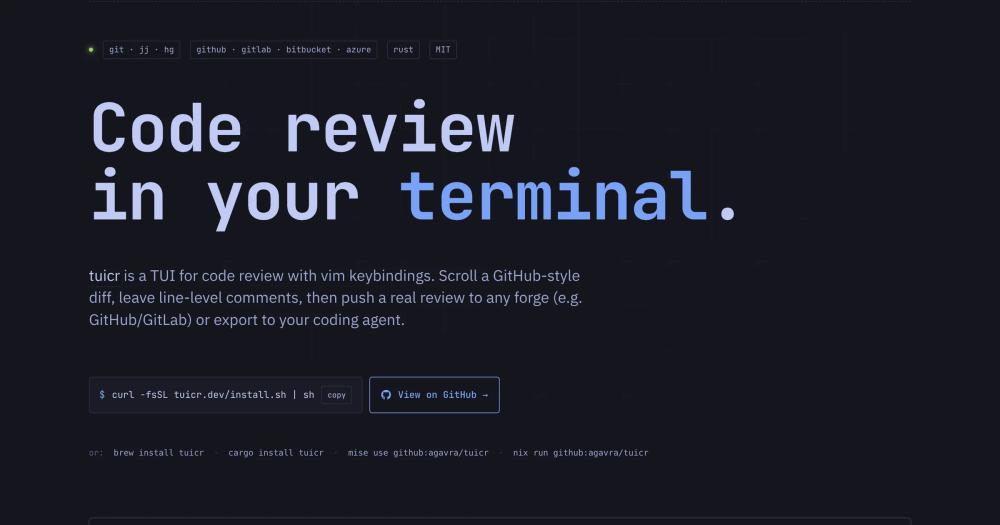
tuicr stands out from alternatives by offering a comprehensive terminal-based code review experience with deep integration for various VCS and export targets.
| Feature | tuicr | hunk | lumen | gh pr review | git diff |
|---|---|---|---|---|---|
| TUI diff viewer | ✅ | ✅ | ✅ | ❌ | ❌ |
| Write comments in the TUI | ✅ | ✅ | ✅ | ❌ | ❌ |
| Vim keybindings | ✅ | ❌ | partial¹ | ❌ | ❌ |
| Push inline review to GitHub | ✅ | ❌ | ❌ | partial² | ❌ |
| Push inline review to GitLab | ✅ | ❌ | ❌ | ❌ | ❌ |
| Push inline review to Bitbucket | ✅ | ❌ | ❌ | ❌ | ❌ |
| Agent-ready markdown export | ✅ | via CLI skill | ❌ | ❌ | ❌ |
| git | ✅ | ✅ | ✅ | ❌ | ✅ |
| jj | ✅ | ✅ | ✅ | ❌ | ❌ |
| Mercurial (hg) | ✅ | ❌ | ❌ | ❌ | ❌ |
| Single static binary | ✅ | (needs Node) | ✅ | ✅ | ✅ |
¹ Lumen has j/k navigation but no broader vim model (visual mode, {N}G, Ctrl-d/Ctrl-u, etc.).
² gh pr review posts approve/comment/request-changes at the review level only. No inline line comments.

Install and self-host#
curl -fsSL tuicr.dev/install.sh | shWhat it's built on#
- Languages
- Rust
FAQ#
How do I install tuicr?
You can install tuicr using a curl script, Homebrew, Cargo, Mise, or Nix, or by downloading pre-built binaries from GitHub releases.
What version control systems does tuicr support?
tuicr supports Git, Jujutsu (jj), and Mercurial (hg), automatically detecting the VCS in your repository.
How can I export my review comments?
You can push your review directly to GitHub, GitLab, or Bitbucket, copy structured markdown to your clipboard, or pipe it to stdout for scripting.
Are there vim keybindings in tuicr?
Yes, tuicr is built with comprehensive vim keybindings for navigation, selection, and commenting, including modal editing and search.
Can I customize the appearance of tuicr?
Yes, tuicr supports over 20 built-in themes and allows for custom themes via TOML configuration files, including syntax highlighting.
Similar open-source tools#
agent-toolkit-for-aws
Empower AI agents to build and manage AWS applications
no-mistakes
Automate clean PRs with gated Git pushes
DeepSeek TUI
A coding agent that lives in your terminal.
Goose
Run repeatable multi-step coding workflows from CLI or desktop
Node-RED
Low-code event-driven programming with a browser-based editor
Sentry
Real-time error tracking with performance monitoring and traces