

Who OpenTodo is for#
Families sharing household task lists
One person sets up OpenTodo on a home server or small VPS. Everyone else in the household gets an account and installs the PWA from the browser on their phone or laptop, no app store needed. Shared projects handle grocery lists, family chores, and renovation planning with comments and assignees.
Skip if:
If everyone in the household prefers a fully managed mobile-first app with no setup, Todoist or TickTick require less technical overhead to get started.
Developers and power users who work from the terminal
The `ot` CLI connects to any OpenTodo server over the REST API and supports dry runs, JSON output, and scripting. The MCP endpoint lets any AI coding assistant read and modify tasks. Keyboard shortcuts cover every action without touching the mouse, and Vim keybindings are available as an opt-in.
Skip if:
If your task workflow does not involve scripting or terminal access, the CLI and MCP integration add setup complexity with no benefit over the web app alone.
Privacy-focused individuals handling sensitive tasks
Optional E2E encryption covers task titles, notes, comments, and names on your devices before the data reaches the server. Combined with self-hosting on your own infrastructure, no third party can read your task content, even if the server is compromised or subpoenaed.
Skip if:
If you do not need E2E encryption and trust a managed service with your data, the self-hosting requirement adds overhead that Todoist or TickTick avoid.
Small teams replacing per-seat collaboration tools
A shared OpenTodo server covers project tracking with roles (viewer, editor, admin), threaded comments, assignees, an activity feed, and a Kanban board view. The server handles any number of team members at the same hosting cost, replacing per-seat fees from managed task management services.
Skip if:
Teams that need deep integrations with external ticketing systems (Jira, Linear) or advanced reporting features will find OpenTodo's scope limited to task management and collaboration.
The problem it solves#
Subscription task apps charge per person, so a household of four or a small team quickly pays more in annual fees than a simple server costs to run. Features like push reminders, shared projects, and advanced recurring rules are often locked behind paid tiers, and your data sits on the vendor's servers under their retention and privacy policies.
Exporting cleanly when you want to leave is the second problem. Moving tasks from Todoist or TickTick means going through a vendor-provided export, which rarely preserves recurring task rules, project membership, or comments in full. When pricing changes or a service shuts down, there is no clean migration path.
How it solves it#
Local-first offline sync
Every device keeps a full copy of your tasks and applies changes locally first, so the app works without a connection. Changes sync to your server and other devices when back online, with conflict-free field-level merging rather than version prompts. Adding and completing tasks on a flight or in a basement works the same as with a connection.
Single-container deployment with no external database
OpenTodo ships as one Docker container with a fully static binary under 25 MB. It uses SQLite for storage with no Postgres, Redis, or external service required. Idle memory usage runs at around 20 MB, so it fits on a Raspberry Pi or the cheapest VPS. One Docker run command gets you to a running server in under five minutes.
Optional end-to-end encryption per account
Turn on E2E encryption per account and your task titles, notes, comments, and names are encrypted on your devices before they reach the server. The server holds only ciphertext, so even a full backup or server access reveals nothing about task content. Encryption is off by default and opt-in per user.
Bring-your-own-AI with model choice
Connect an AI assistant using your own API key with Anthropic, OpenAI, Gemini, or a model running on your own network. The integration is off until the server owner enables it, every change is proposed for review before it is applied, and conversations stay on the device. An MCP endpoint also lets Claude Desktop, IDEs, or any MCP client read your tasks.
Natural language task capture in six languages
Quick add parses natural language into task fields offline: 'Call the dentist next Wed 3pm #Home @call p1 +30m' sets the date, time, project, label, priority, and estimate in one input. Six languages are supported (English, German, French, Spanish, Italian, Portuguese) and the parser runs on the device with no network call.
Shared projects with roles and threaded comments
Share any project with accounts on your server as viewer, editor, or admin. Members work offline and converge to the same state through your server. Each task supports threaded markdown comments with @mentions, assignees, and an activity feed showing who completed or rescheduled what across all shared projects.
Strengths and trade-offs#
Strengths
- No per-person subscription costThe only cost is the server you run OpenTodo on. A Raspberry Pi or a $5/month VPS is enough for a family or small team. A household of four or a team of ten all have accounts on one server at no additional cost, unlike Todoist or TickTick where per-seat pricing scales with headcount.
- Data portability via a single SQLite fileAll task data lives in one folder as a SQLite file, exportable as JSON any time from Settings or the REST API. Import works from the app's own export format, CSV, or other task managers' export files. No proprietary binary format, no cloud lock-in.
- Tiny footprint with no service dependenciesA container image under 25 MB with a statically linked binary and no runtime dependencies beyond a Docker host. No Postgres to maintain, no Redis to configure, no background services to monitor. The same binary also offers restore, MFA reset, and healthcheck subcommands.
- AI integration uses your own key and providerOpenTodo has no built-in AI vendor and never sends task data anywhere without your explicit configuration. You pick the provider (Anthropic, OpenAI, Gemini, or a local model) and supply the API key. The AI tier does not add a monthly cost on top of the app itself.
Trade-offs
- -Very new project with limited real-world validationThe repository was created in October 2026 and the project notes that some integrations (CalDAV with specific apps, SSO providers, app behavior on real phones) still need broader real-world testing. With 30 GitHub stars and 2 forks at launch, community-tested edge cases are limited. Users who rely on CalDAV sync with specific clients or SSO should test before fully committing.
- -AGPL-3.0 restricts reselling as a hosted serviceAGPL-3.0 lets you run OpenTodo for personal, family, or internal team use without restrictions. What it prohibits is offering a modified version of OpenTodo as a hosted service to third parties without releasing your changes under the same license. For self-hosters using it for their own tasks, this clause does not apply.
- -No managed-service tierOpenTodo is not offered as a hosted service. There is no cloud account to sign up for, and the only path to using it is running your own server or joining one someone you know runs. Users who prefer a zero-setup managed service should look at Todoist or TickTick instead.
OpenTodo vs alternatives#
OpenTodo vs Todoist
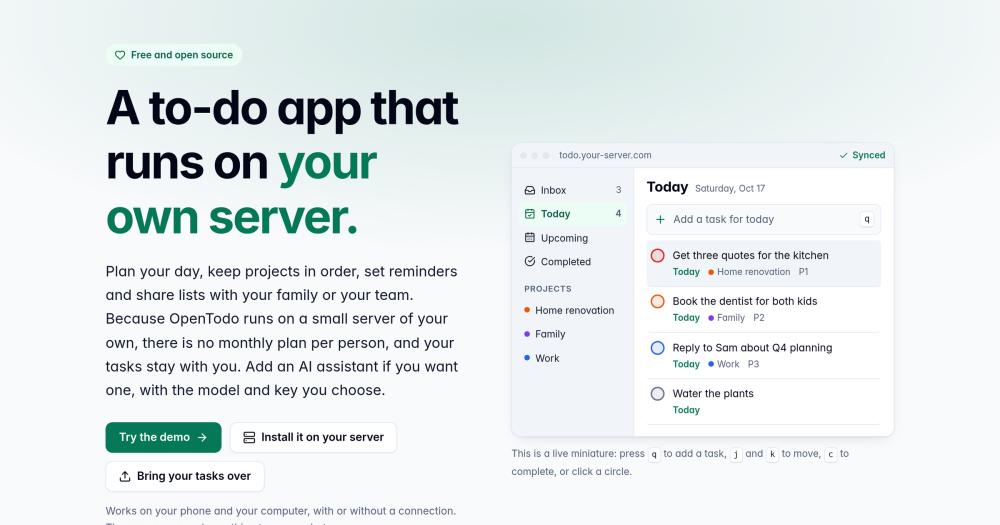
Both tools cover the core task management surface: inbox, today and upcoming views, recurring tasks, push reminders, labels, shared projects, and a Kanban board. The deciding factor is deployment model and cost structure.
| Feature | OpenTodo | Todoist |
|---|---|---|
| License | AGPL-3.0 | Proprietary |
| Self-hosting | Yes (Docker) | No |
| Pricing | Server cost only | Per-seat subscription |
| Offline | Full local-first | Limited |
| E2E encryption | Optional per account | Not offered |
| AI integration | Bring your own key | Proprietary add-on |
OpenTodo is the better choice when you want task data on your own server, shared across a family or small team at no per-person cost, with optional E2E encryption. Todoist is the better choice when you need a zero-setup managed service and a polished mobile experience without any server to run.
OpenTodo vs TickTick
TickTick and OpenTodo share a similar surface area: natural language task input, time-blocking calendar views, recurring tasks, push reminders, shared projects, and filters. Both support desktop and mobile with offline capability.
| Feature | OpenTodo | TickTick |
|---|---|---|
| License | AGPL-3.0 | Proprietary |
| Self-hosting | Yes (Docker) | No |
| Pricing | Server cost only | Subscription-based |
| CalDAV sync | Yes, two-way | No |
| E2E encryption | Optional per account | Not offered |
| AI integration | Bring your own key | Not offered |
OpenTodo is the better fit when two-way CalDAV sync, E2E encryption, and full data ownership are the deciding requirements. TickTick is the stronger choice when you want a zero-setup subscription service with no server to run or maintain.
Quick start#
Deploy OpenTodo with a single Docker command on any Linux server, VPS, or Raspberry Pi.
```bash
docker run -d --name opentodo -p 8080:8080 -v opentodo-data:/data ghcr.io/pixari/opentodo:0.6
```What it's built on#
- Languages
- GoJavaScriptTypeScript
- Frameworks
- React
FAQ#
Does OpenTodo work without an internet connection?
Yes. Every device keeps a full local copy of your tasks and applies changes immediately, whether connected or not. Tasks added or completed offline are queued and sync to the server and your other devices when you reconnect. The sync uses conflict-free field-level merging, so there are no version conflict prompts.
How do I install OpenTodo on my own server?
The quickest path is one Docker command: docker run -d --name opentodo -p 8080:8080 -v opentodo-data:/data ghcr.io/pixari/opentodo:0.6. Open the URL in a browser, create the owner account, and the server is ready. Docker Compose, Coolify, and Unraid installs are also documented on the project site.
Can I import tasks from Todoist or TickTick?
Yes. The project website offers guided migration flows from Todoist and TickTick. OpenTodo also accepts CSV files and other task managers' JSON exports, with a preview and duplicate detection before the import commits. How completely recurring task rules and comments transfer depends on what the source app exports.
What AI providers does OpenTodo support?
OpenTodo supports Anthropic (Claude), OpenAI, Google Gemini, and models running on your own network, all connected using your own API key. The AI integration is off by default and requires the server owner to enable it. Each user accepts what task data is sent to the provider before any data leaves the device. All conversations stay on the device.
Is OpenTodo available as a mobile app?
OpenTodo is a Progressive Web App you install directly from the browser on iPhone, Android, Mac, Windows, or Linux, with no app store required. It works offline and receives push notifications for reminders after installation. No separate native app download is needed.
Similar open-source tools#

rakazo
AI teammates you own: your keys, your model, your machine.

paperclip
Self-hosted AI agent management with org charts and budgets

invoiceninja
Self-hosted invoicing, expenses, and time tracking

knowledge-work-plugins
Open source AI plugins for knowledge workers in Claude

winmux
Project-based window manager for macOS with sidebar and tab groups

FckSignups
Open-source tools that work instantly, no signup required