Open Source Alternatives LogoOpen Source Alternatives
AlternativesBlogAdvertise
Open Source Alternatives LogoOpen Source Alternatives

Stay Updated

Subscribe to our newsletter for the latest news and updates about Alternatives

Open Source Alternatives LogoOpen Source Alternatives

Handpicked Open Source Alternatives to Paid Softwares

Product
  • Categories
  • Tag
  • Sign In
Resources
  • Blog
  • Collection
  • Submit
  • Advertise your tool
Company
  • Privacy Policy
  • Terms of Service
  • Refund Policy
  • Sitemap
Alternatives
  • Superhuman
  • Notion
  • Slack
  • Linear
  • Airtable
  • Wispr Flow
  • All alternatives
Copyright © 2026 All Rights Reserved.
Home/Categories/Product & Project Management/winmux
icon of winmux

winmux

Open source alternative to Magnet, Moom and BetterSnapTool

Manage macOS windows with a project-based, sidebar-first tiler that tiles automatically, groups tabs, and supports multi-monitor virtual desktops.

241 starsSwiftMITActive this week
Visit websiteGitHub repo
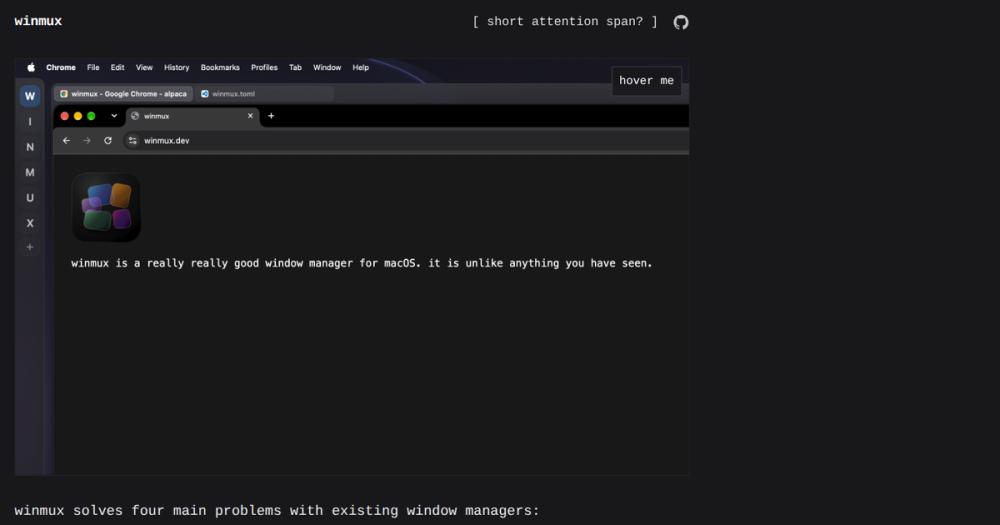
winmux hero: macOS window manager with sidebar-first project tiling
Contents
  1. 01Who winmux is for
  2. 02The problem it solves
  3. 03How it solves it
  4. 04Strengths and trade-offs
  5. 05winmux vs alternatives
  6. 06Install and self-host
  7. 07Tech stack
  8. 08FAQ
  9. 09Similar open-source tools
TL;DR

winmux is a project-based, sidebar-first window manager for macOS, built natively in Swift under the MIT license. It replaces paid commercial tools like Magnet, Moom, and BetterSnapTool by adding persistent workspace organization across projects, tab groups for stacking unrelated apps, intent zones for hover-based tiling, and multi-monitor virtual desktops with no ghost spaces. It installs via Homebrew cask, runs entirely on your machine, and migrates AeroSpace configs automatically on first launch. Best for macOS developers who context-switch between multiple client or project environments throughout the day.MIT · Swift · 241 stars · Active this week

who it's for

Who winmux is for#

Developers context-switching between multiple client projects

WinMux's project and workspace hierarchy keeps each client context isolated. Switching to a client A project shows its browser profile, terminal, and editor; the client B project has its own separate workspace set. The sidebar provides a persistent spatial view of what is open in each workspace.

Skip if:

Skip if you work within a single project context with a small number of windows. The project hierarchy adds structural overhead that simple snapping shortcuts handle more lightly for single-context workflows.

AeroSpace users adding a GUI sidebar and tab group layer

AeroSpace users who want a persistent visual workspace sidebar, tab groups, and intent zones without rebuilding their keybinding configuration can migrate in one launch. WinMux reads the existing AeroSpace config and imports shortcuts automatically, leaving the original config untouched.

Skip if:

Skip if you rely on AeroSpace-specific behaviors or CLI tooling not yet replicated in WinMux, or if a fully terminal-driven, SIP-independent workflow is your preference over a TOML-configured GUI app.

macOS developers managing multiple browser profiles per workspace

Single-tap modifier keybindings let you launch a named Chrome profile or workspace in under 2 seconds using Left or Right Option+Command combinations. Binding different browser profiles to different modifiers avoids the focus-switching friction of apps that are already running in another workspace.

Skip if:

Skip if you use a single browser profile or if your workflow does not require rapid switching between named browser contexts throughout the day.

Multi-monitor power users bothered by ghost spaces

WinMux treats each monitor as independent, letting each display select a workspace from the shared project pool via the sidebar. Ghost spaces (duplicate macOS Spaces appearing across monitors uninvited) are eliminated because WinMux workspaces are lightweight virtual views, not separate Spaces instances.

Skip if:

Skip if you need monitors locked to completely isolated workspace pools with no shared project hierarchy, or if you use only a single display.

the problem

The problem it solves#

macOS's built-in window management stops at basic Mission Control and manual resizing. Power users working across multiple projects, client contexts, and monitor setups need more: project-scoped workspaces that isolate browser profiles and terminal sessions per context, the ability to stack unrelated windows into tabbed groups without creating new macOS Spaces, and a persistent view of what is open and where without hunting through a pile of floating windows.

Paid tools like Magnet, Moom, and BetterSnapTool solve the single-window snapping problem but stop there. Switching from a client A coding context to a client B coding context means mentally tracking which windows belong to which context with no structural support from the window manager. Developers who keep multiple browser profiles, multiple terminal sessions, and multiple editors open in parallel end up with a disorganized desktop and no way to restore context after a reboot.

how winmux solves it

How it solves it#

Project-based workspace organization

Projects act as a parent container for workspaces, forming a hierarchy where each project has its own set of workspaces. Switch between projects as you switch client contexts, and the sidebar reflects the current project's workspaces immediately. Workspaces are automatically destroyed when they contain no windows, keeping the sidebar uncluttered.

Persistent sidebar with spatial awareness

A native Swift sidebar rail shows all open windows and spaces in real time with zero lag, always in sync with macOS Spaces. It rests as a compact rail and expands on hover; auto-hide is configurable for minimal footprint. On macOS 26 and newer, native Liquid Glass is enabled by default and a solid color chrome option is available for greater contrast.

Tab groups for stacking unrelated apps

Tab groups let multiple unrelated apps (Finder, a browser, a terminal) share the same screen footprint with browser-like tab behavior. Drag tabs between groups or across workspaces, rearrange tab order, and navigate with relative or absolute keybindings. No dedicated shortcut is needed to activate a tab.

Intent zones for hover-based tiling

Intent zones let you arrange, tile, and stack windows by hovering a dragged window over a zone, without memorizing a keyboard chord vocabulary. Shake a window horizontally while dragging to toggle between floating and tiling mode. Automatic tiling can be disabled globally or per window if you prefer manual layout.

Multi-monitor virtual desktops without ghost spaces

Each monitor independently selects a different workspace from the shared project pool via the sidebar. Monitors cannot attach to the same workspace simultaneously. Spaces behave as lightweight virtual views with no duplicate ghost spaces across monitors, solving a common macOS multi-monitor pain point.

Automatic AeroSpace config migration

WinMux detects your existing AeroSpace config on first launch and creates a new WinMux config by copying your keybindings and shortcuts, then filling in WinMux defaults for the sidebar and tab groups. Your AeroSpace config is left untouched. No manual editing needed to get started.

strengths · trade-offs

Strengths and trade-offs#

Strengths

  • MIT license with no subscription or purchase requiredWinMux is MIT licensed and installs via Homebrew cask at no cost. There is no subscription tier, no App Store purchase, and no cloud account. Unlike paid commercial window managers such as Magnet or Moom, you pay nothing to run it and there are no usage restrictions for commercial or team environments.
  • No System Integrity Protection bypass requiredWinMux is built on the AeroSpace virtualization framework and achieves full window management capability without requiring an SIP bypass. This is a meaningful security advantage over tiling tools that need macOS's core security layer disabled to function.
  • Zero-friction AeroSpace migration pathExisting AeroSpace users get an automatic config import on first launch. WinMux copies keybindings and shortcuts from the AeroSpace config and writes a new winmux.toml with WinMux defaults for the sidebar and tab groups. The transition requires no manual reconfiguration to get started.
  • TOML-based, version-controllable configurationAll behavior is configured through a plain TOML file at ~/.config/winmux/winmux.toml. Sidebar width, auto-hide, gap sizing, clock display, and keybindings are all file-editable and can be committed to a dotfiles repo and shared across machines.

Trade-offs

  • -App not notarized by AppleRelease builds are signed with the developer's Apple Development certificate but are not notarized by Apple. On first launch, macOS Gatekeeper will block the app and you must right-click and choose Open to proceed. This is a common characteristic of indie macOS apps distributed outside the App Store, but it is a friction point for users who expect notarized software.
  • -Early-stage project at v0.2.1 with 21 open issuesWinMux was created in March 2026 and carries 21 open GitHub issues at v0.2.1. It is actively developed but not yet feature-complete or polished for all workflows. Users who need a stable, mature window manager may prefer to wait for a more complete release or continue with BetterSnapTool or Moom in the interim.
  • -No pre-staging of empty workspacesWorkspaces that contain no windows are automatically destroyed; you cannot create an empty workspace in advance. Workflows that depend on pre-staging workspace layouts before opening apps do not map onto WinMux's model and would need a different organizational approach.
versus alternatives

winmux vs alternatives#

WinMux vs Magnet

Both tools manage macOS windows, but they solve different problems. Magnet focuses on individual window placement via keyboard shortcuts and drag-to-edge snapping. WinMux adds a structural layer above that: projects, workspaces, tab groups, and a persistent sidebar.

FeatureWinMuxMagnet
LicenseMIT (free)Proprietary (paid)
Workspace organizationProjects + workspacesNone
Tab groupsYesNo
SidebarYesNo
ConfigurationTOML fileGUI

Magnet is the better fit for users who want a lightweight, App Store-distributed window snapping layer with no configuration file. WinMux suits developers who need project-level workspace isolation and a visual sidebar for spatial awareness across all open windows.

WinMux vs Moom

Moom is a paid macOS window manager offering snap zones and keyboard shortcuts for window placement. WinMux does not center on the same preset layout approach, replacing it with dynamic project and workspace switching organized through the sidebar.

FeatureWinMuxMoom
LicenseMIT (free)Proprietary (paid)
Project workspacesYesNo
Tab groupsYesNo
ConfigurationTOML fileGUI

Moom is the stronger choice when preset-based, saved window arrangements are central to your workflow. WinMux fits workflows where context is defined by the project, with workspaces built and switched dynamically rather than pre-configured.

WinMux vs BetterSnapTool

BetterSnapTool is a paid Mac App Store window manager offering custom snap areas, keyboard shortcuts, and trigger corners. Like Magnet, it operates at the individual window level without workspace or project hierarchy.

FeatureWinMuxBetterSnapTool
LicenseMIT (free)Proprietary (paid)
Custom snap areasIntent zonesCustom snap areas
Project workspacesYesNo
Tab groupsYesNo
Config methodTOML fileGUI

BetterSnapTool is the better fit for users who want highly customizable snap zones through a GUI with no configuration file. WinMux fits macOS power users and developers who want workspace hierarchy, AeroSpace migration support, and TOML-based configuration under a free MIT license.


install · self-host

Install and self-host#

bash
Install WinMux via Homebrew cask, then run the xattr command to clear the quarantine flag macOS sets on the downloaded app.
```bash
brew tap ZimengXiong/homebrew https://github.com/ZimengXiong/homebrew
brew trust ZimengXiong/homebrew
brew install --cask winmux
xattr -cr /Applications/WinMux.app
```
tech stack · detected from GitHub

What it's built on#

Languages
Swift
frequently asked

FAQ#

Is WinMux free?

Yes. WinMux is MIT licensed and installs via Homebrew cask at no cost. There is no subscription, no App Store purchase, and no cloud account required. The app checks for signed updates from GitHub Releases automatically, also at no cost.

Does WinMux require disabling System Integrity Protection?

No. WinMux is built on the AeroSpace virtualization framework and achieves full window management without requiring an SIP bypass. This distinguishes it from some tiling tools that need SIP disabled to function at the window compositor level.

Can I migrate from AeroSpace to WinMux?

Yes. On first launch, WinMux detects your existing AeroSpace config and creates a new WinMux config by copying your keybindings and shortcuts, then filling in WinMux defaults for the sidebar and tab groups. You do not need to edit anything manually to get started, and your AeroSpace config is left untouched.

Why does macOS block WinMux on first launch?

WinMux release builds are signed with the developer's Apple Development certificate but are not notarized by Apple. macOS Gatekeeper shows a warning when you first open the app. To proceed, right-click WinMux.app and choose Open, then confirm in the dialog. After the first launch, macOS remembers your choice and the warning does not reappear.

How does WinMux handle multiple monitors?

Each monitor independently selects a workspace from the shared project pool via the sidebar. Monitors cannot be attached to the same workspace simultaneously, but they can be on the same project at the same time. Ghost spaces across monitors are eliminated because WinMux workspaces are lightweight virtual views, not separate macOS Spaces instances.

also worth a look

Similar open-source tools#

FckSignups

FckSignups

Open-source tools that work instantly, no signup required

2.9KTypeScriptGPL-3.0
meridian

meridian

Local work journal that logs your day and drafts your standup.

279RustMIT
rakazo

rakazo

AI teammates you own: your keys, your model, your machine.

1.9KTypeScriptApache-2.0
showmd

showmd

The most readable way to preview any .md file on macOS.

57SwiftMIT
Kanri

Kanri

Local-first Kanban board that stores all data in a JSON file

2KVueGPL-3.0
Taiga

Taiga

Agile project management for Scrum, Kanban, and hybrid teams

376CoffeeScriptAGPL-3.0

Repository

Stars
241
Forks
11
License
MIT
Latest
v0.5.3
Last commit
today
Last verified
Sep 6, 2026
Repo
ZimengXiong/winmux ↗

Additional details

Language
Swift
Open issues
21
Contributors
49
First release
2026

Categories

Product & Project ManagementDeveloper ToolsBusiness & Productivity

Tags

macOSDeveloper ToolsWorkflow Automation