

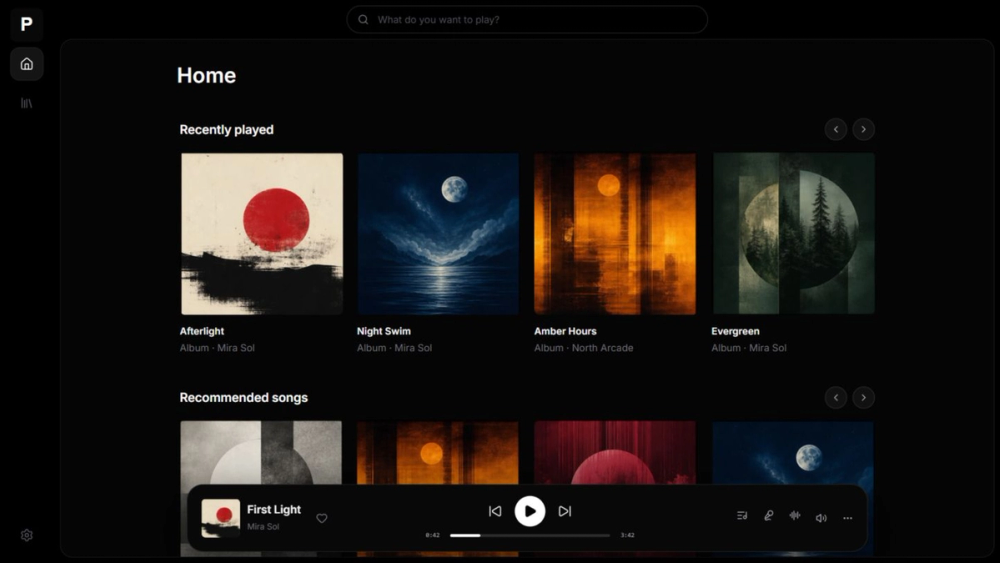
Who Parson is for#
Music collectors who own lossless or local audio files
People who have built a library of FLAC, ALAC, or other audio files and currently use a single-machine player can use Parson to serve that collection to every device in their home, without re-encoding files or routing through a cloud service.
Skip if:
If you do not already own audio files and rely on streaming platforms for discovery and playback, Parson does not provide a streaming catalog or editorial curation.
Roon or Plex users looking to cut subscription costs
Users paying for Roon's license or Plex Pass to manage a music-only library can migrate to Parson for zero ongoing cost. Parson's folder-based model removes the need for Roon's managed database or Plex's metadata scraping configuration.
Skip if:
If you depend on Roon's multi-room DSP management, Plex's video and photo library, or either service's mobile app ecosystem, Parson does not replicate those features.
Home server operators running privacy-first setups
Parson's no-analytics, no-upload design fits home lab setups where every application is evaluated for data handling. The GPL-3.0 license lets you audit the source directly. The README explicitly documents what data stays local and what reaches external services.
Skip if:
If your server is publicly accessible, review the security documentation at parson.dev/docs/accounts-privacy-security before deploying on an open port.
The problem it solves#
Most music owners hit the same wall. Cloud streaming services own the playback experience; when you cancel, access disappears. Single-machine desktop players do not serve files to other devices. Network music servers like Plex or Roon require accounts, subscriptions, or platform lock-in to work well.
Owning a music collection should mean choosing where it lives and which devices can reach it. The infrastructure for that should be free, open source, and not gated behind a paid service.
How it solves it#
Folder-based music library
Point Parson at any directory of audio files and it starts indexing. There is no database migration, metadata scraping wizard, or library import step. The folder is the library, and Parson reads it directly.
Cross-platform native apps
Desktop builds for Windows, macOS, and Linux bundle everything needed to run the server and player together. No separate server process is required for desktop use. A web player at port 1993 provides browser-based access from any device on the same network.
Docker server deployment
The official container image (ghcr.io/parsonlabs/parson:latest) uses host networking and mounts the music directory as a read-only volume. Versioned image tags are published alongside build provenance for pinned deployments.
Privacy-first data handling
Parson does not collect analytics or upload crash reports. Music files, playlists, playback history, and account data stay on infrastructure you control. External requests go only to optional services you choose to use, such as lyrics providers or update checks.
Rust backend with lossless audio support
The server backend is written in Rust, and the project's GitHub topics include 'lossless' and 'audio-streaming'. The development toolchain uses FFmpeg for audio format handling. Desktop builds package all dependencies so end users do not need to install them separately.
Strengths and trade-offs#
Strengths
- GPL-3.0, free to run with no feature tiersThe GPL-3.0 license means you can run Parson on your own hardware at no cost, modify it, and distribute modifications under the same license. There is no subscription and no free-tier-with-paid-upgrades model; all features are available without paying.
- No external account or internet dependencyParson works without a third-party account or active internet connection. It serves files locally without calling home for authentication. This contrasts with Plex, which requires a Plex account even for a local library.
- Actively maintained as of late 2026The last commit was pushed on 2026-10-12, roughly two and a half years after the project's March 2024 founding. Two open issues indicates a clean bug queue. Recent activity reduces the risk that a new adopter inherits an abandoned codebase.
- No telemetry, documented in the READMEThe README explicitly states that Parson does not upload analytics or crash reports, and that music, accounts, playlists, history, and recommendations stay on infrastructure you control. The absence of telemetry is documented, not just inferred.
Trade-offs
- -Small community and limited ecosystem131 stars and 7 forks means few third-party plugins, community guides, or alternative front-ends exist. Bug reports and feature requests depend on the core team. Users who need a broad plugin ecosystem or an active community forum should weigh this before adopting.
- -Self-hosted only, no managed cloud optionParson has no hosted service. Accessing your library from outside your home network requires exposing the server or setting up a VPN. Users who want music available everywhere without managing server infrastructure have no Parson-hosted alternative.
Parson vs alternatives#
Parson vs Plex
Plex is a widely adopted self-hosted media server that handles video, photos, and music from a single application. It is proprietary and requires a Plex account even for local playback.
| Feature | Parson | Plex |
|---|---|---|
| License | GPL-3.0 | Proprietary |
| Account required | No | Yes |
| Self-hosting | Yes | Yes |
| Music-only focus | Yes | No |
| Cost | Free | Free tier; Plex Pass for full features |
Parson covers music only, with no account requirement and no feature tiers. Its folder-based library skips the metadata scraping that Plex runs on setup. Plex is the better option when you need a single server for video, TV, and photos alongside music, or when you are already embedded in the Plex ecosystem with existing libraries and apps.
Parson vs Roon
Roon is a paid, proprietary music management system for audiophiles. It provides rich metadata, multi-room endpoint management, and DSP features through a dedicated server process called Roon Core.
| Feature | Parson | Roon |
|---|---|---|
| License | GPL-3.0 | Proprietary |
| Cost | Free | Paid subscription |
| Self-hosting | Yes | Requires Roon Core (local) |
| Library model | Folder-based | Managed metadata database |
Parson suits listeners who want their files served with minimal setup, no subscription, and full data ownership. Roon suits serious audiophiles who need multi-zone endpoint management, DSP processing, or editorial curation features. The two serve different categories of music listener, and users with an existing Roon setup who rely on its advanced features have little reason to migrate.
Quick start#
Self-hosting deploys the Parson server via Docker Compose using the official container image.
```bash
docker compose up -d
```What it's built on#
- Languages
- JavaScriptRustTypeScript
- Frameworks
- Next.jsReact
FAQ#
Is Parson free to use?
Yes. Parson is GPL-3.0 licensed and free to download, install, and self-host. There are no paid tiers, feature paywalls, or subscription fees. Desktop builds and the Docker image are available at no cost from the GitHub releases page.
Can I run Parson on a Linux server without a desktop environment?
Yes. The official Docker image (ghcr.io/parsonlabs/parson:latest) runs headlessly and does not require a graphical environment. Mount your music directory as a read-only volume and access the web player at port 1993 from any browser on your network.
Does Parson upload my music files or collect usage data?
No. The README states that Parson does not upload analytics or crash reports. Music files, playlists, playback history, and recommendations stay on infrastructure you control. External requests are limited to optional services you choose to use, such as lyrics and update checks.
How does Parson compare to Plex for a music-only library?
Parson is music-only and requires no account. Plex handles video, photos, and music but requires a Plex account for local use and a Plex Pass subscription for some audio features. For a music-only server with no account requirement or paywall, Parson is the simpler path.
What operating systems does Parson support?
Parson provides native desktop apps for Windows, macOS, and Linux. A Docker image covers headless server deployment. A web player is available for browser-based access on your local network. The GitHub topics also list Android, suggesting mobile support is planned or available.
Similar open-source tools#

stremio-web
Open source web UI for media streaming, powered by community addons.

iptv
136k+ public TV channels, free M3U playlists and EPG data

Jellyfin
Free open source media server for movies, TV, and music

Duckle
Self-hosted ETL on DuckDB with 385 connectors and no per-row billing.

touchHLE
High-level emulator for early iOS apps on modern platforms

Flutter
One codebase for mobile, web, and desktop. Native performance.