

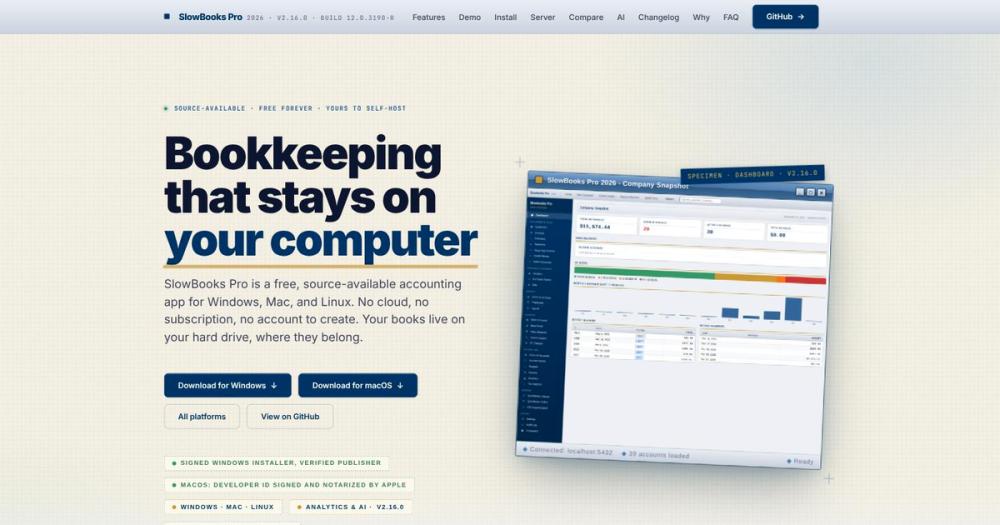
Who SlowBooks-Pro-2026 is for#
Small business owners replacing QuickBooks Desktop
Teams moving off QuickBooks Desktop due to pricing changes or abandoned activation servers can import existing data via IIF export, including invoices, bills, sales receipts, and deposit records. SlowBooks Pro covers the same core workflow: double-entry books, bank reconciliation, payroll, and financial reports.
Skip if:
You need multi-currency support or non-US payroll. Multi-currency is in the project's design work but is not yet a shipped feature; US payroll is the only automated compliance module currently available.
Freelancers and sole proprietors running local books
The desktop mode stores each company as a single SQLite file you can back up to any location. No subscription, no account creation, no cloud upload required. Invoices, estimates, bank reconciliation, and a Schedule C report cover most sole-proprietor needs.
Skip if:
You need a cloud-accessible portal for your accountant or clients. SlowBooks Pro is local-first by design; sharing access requires either the Server Edition or exporting reports manually.
Developers automating accounting workflows via API
The local REST API exposes 357 operations with self-generated documentation that ships with the installer. Developers can point an agent or script at the API to automate invoice creation, payment recording, or report generation. The app is explicitly designed for AI assistant integration.
Skip if:
You need a hosted, multi-tenant API endpoint. The REST API binds to localhost; external access requires the Server Edition or a reverse proxy setup.
Small offices serving multiple users on a LAN
The Server Edition runs from one Windows PC and lets every user access the books through a browser. Roles (admin, bookkeeper, read-only) and per-user audit attribution are built in. A startup task keeps the server running before any user logs in, and setup runs through a single PowerShell script.
Skip if:
You need native mobile apps or a cloud-hosted dashboard accessible from outside your office network. The Server Edition serves only your LAN by default; a TLS reverse proxy is documented but requires additional setup.
The problem it solves#
Accounting software built on subscription licensing or cloud-only storage puts small business owners in a precarious position. When a vendor raises prices, kills an older product version, or shuts down activation servers, the software you paid for stops working and your data becomes inaccessible or locked in a proprietary format.
This is not a hypothetical challenge: Intuit's activation servers for QuickBooks 2003 Pro have been offline since around 2017, making that version impossible to reinstall even with a valid paid license. Small business owners who relied on desktop accounting software for years found themselves forced onto subscription-based cloud products or into expensive upgrades. Migrating data out of a proprietary format requires either official export paths or community-built IIF parsers.
How it solves it#
Double-entry bookkeeping with automatic audit log
Every transaction posts to a double-entry ledger with automatic journal entries, a closing-date enforcement lock, and a tamper-evident audit log. The chart of accounts ships with a 50-account contractor setup out of the box, with full manual journal support for adjustments and a complete general ledger report.
US payroll with tamper-evident W-2, W-3, 940, and 941 forms
The full US payroll module handles deductions, garnishments, PTO tracking, employee onboarding, and a token-accessed employee portal. Every W-2, W-3, 940, and 941 PDF carries a SHA-256 content hash and audit ID in the footer so an auditor can verify the form has not been edited since generation.
Server Edition: multi-user LAN serving without Docker
The same signed Windows installer includes a Server Edition that turns one PC into an office-wide bookkeeping server. Users log in through a browser with role-based accounts (admin, bookkeeper, read-only), and a startup task keeps the books available before anyone logs in. No Docker, no containers: the Server Edition is a mode, not a separate SKU.
SimpleFIN bank feeds with no middleman
Bank transaction sync runs through SimpleFIN: you hold the bank credential, with no third-party server in the middle. Transactions arrive with automatic deduplication and bank rules that apply on import. OFX and QFX files, plus Chase and PayPal CSV formats, are also supported with auto-detection.
Migration from QuickBooks, Xero, and six other platforms
The Migrate Data page handles imports from Xero, MYOB, Sage 50, Wave, Zoho Books, and GnuCash, with every import dry-run verified against the trial balance before writing a single record. QuickBooks Desktop IIF files round-trip in both directions, including sales receipts and bills. QuickBooks Online OAuth sync is also available.
Strengths and trade-offs#
Strengths
- Source-available and free for personal and business useThe license permits self-hosting, modification, and internal business use at no cost, including enterprise deployments. You pay only for the server. Unlike QuickBooks Desktop, which requires annual renewal or moves to cloud-only subscription tiers, SlowBooks Pro carries no per-seat or per-year cost for self-hosters.
- Data stored in local SQLite files you controlEach company is one SQLite file under a known local path. Upgrades and uninstalls never touch the books. If the project were abandoned tomorrow, your data remains readable by any SQLite client. No export required, no vendor permission needed.
- Signed and notarized native installers for Windows and Apple SiliconThe Windows EXE signs with Azure Trusted Signing in CI; the Apple Silicon DMG is signed, notarized, and stapled by the project's Apple Developer ID. Both are self-contained: no Python, no Docker, no build step for end users. The macOS build is maintained by a dedicated contributor and tested on real hardware before each release.
- Self-documenting 357-operation local REST API with AI supportEvery installation exposes a fully documented local REST API, making the app scriptable and agent-operable. AI Insights supports seven providers (including Claude, OpenAI, Gemini, and xAI Grok), with API keys encrypted at rest. The API documentation ships with the app itself, not behind a cloud portal.
Trade-offs
- -Source-available license prohibits commercial resaleThe license allows self-hosting and running your business on the software, but you may not sell it, sublicense it, or offer it as a paid hosted service. If you plan to build a SaaS product on top of SlowBooks Pro, the license terms prohibit that. Personal, business, and internal enterprise use are explicitly permitted at no cost.
- -Payroll module covers US tax forms onlyThe payroll and HR module covers US-specific forms only: W-2, W-3, 940, and 941. There is no built-in payroll for UK, Canada, Australia, or other jurisdictions. International teams can use the double-entry bookkeeping and invoicing features, but will need a separate payroll tool for non-US compliance.
SlowBooks-Pro-2026 vs alternatives#
SlowBooks Pro vs QuickBooks Desktop
QuickBooks Desktop and SlowBooks Pro cover similar ground: double-entry bookkeeping, invoicing, payroll, inventory, and bank reconciliation for small businesses. The key difference is data ownership and licensing model.
| Feature | SlowBooks Pro | QuickBooks Desktop |
|---|---|---|
| License | Source-available, free for business use | Proprietary, annual subscription or one-time purchase |
| Self-hosting | Yes, local SQLite files | Yes, but requires Intuit activation servers |
| Multi-user | Built-in Server Edition (Windows LAN) | Requires multi-user edition upgrade |
| Payroll | US module included at no extra cost | Separate add-on, billed annually |
| Data format | SQLite (open, readable without the app) | QBW (proprietary) |
| REST API | 357-operation local API | QuickBooks API (QuickBooks Online only) |
SlowBooks Pro is the better choice when you want to own your data in a format that survives software discontinuation, avoid payroll add-on costs, or run in a Docker environment. The project was built specifically as a QuickBooks Desktop replacement after Intuit's activation servers went offline, so IIF import is a documented first-class migration path.
QuickBooks Desktop is worth considering when you need certified payroll reports, industry-specific editions (contractor, manufacturing), a well-established accountant ecosystem, or a product your bookkeeper already knows.
SlowBooks Pro vs AccountEdge
AccountEdge is a commercial desktop accounting product with payroll and inventory features, targeted at small businesses on Mac and Windows. Like QuickBooks Desktop, it charges for the software license and annual updates.
| Feature | SlowBooks Pro | AccountEdge |
|---|---|---|
| License | Source-available, free | Proprietary, paid license |
| Platform | Windows, Mac (Apple Silicon), Linux (Docker) | Mac and Windows |
| Self-hosting | Yes, local or Server Edition | Yes, local desktop |
| Payroll | US module included | US payroll included (with plan) |
| Source access | Available on GitHub | Closed source |
| Multi-user server | Built-in, browser-based | Separate network edition |
SlowBooks Pro covers the core AccountEdge use case at no licensing cost, with the added option of a self-hosted multi-user server that AccountEdge's standard desktop model does not include. AccountEdge is the safer choice when you need long-term commercial vendor support, a product with an established accountant network, or industry-certified payroll filing from a dedicated commercial provider.
Quick start#
Self-hosting on Linux or Intel Mac uses Docker Compose with a built-in PostgreSQL database.
```bash
git clone https://github.com/VonHoltenCodes/SlowBooks-Pro-2026.git
cd SlowBooks-Pro-2026
docker compose up
```What it's built on#
- Languages
- JavaScriptPython
- Frameworks
- FastAPI
- Databases
- PostgreSQL
FAQ#
Is SlowBooks Pro really free?
Yes, for self-hosted use. The source-available license permits personal, educational, and internal business use at no cost, including full enterprise deployments. You may not sell it or offer it as a paid hosted service, but running it for your own business has no fee.
Does SlowBooks Pro support multiple users?
Yes. The Server Edition is built into the standard installer for Windows. It converts the app into a LAN-accessible server where users log in through a browser with assigned roles (admin, bookkeeper, or read-only). Each action is attributed to the logged-in user in the audit trail.
Can I migrate from QuickBooks Desktop to SlowBooks Pro?
Yes. SlowBooks Pro imports QuickBooks IIF export files, including invoices, bills, cash sales, and deposit records. A QuickBooks Online OAuth connection can also sync data directly. A migration guide with dry-run verification is included in the project documentation.
What license does SlowBooks Pro use?
SlowBooks Pro uses a source-available license, not an OSI-approved open source license. You may self-host, modify, and run the software for personal, educational, or internal business purposes at no charge. The restriction is commercial resale: you may not sell the software or offer it as a paid hosted service.
Does it run on Mac and Linux?
Yes. A signed and notarized DMG is available for Apple Silicon Macs (M1 and later). Intel Macs use the Docker path. Linux deployments use Docker Compose with a PostgreSQL database, and open on port 3001. All installation methods use the same codebase.
Similar open-source tools#

invoiceninja
10,292 GitHub starsSelf-hosted invoicing, expenses, and time tracking
Alternative to QuickBooks Online

MiroFish
80,112 GitHub starsMulti-agent simulation engine that predicts real-world outcomes

FckSignups
4,477 GitHub starsOpen-source tools that work instantly, no signup required

securo
4,049 GitHub starsSelf-hosted money manager with bank sync and AI agents.
Alternative to Monarch Money

OpenCompany
1,008 GitHub starsSelf-hosted AI agent canvas for every business function
Alternative to Microsoft Copilot Studio

Well
345 GitHub starsRetrieve invoices from email automatically, self-hosted and free
Alternative to Expensify