
Who WolfCut is for#
Short-form content creators editing clips for social media
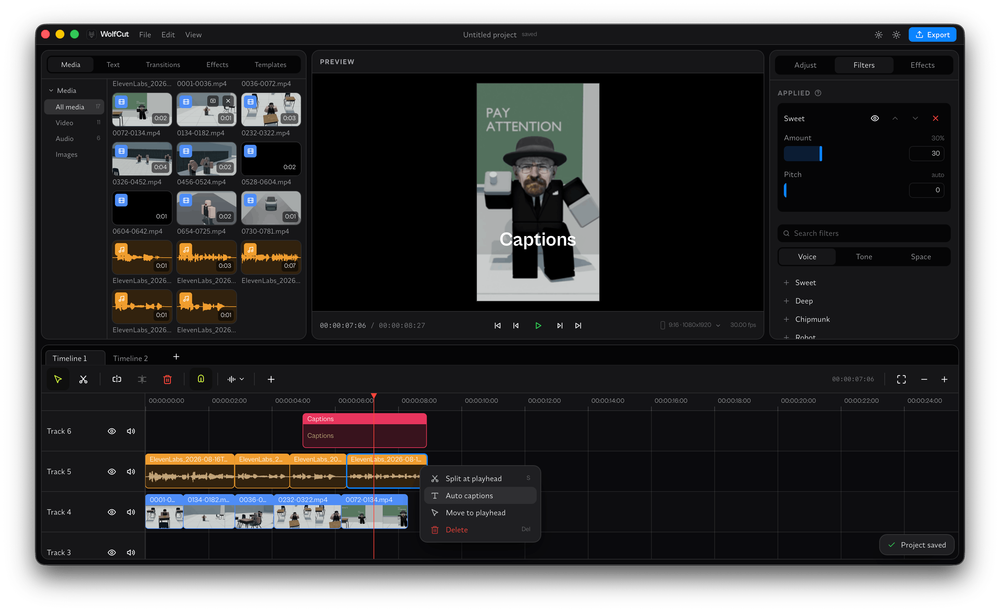
WolfCut covers the core short-form editing workflow: multi-track timeline, voice filters, and auto-captions. Creators who use CapCut mainly to trim clips, add captions, and apply a simple audio effect can replicate that workflow in WolfCut without the watermark or subscription.
Skip if:
Creators who rely on CapCut's built-in library of effects, stickers, transitions, or green screen tools will find WolfCut's current alpha feature set too limited for their workflow.
Privacy-conscious editors handling sensitive or client footage
WolfCut processes all footage locally. No video or audio is sent to a remote server during captioning or export. Client footage never leaves your machine, unlike VEED.IO or CapCut, which process media server-side.
Skip if:
Editors who need cloud storage, multi-device access, or team collaboration features will not find those capabilities in WolfCut, which has no cloud component.
Linux users who need a desktop video editor
WolfCut runs natively on Linux as a Tauri application and is one of the few free video editors targeting Linux as a first-class platform. CapCut has no official Linux client and VEED.IO requires a browser with no offline path.
Skip if:
Linux users who need a mature, feature-complete editor with broad export format support and GPU acceleration should consider DaVinci Resolve or Kdenlive while WolfCut matures.
Developers contributing to an early-stage Tauri project
WolfCut is built with Tauri (Rust) and React (TypeScript), a modern stack for native desktop apps. The project is actively seeking contributors and points to a GitHub Discussion for onboarding. With a small codebase and daily pushes, new contributors have a clear surface area to work on.
Skip if:
Developers wanting an established contributor workflow with a full test suite, triage process, and issue backlog should look elsewhere; WolfCut is at an early organizational stage.
The problem it solves#
Consumer video editors have moved to a subscription model where the basic free tier is deliberately limited. CapCut adds watermarks to exports unless you subscribe. VEED.IO caps resolution and download quality on free accounts. Adobe Express restricts the template and asset library behind a paid plan. Canva free-tier video exports are watermarked or downgraded.
For content creators making clips, short-form videos, or social media content, this creates a constant ceiling: the tool works until you need to export clean footage, at which point you either pay or accept a degraded result. Self-hosted or locally installed tools sidestep this entirely, but most video editors have no offline path at all.
How it solves it#
Multi-track timeline
Arrange video and audio across multiple independent tracks on a single timeline. Layers clips, audio, and effects without bouncing down to a single track first. Standard in desktop editors like DaVinci Resolve and Premiere, but absent from most browser-based tools like VEED.IO.
Voice filters via ffmpeg
Applies audio effects and voice filters using ffmpeg, an industry-standard open source media processing library. Runs locally without uploading audio to a cloud service, keeping voice recordings private. Works on any audio track in the timeline.
Local auto-captions via whisper.cpp
Transcribes speech and generates captions directly on your device using whisper.cpp, a local implementation of OpenAI's Whisper speech recognition model. No audio leaves your machine and no API key is required. Supports the languages covered by Whisper's base models.
Save and reuse templates
Save video compositions as reusable templates and apply them to new projects. Avoids rebuilding common layouts from scratch each session. The roadmap plans a community template registry similar to npm, though that feature is not yet shipped in the current alpha.
No watermarks on export
All exports are clean with no watermarks, no branded end cards, and no quality downgrade on free accounts. This is a hard guarantee in the codebase, not a paid unlock. Directly addresses CapCut's behavior of appending its watermark to free exports.
Cross-platform native app
Installs and runs natively on Windows (tested), macOS (tested), and Linux. Built with Tauri (Rust plus a native WebView), so it uses system resources efficiently rather than bundling a full Chromium instance. Linux support covers a platform where CapCut has no official client.
Strengths and trade-offs#
Strengths
- No account or subscription requiredDownload and run WolfCut with no sign-in, no email address, and no subscription tier. Commercial editors like CapCut and VEED.IO require accounts to save projects or access features. WolfCut starts editing immediately without any registration step.
- Local-only processingVideo files, audio tracks, and auto-captions are all processed on your device using ffmpeg and whisper.cpp. Nothing is uploaded to a server. For creators handling client footage or sensitive content, this eliminates the data handling risk that comes with browser-based editors.
- MPL-2.0 license with no paywallLicensed under Mozilla Public License 2.0, which allows personal and commercial use of the application. You can create and distribute content without restriction. No premium tier sits behind the free download, and no feature is locked to a paid plan.
- Actively maintainedFirst committed in August 2026 and already at version 0.2.0 with a functional core editing pipeline. The repository shows daily pushes and a detailed roadmap with specific planned features. Early-stage but clearly under active development with a Discord community.
Trade-offs
- -Alpha pre-release stabilityWolfCut is at version 0.2.0 and self-describes as pre-release alpha. The README explicitly encourages users to download builds and find where the application breaks. Crashes, missing features, and rough edges are expected. Not suitable for professional or client work where losing a project would be costly.
- -Very young project with a small communityThe repository was created in August 2026 and had 142 stars and 4 forks at time of writing. Third-party tutorials, documentation, and community support do not yet exist. Support means reading the README or joining the Discord server. Contributors are the primary testers.
- -Effects and transitions not yet shippedThe roadmap lists a scalable effects and transitions library, noise cancellation, auto reframe, and object tracking as future features. The current alpha does not include the variety of visual effects, stickers, or preset transitions that CapCut provides. Creators whose workflow depends on ready-made effects will find the tool limited at this stage.
WolfCut vs alternatives#
WolfCut vs CapCut
CapCut is the dominant free consumer video editor, but its free tier exports carry a watermark and require a ByteDance account. WolfCut targets the same audience (social media creators and clippers) with a similar multi-track editing workflow, no account requirement, and no watermarks.
| Feature | WolfCut | CapCut |
|---|---|---|
| License | MPL-2.0 | Proprietary |
| Watermarks | None | Yes (free tier) |
| Account required | No | Yes |
| Desktop app | Yes (native, Tauri) | Yes |
| Auto-captions | Yes (local, whisper.cpp) | Yes (cloud) |
| Voice filters | Yes (ffmpeg) | Yes (proprietary) |
| Linux support | Yes | No |
| Cost | Free | Freemium |
| Stability | Alpha (v0.2.0) | Production |
WolfCut is the better choice when you need watermark-free exports at no cost, want footage to stay local rather than pass through a third-party server, or are on Linux where CapCut has no official client. CapCut is still the stronger choice for creators who need its library of effects, stickers, and transitions, or who want cloud backup and mobile editing across devices.
WolfCut vs VEED.IO
VEED.IO is a browser-based video editor targeting the same short-form content use case. Its free tier limits export quality and adds a VEED watermark. WolfCut runs entirely offline as a desktop app: no browser dependency, no upload step, and no resolution cap.
| Feature | WolfCut | VEED.IO |
|---|---|---|
| License | MPL-2.0 | Proprietary |
| Offline use | Yes | No |
| Auto-captions | Yes (local, free) | Yes (cloud, paid tier) |
| Watermarks | None | Yes (free tier) |
| Cost | Free | Freemium ($18+/mo for watermark-free) |
| Stability | Alpha (v0.2.0) | Production |
WolfCut is the better fit for creators who want to edit offline, keep footage off third-party servers, or avoid VEED.IO's paywall for clean exports. VEED.IO is worth considering when you need browser-based access from any device, team collaboration, or its library of branded templates and assets.
What it's built on#
- Languages
- PythonRustTypeScript
- Frameworks
- React
- Tooling
- FFmpeg
FAQ#
Is WolfCut free to use?
Yes. WolfCut is licensed under MPL-2.0 and free to download and use without any subscription or paid tier. There is no premium unlock, no watermark on exports, and no usage cap. The cost is zero for personal and commercial use alike.
Does WolfCut add watermarks to exported videos?
No. WolfCut explicitly guarantees no watermarks ever on any export. This is its primary differentiator from CapCut, which watermarks free-tier exports, and from VEED.IO, which watermarks or quality-degrades exports on the free plan. All WolfCut exports are clean regardless of use.
What platforms does WolfCut run on?
WolfCut runs on Windows (tested), macOS (tested), and Linux. It is a native desktop application built with Tauri, so it installs as a regular desktop app. Download the binary for your platform from the GitHub Releases page. No account or browser required.
Is WolfCut ready for production video editing work?
Not yet. WolfCut is at version 0.2.0 and self-describes as alpha and pre-release. The core editing pipeline is functional, but crashes and rough edges are expected. The project encourages users to test builds and report where things break. Use it for personal projects and experimentation, not for client deliverables where losing work would be a problem.
Does WolfCut support automatic captions?
Yes. WolfCut uses whisper.cpp, a local implementation of OpenAI's Whisper speech recognition model, to generate captions directly on your device. No audio is sent to a remote service. Caption text highlighting with timestamp sync is listed on the roadmap but is not yet shipped in the current alpha.
Similar open-source tools#

OpenCut
Open source video editing in your browser, free forever

auto-subs
Local-first AI subtitles for DaVinci Resolve and Premiere Pro.

garden-skills
Production-ready agent skills for Claude Code, Cursor, and Codex

image-optimizer
Free desktop image optimizer. Files stay on your machine.

pdfcn
React PDF components, install with the shadcn CLI, MIT licensed
google-timeline-visualizer
Turn Google Timeline exports into animated travel videos