

Who auto-subs is for#
Video editors captioning long-form content
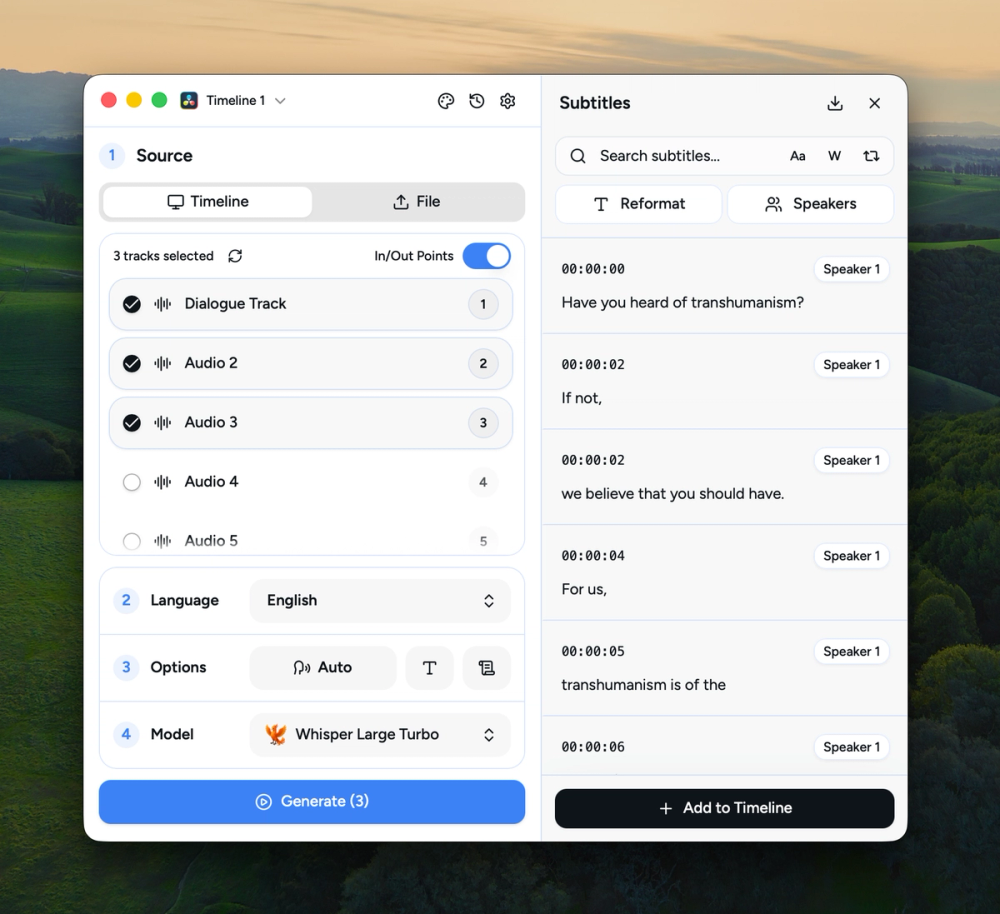
Editors producing interviews, documentaries, or tutorial videos can transcribe a full timeline in minutes, then push styled subtitles directly into DaVinci Resolve or Premiere Pro without leaving the editing environment. Speaker diarization labels each voice separately so subtitles can be styled per speaker.
Skip if:
If your workflow is entirely browser-based and you do not use a desktop NLE, AutoSubs has no browser component to connect to.
Content creators working in multiple languages
Creators who produce multilingual content can pick specialist models for their language: GigaAM for Russian, Moonshine for Arabic, Chinese, Japanese, and Korean, or Canary for European languages. This avoids the accuracy drop that general models show on non-English audio.
Skip if:
If you only produce English-language content and prefer to avoid installing desktop software, a managed cloud subtitle service will be simpler to start with.
Privacy-conscious creators handling sensitive footage
Journalists, legal professionals, or corporate video producers working with footage that cannot leave the building can transcribe and subtitle entirely on their own machine. No account is required, no footage is uploaded, and no third-party service processes the audio.
Skip if:
If your footage is not sensitive and you prefer a fully managed service with no local setup, cloud subtitle tools will be simpler to operate.
Developers building local AI video pipelines
AutoSubs exposes a CLI for command-line usage, making it scriptable as part of automated video processing pipelines. The MIT license allows commercial integration without restriction, and all transcription runs offline so pipelines do not depend on external API uptime.
Skip if:
If you need a REST API or server-side transcription service rather than a desktop tool, AutoSubs is not the right fit. A self-hosted Whisper API server is a better match for that use case.
The problem it solves#
Adding subtitles to video is one of the most time-consuming parts of post-production. Manual captioning requires transcribing every spoken word by hand and syncing timestamps frame by frame. Automated cloud services like VEED.IO, Happy Scribe, and Rev.com speed up the process, but they come with recurring subscription or per-minute fees, and your footage must leave your machine to be processed on their servers.
For creators working with sensitive content, or anyone who cannot afford ongoing SaaS fees, cloud-based subtitle tools present a real challenge. Many video editors using DaVinci Resolve or Adobe Premiere Pro face a broken workflow: they export a clip, upload it to a web app, download the SRT file, and manually re-import it. That round-trip adds friction to every revision and disconnects the captioning step from the editing timeline where it belongs.
How it solves it#
On-device AI transcription
Runs Whisper, Moonshine, Parakeet, SenseVoice, Canary, Cohere, and GigaAM models entirely on your machine using whisper-rs and ONNX Runtime. No audio or video is sent to external servers. Models are downloaded on demand from the in-app Model Manager.
Direct NLE integration
Connects natively to DaVinci Resolve, Adobe Premiere Pro, and After Effects. In Resolve, subtitles are written back to your timeline as styled text. In Premiere Pro, they appear as caption tracks; in After Effects, as SRT-sourced text layers.
Speaker diarization
Identifies and labels different speakers automatically, letting you style each speaker's subtitles independently. The diarization model (approximately 40 MB) is downloaded separately and user-selectable from the Model Manager, alongside a Silero VAD model for voice activity detection.
100+ language transcription and translation
Supports transcription across 100+ languages and can translate content into other languages in the same pass. Coverage depends on the chosen model: Whisper large-v3 covers the broadest multilingual range; specialist models like GigaAM handle Russian and Central Asian languages that general models handle poorly.
Cross-platform desktop app
Runs on macOS (Apple Silicon and Intel), Windows (via Vulkan and DirectML), and Linux (Debian/Ubuntu and Fedora/openSUSE). Install via native package installers or Homebrew on macOS. A CLI is also available for command-line and scripted workflows.
Customizable subtitle styles
Create custom subtitle styles with color and effects presets, or choose from included templates. Speaker diarization lets you apply a distinct visual style to each detected speaker in the same video, so viewers can follow who is speaking at a glance.
Strengths and trade-offs#
Strengths
- No cloud dependency: footage stays on your machineAll transcription models run locally via whisper-rs and ONNX Runtime. Your footage is never uploaded to a server. Unlike VEED.IO, Happy Scribe, or Rev.com, AutoSubs processes video privately on your own hardware, with no account required and no per-minute billing.
- Native timeline integration with DaVinci Resolve and Premiere ProUnlike standalone subtitle apps, AutoSubs writes results directly back to your editing timeline. Styled subtitles appear in Resolve or Premiere Pro without a manual SRT import step, keeping the captioning workflow inside your existing editing environment.
- MIT licensed with no subscription feeThe core application is MIT licensed. Once installed, there is no subscription, no usage cap, and no per-video fee. You can use it commercially without restriction. The only exception is the optional MMS forced-alignment weights, which carry a CC BY-NC 4.0 license for noncommercial use only.
- Wide model selection with on-demand downloadsThe in-app Model Manager lets you download any of seven model families (Whisper, Moonshine, Parakeet, SenseVoice, Canary, Cohere, GigaAM) at the size that matches your hardware. A 60 MB Moonshine tiny model works on a 1 GB RAM device; a 3.1 GB Whisper large-v3 delivers top accuracy on a more capable machine.
Trade-offs
- -Larger models require significant RAMAccuracy and memory requirements scale together. Whisper large-v3 needs approximately 10 GB of RAM; the large-v3-turbo variant needs 6 GB. On devices with 4 GB or less, you are limited to smaller models (tiny, base) with lower accuracy. This makes AutoSubs less practical on low-spec machines.
- -235 open GitHub issuesThe repository has 235 open issues, which is high relative to its 259 forks. This suggests either a fast-growing user base filing bugs and feature requests, or rough edges in specific workflows. Review the issue tracker before depending on less common features or edge-case language support.
- -Integration constraints with DaVinci Resolve and Adobe appsThe DaVinci Resolve integration requires the Blackmagic Design installer, not the Mac App Store version. The Adobe integration works via a bundled CEP extension and supports only Premiere Pro and After Effects, not other Adobe apps.
auto-subs vs alternatives#
AutoSubs vs VEED.IO
VEED.IO is a browser-based video editing and subtitle generation service. Both tools generate subtitles from video, but from different deployment models: VEED.IO is cloud-hosted, AutoSubs is a local desktop application.
| Feature | AutoSubs | VEED.IO |
|---|---|---|
| License | MIT (open source) | Proprietary |
| Deployment | Desktop, on-device | Cloud, browser-based |
| Data privacy | All processing on-device | Footage uploaded to cloud servers |
| NLE integration | DaVinci Resolve, Premiere Pro, After Effects | None |
| Pricing | Free (self-installed) | Paid subscription |
AutoSubs is the better choice when you work in DaVinci Resolve or Premiere Pro, need to keep footage off third-party servers, or want to avoid recurring subscription costs. VEED.IO is worth considering when you need a fully browser-based workflow with no software to install, or when its built-in video templates and direct social export features matter more than NLE integration.
AutoSubs vs Happy Scribe
Happy Scribe is a cloud-based transcription and subtitle service aimed at journalists and media professionals. Both tools produce accurate multilingual subtitles, but Happy Scribe processes content on its servers and charges per use.
| Feature | AutoSubs | Happy Scribe |
|---|---|---|
| License | MIT (open source) | Proprietary |
| Processing | On-device | Cloud |
| Pricing | Free | Paid |
| Speaker diarization | Yes | Yes |
| NLE integration | Yes | None (SRT download only) |
AutoSubs wins on cost and data privacy: there are no usage fees and your audio is never sent to external servers. Happy Scribe is the better choice when you need a human review option for verbatim accuracy in legal or journalism contexts, or when you do not use a desktop video editor and prefer a web-based workflow.
AutoSubs vs Rev.com
Rev.com is a professional transcription service offering AI-powered and human-reviewed transcripts. It is widely used in legal, journalism, and corporate contexts where accuracy is a compliance requirement.
| Feature | AutoSubs | Rev.com |
|---|---|---|
| License | MIT (open source) | Proprietary |
| Processing | On-device | Cloud |
| Pricing | Free | Paid |
| NLE integration | DaVinci Resolve, Premiere Pro, After Effects | None |
| Turnaround | Real-time (local) | Variable |
AutoSubs is the better choice for video editors who need fast on-device transcription with direct timeline integration and no per-use cost. Rev.com is the better choice when legal admissibility, verbatim human accuracy, or compliance requirements make human-reviewed transcripts necessary and real-time processing is not a priority.
Quick start#
Install AutoSubs on macOS using Homebrew.
```bash
brew install --cask auto-subs
```What it's built on#
- Languages
- C++JavaScriptLuaPythonRustTypeScript
- Frameworks
- React
- Tooling
- Rollup
FAQ#
Is AutoSubs free to use?
Yes. AutoSubs is MIT licensed and free to download and run on your own machine with no subscription or per-video fee. The core transcription models are also free to download from the in-app Model Manager. The optional MMS forced-alignment weights are licensed separately under CC BY-NC 4.0, which permits noncommercial use only.
Does AutoSubs send my video to the cloud?
No. All transcription runs on-device using local model files downloaded to your machine. Your audio and video never leave your device. This makes AutoSubs suitable for sensitive footage that cannot be uploaded to third-party servers.
Which video editing software does AutoSubs support?
AutoSubs integrates natively with DaVinci Resolve, Adobe Premiere Pro, and After Effects. It also works as a standalone app for any video or audio file, exporting subtitles as SRT, plain text, or clipboard copy. Note that the DaVinci Resolve integration requires the Blackmagic Design installer, not the Mac App Store version.
Can AutoSubs transcribe languages other than English?
Yes. AutoSubs supports transcription and translation across 100+ languages depending on the model chosen. Whisper multilingual models cover the broadest range. Specialist models include Moonshine for Arabic, Chinese, Japanese, and Korean; GigaAM for Russian and Central Asian languages; and Parakeet and Canary for 25 European languages plus Russian and Ukrainian.
What are the system requirements for AutoSubs?
AutoSubs runs on macOS (Apple Silicon and Intel), Windows, and Linux. RAM requirements depend on the model: the smallest models (60 to 80 MB) run on devices with 1 GB available RAM. The Whisper large-v3 model requires approximately 10 GB of RAM. Most mid-range laptops handle the medium Whisper model (1.5 GB size, 5 GB RAM) without difficulty.
Similar open-source tools#

whishper
Local speech-to-text transcription and subtitling with a web UI

Concat
Watermark-free CapCut alternative for desktop video editing

God's Eye View
Real-time global intelligence on a 3D globe

presenton
Self-hosted AI slide generator with BYOK support and PPTX export.

inspo
Real production sites as design reference for AI coding agents

modly
Generate 3D models from images or prompts, entirely offline