

Who pdfcn is for#
React SaaS teams generating invoices or receipts
pdfcn provides pre-built invoice templates (corporate, minimal) that you drop into your billing flow. Components like page header, key-value, and table are exactly the building blocks an invoice needs, and you own the code so you can brand them to match your product.
Skip if:
Your document volume is very low and you prefer a hosted no-code tool; pdfcn requires frontend development work to integrate.
Frontend developers building reporting features
Financial reports and data summaries built with pdfcn compose tables, sections, and key-value grids into consistent multi-page documents. The shadcn CLI workflow means you can add reporting components without changing your build setup.
Skip if:
Your reports are highly data-dense with complex custom chart types; pdfcn's component library is still early and may not cover every visualization need.
Teams migrating from paid PDF generation APIs
pdfcn is a drop-in replacement strategy for services like DocRaptor or CraftMyPDF that charge per document and process data server-side. The migration path is rebuilding your document templates as React components, which gives you full control over output and eliminates per-call costs at volume.
Skip if:
Your current API integration generates documents from server-side templates without a React frontend; pdfcn requires a React rendering environment.
shadcn/ui users adding document generation
For teams already using shadcn/ui, pdfcn is zero-friction to add: the registry format and CLI command are identical. You get PDF generation without adopting a new toolchain or API dependency.
Skip if:
You need PDF features beyond structured document layouts, such as form filling, digital signatures, or PDF annotations.
The problem it solves#
PDF generation in web applications is a persistent pain point. Browser print dialogs produce inconsistent layouts, HTML-to-PDF conversion libraries often require abandoning the React component model, and server-side rendering approaches add infrastructure complexity. Teams building invoicing features or financial reports end up choosing between brittle workarounds and paid APIs.
Commercial PDF generation services charge per document or per API call, which makes high-volume use expensive fast. More importantly, they require sending document data to a third-party server, creating compliance challenges for anything containing financial or personal information. Most services are also renderer-locked: you describe layouts in their DSL or template format with no way to own or extend the output pipeline.
How it solves it#
Two rendering bases: Takumi and Forme
pdfcn supports two open source renderers: Takumi and Forme. You pick the one that fits your stack and switch without rewriting components. Each renderer handles JSX-to-PDF conversion server-side, so you get consistent output across your documents.
shadcn/ui CLI workflow
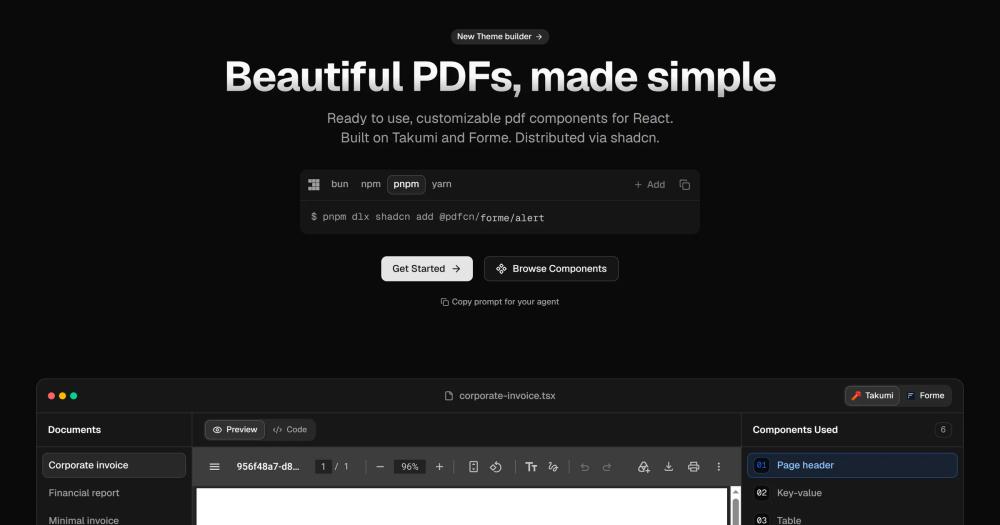
Components are distributed through the shadcn registry format, using the same `pnpm dlx shadcn add` command you already know. You add only the components you need, own the code entirely, and update or modify them without a dependency bump.
Zero configuration required
pdfcn works out of the box with sensible defaults. No renderer configuration, no PDF engine setup, no build tooling changes beyond adding the components. One CLI command and you are generating PDFs.
Composable document components
Documents are built from focused React components: page headers, key-value pairs, tables, sections, text blocks, and page footers. Each component maps to a specific document element, and you compose them in JSX like any other React UI.
Live component previews in documentation
Every component and block in the pdfcn documentation renders a live PDF preview alongside the code. You can see the exact output before adding a component to your project.
Pre-built document templates
pdfcn ships with full document templates including a corporate invoice, financial report, and minimal invoice. Each template shows which components are composed and provides a starting point for common document types.
Strengths and trade-offs#
Strengths
- MIT license with no per-document feespdfcn is MIT licensed, so you can run it commercially with no restrictions. Unlike DocRaptor or APITemplate.io (API-only, per-call billing), you generate as many documents as your server can handle without paying per output.
- Document data never leaves your infrastructureBecause generation happens inside your own React or Next.js app, document data never touches a third-party server. This matters for invoices, financial reports, and any document containing personal or financial data under GDPR or similar regulations.
- Familiar developer workflow for shadcn/ui usersThe shadcn registry format means adding a pdfcn component feels identical to adding any other shadcn/ui component. Teams already using shadcn/ui add zero new tooling or mental models to generate PDFs.
- You own every component after installUnlike black-box PDF APIs, every pdfcn component lives in your project after install. You can modify the markup, adjust the theme, or extend a component for your exact document requirements without waiting for a library release.
Trade-offs
- -Early-stage project with limited component coveragepdfcn launched in August 2026 and has a focused set of components: invoices, reports, and basic document primitives. Teams needing complex charts, form fields, or specialized layouts may find the component library thin until it matures.
- -Dependent on Takumi and Forme upstream releasespdfcn delegates PDF rendering to Takumi and Forme. Both are separate open source projects; bugs or breaking changes in those upstream renderers affect pdfcn output. Teams using pdfcn in production take on an indirect dependency on two less-established projects.
- -React-only: no framework-agnostic pathpdfcn requires a React rendering environment. Projects using plain HTML, Vue, Svelte, or a non-JavaScript backend cannot use pdfcn components directly without adding a React server-side rendering layer.
pdfcn vs alternatives#
pdfcn vs DocRaptor
DocRaptor is a hosted HTML-to-PDF API using the Prince PDF renderer. Teams send HTML to DocRaptor's servers and receive a PDF in response. It supports complex CSS including flexbox, floats, and page-break control, and handles large multi-page documents reliably.
pdfcn takes a different approach: you compose documents in JSX inside your own React app and generate PDFs without an external API call. Document data never leaves your infrastructure, which matters for invoices and financial reports under data residency requirements. The cost structure is also different: DocRaptor charges per document on test and production calls, while pdfcn is MIT licensed with no per-call cost.
| Feature | pdfcn | DocRaptor |
|---|---|---|
| License | MIT | Proprietary |
| Self-hosting | Yes (runs inside your app) | No (hosted API only) |
| Pricing model | Free (MIT) | Per-document billing |
| React required | Yes | No |
| Data leaves your server | No | Yes |
| Template format | React JSX components | HTML + CSS |
DocRaptor is worth considering when your document generation is server-side without a React frontend, or when you need advanced CSS layout features (Prince is one of the best HTML-to-PDF renderers available). pdfcn is the better choice when you are already in a React stack, care about data residency, or want to eliminate per-call costs at document volume.
pdfcn vs APITemplate.io
APITemplate.io is a no-code PDF and image generation service with a visual template builder, REST API, and Zapier integration. It is designed for non-developers or teams that want to generate PDFs from data without writing code.
pdfcn requires a React developer to integrate and build document templates in JSX. That is a higher initial investment, but the payoff is full ownership: your templates are code in your repo, your data stays on your server, and your generation costs do not scale with document volume. APITemplate.io starts free for a small monthly quota and moves to paid tiers as volume increases.
| Feature | pdfcn | APITemplate.io |
|---|---|---|
| License | MIT | Proprietary |
| Self-hosting | Yes | No |
| Developer required | Yes | No (visual builder) |
| Data sent to third party | No | Yes |
| Volume pricing | None | Per-document tiers |
| Template format | React JSX | Visual builder + JSON/HTML |
Choose APITemplate.io if your team lacks React developers or needs to generate PDFs from Zapier workflows or simple REST API calls without a frontend integration. Choose pdfcn if you are in a React app, need data residency, or expect high document volume where per-call fees accumulate.
Quick start#
Clone the pdfcn repo to browse the component source, then add individual components to your React project using the shadcn CLI.
```bash
git clone https://github.com/shadcn-labs/pdfcn
pnpm dlx shadcn@latest add @pdfcn/takumi/page-header
```What it's built on#
- Languages
- RustTypeScript
- Frameworks
- Next.jsReactshadcn/ui
- Runtimes
- WebAssembly
FAQ#
Is pdfcn free to use?
Yes. pdfcn is MIT licensed and free to use commercially with no restrictions. There is no managed cloud service or paid tier; you run it inside your own React application and generate documents without per-call fees.
How does pdfcn compare to DocRaptor or APITemplate.io?
DocRaptor and APITemplate.io are hosted APIs that generate PDFs server-side and charge per document. pdfcn runs inside your own React app, requires no third-party API call, and has no per-document cost. The tradeoff is that pdfcn requires React and developer implementation work, while the paid services offer no-code template builders.
What PDF renderers does pdfcn use?
pdfcn supports two renderers: Takumi and Forme. Both are open source and handle conversion from JSX to PDF. You choose which renderer to use per component; the pdfcn component library provides components for each renderer.
Does pdfcn work with Next.js?
Yes. pdfcn components work in any React environment, including Next.js. Since there is no separate server to host, you add components to your existing Next.js project and generate PDFs inside your own deployment.
How do I install pdfcn components?
Use the shadcn CLI. Run pnpm dlx shadcn@latest add @pdfcn/takumi/page-header to add a Takumi-based component, or substitute @pdfcn/forme/ for Forme components. Each component installs individually and you own the code after installation. The CLI also supports bun, npm, and yarn.
Similar open-source tools#

God's Eye View
Real-time global intelligence on a 3D globe

univer
Embed spreadsheets, docs, and slides in your own product

presenton
Self-hosted AI slide generator with BYOK support and PPTX export.

VvvebJs
Open source drag-and-drop page builder for Bootstrap 5 sites

inspo
Real production sites as design reference for AI coding agents

bg0
Background removal that runs in your browser, never uploads