

Who FreeFlow is for#
Writers and knowledge workers who dictate long-form content
FreeFlow pastes clean, punctuated text directly into the active window on macOS, making it practical for anyone who writes emails, documents, or long-form content by voice. The context-aware cleanup catches names and terms accurately without requiring manual correction after each dictation session.
Skip if:
Skip if you need cross-platform dictation on Windows or Linux, or a mobile companion app. FreeFlow is macOS-only with no companion app.
Developers configuring a privacy-first transcription backend
Developers can point FreeFlow at a local Ollama or LM Studio server so all transcription happens on-device. This eliminates any external API dependency, making FreeFlow practical for dictating in sensitive codebases or environments where audio data must not leave the machine.
Skip if:
Skip if you prefer not to manage a local inference server. This use case requires installing and running an OpenAI-compatible model server alongside FreeFlow.
Users switching from paid dictation subscriptions
Users paying for Wispr Flow or Superwhisper can switch to FreeFlow and keep a nearly identical dictation workflow: context-aware cleanup, custom vocabulary, voice macros, and Edit Mode are all present. The main difference is configuring a Groq API key instead of paying a monthly fee.
Skip if:
Skip if your organization requires a vendor support contract or a managed service with guaranteed uptime SLAs. FreeFlow is community-maintained open source software.
The problem it solves#
Voice dictation on macOS used to mean expensive proprietary subscriptions or poor accuracy. Paid tools like Wispr Flow and Superwhisper deliver fast, context-aware transcription, but they tie you to vendor servers and a billing cycle that continues whether or not you use the app heavily that month.
The harder challenge is cleanup quality: raw speech-to-text output is full of filler words, misspelled names, and missing punctuation. Getting dictation that reads as naturally typed requires a post-processing pass that understands the application you are writing in and the terms that matter to your work. Without that context layer, dictation produces output that needs more editing than typing would have.
How it solves it#
Context-Aware Cleanup
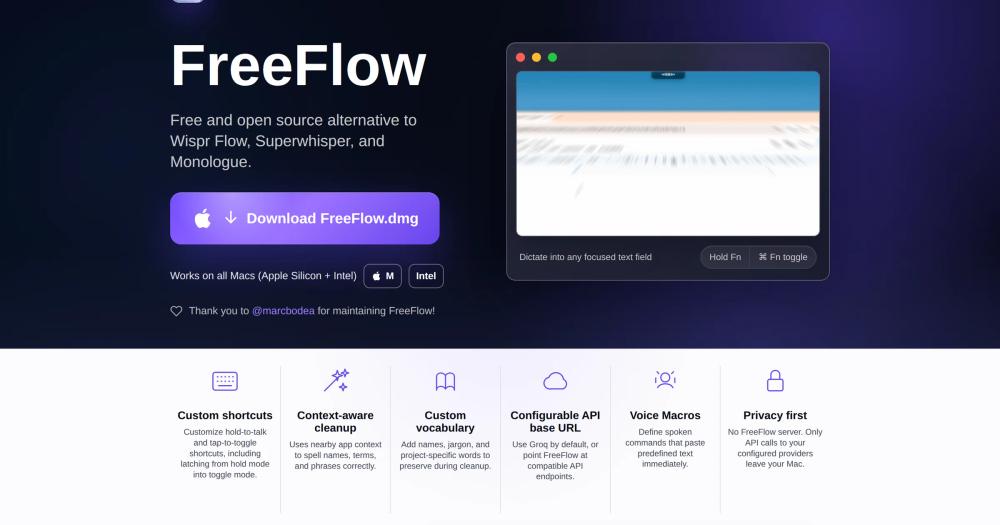
FreeFlow reads nearby app context before cleaning your dictation, so it spells names, technical terms, and project-specific phrases correctly. Dictating into a terminal, email client, or document editor produces output tailored to that context without manual correction after the fact.
Hold-to-Talk and Toggle Shortcuts
Hold Fn to record; release to paste cleaned text. Tap Command-Fn to start and stop dictation without holding a key. If your toggle shortcut extends your hold shortcut, you can begin in hold mode and press the extra modifier keys to latch into tap mode mid-recording, giving you both hands-free and one-shot dictation from the same gesture.
Voice Macros
Define spoken commands that paste predefined text immediately. A voice macro lets you trigger boilerplate, signatures, or code snippets with a single spoken phrase rather than typing or retrieving the text manually. Macros are configured in settings and fire the moment FreeFlow recognizes the trigger phrase.
Configurable API Backend
Uses Groq for transcription and LLM cleanup by default, which provides sub-second response times. You can point FreeFlow at any OpenAI-compatible API endpoint in settings, including local servers like Ollama and LM Studio, to change the transcription model or route all audio processing off-cloud entirely.
Edit Mode
Highlight existing text in any app, invoke your dictation shortcut, and speak a transformation instruction such as 'make this shorter' or 'turn this into bullets.' FreeFlow sends the selection and instruction to your configured LLM and replaces the selected text with the result. Enable it in settings; Manual mode requires an extra modifier key to avoid accidental triggers.
Custom Vocabulary
Add names, jargon, and project-specific terms to a vocabulary list that FreeFlow preserves during cleanup. Useful for domain-specific language, uncommon proper nouns, or technical abbreviations that generic transcription would otherwise misspell or normalize away.
Strengths and trade-offs#
Strengths
- MIT License with Zero Ongoing CostFreeFlow is MIT licensed and free to download, use, and modify with no restrictions. Unlike Wispr Flow and Superwhisper, there is no subscription tier, per-month fee, or feature gating. The source code is on GitHub, so you can audit it, fork it, or contribute directly.
- No Vendor Server Touches Your AudioFreeFlow has no backend server. The only data that leaves your Mac are API calls to your configured transcription and LLM provider. Choosing a local provider like Ollama keeps all audio fully on-device, which is a meaningful privacy advantage over commercial platforms that process audio server-side.
- Flexible, Swappable API BackendsYou can replace Groq with any OpenAI-compatible endpoint in settings, covering Ollama, LM Studio, and any self-hosted Whisper or chat model. Separate settings exist for the transcription API URL and the LLM API URL, so you can mix providers. This future-proofs FreeFlow against API pricing changes at any single provider.
- Active Development on a Young ProjectThe project launched in February 2026 and received code pushes as recently as September 2026, with over 2,600 GitHub stars and community-contributed features including the configurable API base URL. An active maintainer manages the project, reducing the risk of abandonment common in newer open source tools.
Trade-offs
- -macOS OnlyFreeFlow is built in Swift and distributed as a macOS app. It does not run on Windows or Linux. Users on other platforms need a different dictation tool entirely.
- -Requires API Key Configuration Before First UseGetting started requires a Groq API key (free tier available) or a compatible local model setup. Unlike commercial tools that handle backend provisioning for you, FreeFlow requires a brief configuration step before it works. Users who want zero-setup dictation should weigh this against the cost savings.
- -Local Models Add Significant LatencyFreeFlow's own documentation notes that local models currently introduce 5-10 seconds of latency per request and can affect battery life. The default Groq path stays under one second, but users who switch to local providers for privacy reasons should expect meaningfully slower cleanup responses.
- -78 Open Issues on a Project Less Than a Year OldThe repository had 78 open issues as of the research date, spanning feature requests and bug reports across a project that launched in February 2026. For users who rely on dictation in production workflows, checking the issue tracker before switching is worthwhile.
FreeFlow vs alternatives#
FreeFlow vs Wispr Flow
Wispr Flow is the most widely used paid Mac dictation tool, known for fast, context-aware transcription and a polished onboarding experience. FreeFlow was created explicitly as a free alternative and shares the same core value: clean, accurate dictation pasted system-wide.
| Feature | FreeFlow | Wispr Flow |
|---|---|---|
| License | MIT (open source) | Proprietary |
| Price | Free | Paid subscription |
| Server | None; API calls go to your provider | Vendor-managed |
| Context-aware cleanup | Yes | Yes |
| macOS support | Apple Silicon + Intel | Yes |
| API backend | Groq, Ollama, any OpenAI-compatible endpoint | Proprietary |
| Voice macros | Yes | Limited |
FreeFlow wins when cost is the deciding factor or when you need control over where audio is processed. Configuring a local Ollama backend routes all transcription on-device with no audio leaving your Mac. Wispr Flow remains the better choice for users who want a fully managed experience with no API key setup, a dedicated support team, and a more polished initial setup flow.
FreeFlow vs Superwhisper
Superwhisper is another paid Mac dictation tool that emphasizes local Whisper model support and offline transcription. FreeFlow overlaps significantly: both support voice cleanup and configurable backends.
| Feature | FreeFlow | Superwhisper |
|---|---|---|
| License | MIT (open source) | Proprietary |
| Price | Free | Paid subscription |
| Local model support | Yes (any OpenAI-compatible endpoint) | Yes (built-in local Whisper) |
| Voice macros | Yes | Limited |
| Edit Mode | Yes | Partial |
| Open source | Yes | No |
FreeFlow is the stronger pick when you want MIT-licensed source access, zero cost, or flexibility to swap transcription providers without changing apps. Superwhisper has an advantage if you want a polished out-of-the-box local model experience without configuring API endpoints or a local inference server manually.
What it's built on#
- Languages
- Swift
FAQ#
Is FreeFlow actually free to use?
Yes. FreeFlow is MIT licensed and available as a free download for macOS. The only cost is the API backend you choose: Groq offers a free tier sufficient for personal use, and running a local model with Ollama or LM Studio costs nothing beyond the hardware. There is no FreeFlow subscription, paid tier, or feature paywall.
Does FreeFlow work with local models for fully offline transcription?
Yes. In settings, you can configure a custom API base URL and model ID pointing to any OpenAI-compatible local server such as Ollama or LM Studio. This routes all transcription and cleanup through models running on your own machine. The README notes that local models currently add 5-10 seconds of latency compared to the sub-second response from Groq, and can affect battery life.
What do I need to get started with FreeFlow?
Download FreeFlow.dmg from the GitHub releases page and open it on your Mac (Apple Silicon or Intel both work). Then create a free account at groq.com to get an API key, enter it in FreeFlow settings, and hold Fn to start dictating. The whole setup takes a few minutes and costs nothing.
Is FreeFlow available on Windows or Linux?
No. FreeFlow is built in Swift and distributed as a macOS application that runs on Apple Silicon and Intel Macs. The project has no stated plans for a Windows or Linux port. Users on those platforms need a different dictation tool.
Who maintains FreeFlow now?
FreeFlow was created by Zach Latta and is currently maintained by @marcbodea, as noted in the README. The project is open source under the MIT license, so community contributions are welcome via the GitHub repository at zachlatta/freeflow.
Similar open-source tools#

FU Flow
1 GitHub starsFree offline voice typing for Windows 10/11 and Ubuntu Linux
Alternative to Wispr Flow

VoiceInk
6,840 GitHub starsPrivate voice dictation for Mac, no subscription required.
Alternative to Superwhisper

Handy
34,024 GitHub starsFree offline speech-to-text: runs on Windows, macOS, and Linux
Alternative toWispr Flow

Diction
239 GitHub starsiOS keyboard with self-hosted speech-to-text, no word limits
Alternative toWispr Flow

Voquill
1,019 GitHub starsOpen source voice dictation with local AI and custom glossary
Alternative toWispr Flow

SpeakoFlow
321 GitHub starsVoice dictation and AI assistant for your desktop, fully offline
Alternative toWispr Flow