

Who VoiceInk is for#
Writers and content creators who dictate long-form
VoiceInk removes filler words and structures spoken text into readable prose automatically. Writers can dictate at speech speed and get clean formatted output ready for editing. Different output modes handle email, journal entries, and long-form drafts with distinct formatting logic.
Skip if:
Skip if you need cross-platform dictation. VoiceInk is macOS-only on Apple Silicon; if you also write regularly on Windows or Linux, you need a different tool.
Developers who dictate variable names, prompts, and documentation
The personal dictionary handles developer-specific terminology that general speech models mis-transcribe: framework names, variable conventions, and product terms. App-aware modes can apply editor-specific settings automatically when you switch to your IDE.
Skip if:
Skip if you need voice-command execution in your IDE (running tests, triggering editor commands). VoiceInk dictates text but does not execute voice commands inside code editors.
Professionals handling sensitive or confidential content
Lawyers, doctors, and consultants who cannot allow audio to leave their device have a strong fit here. All transcription is local by default, and the cloud enhancement step can be left disabled to keep all data on-device, including the transcribed text.
Skip if:
Skip if your organization requires centralized transcription logging, IT-managed shared vocabularies, or compliance reporting that a managed cloud service provides.
Mac users replacing a paid dictation subscription
Anyone currently paying for Wispr Flow or Superwhisper can switch to a one-time payment and retain the core capabilities: cross-app dictation, AI text enhancement, and a personal dictionary. The switch removes monthly billing with no meaningful feature regression for typical dictation use.
Skip if:
Skip if you rely heavily on iPhone dictation alongside your Mac as a primary workflow. VoiceInk's iOS app is noted on the website but the primary product focus is macOS.
The problem it solves#
Most voice dictation tools for Mac process audio in the cloud. Your voice travels to a remote server, gets transcribed there, and the text comes back. Beyond the privacy concern, cloud dictation tools typically charge monthly: Wispr Flow and Superwhisper both require subscriptions that add up to over $100 a year. For individuals and small teams who dictate regularly, that is a meaningful ongoing cost for a core productivity tool.
The deeper challenge is that cloud-based processing means your voice data leaves your machine, often without clear retention policies. For professionals working on sensitive content, legal documents, medical notes, or private correspondence, that is a real constraint. Local dictation existed before, but earlier tools were either inaccurate or slow. Modern Whisper-based models running on Apple Silicon's Neural Engine now deliver high-accuracy transcription at near-real-time speed with no network round trip.
How it solves it#
On-Device Transcription with Whisper Models
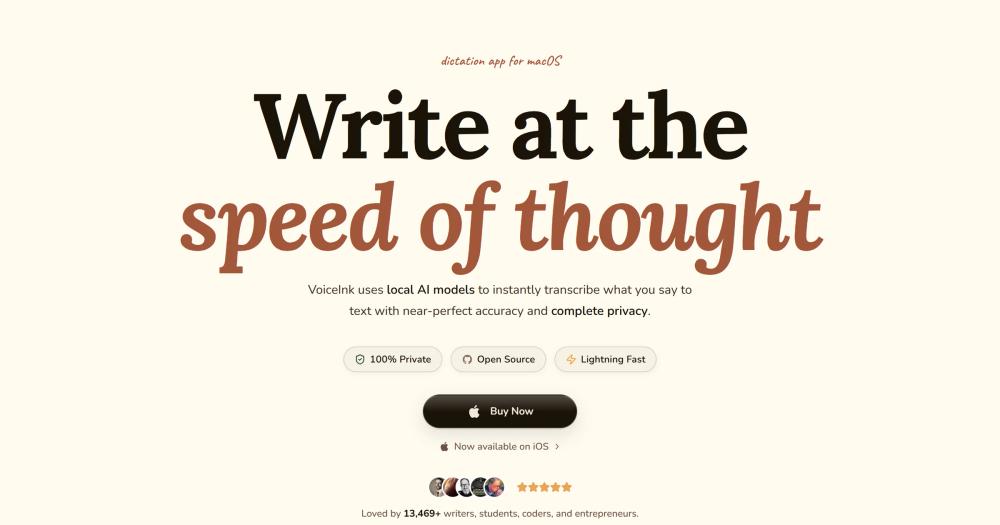
All audio is processed locally using Whisper-based models (including Parakeet via FluidAudio and WhisperKit) through Apple's Neural Engine. No audio leaves your Mac, and latency is near-real-time on Apple Silicon. The README cites 99% accuracy on clean speech.
Works Across Every Mac App
VoiceInk inserts transcribed text into any macOS application without special integration: email clients, code editors, note apps, chat tools, and web browsers. A configurable global hotkey or push-to-talk mode starts recording from anywhere on the system.
AI Text Enhancement
An optional AI layer cleans up filler words, restructures spoken notes into formatted prose, and adapts output for specific formats such as email, journal entries, and bullet lists. Cloud enhancement sends only already-transcribed text (not audio) to a cloud model if you enable it.
Personal Dictionary and Smart Replace
Train VoiceInk to recognize names, product names, and domain-specific terms exactly as written. Smart Replace expands short trigger phrases into full text, which accelerates repetitive dictation like calendar links, email sign-offs, or common code snippets.
App-Aware Dictation Modes
Intelligent app detection switches to the correct pre-configured dictation profile based on the active app or URL. No manual mode switching is needed when moving between a code editor, a chat window, and a document editor.
Voice AI Assistant Mode
A built-in voice assistant mode lets you speak queries conversationally and receive responses, similar to a hands-free chat interface. Useful for quick lookups and drafting ideas without leaving your current application context.
Strengths and trade-offs#
Strengths
- One-time pricing, no recurring feesVoiceInk costs $25 for a single device with lifetime updates. Wispr Flow and Superwhisper charge monthly. Over two years, even VoiceInk's highest tier ($49 for 3 devices) costs less than two to three months of a typical dictation subscription.
- Complete audio privacy, on-device onlyVoice audio is never transmitted anywhere. The optional cloud step sends only already-transcribed text for AI formatting, not the original audio. For professionals handling confidential content, this is a concrete privacy advantage over cloud-first dictation tools.
- GPL-3.0 open source with auditable codeThe full source is on GitHub under GPL-3.0. You can inspect the code, verify the privacy claims directly in the codebase, and build from source without paying. Over 6,200 GitHub stars and 200,000+ reported downloads indicate substantial real-world adoption.
- Actively maintained since late 2024The repository had its last push in September 2026 and has been actively developed since October 2024. The maintainer ships updates regularly and accepts bug reports and feature requests via GitHub Issues, with 897 forks showing community interest.
Trade-offs
- -macOS only, Apple Silicon requiredVoiceInk runs exclusively on Macs with Apple Silicon (M1 or later) and macOS 14.4 or later. Intel Macs are unsupported. Teams with mixed hardware, or users who also work on Windows or Linux, cannot use VoiceInk across all their devices.
- -No pull requests accepted currentlyThe README explicitly states the project does not accept pull requests at this time. Community members can report bugs and suggest features via GitHub Issues, but cannot contribute code changes, limiting how quickly the community can fix bugs independently of the maintainer.
- -Single-maintainer, 125 open issuesVoiceInk is maintained by one developer. With 125 open GitHub issues, resolution timelines depend entirely on one person's capacity. Users with critical workflow dependencies should review open issues before committing to the tool.
VoiceInk vs alternatives#
VoiceInk vs Wispr Flow
Wispr Flow and VoiceInk both target Mac users who want to dictate into any application, but they differ on ownership model and audio processing location. Wispr Flow is a proprietary subscription service with cloud audio processing, which enables cross-device sync and profile backup but means voice data leaves the user's machine. VoiceInk processes all audio on-device with no audio transmitted anywhere.
| Feature | VoiceInk | Wispr Flow |
|---|---|---|
| License | GPL-3.0 | Proprietary |
| Pricing | One-time ($25 to $49) | Monthly subscription |
| Audio processing | On-device | Cloud |
| Open source | Yes | No |
| Platform | macOS, Apple Silicon only | macOS |
| AI enhancement | Optional, text only sent to cloud | Cloud-based |
For users who prioritize privacy or want to avoid recurring fees, VoiceInk is the stronger pick. Wispr Flow may still be preferable if you need cross-device sync, a polished managed onboarding experience, or if you value a commercial support relationship.
VoiceInk vs Superwhisper
Superwhisper is a macOS dictation tool that also uses Whisper-based models, making it the closest technical comparison to VoiceInk. Both target Apple Silicon and support on-device transcription. The key difference is licensing: Superwhisper is proprietary with subscription pricing, while VoiceInk is GPL-3.0 open source with one-time pricing.
| Feature | VoiceInk | Superwhisper |
|---|---|---|
| License | GPL-3.0 | Proprietary |
| Pricing | One-time ($25+) | Monthly subscription |
| Source available | Yes (GitHub) | No |
| Audio processing | On-device | On-device |
| Custom dictionary | Yes | Yes |
Superwhisper may be worth considering if it offers specific features your workflow requires or if you prefer a fully managed commercial product with dedicated support. For most Mac users replacing a paid dictation subscription, VoiceInk delivers equivalent core functionality at a lower long-term cost.
VoiceInk vs DictaFlow
DictaFlow targets a similar macOS dictation use case. VoiceInk differentiates through its GPL-3.0 open source codebase, its fully local audio processing model, and its one-time pricing structure. The open source license lets technical users audit the privacy claims directly in the code, which a commercial product like DictaFlow does not allow.
Quick start#
Install VoiceInk via Homebrew Cask, or download the prebuilt binary from the GitHub releases page.
```bash
brew install --cask voiceink
```What it's built on#
- Languages
- Swift
FAQ#
Does VoiceInk send my voice to the cloud?
No. All voice transcription happens locally on your Mac using on-device AI models. Your audio never leaves your device. The optional AI enhancement step sends only the already-transcribed text (not your voice) to a cloud model if you choose to enable it. You can use VoiceInk entirely offline by keeping cloud enhancement disabled.
What are the system requirements for VoiceInk?
VoiceInk requires Apple Silicon (M1 or later) and macOS 14.4 or later. It does not run on Intel Macs. The website recommends 8GB RAM for smooth local model operation. VoiceInk is macOS-only; there is no Windows or Linux version.
Is VoiceInk free or does it cost money?
VoiceInk is open source under GPL-3.0 and can be built from source for free using the instructions in BUILDING.md on GitHub. The prebuilt app with automatic updates costs a one-time fee: $25 for one Mac, $39 for two Macs, and $49 for three Macs. There are no monthly fees; the license includes lifetime updates and a 14-day money-back guarantee.
How does VoiceInk compare to Wispr Flow and Superwhisper?
All three apps transcribe speech on Mac using AI models. Wispr Flow and Superwhisper are proprietary and charge monthly subscriptions. VoiceInk is GPL-3.0 open source with one-time pricing and processes all audio locally on-device. The key practical differences are privacy (VoiceInk audio never leaves your Mac) and cost model (one-time vs recurring). VoiceInk requires Apple Silicon; some paid tools also support older Mac hardware.
Can I modify or contribute to VoiceInk?
The source code is on GitHub under GPL-3.0, so you can fork it, build from source, and modify it for personal use. The project currently does not accept pull requests. You can contribute by reporting bugs or suggesting features via GitHub Issues, or by improving documentation. Any redistribution of modified versions must comply with GPL-3.0 requirements, including releasing the modified source.
Similar open-source tools#

FU Flow
1 GitHub starsFree offline voice typing for Windows 10/11 and Ubuntu Linux
Alternative to Wispr Flow

FreeFlow
2,931 GitHub starsFree, open source Mac dictation with AI cleanup and voice macros
Alternative toWispr Flow

Diction
239 GitHub starsiOS keyboard with self-hosted speech-to-text, no word limits
Alternative toWispr Flow

Voquill
1,019 GitHub starsOpen source voice dictation with local AI and custom glossary
Alternative toWispr Flow

SpeakoFlow
321 GitHub starsVoice dictation and AI assistant for your desktop, fully offline
Alternative toWispr Flow

OpenWhispr
9,509 GitHub starsLocal-first voice dictation with Whisper, offline mode, and AI cleanup
Alternative toWispr Flow