
Who Radar is for#
Platform engineers debugging multi-cluster incidents
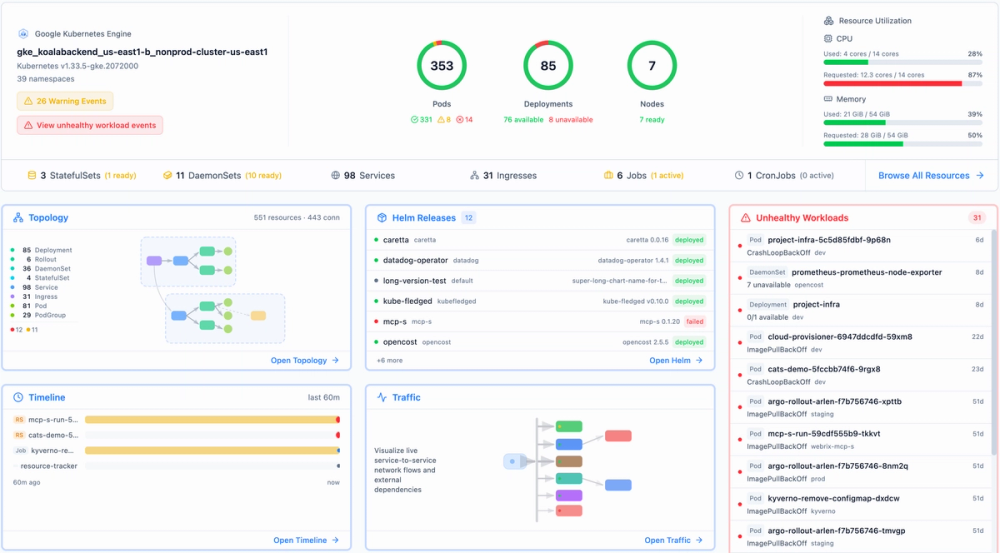
Search across every cluster from one bar, rewind the event timeline to the moment before an incident, and share a direct link to the relevant view. The topology view shows cross-namespace dependencies and live traffic without kubectl roulette across multiple contexts.
Skip if:
Your team manages a single small cluster and already has a working kubectl debugging workflow. Radar's value compounds with cluster count and team size.
DevOps teams managing Helm releases and GitOps workflows
Every Helm release history and ArgoCD or Flux sync state in one view alongside cluster resources. Roll back with a click. No separate ArgoCD UI or Helm diff tooling needed for standard release management and change auditing.
Skip if:
Your team uses a dedicated ArgoCD UI and Helm release management is not a pain point. Radar adds the most value when GitOps visibility is fragmented across separate tools.
Engineers evaluating AI-assisted incident response
The built-in MCP server gives AI agents like Claude direct access to live cluster state, workload details, and event history. The Radar website cites a benchmark where AI investigations diagnosed faults three times faster on average with Radar than with plain kubectl.
Skip if:
Your team is not yet using AI agents in engineering workflows. The MCP server adds no value if you are not using MCP-compatible AI tools.
Teams migrating away from Lens or other subscription-gated Kubernetes UIs
Radar is a direct alternative to Lens, K8Studio, and Aptakube, with topology, resource browser, Helm, GitOps, and audit views all included at no cost. The project reached 73,000+ downloads in 2026 and 3,866 GitHub stars, reflecting broad adoption among teams managing production clusters.
Skip if:
You rely on Lens IDE's extension marketplace or have Lens Pro integrations that Radar does not replicate. Radar does not have a plugin extension ecosystem.
The problem it solves#
Kubernetes is designed to be queried, not understood. kubectl gives you point-in-time answers for a single engineer at a single moment, but your team manages dozens of clusters across regions, and when an alert fires at 2am nobody has time to SSH through three jump hosts and grep for pods. The typical platform team juggles five or more tools to debug a single incident: kubectl for resources, a separate dashboard for topology, another for Helm releases, yet another for GitOps state.
Kubernetes also deletes events after one hour by default, so by the time you notice something went wrong, the timeline is already gone. As AI agents become part of incident-response workflows, there is still no structured way to give them cluster context without building custom tooling on top of an already fragmented stack.
How it solves it#
Live topology view
Every Deployment, Service, and Ingress rendered as a live graph with real-time traffic flows, TLS health, and cross-namespace dependencies. Two modes show the full resource hierarchy or the network traffic path. Click any node to drill into logs, events, and manifests. Auto-layout updates as the cluster changes, with filtering by namespace, resource kind, or app label.
Built-in MCP server for AI agents
An embedded Model Context Protocol server lets AI agents query live cluster state, topology, and workload details through any MCP-compatible client. The same data the UI shows is queryable by agents, so investigation workflows can read real cluster context without custom tooling or separate APIs. Pass --no-mcp to disable it or --mcp-read-only to restrict agents to read-only tools.
Event timeline with extended history
A unified timeline of Kubernetes events and resource changes retained beyond the default one-hour cluster window. Storage backends include memory, SQLite, and Postgres. Rewind to any moment before an incident to see what changed, including resource diffs showing exact replica counts and image tags.
Helm release management
Every Helm release in the cluster shows full revision history, value file diffs between revisions, and one-click rollback. The audit trail shows exactly what changed and when, making upgrades reversible without kubectl commands or separate Helm tooling.
Native GitOps state for ArgoCD and Flux
ArgoCD and FluxCD integration surfaces the sync state of every Application alongside the resources it produced. Drift and sync failures appear in the same view as the rest of the cluster, with no separate ArgoCD UI required for standard GitOps visibility.
44 cluster audit checks
A built-in audit view runs 44 checks against your cluster configuration, covering resource hygiene, security posture, and common misconfigurations. Results surface alongside topology and resource views, so audit failures appear in context rather than in a separate security tool.
Strengths and trade-offs#
Strengths
- Apache 2.0 with no feature gatesThe full feature set is Apache-licensed with no paid tier required for individual engineers or teams. Unlike Lens, which moved core features behind a Lens Pro subscription, the Radar OSS binary is not a crippled version of a paid product. Every topology, Helm, GitOps, and audit view is included at no cost.
- Single binary with no cluster-side dependenciesA single ~30MB Go binary reads the Kubernetes API directly from your kubeconfig. No agents, no CRDs, and no cluster-side components are required in local mode. Works on any conformant cluster including GKE, EKS, AKS, k3s, kind, and minikube, and runs in air-gapped environments with no outbound internet access required.
- Privacy-first by defaultCluster data stays on your machine in local mode. No account is required and no cloud sync occurs. Usage reporting is off by default; the opt-in telemetry sends only anonymous counts and coarse cluster facts like Kubernetes version and node-count range, not workload details or resource names.
- MCP server for AI agent workflowsThe built-in MCP server is the only Kubernetes UI in the Lens/K8Studio/Aptakube category that gives AI agents direct structured access to live cluster state. Teams using Claude or other MCP-compatible tools for incident investigation can query Radar's data layer without additional tooling.
Trade-offs
- -124 open issues on a fast-moving early codebaseThe repository launched in January 2026 and had 124 open issues by October 2026. Rapid growth and active feedback account for most of it, but edge cases including slow or high-latency clusters, specific ingress controllers, and very large namespace counts have known issues in flight. The docs cover tuning flags for these scenarios.
- -Alerts and cross-cluster fleet features require Radar CloudAutomated failure alerts delivered to Slack or webhooks, AI root cause investigations, and the aggregated cross-cluster fleet view are Radar Cloud features. The OSS binary and self-hosted Helm deployment cover full cluster inspection per instance; the fleet-level and notification features are cloud-only. Radar Cloud has a free tier for up to three clusters.
- -Kubernetes-only scopeRadar covers Kubernetes clusters and their workloads. It does not monitor non-Kubernetes infrastructure such as bare metal nodes, VMs, or cloud-provider resources outside the cluster API. Teams needing broader infrastructure observability need a separate tool alongside it.
- -In-memory timeline is lost on restartThe default timeline storage backend is in-memory. History is lost when the binary restarts. Persistent incident history requires setting the --timeline-storage flag to sqlite or postgres and provisioning the relevant database. The default is fine for local use but not for long-running in-cluster deployments where history retention matters.
Radar vs alternatives#
Radar vs Lens
Both are Kubernetes UIs with topology visualization and resource browsing, but they diverged on licensing and deployment model. Lens moved core features behind a paid Lens Pro subscription, while Radar is Apache 2.0 with the full feature set in the OSS binary.
| Feature | Radar | Lens |
|---|---|---|
| License | Apache 2.0 | Proprietary (paid Pro tier) |
| MCP server for AI agents | Yes | No |
| Price for individuals | Free forever | Free tier + paid subscription |
| In-cluster Helm deployment | Yes | No |
Radar is the better choice for teams that need in-cluster shared deployment under an open source license, native GitOps visibility, or an MCP server for AI agent workflows. Lens still has an advantage for engineers who rely on its extension marketplace or have existing Lens Pro integrations.
Radar vs K8Studio and Aptakube
K8Studio and Aptakube are commercial Kubernetes desktop UIs with polished interfaces and paid license models. Radar's primary advantages are Apache 2.0 licensing with no per-seat cost, Helm-based in-cluster deployment for team access, and the built-in MCP server. Neither K8Studio nor Aptakube offer an open source tier or an MCP endpoint.
K8Studio or Aptakube may fit better when a team wants a commercial support contract, a native desktop experience with dedicated vendor support, and does not need open source licensing or AI agent integration.
Quick start#
Install Radar with the quick-install script or Homebrew, then run kubectl radar.

```bash
curl -fsSL https://get.radarhq.io | sh && kubectl radar
```

For shared in-cluster deployment, Helm handles the setup.

```bash
helm repo add skyhook https://skyhook-io.github.io/helm-charts
helm install radar skyhook/radar -n radar --create-namespace
```What it's built on#
- Languages
- GoTypeScript
- Frameworks
- React
- Infrastructure
- GitOpsKubernetes
FAQ#
Is Radar free to use?
Yes. The OSS binary is Apache 2.0 licensed and free to run on your laptop or in-cluster via Helm forever, with no feature gates. Radar Cloud (alerts, AI investigations, shared multi-user views) has a free tier for up to three clusters and paid plans above that.
Does Radar require installing anything on the cluster?
No. Local mode runs on your laptop and talks to the Kubernetes API using your existing kubeconfig without installing anything on the cluster. In-cluster mode, which provides shared team access and persistent event history, deploys as a Helm chart.
Can AI agents use Radar to query cluster state?
Yes. Radar includes a built-in MCP server (Model Context Protocol) that any compatible AI client, including Claude, can use to query topology, workloads, events, and audit results. The same data the browser UI shows is available to agents over the MCP endpoint. Pass --no-mcp to disable it or --mcp-read-only to restrict agents to read-only tools.
How does Radar compare to Lens?
Lens moved core features behind a paid Lens Pro subscription after years as a free tool. Radar covers the same categories (topology, resource browser, Helm, GitOps) under Apache 2.0 with no paid tier required for individual engineers, plus adds a built-in MCP server and native ArgoCD/Flux support. Lens still has an advantage for engineers who rely on its extension marketplace.
Does Radar work on air-gapped clusters?
Yes. The OSS binary is self-contained and connects directly to the Kubernetes API with no outbound internet access required. Usage reporting is off by default. In-cluster Helm deployment also works in air-gapped environments if you mirror the container image to a private registry.
Similar open-source tools#


Keda
10,642 GitHub starsEvent-driven Kubernetes autoscaling with 70+ scalers and scale to zero
Alternative to Kedify


Statlite
172 GitHub starsSelf-hosted Spring Boot monitoring, no Prometheus or Grafana needed

Oxynote
214 GitHub starsTechnical wiki with live metrics, draft reviews, and real-time editing
Alternative to Notion

Void Cloud
386 GitHub starsFull-stack Vite toolkit with one-command Cloudflare deployment
Alternative to Vercel