

Who Twake Drive is for#
Twake workplace file management
Use Twake Drive when a team wants file browsing, uploads, sharing, and search inside a Twake-oriented collaboration environment.
Cozy app development and deployment
Use it when building or operating a Cozy-backed Drive app and you need the official web app source, manifest, and development workflow.
The problem it solves#
Teams that want open source file management often need a familiar Drive interface, not only raw storage. Twake Drive covers that app layer for organizations already using or evaluating Twake and Cozy infrastructure.
How it solves it#
File tree navigation
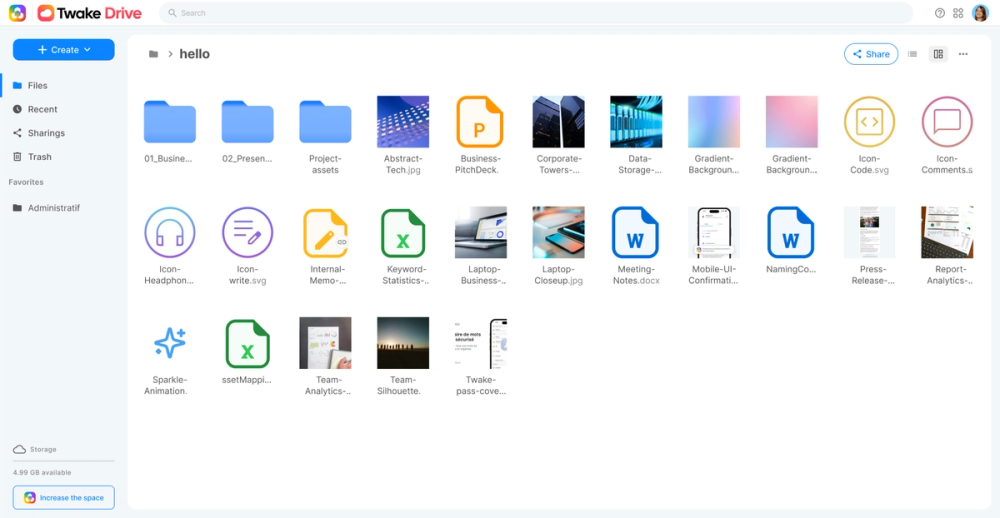
Users can browse folders and files through a Drive-style web interface instead of working directly against backend storage primitives.
Uploads and sharing
The app supports file and folder upload flows plus URL-based sharing, which are the daily collaboration actions expected from a Drive surface.
Search in Twake workflows
Search and platform integration help teams find documents inside the Cozy/Twake environment rather than treating files as a separate silo.
Strengths and trade-offs#
Strengths
- Product-owned repoThe GitHub repository is owned by LINAGORA, points to the Twake Drive website, and carries the Drive web app source, manifest, tests, and build configuration.
- Clear open source licenseGitHub reports AGPL-3.0 and the repository includes a root LICENSE file, giving reviewers first-party license evidence for the listing.
Trade-offs
- -Environment-specific scopeTwake Drive is not a drop-in replacement for every storage stack. It is strongest when Cozy or Twake platform services are part of the deployment plan.
Twake Drive vs alternatives#
Twake Drive is an AGPL-3.0 licensed open-source, self-hostable alternative to Google Drive, Microsoft OneDrive, and Dropbox for teams that want file sharing, search, shared workspaces, and office-document editing without putting the storage layer fully inside a proprietary productivity suite.
vs Google Drive: Google Drive is strongest when a team already lives in Google Workspace, with Docs, Sheets, Slides, shared drives, admin controls, and pooled storage tied to paid Workspace seats. Twake Drive trades that mature Google ecosystem for deployability: LINAGORA positions it for cloud or on-premise use, with encrypted file storage, shared drives, link sharing, full-text search, and OnlyOffice integration. It is a better fit when data residency, auditability, or avoiding Big Tech dependency matters more than Google-native collaboration depth.
vs Microsoft OneDrive: OneDrive fits organizations standardized on Microsoft 365, SharePoint, Teams, and Office files, and business storage is provisioned per user through Microsoft plans. Twake Drive is narrower but more controllable: it focuses on secure file trees, uploads, sharing, search, version history, and office editing in an open-source stack. Choose Twake Drive when self-hosting and source availability are requirements; choose OneDrive when Microsoft 365 administration and desktop Office integration are the priority.
vs Dropbox: Dropbox offers polished sync, sharing, admin controls, and business plans with team storage sold by seat. Twake Drive is less of a universal file-sync network and more of a sovereign collaborative drive for organizations that can operate or contract for open-source infrastructure. It wins on ownership, deployment control, and integration into the Twake Workplace suite, while Dropbox wins on broad client maturity and low-friction adoption.
What it's built on#
- Languages
- JavaScriptTypeScript
- Frameworks
- React
FAQ#
Is Twake Drive a standalone storage server?
No. The repository is the Drive web app layer for Cozy/Twake workflows, so it expects the surrounding platform services for a full deployment.
What license does Twake Drive use?
GitHub reports AGPL-3.0, and the repository includes a root LICENSE file with the GNU Affero General Public License version 3 text.
What workflows does Twake Drive cover?
The official README lists file tree navigation, file and folder uploads, URL sharing, and search as the main Drive features.
Similar open-source tools#

ownCloud

Nextcloud

Syncthing
Decentralized continuous file sync with no central server

Immich
Self-hosted Google Photos with mobile backup and face search

Totum
Self-hosted low-code platform for internal business tools

Spacedrive
Unified file explorer that spans your devices and cloud drives