

Who Vectorcraft is for#
Illustrators migrating off Illustrator or CorelDRAW subscriptions
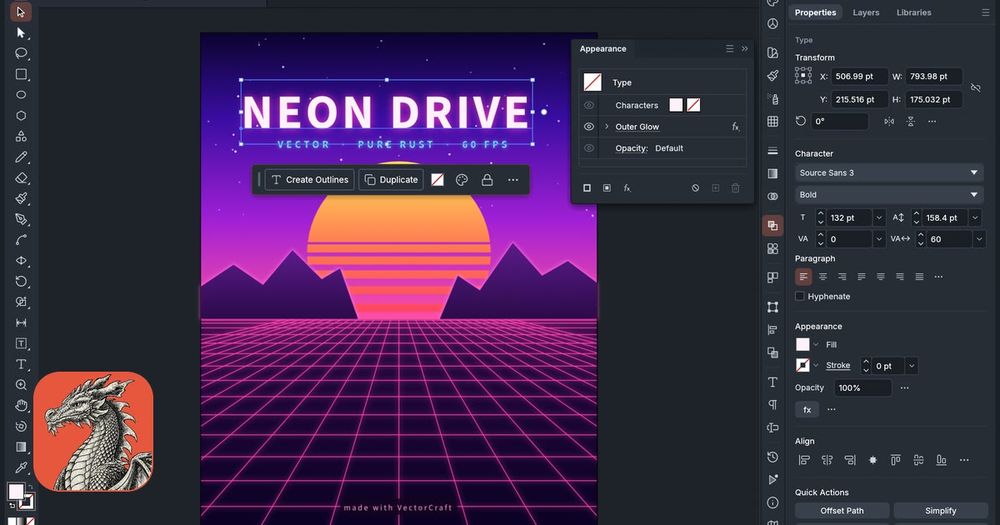
VectorCraft provides the Pen, Direct Selection, Pathfinder, Smart Guides, Appearance panel, and Layers layout that working illustrators already know. The Apache-2.0 license and no-subscription model eliminate per-seat costs. The core illustration workflow is functional in the current alpha; teams who start now gain familiarity before the remaining feature set ships.
Skip if:
If your workflow depends on live 3D effects beyond Revolve, the full raster effects gallery, or scripting automation, VectorCraft is not yet feature-complete for a full subscription replacement.
AI engineers building agentic creative pipelines
VectorCraft's MCP server exposes every drawing tool and panel as a command, so Claude Code and other agents can create, edit, and export vector art programmatically. The JSON control channel also works directly for non-MCP automation. The CLI runs headless batch exports, and the examples directory includes source files for complex artwork built entirely through the command API.
Skip if:
If you need generative AI drawing features inside the canvas (text-to-image, diffusion inpainting), those are listed as not yet available in the alpha.
Teams hosting a web-based vector editor on their own infrastructure
The same Rust codebase compiles to WebAssembly for browser use. Teams can download the web build from GitHub releases and deploy it on their own servers with no licensing cost. The interface and feature set are identical to the desktop app, including MCP server access from the browser context.
Skip if:
If you need a deeply embedded or white-labeled vector editor with a documented JavaScript API for host-app integration, the project's embedding documentation is still developing.
The problem it solves#
Adobe Illustrator and CorelDRAW have dominated professional vector illustration for decades, but both require per-seat subscriptions with no self-hosting option, no data portability through open formats, and no path to escaping recurring fees as a team grows.
Format lock-in compounds the cost problem. Illustrator's native .ai format is not fully documented and SVG round-trips lose live effects. Teams building AI-powered creative workflows find no documented automation API. Scripting requires an underdocumented JavaScript interface, and pixel-level UI automation is brittle. Developers who want to drive vector drawing programmatically or through an AI agent have no reliable path with the paid tools.
How it solves it#
MCP Server for AI Agents
Every menu item, tool, panel, and dialog in VectorCraft is exposed as a command over a JSON control channel and an MCP server. Claude Code and other AI agents can draw, edit, and export vector art the way a person does. The MCP server is started by the vectorcraft-cli binary; full setup and scoping options are documented in the repo's docs/mcp.md.
20,000-Shape Rendering at 120 fps
VectorCraft's multithreaded SIMD renderer runs off the UI thread and renders 20,000 shapes in about 27 ms at full retina resolution while the interface stays at 120 fps. The GPU renderer uses wgpu, with automatic fallback to a second graphics processor if the primary cannot open the window.
Exact Curve Booleans
Pathfinder and Shape Builder operations that fail on complex or overlapping paths in other vector editors work without error in VectorCraft. Exact curve booleans handle any geometry, and unlimited undo via structural sharing means there is no consequence for experimenting with boolean operations.
Live Editable Effects
Blends, envelope distort, gradient mesh, live radial repeats, grid and mirror repeats, glows, and drop shadows stay fully editable after they are applied. 3D Revolve generates smooth vector shading with a rotation gizmo. Select any live effect and adjust its parameters; the art updates in place.
Open Formats and SVG/PDF Exchange
Native documents save as human-readable JSON (.vectorcraft). SVG, PDF (including PDF-compatible .ai files), EPS, DXF, EMF/WMF, and Affinity documents (.af, .afdesign, .afpub, .afphoto) open natively. Export targets include PNG, JPEG, WebP, SVGZ, GIF, TIFF, BMP, and multi-size screen export.
Headless CLI for Batch Export
The vectorcraft-cli binary runs headless batch exports for script-driven workflows: open a .vectorcraft file and export to PDF, SVG, or a raster format without a display. The same binary starts the MCP server for agent integration. A standalone download is available for each platform alongside the desktop app.
Strengths and trade-offs#
Strengths
- Apache-2.0 License, No SubscriptionVectorCraft is Apache-2.0 licensed. You can run it commercially, modify it, redistribute it, and use it in proprietary products with no licensing fee. Unlike Illustrator and CorelDRAW, which both require per-seat subscriptions, VectorCraft has no recurring cost regardless of team size.
- Native Performance on All Major PlatformsOne Rust codebase produces native apps for macOS (Apple silicon and Intel), Windows (x64, x86, ARM64), Linux (x86_64 and ARM64 via Flatpak, AppImage, .deb, .rpm, and tarball), FreeBSD, and the browser via WebAssembly. There is no Electron or JavaScript runtime in the desktop app; the interface runs in Rust with direct GPU access via wgpu.
- Agent-Native Command APIEvery tool gesture, menu item, panel, and dialog is a first-class command in VectorCraft's JSON control channel and MCP server. This makes agent-driven drawing workflows possible without GUI automation. The examples directory contains artwork built entirely through the command API, confirming the interface is fully command-addressable.
- Affinity Document ImportVectorCraft opens Affinity 2 and Affinity 3 documents (.af, .afdesign, .afpub, and .afphoto) natively, preserving layers, groups, artboards, curves, fills, gradients, clipping masks, text, and images. Import fidelity is validated against 33 pinned files, giving Affinity users a migration path without PDF or SVG conversion loss.
Trade-offs
- -Alpha Status: About 65% Ready for Mainstream Daily UseAs of October 2026, VectorCraft is in alpha, covering about 65% of the daily workflow a mainstream illustrator needs (88% of core menu items exist, feature depth around 75%). Core path-drawing, Pathfinder, paint, gradients, type, and file exchange are functional. Missing: full 3D beyond Revolve, scripting, Variables (image and graph kinds), most of the raster effects gallery (46 of 57), and CJK vertical text. Teams evaluating it for production work should review ROADMAP.md and gaps.md.
- -Limited .ai File CompatibilityVectorCraft imports .ai files but layer structure in complex real-world Illustrator files is not yet reliably preserved. The app does not write .ai files. SVG and PDF are available as exchange formats with Illustrator users, but workflows that depend on proprietary .ai data round-trips will encounter compatibility gaps.
- -Drawing Tablet Pen Requires XWayland on LinuxUnder KDE Plasma 6.3 and GNOME on native Linux Wayland, the drawing tablet pen does not respond yet (tracked as issues #491 and #2028). The workaround is to open VectorCraft through XWayland via the preference setting or the WAYLAND_DISPLAY= environment variable. Mouse and keyboard input work normally on Wayland without this workaround.
- -Scripting API Not Yet AvailableScripting, Variables beyond the text kind, and graph-data features are listed as missing in the README. Illustrator users who depend on scripted automation of repetitive artwork tasks will find no direct replacement yet. The MCP server covers agent-driven automation from external tools, but in-app scripting for end users is not available in the current alpha.
Vectorcraft vs alternatives#
VectorCraft vs Adobe Illustrator
Both tools target professional vector illustration with pen tools, Pathfinder operations, and appearance controls. The core distinctions are license model, programmability, and platform reach.
| Feature | VectorCraft | Adobe Illustrator |
|---|---|---|
| License | Apache-2.0 | Proprietary |
| Self-hosting | Yes (desktop and web) | No |
| AI agent API | MCP server | No documented command API |
| Native format | Open JSON (.vectorcraft) | Proprietary (.ai) |
| Status | Alpha | Production |
VectorCraft is the better choice for teams that need self-hosting, Linux or browser support, or AI-agent-driven drawing workflows. Illustrator remains the better fit for teams that require full production stability today, access to its established plugin ecosystem, or workflows that depend on reliable .ai file exchange with external agencies and clients.
VectorCraft vs CorelDRAW
CorelDRAW is a proprietary tool with no self-hosting option and no documented command API for agent automation. VectorCraft covers macOS, Windows, Linux, FreeBSD, and the browser under an Apache-2.0 license.
| Feature | VectorCraft | CorelDRAW |
|---|---|---|
| License | Apache-2.0 | Proprietary |
| Self-hosting | Yes | No |
| AI agent API | MCP server | No documented command API |
| Status | Alpha | Production |
VectorCraft is the better fit for cross-platform teams, developers building agentic creative pipelines, and organizations moving off proprietary subscriptions. CorelDRAW remains the stronger choice for established users who need full production stability today and access to its existing format ecosystem.
Quick start#
Install VectorCraft by building from source with Rust 1.90 or newer (available via rustup).
```bash
git clone https://github.com/storytold/vectorcraft
cd vectorcraft
cargo run --release -p vectorcraft
```What it's built on#
- Languages
- Rust
FAQ#
Is VectorCraft free for commercial use?
Yes. VectorCraft is Apache-2.0 licensed, which permits commercial use, modification, and redistribution. You can run it in a commercial studio, include it in a product, or modify the source, as long as you include the license notice. There are no per-seat costs.
Can VectorCraft open Adobe Illustrator (.ai) files?
It can import many .ai files, but layer structure in complex real-world Illustrator files is not always preserved, and the app does not write .ai files. SVG, PDF, and the native .vectorcraft JSON format are the recommended exchange formats. Affinity documents (.af, .afdesign) import with better fidelity, validated against 33 pinned files.
What platforms does VectorCraft run on?
VectorCraft runs natively on macOS (Apple silicon and Intel), Windows (x64, x86, ARM64), Linux (x86_64 and ARM64 via Flatpak, AppImage, .deb, .rpm, and tarball), and FreeBSD. A WebAssembly build for browser use is available separately from GitHub releases for self-hosted deployments.
How mature is VectorCraft for production illustration work?
As of October 2026, VectorCraft is in alpha: it covers about 65% of a mainstream illustrator's daily workflow. Core path drawing, Pathfinder, paint, type, and file exchange are functional. Missing features include most raster effects, full 3D beyond Revolve, scripting, and some interaction-fidelity details. Review ROADMAP.md and gaps.md in the repo before committing to production use.
How does the MCP server work for AI agent drawing?
The vectorcraft-cli binary starts the MCP server with its mcp subcommand. Every tool, panel, menu item, and dialog in VectorCraft is available as a command the agent can call. An agent draws, edits, and exports vector art the same way a person would, but programmatically. Setup and protocol details are in docs/mcp.md and docs/control-protocol.md in the repo.
Similar open-source tools#

sK1 Project
332 GitHub starsLinux vector editor for print prepress with CMYK and ICC support
Alternative to CorelDRAW Graphics Suite

Inkscape
3,460 GitHub starsOpen source vector graphics editor. SVG-native, no subscription.
Alternative to Adobe Illustrator


Screenshots
2 GitHub starsmacOS screenshot and recorder, no cloud, no account, MIT licensed
Alternative to CleanShot X

Jasna
2,411 GitHub starsGPU-accelerated mosaic detection and restoration for video and images
Alternative to UniFab Video Enhancer
SOMA
162 GitHub starsParametric 3D modeling via CLI agent: describe, generate, iterate.
Alternative to Zoo.dev