

Who Vela is for#
GrapheneOS and degoogled ROM users
Vela was built specifically to run on degoogled phones where Google Maps is not an option. Turn-by-turn with live traffic, transit boards, and offline routing all work without Play Services, a Google account, or any Google SDK on the device.
Skip if:
You are on stock Android and have no objection to Google Maps or a Google account. Vela's primary differentiator is its Play Services independence; stock Android users comfortable with Maps gain little from switching.
Privacy-conscious Android users on stock Android
For users who want to reduce their Google footprint without fully degoogling, Vela keeps GPS trail and saved places off Google's servers while still delivering live traffic and hours data that most privacy-focused map apps lack. The weekly session reset and fully on-device TTS voice further reduce the tracking surface.
Skip if:
Your main concern is battery or data usage rather than privacy. Vela's privacy architecture adds overhead compared to a lightweight cached-map app.
Transit commuters in cities with open GTFS data
Vela pulls real-time countdowns from open transit feeds via Transitous, covering most major agencies that publish GTFS-RT data. The departure board shows every route at a stop with live timing, and the stop list view lets you trace a route end to end with live times at each station.
Skip if:
Your city's transit agency does not publish GTFS feeds and Transitous has no coverage for your area. Vela falls back to the stop's Google page, which works but is not native navigation.
Keypad phone and Android Auto users
Every Vela screen works with a five-key D-pad and no touchscreen, down to small flip-phone displays. Android Auto screens are included, though sideloading a third-party app on Android Auto requires specific device configurations documented in the project's Android Auto guide.
Skip if:
You need Android Auto and your head unit does not accept sideloaded apps. This is a device restriction, not a Vela restriction, but it may prevent Android Auto use in some car models.
The problem it solves#
Android users who remove Google Play Services from their phone lose access to Google Maps entirely. OpenStreetMap-based navigation apps cover the basemap and offline routing but fall short where Google Maps is hardest to quit: live traffic that reflects what the road is actually doing, business hours current enough to trust, search that ranks nearby results accurately, and transit schedules for cities whose agencies publish open data. Running a degoogled phone meant accepting a significant navigation downgrade or resorting to the browser version of Maps, which has no turn-by-turn navigation and works poorly at speed.
The same challenge applies in a softer form to users on stock Android who want their map to stop uploading a continuous GPS trace, feeding search history to an ad profile, and transmitting device identifiers through Play Services in the background while they drive.
How it solves it#
Traffic-aware turn-by-turn navigation
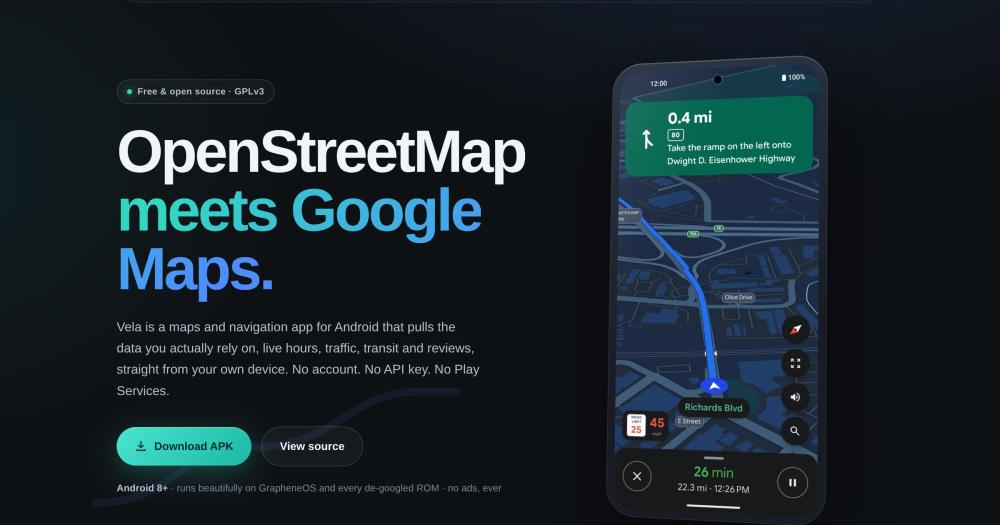
Driving routes come from Google's own routing engine, so they reflect live traffic, closed roads, and current travel times. Lane diagrams, highway exit shields, speed limits, and a speedometer appear during navigation. When a jam builds ahead, Vela offers a faster route. A neural TTS voice generates spoken guidance on the phone with no speech service required.
Open map basemap with Google place details
Map tiles draw from OpenStreetMap via OpenFreeMap. The businesses on the map come from Vela's own open data: Overture Maps and AllThePlaces, positioned with OpenStreetMap. Browsing the map sends Google nothing. Tapping a place fetches current hours, reviews, photos, and busy times from Google anonymously, with a switch to turn that lookup off entirely.
Offline region downloads
Download a state or country to keep the map, place search, address geocoding, and turn-by-turn routing fully functional with no network connection. The offline tile format is the same vector tileset used online. Turning on Settings → Privacy → Use Vela without Google with a downloaded region removes all external network calls.
Live transit departure boards
Tap any transit stop to see a real-time departure board from the open GTFS feeds served by the Transitous project. The board shows every route, live countdowns, and official line colors. For stops where Transitous has no coverage, Vela falls back to the stop's Google page. Rail lines draw along their real track in their official colors.
License plate camera locations on the map
Community-mapped license plate reader positions from the DeFlock project's OpenStreetMap data appear on the map by default. The route picker counts cameras along each option and can prefer lower-camera routes when the detour stays small. A spoken alert or an on-screen card as you approach one is optional. The dataset updates weekly and lives on the phone.
On-device TTS voice and speech search
Spoken turn instructions come from a neural voice model that runs entirely on the phone, downloading as a language pack with no streaming required. An optional on-device speech model transcribes search queries without sending audio to a remote service. 18 language packs are available for both interface and spoken guidance.
Strengths and trade-offs#
Strengths
- Full navigation without Google Play ServicesVela is a native Kotlin app using Jetpack Compose and MapLibre with no Google SDK, no Play Services dependency, and no sign-in requirement. Built specifically for GrapheneOS and other degoogled ROMs, it is one of the few Android navigation apps that delivers live traffic and turn-by-turn directions without any Google software installed on the device.
- Privacy by architecture, not by settingSaved places, GPS trail, search history, and route history never leave the phone. Vela starts a fresh Google session cookie weekly by default, contacts Google the way a logged-out browser would, and has no Vela backend, no telemetry, and no analytics SDK. The per-request breakdown of what reaches Google is documented in PRIVACY.md in the repository.
- Self-healing without app store updatesThe request recipes Vela uses to talk to Google's public endpoints live in a signed remote calibration file. When Google shifts a field or changes a response format, the project can push a signed fix that every installed copy picks up at launch within minutes, without requiring an app update.
Trade-offs
- -Beta status with active open issuesThe project launched in mid-2026 and carries an explicit beta warning in the README. With 13 open issues and a codebase under active development, users should expect occasional bugs. Nightly and canary builds are less tested than the weekly stable channel.
- -Google data remains involved for core featuresDespite no Play Services requirement, driving routes, live traffic, search, and place details still rely on Google's public web endpoints. With default settings, a driving route sends your start and end points anonymously to Google, and traffic re-checks during navigation send your current position periodically. Turning on Settings → Privacy → Use Vela without Google removes these calls but also removes live traffic and place details.
- -OpenStreetMap coverage varies by regionStreet names, house numbers, and the depth of offline place data depend on how well OpenStreetMap covers your area. In regions with sparse OSM coverage the offline experience is thinner, and the project's README notes it is actively working on improving data gaps.
Vela vs alternatives#
Vela vs Google Maps
Both are Android navigation apps covering turn-by-turn directions, live traffic, place search, and transit. The deciding factor is whether Google Play Services and a Google account are acceptable on the device.
| Feature | Vela | Google Maps |
|---|---|---|
| License | GPL-3.0 | Proprietary |
| Requires Google Play Services | No | Yes |
| Requires a Google account | No | No (limited) / Yes (full features) |
| Backend | No Vela backend | Google's servers |
| Map tiles | OpenStreetMap via OpenFreeMap | Google's proprietary tiles |
| Live traffic | Yes (anonymous query) | Yes (account-tied) |
| Offline routing | Yes, downloaded regions | Yes, limited to saved areas |
| Price | Free, no ads, GPL-3.0 | Free with data collection |
| Platform | Android only (APK sideload) | Android, iOS, web |
| Location history | Stays on the phone | Stored on Google's servers |
Vela has the stronger privacy position: no Play Services, no account, no GPS trail uploads, and saved places that stay on the phone. For users on GrapheneOS or other degoogled ROMs, Vela is the practical option because Google Maps cannot run without Play Services. For privacy-conscious users on stock Android, Vela provides a meaningful reduction in tracking without sacrificing live traffic or place data.
Google Maps is the better choice when you need access on iOS or the web, when you depend on features such as business contributions, Street View creation, or photo uploads, when you need account-synced saved places across devices, or when you operate in regions where OpenStreetMap coverage is thin enough to affect search accuracy.
Quick start#
Install Vela by sideloading the APK from GitHub Releases, or build from source using a standard Gradle setup.

```bash
git clone https://github.com/PimpinPumpkin/Vela.git
./gradlew :app:assembleRelease
```What it's built on#
- Languages
- KotlinPython
FAQ#
Does Vela require a Google account or Google Play Services?
No. Vela has no Google SDK, no Play Services dependency, and no sign-in requirement. It was built specifically to run on degoogled Android phones such as GrapheneOS. When it fetches routes, traffic, or place details from Google, it does so directly from your phone like a logged-out browser, with no shared API key and no Vela server in between.
Is Vela free? How does it stay funded?
Vela is free, GPL-3.0 licensed, and ad-free. The project accepts optional donations via Buy Me a Coffee. There is no paid tier, no freemium model, and no telemetry that monetizes usage data.
What data does Vela send to Google?
Map browsing sends nothing to Google by default. Searching sends your text anonymously as you type and when you submit. Tapping a place sends an anonymous place lookup. A driving route sends the start and end points anonymously. During navigation, periodic traffic re-checks send your current position (this can be turned off in Settings). Saved places, history, and your GPS trail stay on the phone. The full per-request breakdown is in PRIVACY.md in the GitHub repository.
How do I install Vela? Is it on the Play Store?
Vela is not on the Play Store. Install it via the project's own F-Droid repository, Obtainium pointed at the GitHub repo, or by downloading the APK directly from GitHub Releases. All three channels serve the same signed APK, and the app self-updates after the first install. Every Vela APK is signed with the same certificate; the fingerprint is in the README for verification before installing.
Does Vela work offline?
Yes. Download a region from within the app and the map, routing, place search, and address geocoding work with no network connection. Offline routing runs on the phone using the open OSRM and Valhalla routers. Live traffic and place details require network access, but turning on Settings → Privacy → Use Vela without Google with a downloaded region gives full offline operation with no calls to Google.
Similar open-source tools#

FckSignups
Open-source tools that work instantly, no signup required

fmt
Fast, type-safe C++ formatting that replaces printf and iostreams

Obtainium
Android app updates direct from GitHub and F-Droid

Cloudflare Os
Open source AI workspace with sandboxed apps and Gatekeeper security

supervision
Python toolkit for computer vision detection, tracking, and annotation

opendisplay
Turn any iPhone, iPad, or spare Mac into a free second Mac monitor