

Who fmt is for#
C++ developers building performance-critical backend systems
Databases, network servers, and message brokers format large volumes of log and diagnostic output per second. fmt handles high-throughput formatting without becoming a bottleneck: it is adopted in ClickHouse, Ceph, redpanda, and Envoy for exactly this reason, where both correctness and throughput are non-negotiable.
Skip if:
If your backend is written in Python, Go, or Rust, those languages have built-in formatting that does not need fmt. This library is specifically for C++ codebases.
Game engine and real-time application developers
Game engines require fast, low-overhead string formatting for debug output, logging, and UI text. fmt is used in 0 A.D., GemRB, and Grand Mountain Adventure. Its compile-time checking reduces the chance of format bugs that only surface under specific player or timing conditions.
Skip if:
Skip if your engine already bundles a formatting library with comparable performance. Adding fmt to a codebase with established formatting conventions requires a migration effort and buy-in from the full team.
Teams migrating printf-heavy codebases to modern C++
clang-tidy v18's `modernize-use-std-print` check can automatically convert `printf` and `fprintf` calls to `fmt::print`, making a controlled migration feasible at scale. The format specifier syntax is close enough to `printf` that the learning curve is low for developers coming from a C background.
Skip if:
If your codebase is entirely C (not C++), fmt requires C++ compilation. For pure C projects, safer `printf` alternatives written in C are a better fit.
Embedded and cross-platform C++ projects
The library compiles on Linux, macOS, and Windows across GCC, Clang, and MSVC with consistent output across platforms. The header-only mode and zero-dependency footprint make it practical for embedded targets where binary size, build system complexity, and reproducibility matter.
Skip if:
If your embedded environment cannot compile C++14 or later, fmt requires at minimum a C++14-capable compiler. Very constrained bare-metal targets without an OS may need further evaluation of memory and stack overhead.
The problem it solves#
C++ has always had a formatting problem. printf is fast and familiar but type-unsafe: passing the wrong argument type causes undefined behavior, and there is no compile-time checking in C++17 and earlier. std::cout and std::ostringstream (IOStreams) are type-safe but verbose, slow to compile, and slow at runtime, particularly for floating-point output where they can be 20-30x slower than a well-implemented library. Boost.Format adds type safety and a Python-like syntax but at a steep performance cost: nearly 9x slower than printf in benchmarks, and linking it adds hundreds of kilobytes to the binary.
The result is that C++ projects face a genuine tradeoff: write safe code slowly, write fast code unsafely, or pull in a heavy dependency with its own performance ceiling. Format string errors caught only at runtime cause crashes and security vulnerabilities, as format string attacks via printf are a documented vulnerability class. Teams working on databases, game engines, network servers, and systems software feel this most acutely, where both performance and correctness are non-negotiable.
How it solves it#
Python-style format API with positional arguments
Uses `{}` placeholder syntax inspired by Python's `str.format()`, with support for positional arguments for localization. Format specifiers follow the same rules as Python's format mini-language, making the API immediately familiar to developers who work across both languages.
C++20 std::format and C++23 std::print implementation
Implements both the C++20 `std::format` and C++23 `std::print` standards, making fmt a production-ready preview of the C++ standard library's formatting direction. Code using fmt can migrate to `std::format` with minimal changes when the target compiler supports it.
Compile-time format string checking
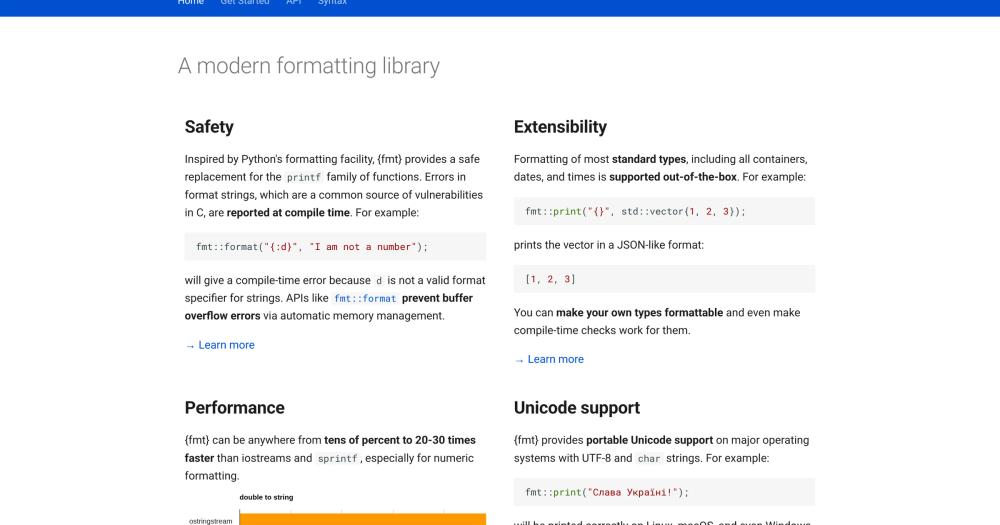
In C++20 mode, format errors are caught at compile time rather than at runtime. Passing `{:d}` (integer format specifier) for a string argument generates a compiler error, preventing the class of runtime crashes that `printf` type mismatches cause. This is enforced by the type system with zero runtime overhead.
Benchmarked faster than printf and Boost.Format
In published benchmarks, `fmt::print` runs in 0.44s versus `printf` at 0.66s and Boost.Format at 3.89s for 2 million formatted writes. For floating-point output, fmt is 20-30x faster than `std::ostringstream` and `sprintf`. The Dragonbox algorithm handles IEEE 754 floating-point formatting with correct rounding and shortest-representation guarantees.
Header-only and dependency-free configuration
The minimum configuration consists of three files: `base.h`, `format.h`, and `format-inl.h`. Enabling the `FMT_HEADER_ONLY` macro switches to a fully header-only deployment with no compiled library required. There are no external dependencies beyond a C++ compiler and standard library.
Extension headers for chrono, ranges, and color output
Optional headers add formatting for `std::chrono` dates and times (`fmt/chrono.h`), STL containers and ranges (`fmt/ranges.h`), colored and styled terminal output (`fmt/color.h`), and high-performance file I/O up to 9x faster than `fprintf` (`fmt/os.h`). Each header is self-contained and included only when needed.
Strengths and trade-offs#
Strengths
- Fastest of all common C++ formatting alternativesBenchmarked against `printf`, IOStreams, Boost.Format, and Folly Format, fmt is the fastest: 50% faster than `printf`, 9x faster than Boost.Format, and 20-30x faster than `std::ostringstream` for floating-point output. The Dragonbox algorithm provides correct rounding and shortest-representation guarantees without sacrificing throughput.
- Adopted across high-stakes production systemsUsed in MongoDB, ClickHouse, MariaDB, PyTorch, Envoy (Lyft), Apple FoundationDB, Salesforce Analytics Cloud, Windows Terminal (Microsoft), spdlog, and Kodi. Continuous fuzz testing via OSS-Fuzz and an OpenSSF Best Practices badge reflect production-grade reliability maintained across more than a decade of active development.
- Small binary footprint and short compile timesWith an optimized build, fmt produces a binary of 54 KiB, identical to `printf` and a fraction of Boost.Format's 530 KiB. Compile time for a medium-sized project (100 translation units) is around 5 seconds versus 55 seconds for Boost.Format and 28 seconds for IOStreams. Small footprint matters on embedded and mobile targets.
- MIT license with no external dependenciesThe MIT license allows use in commercial and proprietary projects with no copyleft restrictions. There are no external dependencies, so integrating fmt requires no changes to the build system beyond adding the source files or a single CMake target. The library compiles clean at high warning levels (`-Wall -Wextra -pedantic`).
Trade-offs
- -C++ only: no bindings for other languagesThis is a C++ library. Python, Rust, Go, and other language ecosystems have their own built-in formatting that does not depend on fmt. If your project is polyglot, each language handles formatting independently and fmt provides no benefit outside the C++ layer.
- -Compile-time checking requires C++20Format string validation at compile time is available only in C++20 mode. Projects targeting C++17 or earlier get the runtime API but lose the compile-time error detection that prevents format string mismatches. Upgrading the C++ standard is often constrained by toolchain, platform, or codebase requirements outside a team's immediate control.
fmt vs alternatives#
fmt vs Boost.Format
Both libraries offer Python-style format string syntax for C++ with type safety that printf lacks. The practical difference comes down to performance, binary size, and dependency weight.
| Feature | fmt | Boost.Format |
|---|---|---|
| License | MIT | Boost Software License |
| External dependencies | None | Boost library set |
| Runtime, 2M writes (optimized) | 0.44s | 3.89s |
| Binary size (optimized) | 54 KiB | 530 KiB |
| Compile time, 100 TUs (optimized) | 5.0s | 55.0s |
| C++20 std::format implementation | Yes | No |
| Header-only option | Yes | Yes |
fmt is the clear choice when performance, compile time, or binary size are constraints. Boost.Format remains relevant only when a project already carries a hard Boost dependency and the performance tradeoff is acceptable for that specific codebase.
fmt vs C stdio printf
printf is fast and universal but has serious safety issues: type mismatches cause undefined behavior, and there is no compile-time format string validation in C++17 and earlier. Buffer overflow via format strings is a documented vulnerability class.
| Feature | fmt | printf |
|---|---|---|
| Type safety | Yes (compile-time in C++20) | No |
| Runtime, 2M writes (optimized) | 0.44s | 0.66s |
| Binary size (optimized) | 54 KiB | 54 KiB |
| Unicode support | Yes | Platform-dependent |
| Extensible for user-defined types | Yes | No |
| C++20 std::format compatible | Yes | No |
fmt is faster than printf in benchmarks while adding type safety, Unicode portability, and extensibility at no binary size cost. printf remains the better fit for pure C codebases or environments where adding any C++ dependency is not possible.
What it's built on#
- Languages
- C++Python
FAQ#
Is fmt part of the C++ standard library?
Not directly, but it is the basis for the std::format facility in C++20 and std::print in C++23. The C++ committee adopted fmt's design for the standard. You can use fmt today on C++14/17 compilers as a backport of those facilities, then migrate to std::format when your toolchain supports it.
Can I use fmt in a commercial or closed-source project?
Yes. The library is MIT licensed, which allows unrestricted use in commercial, proprietary, and closed-source projects. You must include the license notice in your distribution, but there are no copyleft conditions, no revenue-based terms, and no restrictions on modification or redistribution.
How much faster is fmt than printf?
In published benchmarks on macOS with Clang, fmt::print runs in 0.44 seconds versus printf's 0.66 seconds for 2 million formatted writes, roughly 50% faster. For floating-point output specifically, fmt is 20-30x faster than std::ostringstream and sprintf. The Dragonbox algorithm handles IEEE 754 formatting with correct rounding and round-trip guarantees.
Does fmt support Unicode?
Yes, portable Unicode support is a listed core feature. Output is consistent across platforms including Windows terminals with Unicode enabled, as demonstrated by the library's color output examples with multi-language strings (Latin, Cyrillic, and CJK in the same program).
What is the difference between fmt and Boost.Format?
Both provide Python-style formatting syntax for C++ with type safety. The practical differences are substantial: fmt is about 9x faster in runtime benchmarks (0.44s vs 3.89s), compiles 11x faster on a medium project (5s vs 55s), and produces binaries 10x smaller in optimized builds (54 KiB vs 530 KiB). fmt also has zero external dependencies, whereas Boost.Format requires the Boost library set.
Similar open-source tools#

FckSignups
4,495 GitHub starsOpen-source tools that work instantly, no signup required

Vela
2,060 GitHub starsOpenStreetMap and Google data, no account, no Play Services
Alternative to Google Maps

dograh
5,897 GitHub starsOpen source voice agent builder with telephony and BYOK AI support
Alternative to Vapi
Vapi

agency-agents
160,805 GitHub starsExpert AI agent personalities for every workflow

Paymenter
2,757 GitHub starsSelf-hosted billing for hosting providers, MIT licensed
Alternative to WHMCS
WHMCS

Cloudflare Os
11,470 GitHub starsOpen source AI workspace with sandboxed apps and Gatekeeper security
Alternative to Dust
Dust