Open Source Alternatives LogoOpen Source Alternatives
AlternativesBlogAdvertise
Open Source Alternatives LogoOpen Source Alternatives

Stay Updated

Subscribe to our newsletter for the latest news and updates about Alternatives

Open Source Alternatives LogoOpen Source Alternatives

Handpicked Open Source Alternatives to Paid Softwares

Product
  • Categories
  • Tag
  • Sign In
Resources
  • Blog
  • Collection
  • Submit
  • Advertise your tool
Company
  • Privacy Policy
  • Terms of Service
  • Refund Policy
  • Sitemap
Alternatives
  • Claude Code
  • Jira
  • Notion
  • Slack
  • Linear
  • Wispr Flow
  • All alternatives
Copyright © 2026 All Rights Reserved.
Home/Categories/Web Development/opendisplay
icon of opendisplay

opendisplay

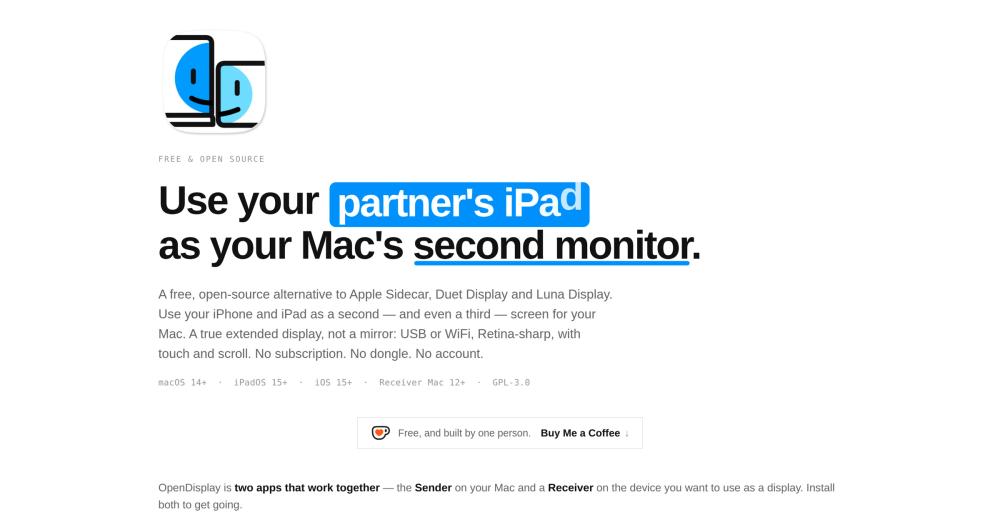
Open source alternative to Duet Display, Luna Display and iDisplay

Transform your iPhone, iPad, or spare Mac into a true second monitor for your Mac over USB or WiFi. GPL-3.0 licensed, no account and no subscription required.

3.6K starsSwiftGPL-3.0Active this month
Visit websiteGitHub repoDeployDeploy on Hostinger
image of opendisplay
Contents
  1. 01Who opendisplay is for
  2. 02The problem it solves
  3. 03How it solves it
  4. 04Strengths and trade-offs
  5. 05opendisplay vs alternatives
  6. 06Quick start
  7. 07Tech stack
  8. 08FAQ
  9. 09Similar open-source tools
TL;DR

opendisplay is a GPL-3.0 open source tool that turns an iPhone, iPad, or spare Mac into a true second monitor for your Mac over USB or WiFi. It replaces paid tools like Duet Display (subscription-based) and Luna Display (hardware dongle required) with a free, no-account alternative that works across different Apple IDs and supports both iPhone and iPad as displays. The Mac app streams hardware-encoded H.264 video at up to 60 FPS; touch and scroll input from the device returns as native mouse events. Best for Mac users with spare Apple hardware who want a second screen without new hardware costs.GPL-3.0 · Swift · 3.6K stars · Active this month

who it's for

Who opendisplay is for#

Mac users with a spare iPhone or iPad

Any iPhone on iOS 16+ or iPad on iPadOS 16+ becomes a second extended display: landscape for a browser or editor, portrait for logs or a chat window. Works even when the device belongs to a different Apple ID, such as a partner's iPad at a shared desk.

Skip if:

You need audio forwarded to the secondary display, multi-touch gestures beyond two-finger scroll, hardware keyboard passthrough, or Apple Pencil pressure input. Those features are not yet available.

Developers setting up a portrait-mode monitor

Portrait mode rebuilds the virtual display as a vertical rectangle at native resolution when the phone rotates. Suits log tailing, terminal output, documentation reading, and narrow vertical interfaces. Touch input lets you scroll on the device screen without leaving the keyboard.

Skip if:

You need frame-perfect latency for video editing, gaming, or drawing. Apple Pencil pressure and tilt support is roadmapped but not yet shipped.

Anyone reusing an old Mac as a second display

Install OpenDisplay Receiver on a spare Mac running macOS 12+ and the sending Mac gains a full Retina extended display. Any Mac from around 2015 that runs macOS 12 Monterey qualifies. Thunderbolt Bridge, Ethernet, and USB-C wired connections are all supported alongside WiFi.

Skip if:

The spare Mac cannot run macOS 12 Monterey. The receiver requires at minimum macOS 12, which excludes Macs older than around 2015.

Teams or households sharing devices across different Apple IDs

Corporate or family setups where the iPhone and Mac belong to different Apple IDs lock out Apple Sidecar entirely. OpenDisplay has no Apple ID requirement and pairs over a direct local connection with no account linking required.

Skip if:

Your organization restricts installing apps from outside the Mac App Store on managed devices. The Mac sender cannot ship through the Mac App Store because CGVirtualDisplay is a private API, so it requires a direct download from GitHub Releases.

the problem

The problem it solves#

Mac users who want a second monitor have three mainstream options, each with a meaningful restriction. Apple Sidecar is free but iPad-only, requires both devices on the same Apple ID, and only works on Apple-approved hardware pairs. Duet Display pioneered third-party tools for years but moved to a subscription. Luna Display achieves low latency through a dedicated hardware adapter, but that dongle costs extra and only works with specific Mac ports.

The result is that someone sitting next to a capable iPad or a spare iPhone has no free, open path to use it as a second screen if the devices are on different Apple IDs, if they prefer an iPhone over an iPad, or if they are unwilling to pay a recurring fee for a one-time hardware setup.

how opendisplay solves it

How it solves it#

USB and WiFi with automatic Bonjour discovery

Streams over the Lightning or USB-C charging cable via macOS's built-in usbmuxd with no tunnel tools required. WiFi mode uses Bonjour for automatic device discovery; pick the device from a dropdown with no IP address entry. USB mode charges the device during use and achieves the lowest latency.

Hardware H.264 pipeline at up to 60 FPS

VideoToolbox encodes the display stream in real-time hardware H.264 mode with TCP_NODELAY and frame-drop backpressure. Instant keyframe recovery prevents freeze frames on packet loss. At 18 Mb/s, the stream fits within USB 2.0 bandwidth, so a standard data-capable USB 2.0 cable is sufficient.

Retina HiDPI resolution

The Mac creates a virtual display sized to match the device panel pixel-for-pixel at @2x HiDPI. Text and icons appear at the same sharpness as on the physical device. No downscaling introduced by the encoding pipeline, so a 6.1-inch iPhone screen reads as clearly as a native display.

Touch and scroll input

Tap on the iPhone or iPad to click, drag to drag, and use a two-finger swipe to scroll. The Mac receives these as native mouse and scroll events via Accessibility API injection. Input works in both portrait and landscape orientation across all connected devices.

Portrait mode and multi-device support

Rotate the device and the virtual display rebuilds at portrait resolution, producing a vertical monitor suited to log files, chat apps, or documentation. Up to three simultaneous devices have been tested; each appears in macOS System Settings as an independent extended display that can be freely arranged.

Spare Mac as a display

Install the separate OpenDisplay Receiver app (macOS 12+) on an older Mac and it becomes a second extended display for the sending Mac. Connects over WiFi, Thunderbolt Bridge, Ethernet, or USB-C data cable. The sender switches to the wired cable automatically when plugged in mid-session.

strengths · trade-offs

Strengths and trade-offs#

Strengths

  • Free with no account, no subscription, and no dongleNo sign-up, no email, no login. Unlike Duet Display's subscription and Luna Display's dongle purchase, OpenDisplay has no recurring cost and no hardware requirement beyond a cable. GPL-3.0 means the source is auditable: the privacy properties and the streaming logic can be verified rather than trusted.
  • Works across different Apple IDsApple Sidecar requires both the Mac and iPad to share the same Apple ID. OpenDisplay has no such restriction. A partner's iPad, a work-owned iPhone, or any device from a different Apple account can be used as a second display without account linking.
  • iPhone support that Sidecar lacksApple Sidecar is iPad-only. OpenDisplay works with any iPhone running iOS 16+, including the iPhone 8 and iPhone X on iOS 16.7.x. An older iPhone that no longer serves as a primary device becomes a functional portrait-mode monitor rather than sitting unused.
  • Private by designOne direct TCP connection between your Mac and your device. No servers, no analytics, no telemetry. The full codebase is under GPL-3.0 so any claimed privacy property can be read in the source. The project's privacy page documents what each app stores locally and the current WiFi-encryption caveat.

Trade-offs

  • -Depends on a private macOS APIThe Mac sender uses CGVirtualDisplay, a private CoreGraphics API also used by BetterDisplay and DeskPad. Because it is undocumented and unsupported by Apple, a future macOS update could break virtual display creation without a workaround. The same risk applies to every virtual-display product that does not use a hardware dongle.
  • -Audio and several input features not yet shippedAudio forwarding is out of scope per the README. Multi-touch gestures beyond two-finger scroll, hardware keyboard passthrough, right-click, and Apple Pencil pressure and tilt are roadmap items rather than shipped features. The project had 141 open GitHub issues at the time of this writing.
  • -WiFi transport is currently unencryptedWiFi mode streams H.264 over an unencrypted TCP connection on the local network. Encrypted WiFi transport with a pairing code is tracked on the roadmap as issue #16. USB mode is unaffected: the charging cable provides a private, direct link between devices.
versus alternatives

opendisplay vs alternatives#

OpenDisplay vs Duet Display

Both tools extend the Mac desktop onto an iPhone or iPad over USB or WiFi. Duet Display pioneered this approach for iOS and was the leading third-party option before moving to a subscription model. OpenDisplay provides the same core capability for free.

FeatureOpenDisplayDuet Display
PriceFree (GPL-3.0)Subscription
iPhone supportYesYes
iPad supportYesYes
USB wiredYesYes
WiFiYesYes
Open sourceYes (GPL-3.0)No
No account requiredYesNo

OpenDisplay is the better choice when cost is the deciding factor or when you want an auditable, subscription-free tool you can build from source. Duet Display remains relevant if you need a more mature tool with a longer track record across macOS major versions or enterprise support options. Duet has shipped through more macOS release cycles, which matters if stability across OS upgrades is your primary concern.

OpenDisplay vs Luna Display

Luna Display ships a small hardware dongle that plugs into your Mac's USB-C or HDMI port. The dongle handles transport, enabling Luna Display's app to stream the Mac desktop to an iPad or another Mac at low latency. OpenDisplay matches the core use case using the charging cable you already own.

FeatureOpenDisplayLuna Display
PriceFree (GPL-3.0)Hardware dongle + app
iPhone supportYesYes
iPad supportYesYes
Wired USBYesNo (dongle provides its own link)
Open sourceYes (GPL-3.0)No
No extra hardware requiredYesNo

OpenDisplay is the better choice for anyone who does not want to purchase hardware and is willing to use an existing USB cable. Luna Display is worth considering when you need the most consistent low-latency profile across macOS versions, because Luna's own hardware handles transport without depending on Apple's private CGVirtualDisplay API.

install · quick start

Quick start#

bash
Building from source on macOS 14+ requires Xcode 15+, a free Apple developer account, and the xcodegen setup tool.
```bash
brew install xcodegen
git clone https://github.com/peetzweg/opendisplay.git
cd opendisplay
./generate.sh
```
tech stack · detected from GitHub

What it's built on#

Languages
Objective-CRubySwiftTypeScript
Frameworks
React
frequently asked

FAQ#

Is OpenDisplay free? Does it require a subscription?

OpenDisplay is free to download and use with no subscription, no account, and no in-app purchase. It is funded by voluntary Ko-fi donations. The source code is published on GitHub under GPL-3.0, so you can also build it yourself for free using a free Apple developer account.

Why does macOS show the purple screen-recording indicator when OpenDisplay runs?

macOS shows the screen-recording privacy indicator for any app that captures the screen, including Duet Display, Luna Display, OBS, and Zoom. Apple Sidecar avoids it because it is built into the operating system rather than running as a user-space app. The indicator cannot be suppressed by a third-party app; it is a macOS privacy feature that confirms a capture session is active.

Will OpenDisplay break on a future macOS update?

Possibly. The Mac sender uses CGVirtualDisplay, a private CoreGraphics API. Apple could change or remove it in a future macOS release without warning. The same risk applies to every virtual-display product that does not use dedicated hardware, including BetterDisplay and DeskPad. The capture and streaming pipeline uses only public macOS APIs and would be unaffected; only virtual display creation depends on the private API.

What license governs OpenDisplay, and can I fork or modify it commercially?

GPL-3.0. You can use, study, adapt, and distribute OpenDisplay, including for commercial purposes. If you distribute a modified version, it must remain open source under GPL-3.0 with the original attribution intact, so improvements flow back rather than into closed forks. Releases up to v0.4.x were MIT-licensed and remain available under those terms.

Does OpenDisplay work when my iPhone and Mac are on different Apple IDs?

Yes. OpenDisplay pairs directly over USB or WiFi with no Apple account requirement on either device. This is the main practical advantage over Apple Sidecar, which requires both devices to share the same Apple ID and therefore cannot be used with a partner's iPad or a corporate-issued iPhone.

also worth a look

Similar open-source tools#

FckSignups

FckSignups

Open-source tools that work instantly, no signup required

4.2KTypeScriptGPL-3.0
OpenResearch

OpenResearch

Local-first workspace for parallel research agents and experiments.

2.6KRustMIT
JellyBoxPlayer

JellyBoxPlayer

Native Jellyfin and Emby music player for every platform

584DartAGPL-3.0
fmt

fmt

Fast, type-safe C++ formatting that replaces printf and iostreams

25.8KC++MIT
kilocode

kilocode

Open source AI coding agent. 500+ models at zero markup.

27.3KTypeScriptMIT
iroh

iroh

Connect devices seamlessly without relying on the cloud.

12.5KRustApache-2.0

Repository

Stars
3.6K
Forks
251
License
GPL-3.0
Latest
v1.19.0
Last commit
8 days ago
Last verified
Sep 15, 2026
Repo
peetzweg/opendisplay ↗

Additional details

Language
Swift
Open issues
141
Contributors
6
First release
2026

Categories

Web DevelopmentCloud & HostingProduct & Project ManagementAI & Machine LearningDeveloper Tools

Tags

macOSSelf HostedDeveloper ToolsScreen RecordersWorkflow Automation