

Who Google Maps Scraper is for#
SDR teams running city-by-niche keyword grids
An SDR team prospecting local businesses pastes a grid of city-category pairs into the keyword batch, runs the job, and receives a CSV with phones, emails, and socials for every result. The per-keyword CSV structure keeps each city segment separate for territory assignment.
Skip if:
Your prospecting targets national or enterprise accounts where Google Maps listings are sparse or incomplete. The pipeline is built for local business outreach, not B2B SaaS or mid-market accounts with no Maps presence.
Local and GBP agencies building niche prospect lists
An agency researching dentists, salons, or HVAC contractors across a metro can batch all city-niche combinations in one job and receive enriched contact rows within the same session. The Place ID column enables deduplication across repeated runs as the agency expands its target list.
Skip if:
Your agency already has an established enrichment workflow with a different tool and migration cost outweighs the per-lead savings. The tool is best for teams starting a new outreach program or replacing a more expensive per-row billing model.
Engineers integrating Maps data into agent pipelines
The MCP endpoint and multi-language SDK make it possible to trigger lead collection from an AI agent thread, parse the structured JSON response, and pass the results to a CRM write or email sequence without leaving the agent session. The API key model is simple to configure in existing automation infrastructure.
Skip if:
You need to scrape sites beyond Google Maps, or require a fully self-hosted pipeline with no cloud dependency. This tool is purpose-built for Maps and does not cover general web scraping.
Franchise and territory teams mapping competitor categories
A franchise operator can search a target category across multiple cities to map competitor density before assigning reps or opening a unit. The rating, review count, and claimed status columns give a quick signal of how established each competitor is in each geography.
Skip if:
Your territory analysis needs data beyond Maps listings, such as revenue estimates, employee counts, or technographic data. Those require a different data source alongside this one.
The problem it solves#
Building a prospect list from Google Maps manually is time-consuming and contact-poor. You search a keyword, open each listing, write down a phone number, then visit the business website to find an email address. For teams running territory grids across multiple cities and categories, the work repeats across hundreds of rows and the results still lack social profiles and enriched contact data before any outreach can start.
Commercial lead enrichment tools charge per row or per credit at rates that grow quickly when a keyword grid spans dozens of city-niche pairs. Some general-purpose scraping tools require building and maintaining a custom integration; others add enrichment as a separate paid step on top of the base extraction cost. The result is either high manual effort or high per-lead cost before the first outreach message goes out.
How it solves it#
Batch keyword scraping
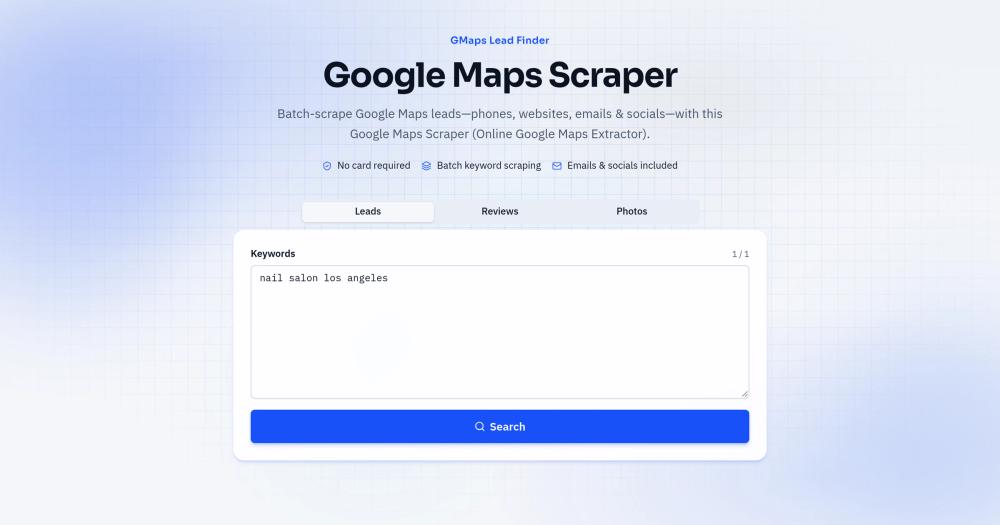
Accepts a list of keywords, one city-niche pair per line, and runs each as a separate Maps job. The pipeline paginates through Maps results and collects every place row, including name, phone, website, GMB categories, rating, review count, and Maps URL. Results stay in a Lead list for re-download.
Email and social enrichment included
After place rows land, the pipeline visits each business website and scans for public email addresses and social profile links. Facebook, Instagram, LinkedIn, YouTube, TikTok, and X are captured when linked from the business site. Enrichment runs per row at no extra billing step.
Per-keyword CSV zip export
Each completed batch downloads as a zip where every keyword gets its own CSV file. Columns include name, full address, phone, website, email, social links, rating, review count, claimed status, Place ID, CID, and the search keyword that produced the row. The format imports directly into a CRM, Google Sheets, or territory folders.
Open source SDK in seven languages
MIT-licensed client packages for Python, TypeScript, Go, Rust, PHP, Ruby, and .NET wrap the same cloud API. Each package installs via the standard package manager for its language (pip, npm, cargo, composer, gem, dotnet) and reads the API key from the GMF_API_KEY environment variable.
MCP and HTTP agent integration
The hosted pipeline exposes a remote MCP endpoint accessible from Claude Code, Cursor, and any MCP-compatible client. The same scrape-and-enrich workflow runs inside an agent chat session without switching to a browser or separate tool. Agent use requires the Growth plan or higher.
Chrome extension for in-browser extraction
A separate Chrome extension lets you extract place data while browsing Maps, capturing reviews, photos, and bulk lists from whatever you are currently viewing. It runs alongside the online cloud tool and shares the same account credentials, so results can be combined with batch keyword jobs.
Strengths and trade-offs#
Strengths
- MIT-licensed SDK across seven languagesThe client library is MIT licensed, so you can integrate it into commercial projects, fork it, or build on it without licensing fees or restrictions. The polyglot coverage (Python, TypeScript, Go, Rust, PHP, Ruby, .NET) means teams can use whichever language fits their existing stack rather than wrapping an HTTP client by hand.
- Enrichment included per row, not billed separatelyPublic email and social profile discovery runs as part of the same extraction job rather than as a separate paid credit pool. Compared to Outscraper, where email enrichment consumes a different credit type on top of the base listing credits, the bundled billing model keeps per-lead cost predictable.
- Free starter tier with no card requiredGMaps Lead Finder starts with 500 lifetime credits at no cost and no payment card required. For small batches, agency pilots, or developer testing, the free tier covers real workloads. The website states credits are lifetime, not monthly-expiring, so unused credits carry forward.
- Direct MCP support for AI agent workflowsThe remote MCP endpoint makes it possible to call Maps lead extraction directly from an agent session in Claude, Cursor, or Codex without leaving the conversation. The MCP server exposes tools for creating jobs, polling results, and fetching reviews or photos, covering the full prospecting workflow in one agent thread.
Trade-offs
- -Requires a hosted cloud account, not a local scraperThe README is explicit: this repo does not run a local browser crawler. All scraping runs on GMaps Lead Finder's cloud infrastructure, so you cannot run the pipeline on your own server without using the hosted service. Teams with strict data-residency requirements or who need full stack ownership should account for this dependency.
- -Agent API requires Growth plan or higherMCP and HTTP agent access is locked to the Growth plan and above. The free tier and Starter plan cover web UI and Chrome extension use only. Teams building agent workflows will need to assess whether the plan cost fits the use case before integrating the MCP endpoint into production pipelines.
- -One active job per account at a timeOnly one scrape job can run at a time per account; the API returns HTTP 409 if a second job starts while the first is still running. High-volume teams running many concurrent keyword grids would need multiple accounts or sequential job queuing, which adds latency to large batch workflows.
- -New project with no community track recordThe GitHub repository was created in October 2026, has zero stars and zero forks, and has no public issues. There is no community-reported bug history or third-party review to draw on. The SDK is thin client code wrapping a hosted API, so the main operational risk is hosted service reliability, not the SDK code itself.
Google Maps Scraper vs alternatives#
Google Maps Scraper vs Outscraper
Both tools extract Google Maps business listings in bulk and can include contact enrichment. The key difference is pricing model and access pattern. Outscraper is a proprietary managed service where listings and enrichment each consume separate credit pools; GMaps Lead Finder bundles extraction and enrichment into one per-row cost and offers 500 lifetime starter credits before any billing begins.
| Feature | Google Maps Scraper | Outscraper |
|---|---|---|
| License | MIT (SDK) | Proprietary |
| Free tier | Yes (500 lifetime credits) | Limited trial |
| Enrichment billing | Included per row | Separate credit pool |
| Open source SDK | Yes (7 languages) | No |
| MCP / Agent API | Yes (Growth+ plan) | No |
Outscraper suits teams who need its broader export integrations or Google reviews scraping at high volume with established account controls. Google Maps Scraper is the better fit when you need an MIT-licensed SDK for direct API or agent integration, or when the bundled enrichment model better fits your per-lead budget.
Google Maps Scraper vs Apify
Apify is a general-purpose scraping platform where Google Maps extraction typically requires running a community-maintained Actor. Google Maps Scraper is purpose-built for Maps leads with enrichment included. The Apify actor model is more flexible for multi-site scraping, but adds setup and per-run billing at the task level.
| Feature | Google Maps Scraper | Apify |
|---|---|---|
| License | MIT (SDK) | Proprietary |
| Maps-specific pipeline | Yes | Via Actor |
| Enrichment included | Yes | Depends on Actor |
| MCP / Agent support | Yes | Via HTTP |
| Setup for Maps leads | Low | Moderate |
Apify is the better choice when the work spans multiple data sources beyond Maps or requires custom extraction logic. For teams who need Maps leads with enrichment and no custom scraper setup, Google Maps Scraper's narrower scope and zero-config batch path reduce the time from keyword to outreach-ready CSV.
Google Maps Scraper vs LocalProspects
Both are purpose-built for local business lead generation with similar enrichment outputs. The main distinction is integration depth: Google Maps Scraper exposes an MIT-licensed multi-language SDK and an MCP endpoint, giving engineering and agent-heavy teams a direct integration path that LocalProspects does not offer as an open source component. LocalProspects may be a better fit for teams who prefer a fully managed proprietary interface with no SDK setup.
Quick start#
Install the Python SDK to connect to the GMaps Lead Finder cloud pipeline; set your API key before running.
```bash
pip install google-maps-scraper-sdk
```What it's built on#
- Languages
- C#GoPythonRubyRustTypeScript
FAQ#
Is Google Maps Scraper self-hosted or cloud-based?
The scraping pipeline runs on GMaps Lead Finder's cloud infrastructure, not on a server you provision. The GitHub repository is an MIT-licensed SDK client that calls the hosted API; there is no local browser crawler in the repo. You install the SDK in your language of choice, provide an API key, and the extraction runs on the hosted service.
Does every business row include an email address?
No. The pipeline scans each business website for publicly listed email addresses, but if a business does not publish one, the email column is left blank rather than filled with a guess. The product website describes this behavior as honest empty cells. Social profile links follow the same rule: only URLs the business already publishes on its own website are captured.
Can I use Google Maps Scraper from an AI agent like Claude or Cursor?
Yes. The hosted pipeline exposes a remote MCP endpoint at gmapsleadfinder.com/mcp. You connect it to Claude Code, Cursor, or any MCP-compatible client using your API key, then call the scrape and enrichment tools directly from an agent chat session. MCP access requires the Growth plan or higher.
What languages does the open source SDK support?
The MIT-licensed SDK is available for Python (PyPI), TypeScript and Node.js (npm), Go (pkg.go.dev), Rust (crates.io), PHP (Packagist), Ruby (RubyGems), and .NET (NuGet). Each package installs via the standard package manager for its language and reads credentials from the GMF_API_KEY environment variable.
Is Google Maps scraping legal?
Scraping publicly visible business information from Google Maps, such as names, phone numbers, and addresses, generally falls under public data collection, but legality depends on your jurisdiction and how you use the data. The product website notes GDPR compliance in its FAQ. For commercial outreach use, review the terms of service for Google Maps and applicable data protection regulations in your region before running large batches.
Similar open-source tools#

openpanel
Open-source analytics with funnels, replay, and self-hosting

MiroFish
Multi-agent simulation engine that predicts real-world outcomes

FckSignups
Open-source tools that work instantly, no signup required

treg
One token for 2,600+ agent tools across 47 providers

rybbit
Cookieless web analytics: GDPR compliant, 18 KB script

Umami
Self-hosted analytics for product and marketing teams