

Who PDFsam Basic is for#
Office users organizing scanned PDFs
Use PDFsam Basic to split scans, merge document packets, and rotate pages without buying a full PDF editor.
Skip if:
You need OCR, redaction, or advanced form editing.
Legal or finance teams handling sensitive files
Use PDFsam Basic when confidential PDFs should stay local during simple page operations.
Skip if:
Your workflow requires cloud sharing, approval routing, or e-signature collection.
IT teams reducing Acrobat seat count
Use PDFsam Basic for users who only need split and merge operations, keeping paid seats for advanced editors.
Skip if:
Every user needs the full Acrobat toolset.
The problem it solves#
Simple PDF tasks often push users toward paid editors or browser upload tools. That is wasteful when the job is just merging invoices, extracting pages, or rotating scans. It can also create privacy risk when confidential PDFs are uploaded to third-party services for edits that should happen locally.
How it solves it#
Split and merge PDFs locally
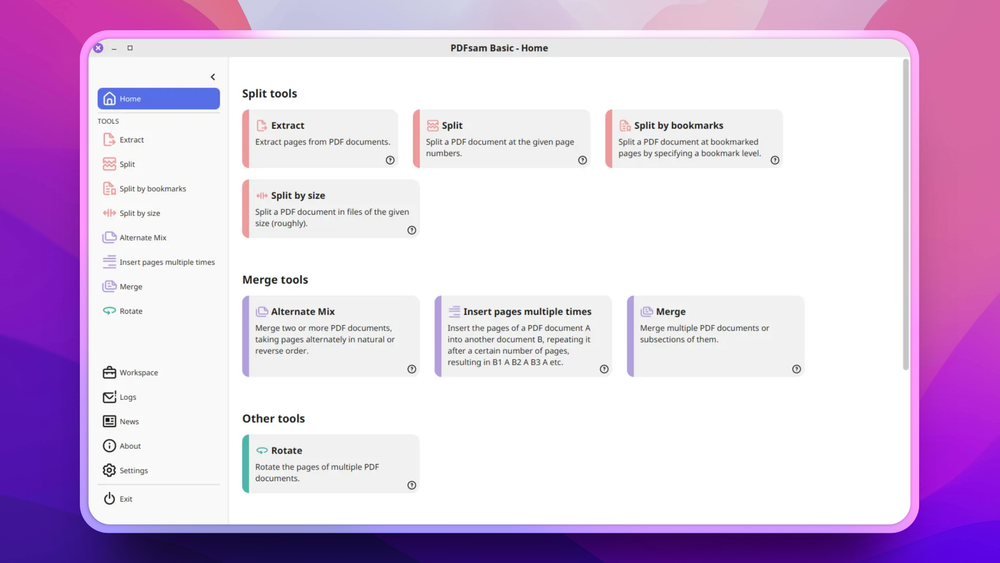
PDFsam Basic focuses on extracting pages, splitting documents, merging files, mixing pages, and rotating PDFs from a desktop app.
Cross-platform desktop packaging
PDFsam Basic is multi-platform, and newer versions ship as self-contained applications.
No document upload required
Because PDF operations happen locally, sensitive PDFs do not need to be sent to a browser-based conversion service.
AGPL-licensed Basic edition
PDFsam Basic is open source under GNU AGPL since version 3, with earlier versions under GPLv2.
Strengths and trade-offs#
Strengths
- Good for repeated page operationsPDFsam Basic targets the operations office users repeat often: split, merge, mix, rotate, and extract. It avoids the cost of a full PDF editor for those tasks.
- Local processing improves privacyCompared with upload-based web tools, a local desktop utility is safer for contracts, invoices, and internal documents.
- Simple open source alternativeThe Basic edition gives teams a free local option before they buy Acrobat seats for users who only need page-level PDF tasks.
Trade-offs
- -Not a full PDF editing suitePDFsam Basic does not replace Acrobat Pro for deep text editing, OCR workflows, form authoring, redaction, or e-signature workflows.
- -Desktop workflow onlyTeams that need browser-based collaboration or automated API processing should look beyond PDFsam Basic.
What it's built on#
- Languages
- Java
- Frameworks
- JavaFX
FAQ#
What does PDFsam Basic do?
PDFsam Basic splits, merges, extracts, mixes, and rotates PDF files from a desktop application.
Is PDFsam Basic open source?
Yes. PDFsam Basic has been AGPL-licensed since version 3, with previous versions under GPLv2.
Does PDFsam Basic upload PDFs?
No. PDFsam Basic is a desktop app, so common page operations run locally rather than through an upload service.
Similar open-source tools#

OCRmyPDF
35,068 GitHub starsMake scanned PDFs searchable and copy-pasteable in one command.
Alternative to Adobe Acrobat

Stirling PDF
94,366 GitHub starsSelf-hosted PDF editor with 50+ tools for every PDF task
Alternative toAdobe Acrobat

Okular
1,541 GitHub starsMulti-platform document viewer supporting PDF, EPUB, and more
Alternative toAdobe Acrobat

PDF4QT
1,499 GitHub starsOpen source PDF editor and viewer for Windows and Linux
Alternative toAdobe Acrobat

Vorssaint Utils
27,734 GitHub starsOne menu bar icon replacing a dozen paid macOS apps

FckSignups
4,477 GitHub starsOpen-source tools that work instantly, no signup required