

Who tabularis is for#
Developers building AI-assisted database workflows
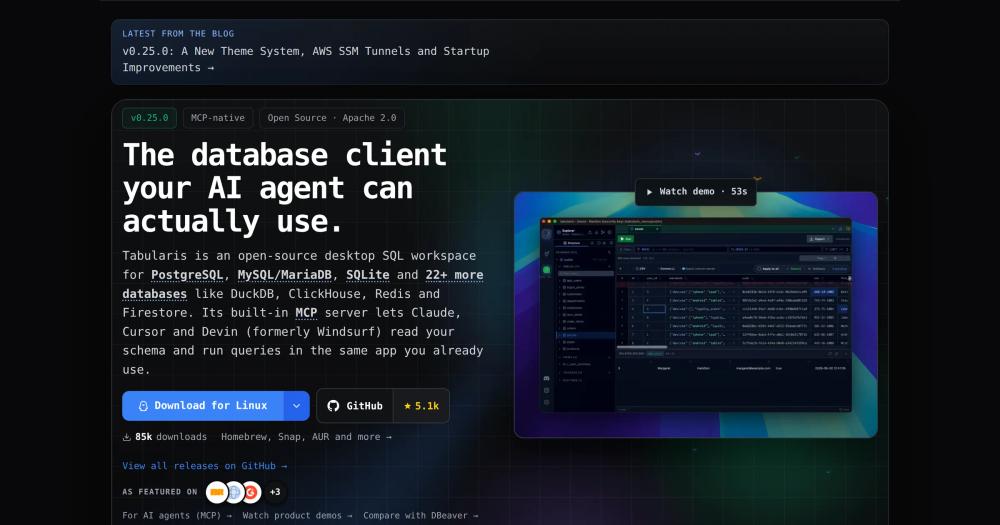
Tabularis's built-in MCP server connects Claude Desktop, Cursor, or Windsurf directly to your database schema. AI coding agents can read your tables, write queries, and execute them without leaving their chat interface. The AI assist overlay adds text-to-SQL via Ollama for fully local inference with no API key required.
Skip if:
Your AI tooling is browser-based and cannot connect to a desktop MCP server, or your team needs a shared server-side database interface rather than individual desktop clients.
Data engineers writing and documenting SQL analysis
SQL notebooks combine queries, Markdown documentation, and inline charts in a single auto-saved file. Cross-cell variables let you reference one query's output as a table in another using CTE syntax, which is useful for staged analysis pipelines. Export to HTML or JSON for sharing results outside the app.
Skip if:
Your workflow centers on Jupyter notebooks with Python kernels, or you need scheduled query execution on a server. Tabularis notebooks run interactively on the desktop, not on a schedule.
Full-stack developers working across PostgreSQL and MySQL
Tabularis handles PostgreSQL with multi-schema support, MySQL/MariaDB, and SQLite from a single app with per-connection profiles, SSH tunneling, and a Monaco-based SQL editor with tab isolation per connection. ER diagrams and visual EXPLAIN are built in for schema exploration and query optimization.
Skip if:
You primarily use databases not yet in the plugin registry (Snowflake, Cassandra, ScyllaDB) where the driver is listed as coming soon or open on the bounty board.
Linux developers who need a TablePlus-quality GUI
TablePlus does not have a Linux client. Tabularis provides a comparable connection manager with per-connection icon and accent color customization, system keychain integration, SSH tunneling, and a polished SQL editor, plus features TablePlus lacks: notebooks, an MCP server, and a language-agnostic plugin system.
Skip if:
You are on macOS or Windows and find the TablePlus one-time license acceptable. TablePlus supports a wider range of databases out of the box and has a larger installed base.
The problem it solves#
Most database GUI tools make you choose between features and cost. The polished ones (TablePlus, DataGrip, Navicat) are commercial, with per-seat pricing or per-device licenses that add up as your team grows or as you move between machines. The free options either lack the features that make daily work fast or, in the case of DBeaver CE, have a UI complexity that slows you down. There is no straightforward path to getting a fast, modern SQL-editing experience without paying a license fee or giving up capabilities like query notebooks, visual EXPLAIN, or AI integration.
The gap widens for developers who want AI in their database workflow. Most paid tools either bolt on a cloud AI assistant as an afterthought or leave AI out entirely. Running text-to-SQL with a local model, or giving an AI coding agent direct access to your database schema, requires stitching together multiple tools. That friction compounds when you work across multiple databases or need to share query notebooks with teammates.
How it solves it#
SQL Notebooks with Inline Charts
Combine SQL queries and Markdown cells in a single document with inline result charts. Each cell runs independently; results render as tables, bar charts, line charts, or pie charts. Cross-cell variables reference one cell's full result as a table in another query using `{{cell_N}}` syntax, which expands to a CTE at run time. Notebooks auto-save as `.tabularis-notebook` files and export to HTML, CSV, or JSON.
Built-in MCP Server for AI Agents
Tabularis ships a Model Context Protocol server that AI coding agents connect to directly. Run `tabularis --mcp` to expose your database schema and query execution to Claude Desktop, Cursor, or Windsurf. One-click config install in Settings handles the agent-side setup. No separate server is required: the MCP server runs inside the desktop app itself.
Language-Agnostic Plugin System
Database drivers are plugins that communicate over JSON-RPC 2.0 via stdin/stdout, so you can write a driver in Go, Rust, Python, or any other language. The registry includes DuckDB, MongoDB, Redis, ClickHouse, Elasticsearch, DynamoDB, Firestore, Google Sheets, LibSQL, and more. Install plugins from Settings without restarting the app.
Visual EXPLAIN with Interactive Plan Graphs
Query execution plans render as navigable node graphs instead of raw text output. Switch between graph, table, and raw views, or enable optional AI-assisted analysis that annotates expensive scans and optimizer decisions. Works with PostgreSQL, MySQL/MariaDB, and SQLite using each driver's best available EXPLAIN format.
AI Text-to-SQL with Local Model Support
The AI assist overlay in the SQL editor connects to OpenAI, Anthropic, MiniMax, OpenRouter, and Ollama. Ollama runs entirely on your machine with no API key: point it at a local model and text-to-SQL stays private. Model lists are fetched from your provider and cached locally; custom models can be configured per provider.
Visual Query Builder
Build queries with a drag-and-drop canvas powered by ReactFlow. Connect tables to define JOINs, add WHERE and HAVING filters, include aggregate functions (COUNT, SUM, AVG), and set ordering and limits. SQL generates in real time as you build, so you can inspect or copy the output at any step without switching to the editor.
Strengths and trade-offs#
Strengths
- Apache 2.0 License with No Paid TierTabularis is Apache 2.0 licensed with no feature gating and no commercial upgrade. TablePlus is fully commercial; DataGrip requires a JetBrains subscription; DBeaver's advanced features require the Pro edition. Apache 2.0 allows commercial use, modification, and redistribution without restriction.
- MCP Server Integration No Paid Competitor OffersNo other major database GUI (TablePlus, DataGrip, Beekeeper Studio, DBeaver) ships a built-in MCP server. Tabularis's built-in MCP server lets AI coding agents read your live schema and execute queries from their chat interface. This is a native capability, not a plugin or external integration.
- SQL Notebooks Absent from All Listed AlternativesSQL notebooks (SQL cells combined with Markdown and inline charts) are not available in TablePlus, DataGrip, or Beekeeper Studio. Tabularis builds them in with cross-cell variable references, sequential execution with stop-on-error, and export to HTML, CSV, or JSON. This enables documentation-as-query workflows that a plain SQL editor tab cannot support.
- Linux Support Where TablePlus Has NoneTabularis ships Snap, Flatpak, AppImage, .deb, .rpm, and AUR packages. TablePlus does not have a Linux client. For Linux developers who want a polished database GUI with per-connection profiles, SSH tunneling, and keychain password storage, Tabularis is one of the few free options with this feature depth.
Trade-offs
- -Fewer Built-in Drivers than DBeaverTabularis ships 3 built-in drivers (PostgreSQL, MySQL/MariaDB, SQLite) plus roughly 16 official plugins. DBeaver CE ships 100+ drivers out of the box. The README is direct on this: "If you need dozens of drivers, use DBeaver." Teams connecting to a wide variety of database types will hit this gap, since each additional driver requires a separate plugin install.
- -Young Project with Open IssuesTabularis was created in January 2026 and had 81 open issues as of September 2026. Core features (SQL editor, notebooks, MCP server) are stable, but edge cases in plugin drivers may surface. Some drivers in the registry are community-maintained rather than officially supported by the TabularisDB team.
- -Desktop App Only, No Web InterfaceTabularis is a desktop client with no web interface or server component. Teams that need a shared browser-based query environment will need a separate tool. The MCP server exposes schema to AI agents, but it runs from the desktop app and does not function as a standalone service.
tabularis vs alternatives#
Tabularis vs TablePlus
TablePlus is a commercial database client available on macOS and Windows. It supports 20+ databases out of the box but does not have a Linux client, and its feature set does not include SQL notebooks, an MCP server, or visual EXPLAIN. Tabularis is Apache 2.0 and free, supports all three platforms, and adds those capabilities.
For macOS or Windows users who need a fast connection manager and have no requirement for notebooks or AI agent integration, TablePlus is competitive. For Linux developers or teams using AI coding agents, Tabularis is the stronger choice.
| Feature | Tabularis | TablePlus |
|---|---|---|
| License | Apache 2.0, free | Commercial |
| Linux client | Yes | No |
| SQL notebooks | Yes | No |
| MCP server | Yes | No |
| Visual EXPLAIN | Yes | No |
| Built-in databases | 3 + 16+ plugins | 20+ |
Tabularis vs DataGrip
DataGrip is JetBrains' commercial database IDE, available through a JetBrains subscription. It covers a wide range of databases and integrates with the JetBrains IDE ecosystem. Tabularis is Apache 2.0 and free, focused on a smaller set of databases with SQL notebooks and native MCP server support.
DataGrip's strengths are broad driver coverage and schema refactoring tools. Tabularis is the better choice when cost is a factor, when you work primarily with PostgreSQL, MySQL, or SQLite, or when local AI inference via Ollama matters.
| Feature | Tabularis | DataGrip |
|---|---|---|
| License | Apache 2.0, free | Commercial subscription |
| SQL notebooks | Yes | No |
| MCP server | Yes | No |
| AI text-to-SQL (local Ollama) | Yes | No |
| Database driver coverage | 3 built-in + 16+ plugins | 100+ |
Tabularis vs DBeaver Pro
DBeaver Community Edition is Apache 2.0 and free with 100+ database drivers. DBeaver Pro adds enterprise features at a commercial license price. Tabularis and DBeaver CE share the same license but make different tradeoffs: DBeaver prioritizes driver breadth; Tabularis prioritizes SQL notebooks, MCP integration, and a plugin system that works in any language.
The Tabularis README states directly: "If you need dozens of drivers, use DBeaver. Tabularis focuses on doing a few databases well." For teams using PostgreSQL, MySQL, and a handful of modern databases who want AI agent integration and notebook workflows, Tabularis offers a lighter, more modern experience than DBeaver's Java-based interface.
| Feature | Tabularis | DBeaver Pro |
|---|---|---|
| License | Apache 2.0, free | Community free; Pro commercial |
| SQL notebooks | Yes | No |
| MCP server | Yes | No |
| Database drivers | 3 built-in + 16+ plugins | 100+ built-in |
| Plugin language | Any (JSON-RPC) | Java/Eclipse |
| Visual EXPLAIN | Yes | Yes |
Quick start#
Install Tabularis using the package manager for your operating system.
```bash
winget install Debba.Tabularis
brew install --cask tabularis
sudo snap install tabularis
```What it's built on#
- Languages
- RustTypeScript
- Frameworks
- React
- Databases
- MariaDBMySQLPostgreSQLSQLite
FAQ#
Is Tabularis free to use commercially?
Yes. Tabularis is Apache 2.0 licensed, which allows commercial use, modification, and redistribution without restriction. There is no paid tier, no seat limit, and no feature gating behind an upgrade.
Which databases does Tabularis support?
PostgreSQL, MySQL/MariaDB, and SQLite ship built in. The plugin registry adds DuckDB, ClickHouse, MongoDB, Redis, Elasticsearch, DynamoDB, Firestore, Google Sheets, LibSQL, Cloudflare D1, IBM Db2, and more. Total coverage is 3 built-in databases plus roughly 16 official plugins, with additional community-maintained plugins available in the registry.
How does the Tabularis MCP server integration work?
Running tabularis --mcp starts the built-in Model Context Protocol server. From Settings > MCP Server Integration, you can install the config for Claude Desktop, Cursor, or Windsurf in one click. Once connected, the AI agent can read your database schema and run queries from its own chat interface without switching apps.
Does Tabularis work on Linux?
Yes. Tabularis supports Snap, Flatpak, AppImage, .deb, and .rpm packages on Linux, and is available in the AUR for Arch Linux. TablePlus does not have a Linux client, making Tabularis a common replacement for Linux developers who want a polished database GUI with this feature depth.
How do Tabularis SQL notebooks differ from a regular SQL editor?
SQL notebooks combine SQL cells and Markdown cells in a single document with inline result charts (bar, line, pie). Cross-cell variables let you reference one cell's output as a table in another query using {{cell_N}} syntax, which expands to a CTE at run time. Notebooks auto-save as .tabularis-notebook files and export to HTML, CSV, or JSON. A regular SQL editor tab runs queries in isolation without persistent documentation or chart output.
Similar open-source tools#

QoreDB
152 GitHub starsRust-powered database client for 9 SQL and NoSQL engines
Alternative to DataGrip

Dbdelve
205 GitHub starsNative Rust DB client. Multi-engine, no Electron, no paywall.
Alternative toDataGrip

Chat2DB
28,322 GitHub starsAI text-to-SQL client for 40+ databases; local-first, self-hosted
Alternative toDataGrip

libredb-studio
1,225 GitHub starsOne browser tab for 18 database engines, deployed beside your data
Alternative toDataGrip

DBeaver
52,091 GitHub starsFree open-source database management tool for SQL databases.
Alternative toDataGrip

dbx
27,074 GitHub starsManage 100+ databases with a 25 MB open source client
Alternative to TablePlus