

Who dbx is for#
Developers who touch several database engines
A backend developer working with PostgreSQL, Redis, and MongoDB in one project can keep all three connections in a single lightweight client, with one editor and one export flow.
Skip if:
You only use one engine and already rely on a dedicated IDE for it.
Teams that want browser access to internal databases
Deploy the Docker version on your own infrastructure so teammates can reach databases from a browser, and use the desktop app for local work from the same project.
Skip if:
You need enterprise features such as managed access policies that the project does not document.
Engineers using AI coding tools with live data
The MCP Server lets Claude Code or Cursor read from a connected database while the confirmation prompts on dangerous operations guard the desktop client.
Skip if:
Your policy forbids giving AI tools any access to database contents.
The problem it solves#
Working with databases usually means working with several clients. A relational client covers MySQL and PostgreSQL, another tool opens Redis or MongoDB, and a third handles a vendor-specific engine such as ClickHouse or a Chinese domestic database. Each tool has its own connection manager, its own export format, and its own habits.
The all-in-one options have their own costs. Commercial database IDEs charge per seat, and free multi-engine clients built on the JVM can feel heavy on a low-spec laptop. Teams that want browser-based access to internal databases often end up deploying yet another separate product. DBX targets that gap with one small client that connects to many engines and runs as a desktop app, a Docker web deployment, or a CLI.
How it solves it#
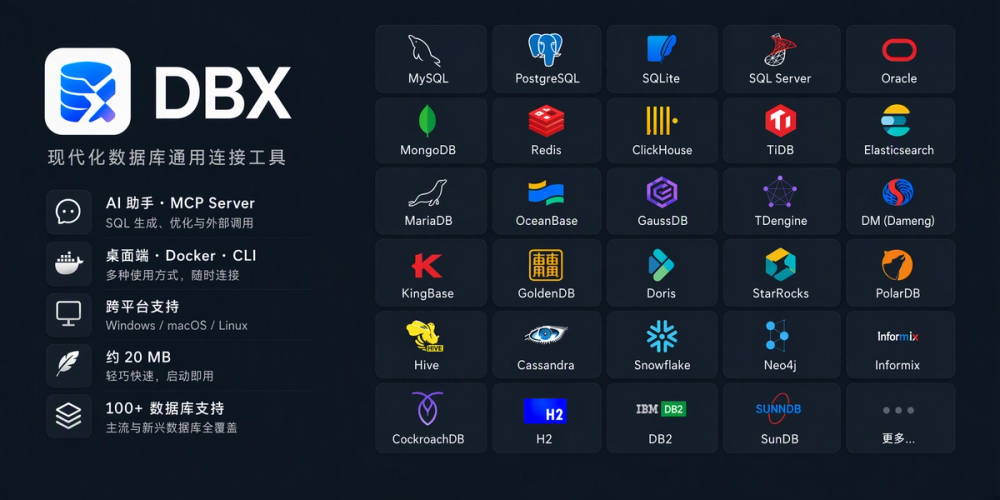
100+ database engines in one client
Connects to SQL, NoSQL, vector, time-series, embedded, and message-queue systems, including MySQL, PostgreSQL, SQLite, Redis, MongoDB, DuckDB, ClickHouse, SQL Server, Oracle, Elasticsearch, Qdrant, Snowflake, BigQuery, and Dameng. A JDBC option covers engines without a native driver.
SQL editor and editable data grid
The editor is built on CodeMirror 6 with metadata autocompletion, formatting, query history, and execution of selected SQL. The data grid uses virtual scrolling, inline editing, WHERE and ORDER BY controls, SQL preview, and export tools.
Schema browsing, ER diagrams, and comparison
The sidebar lists databases, schemas, tables, columns, indexes, foreign keys, and triggers. ER diagrams, schema comparison, and field lineage cover deeper analysis, and light and dark themes are both available.
Import, export, and cross-engine transfer
Import CSV, Excel, and SQL files, run SQL files, export whole databases, and move data between different database engines from inside the same app.
Built-in AI assistant and MCP Server
An optional AI assistant helps generate, explain, optimize, and fix SQL. The MCP Server lets tools such as Claude Code and Cursor connect to your databases and query data.
Desktop, Docker, and CLI from one project
Use the desktop app on Windows, macOS, and Linux for local work, deploy the Docker version for browser access, or use the CLI. SSH tunnels, encrypted configuration export, and confirmation prompts for dangerous operations are built in.
Strengths and trade-offs#
Strengths
- Small download with native driversThe desktop installer is about 25 MB, and the drivers are native Rust code with no JDBC runtime. That makes it practical on low-spec laptops and office machines.
- Very wide engine coverageOne tool reaches mainstream databases, analytics engines, vector stores, message queues, and a long list of Chinese domestic databases such as Dameng, GaussDB, and KingbaseES, which many Western clients do not list.
- Free under Apache-2.0The license permits commercial use and modification, so there is no per-seat fee and no license server. The repository has over 305 listed contributors and active development.
- Same project for desktop and self-hosted webTeams can run the desktop app locally and deploy the Docker version when browser access is needed, without adopting a second product.
Trade-offs
- -Young project with a large issue backlogThe repository was created in April 2026 and lists about 1,250 open issues. Expect rough edges and fast-changing behavior, especially on less common database engines.
- -Fewer features than the largest clientsCommunity reviewers quoted on the project site say it does not have everything DBeaver offers, though the features it has are well done. Check that your specific workflows are covered before switching from a mature IDE.
- -Site and community are Chinese-firstThe product website and much of the community discussion are in Chinese. The README and the GitHub repository description are available in English.
- -AI features depend on a provider you configureThe AI assistant is optional and needs a model provider. Sending schema or query text to an external model is your decision, so review your data policy before enabling it.
dbx vs alternatives#
DBX vs TablePlus
Both are database clients for everyday querying and editing. DBX is free and Apache-2.0 licensed, so there is no license to buy. It also adds a Docker web deployment, a CLI, and an MCP Server, which lets you run the same tool for browser access. Check TablePlus's own pricing page for its current terms.
DBX vs JetBrains DataGrip
DataGrip is a full database IDE from JetBrains that is sold as a paid product. DBX is smaller, at about 25 MB for the desktop installer, and uses native Rust drivers without a JDBC runtime. DBX covers the daily workflow: SQL editor with autocompletion and formatting, editable data grid, schema browsing, ER diagrams, and schema comparison. If you depend on deep IDE integrations, verify that DBX covers them first.
DBX vs DbVisualizer
DbVisualizer is a commercial multi-database client. DBX matches the multi-engine idea with more than 100 engines, plus data import and export, cross-engine transfer, SSH tunnels, and encrypted configuration export. It is a young project, so mature commercial tools may be steadier on edge cases in less common engines.
Where the choice matters
Pick DBX if you want a free client that covers many engines with a small footprint and an optional AI assistant. Stay with a paid tool if your team needs vendor support, long release history, or features DBX does not yet document.
What it's built on#
- Languages
- GoJavaJavaScriptRustTypeScript
- Frameworks
- Next.jsReactVue
- Databases
- ClickHouseMongoDBMySQLPostgreSQLSQLite
- Infrastructure
- Docker
- Cache
- Redis
FAQ#
Is DBX free and open source?
Yes. DBX is released under the Apache-2.0 license, which allows commercial use, modification, and self-hosting. The source is on GitHub at t8y2/dbx.
Which databases does DBX support?
The project lists more than 100 engines, including MySQL, PostgreSQL, SQLite, Redis, MongoDB, DuckDB, ClickHouse, SQL Server, Oracle, Elasticsearch, Snowflake, BigQuery, and Dameng. JDBC is available for others. The full list is on the product website.
Can I self-host DBX for browser access?
Yes. Besides the desktop app for Windows, macOS, and Linux, the project provides a Docker version for browser access. The website suggests the desktop version for local work and Docker when you need browser access.
Is the AI assistant required?
No. The website describes the AI assistant as optional. It helps generate, explain, optimize, and fix SQL, and the separate MCP Server lets tools like Claude Code and Cursor query your databases.
Similar open-source tools#

libredb-studio
One browser tab for 18 database engines, deployed beside your data

tabularis
Open-source desktop SQL workspace with AI, notebooks, and MCP

code-graph-rag
AI-powered codebase analysis with knowledge graphs

Omnara
Open-source agent deployment API. Self-host or use Omnara Cloud.

rakazo
AI teammates you own: your keys, your model, your machine.

Agent Reach
Give any AI agent internet access, free and local