

Who Lyrimuse is for#
Mac users replacing Musixmatch Premium
Lyrimuse covers the same word-by-word lyrics use case as Musixmatch Premium across Apple Music and Spotify, at no cost. It also adds QQ Music, NetEase, and Kugou support, and runs entirely on your Mac with no subscription renewal.
Skip if:
If you need lyrics on iOS or Android alongside your Mac, Musixmatch Premium's mobile apps cover that. Lyrimuse is desktop-only and has no mobile companion.
LyricsX users who need current player support
LyricsX stopped shipping updates in April 2022 and does not support Chinese-language players or modern macOS features like Dynamic Island. Lyrimuse picks up where LyricsX left off and adds Last.fm scrobbling, translation, and nine players.
Skip if:
If you are on macOS 13 or earlier, Lyrimuse requires Sonoma (14). LyricsX or another app is the fallback for those systems.
Listeners who follow Chinese-language music
QQ Music, NetEase Cloud Music, Kugou, and Soda Music are fully supported players with their own lyrics sources. Cantonese songs get Jyutping romanization; Japanese and Mandarin get romaji and Pinyin respectively, all decided line by line.
Skip if:
If you only listen through Apple Music or Spotify and have no interest in Chinese-language services, simpler alternatives may cover your needs with less setup.
Last.fm scrobblers who want lyrics on Mac
Lyrimuse connects to Last.fm and ListenBrainz, saves plays locally before upload, and shows top artists, albums, and tracks in the app itself with a year-long heatmap. It replaces the need for a standalone Mac scrobbler while also handling lyrics.
Skip if:
If you scrobble from multiple devices and need mobile coverage, you still need Last.fm or ListenBrainz's mobile apps for iPhone plays. Lyrimuse only tracks plays on the Mac.
The problem it solves#
Synced lyrics on macOS are dominated by a handful of apps that either stopped shipping updates years ago or gate the features most users want behind a subscription. LyricsX was the go-to open source option, but its last release was April 2022, and it does not support the Chinese-language music services that hundreds of millions of users rely on. Musixmatch Premium has the catalog depth, but it requires a monthly subscription for word-by-word timing, works only with the players it officially supports, and keeps your listening data on its servers.
For users who follow music across Apple Music, Spotify, and Chinese platforms like QQ Music or NetEase Cloud Music, there has been no single app that covers all of them with word-by-word accuracy. Finding lyrics manually, switching between apps for different services, or losing listening history when a subscription lapses are the recurring pain points this space produces.
How it solves it#
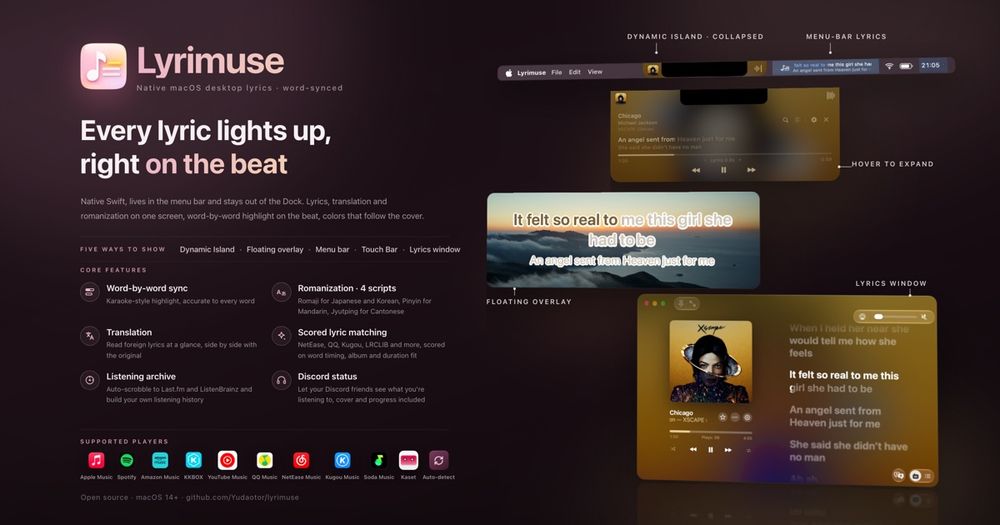
Twelve-source lyrics engine
Queries NetEase Cloud Music, QQ Music, Kugou, Kuwo, Migu, Musixmatch, LRCLIB, LyricFind, Deezer, AMLL, Soda Music, and Apple Music's native lyrics in one pass. Every result is scored by timing quality, content match, and album match; the best candidate wins automatically. If the result is wrong, manual search lets you pick and lock any candidate.
Five display surfaces
Shows lyrics as a floating overlay you can drag anywhere, a Dynamic Island-style capsule under the notch, the menu bar, the Touch Bar, or a full resizable Lyrics Window modeled on Apple Music's lyrics page. Each surface has independent font, color, width, and behavior settings with a live preview.
Translation and romanization
Translations sit below the original line; romanizations (Pinyin, Jyutping, Japanese romaji) appear under the exact words they belong to, decided line by line. System translation on macOS 15 keeps foreign-language lyrics local; a network fallback steps in when the OS cannot handle the language. Seventeen target languages supported.
Last.fm and ListenBrainz scrobbling
Connects to Last.fm and ListenBrainz from the Accounts section with no token to copy. The app saves every play locally first, so you can connect Last.fm after the fact and recover recent plays. A built-in Footprint tab shows a year-long heatmap, daily average, streaks, and an 'On This Day' history.
Nine-player support
Works with Apple Music, Spotify, Kaset (a YouTube Music client for Mac), KKBOX, Amazon Music, QQ Music, NetEase Cloud Music, Kugou, and Soda Music, plus web players in the browser. Apple Music and Spotify require Automation access; the others use macOS's MediaRemote and need no extra permissions.
No account, no telemetry
No sign-up, no analytics, no data leaves the Mac about what you play or who you are. Lyrics fetch over each source's own API for the song currently playing; translation defaults to Apple's on-device framework on macOS 15. The privacy policy lists every server the app contacts.
Strengths and trade-offs#
Strengths
- Actively maintained replacement for LyricsXLyricsX shipped its last release in April 2022. Lyrimuse reached v1.10.0 in October 2026 and adds six more players, scored lyric matching, Jyutping and Japanese romaji, and Last.fm scrobbling that LyricsX never had. Development is ongoing, with the most recent push on October 10, 2026.
- First-class Chinese-language player supportQQ Music, NetEase Cloud Music, Kugou, and Soda Music are fully supported players, each with their own lyrics source in the matching engine. Cantonese songs get Jyutping romanization that works at the word level rather than character by character.
- GPL-3.0 with no premium tierThe full feature set ships under GPL-3.0; there is no premium tier, no credit system, and no subscription. Running it for personal or team use costs nothing beyond the Mac itself.
- Offline lyrics with no accountNo sign-up is required and no data about your listening leaves your Mac. Lyrics are cached locally after the first fetch, so songs play offline without a network request once they have been looked up once.
Trade-offs
- -macOS 14+ only, no mobile companionLyrimuse requires macOS Sonoma (14) or later. Users on Macs running macOS 13 or earlier cannot install it. There is no mobile app; scrobbling from iPhone requires a separate Last.fm or ListenBrainz client. Intel Macs use a separate build from Apple Silicon.
- -Not notarized by AppleThe app is not signed with an Apple Developer certificate, so the first launch from the DMG triggers a Gatekeeper warning. You must manually approve it in System Settings > Privacy and Security. Homebrew's brew trust step handles this automatically, but users who download the DMG directly face a one-time manual step.
- -On-device translation requires macOS 15The translation path that keeps lyrics fully local requires macOS Sequoia (15). On macOS 14 the app falls back to an online translator. Users who need fully local translation of foreign-language lyrics must be on Sequoia or later.
Lyrimuse vs alternatives#
Lyrimuse vs Musixmatch Premium
Both Lyrimuse and Musixmatch Premium deliver word-by-word synced lyrics, but they follow different models. Musixmatch Premium is a proprietary subscription service with mobile and desktop apps; Lyrimuse is a GPL-3.0 open source Mac app with no subscription and no account required.
| Feature | Lyrimuse | Musixmatch Premium |
|---|---|---|
| License | GPL-3.0 | Proprietary |
| Price | Free | Subscription |
| Platforms | macOS 14+ | macOS, iOS, Android |
| Word-by-word timing | Yes | Paid tier only |
| Chinese-language players | Yes (QQ, NetEase, Kugou) | No |
| Offline lyrics | Yes (cached) | Yes (cached) |
| Last.fm scrobbling | Yes | No |
| Account required | No | Yes |
Lyrimuse is the better fit when you want no subscription cost, need Chinese-language player support (QQ Music, NetEase Cloud Music, Kugou), or care about keeping your listening data off third-party servers. Musixmatch Premium has broader platform coverage (iOS and Android included) and a larger catalog backed by its own lyrics label, which matters if you listen heavily on mobile.
Lyrimuse vs Verse
Verse is a paid Mac lyrics app focused on Apple Music and Spotify, with a clean interface and Touch Bar support. Lyrimuse covers the same two players and the same Touch Bar display, and adds QQ Music, NetEase Cloud Music, Kugou, KKBOX, Amazon Music, and Last.fm scrobbling.
| Feature | Lyrimuse | Verse |
|---|---|---|
| License | GPL-3.0 | Proprietary |
| Price | Free | Paid |
| Player support | 9 players | Apple Music, Spotify |
| Last.fm / ListenBrainz | Yes | No |
| Translation | Yes (17 languages) | Limited |
| Open source | Yes | No |
Lyrimuse is the better choice for users who need more than Apple Music and Spotify, want Last.fm scrobbling, or prefer a GPL-3.0 licensed app. Verse may suit users who want a simpler single-purpose app and are satisfied with its two-player scope.
Quick start#
Install via Homebrew, which also handles the one-time Gatekeeper setup on first launch.
```bash
brew tap yudaotor/lyrimuse
brew trust --cask yudaotor/lyrimuse/lyrimuse
brew install --cask lyrimuse
```What it's built on#
- Languages
- GoPythonSwift
FAQ#
Does Lyrimuse require a Musixmatch or Last.fm account to get lyrics?
No account is required to get lyrics or to use the app. Lyrics are fetched directly from sources including Musixmatch, NetEase, QQ Music, and others without any sign-in. Last.fm and ListenBrainz connections are optional; the app scrobbles only if you link an account in Settings.
Which Mac models and macOS versions does Lyrimuse support?
Lyrimuse runs on macOS Sonoma (14) or later, on both Apple Silicon (M1 and later) and Intel Macs. Apple Silicon and Intel builds are separate downloads. On-device translation requires macOS Sequoia (15); on macOS 14 the app falls back to an online translator.
Is Lyrimuse a free replacement for Musixmatch Premium on Mac?
For the desktop macOS use case, yes. Lyrimuse is GPL-3.0 licensed, free to use, and covers word-by-word lyrics for Apple Music, Spotify, and several players Musixmatch does not support. It does not have mobile apps, so it does not replace Musixmatch on iPhone or Android.
How does Lyrimuse choose the right lyrics for a song?
It queries up to twelve sources (Musixmatch, NetEase, QQ Music, Kugou, LRCLIB, and others), scores each result by timing accuracy, duration match, and content corroboration, then applies the highest-scoring candidate automatically. You can override any decision and lock your choice in Lyrics Manager.
Can I use Lyrimuse offline?
Lyrics found previously are cached on your Mac and display without a network connection. The first lookup for a new song requires connectivity, as does real-time online translation. Scrobbles queue locally and sync to Last.fm or ListenBrainz when the connection returns.
Similar open-source tools#

editor
Browser-based 3D building editor, MIT licensed and self-hostable

diagram-design
Editorial diagrams for Claude Code, no Figma or Mermaid required

God's Eye View
Real-time global intelligence on a 3D globe

Tabler Icons
6,238 free MIT-licensed SVG icons for web and app design

Vela
OpenStreetMap and Google data, no account, no Play Services

Caret
Your design canvas is backed by real files in git