

Who Caret is for#
Developers iterating on UI with an AI coding assistant
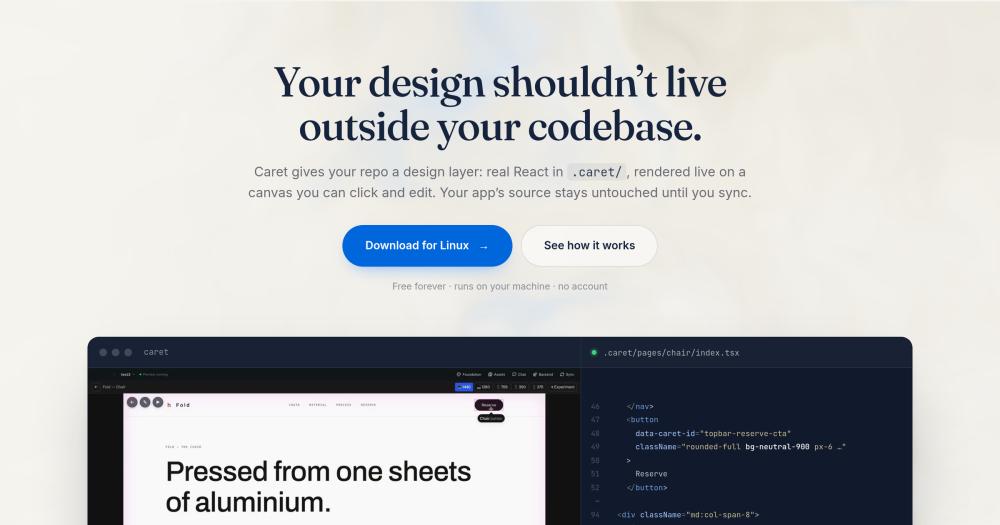
Caret keeps visual edits in .caret/ as real .tsx files, so changes made on the canvas survive the next AI-generated rebuild. Instead of describing layout changes in words and verifying whether the agent interpreted them correctly, the developer paints the region and states the intent directly, giving the agent exact element references.
Skip if:
Teams with a dedicated designer producing Figma handoff assets and a working design-to-code plugin process have no immediate problem Caret solves. Caret is for teams where the developer is also doing the design work.
Solo developers prototyping a new product
Caret creates .caret/ inside any project folder and touches nothing else. The developer sets a color palette, type scale, and spacing system at the start (Caret can interview them or accept manual input), then builds pages by asking in the chat or writing the file. Everything produced is real React, readable in a diff.
Skip if:
Developers who need to ship in a framework that Caret's sync step does not support should verify compatibility before adopting it as the primary design tool.
Teams whose design file has drifted from the shipped code
When the design file has not been trusted for months and no one knows which artifact is authoritative, Caret offers a path by making the design layer part of the repo. The design becomes a .caret/ directory tracked in git, versioned alongside every code change.
Skip if:
Teams with an established Figma contract and a dedicated designer producing handoff assets are better served by design-handoff tools than by a tool that replaces the design file with in-repo React components.
Developers using Claude Code or Codex as their primary agent
Caret exposes a MCP server that Claude Code and Codex can call directly, so the sync step from design to app can be handed off to the terminal agent without switching contexts. The developer designs in Caret and hands the diff to the agent, which applies it in the framework the app actually ships.
Skip if:
Developers using agents without MCP support will not benefit from the terminal handoff. All other Caret features (canvas editing, AI chat, sync) still work without MCP.
The problem it solves#
Every project that uses a design tool eventually splits into two sources of truth. The mockup looked right in week one. By week four, someone fixed a spacing issue directly in the code, and now neither file is fully correct. Everyone on the team knows which one not to trust, but no one decided which one wins.
AI coding assistants make this worse. When you describe a visual change in words and ask an agent to implement it, the agent rebuilds the component from scratch. Tweaks made last month get overwritten because they were context in a conversation, not files in git. You fix the same thing twice, sometimes three times.
Describing visual changes in words is the other half of the problem. Three sentences about the padding on a card come back wrong, because language was never the right tool for pointing at a specific element on a screen.
How it solves it#
Canvas editing that writes to source files
Right-clicking any text, color, or image on the canvas changes the corresponding .tsx file in .caret/ immediately. Caret checks color picks against your design tokens and writes the token name instead of a raw hex value when a match exists, so changing a brand color later changes everywhere that used it.
Region-based AI instructions
Paint over any section of the page and describe what you want in words. The agent receives the exact elements you marked rather than guessing from a text description alone. This is the intended path for changes too fiddly to make by clicking directly on the canvas.
Side-by-side layout variants
Ask for multiple versions of a layout or component at once. Caret generates them live, side by side on the canvas, and picking one leaves an undo step. This avoids committing to an approach before seeing the options.
Bi-directional sync with any framework
When a design is ready, Caret determines which .caret/ files changed since the last sync and your agent updates the app to match, in Next, Remix, Vue, Svelte, Rails, or any other framework. Sync is explicit and snapshot-based, so undo always works. If someone edits the app directly, Caret detects the drift and offers to bring the design back in line.
MCP server for terminal agents
Caret exposes the design layer over MCP so Claude Code, Codex, and other terminal-based agents can call into it directly. Design stays in Caret; the sync step can be handed off to whichever agent is already running in the terminal. The protocol is one-way: the external agent calls in, Caret does not push work back out.
Design token injection into agent context
Caret writes color, type, spacing, and radius tokens into AGENTS.md, CLAUDE.md, and .cursor/rules and keeps them current. An agent building a new component reads the actual token values from the repo instead of inventing spacing that will not match the rest of the UI.
Strengths and trade-offs#
Strengths
- Design changes are git commitsEvery canvas edit produces a file change in .caret/. Visual changes are diffable in pull requests, revertible with git revert, and permanent through subsequent AI code generation. A fix made once survives the next time an agent regenerates a component, because it is a file in git, not context in a conversation.
- Apache-2.0, no account, no subscriptionThe app is free forever and requires no cloud account or API key of its own. The only ongoing cost is the AI model subscription the developer already has. Unlike Builder.io Visual Copilot and Locofy.ai, which are paid commercial platforms, there is no per-seat fee and no code sent to a third-party server.
- Bring your own AI modelCaret connects to OpenCode's built-in engine and supports any AI provider: an API key or an existing subscription (ChatGPT Plus, Pro, and Go; Kimi For Coding; GitHub Copilot; Z.AI and Zhipu coding plans). Anthropic requires an API key. There is no model lock-in and no vendor controlling which AI the tool uses.
- Isolated design sandbox with explicit syncCaret only reads from and writes to .caret/. The application source, routes, and business logic are outside its blast radius during design iteration. Sync is a deliberate step, snapshot-based, so undo always works and nothing is merged without the developer choosing to.
Trade-offs
- -Early-stage project with 33 GitHub starsThe repository was created in June 2026 and had 33 stars and 7 forks as of October 2026. The project is under active development (last push: October 2026) but has not been widely adopted. Production teams should evaluate it on a non-critical project before relying on it for primary UI work.
- -Node.js required for the live canvasThe canvas renderer runs a local dev server and requires Node.js LTS 20.19+ or Node 22.12+. Without it, the preview panel sits on a loading screen indefinitely while the rest of the app (chat, file editing) works normally. This is easy to miss on first install because the app opens and responds with only the canvas broken.
- -Windows builds are not code-signedThe Windows installer triggers SmartScreen warnings and may be quarantined by Defender on download. The app is safe to run, but teams with managed Windows environments or strict antivirus policies need to manually allow the install. macOS builds are signed and notarized; Linux packages require no signing.
Caret vs alternatives#
Caret vs Builder.io Visual Copilot
Builder.io Visual Copilot is a commercial design-to-code product. The core difference from Caret is where the design relationship with code lives: Builder.io's platform is cloud-hosted, while Caret's design layer lives as files in your own git repository.
| Feature | Caret | Builder.io Visual Copilot |
|---|---|---|
| License | Apache-2.0 | Proprietary |
| Pricing | Free (open source) | Paid |
| Runs locally | Yes (desktop app) | No (cloud-based) |
| Account required | No | Yes |
| Design storage | .caret/ in git | External platform |
| AI model | Bring your own | Platform model |
Caret is the better choice when the design layer needs to live in version control alongside application code, when source files must not leave the local machine, or when a per-seat subscription is not viable for the team. Builder.io Visual Copilot is worth considering for teams already using Builder.io's CMS and page-building product, where the cloud infrastructure is the expected environment.
Caret vs Locofy.ai
Locofy.ai is a commercial tool that converts Figma designs to code. The distinction from Caret is fundamental: Locofy.ai bridges two separate artifacts (a Figma file and a code editor), while Caret eliminates the separation by making the design layer part of the repository itself.
| Feature | Caret | Locofy.ai |
|---|---|---|
| License | Apache-2.0 | Proprietary |
| Pricing | Free (open source) | Paid |
| Runs locally | Yes (desktop app) | No (cloud-based) |
| Account required | No | Yes |
| Design source | .caret/ in git | Figma plugin |
| Update flow | Canvas edit, sync to app | Re-export from design tool |
Caret is the better choice when the goal is to eliminate the separate design-file step and keep all iteration in one git repository, particularly for developers who handle both design and implementation. Locofy.ai is more appropriate for teams with a dedicated designer working in Figma and a developer implementing those designs separately; in that workflow the translation step is the intended process, not the problem.
Quick start#
Install Caret by building from source; Node 20 or newer is required.
```bash
git clone https://github.com/precious112/caret-desktop
npm install
npm run dev
```What it's built on#
- Languages
- TypeScript
- Frameworks
- React
FAQ#
Does Caret replace my existing application code?
No. Caret creates a .caret/ directory inside your project folder and only reads from and writes to that directory. Application source code, routes, and business logic are untouched until you explicitly run a sync. Sync takes a snapshot first, so undo always works and nothing is ever merged automatically.
Which frameworks does Caret support for the sync step?
The design layer in .caret/ is always React (.tsx files). The sync step translates that into whatever framework the app ships: Next.js, Remix, Vue, Svelte, Rails, or others. The app-side framework does not need to match the design layer. See the product website for the current compatibility details.
Does Caret send my code to a remote server?
No. Caret runs locally and requires no account. Source files go to the AI model you have signed in to (via API key or a subscription like GitHub Copilot or ChatGPT Plus) and nowhere else. The only other data sent is anonymous usage and crash statistics, which can be turned off in one click. The telemetry document in the GitHub repo lists exactly what is and is not collected.
Is Caret free to use?
Yes. Caret is Apache-2.0 licensed, free forever, and has no tier, subscription, or per-seat charge of its own. The only ongoing cost is the AI model subscription or API key you bring to it. Canvas editing features work without any connected model.
Does the canvas work without Node.js installed?
Partially. The canvas renderer requires Node.js LTS 20.19+ or Node 22.12+, because it runs a local dev server. Without it, the preview panel will not load, though chat, file editing, and all other features still work. Install the Node.js LTS build from nodejs.org and restart Caret to enable the canvas.
Similar open-source tools#

Onlook
Visual React editor where every design change writes real code

Handle
Edit UI visually in the browser and sync changes to code

Puck
Open source drag-and-drop page editor for any React app

Fluent-Qt
Fluent UI component library for Qt Widgets in C++17 and Python

Neon-Vision-Editor
Native Apple text and Markdown editor with safe file sync

image-optimizer
Free desktop image optimizer. Files stay on your machine.