Open Source Alternatives
  • Alternatives
  • Categories
    Categories by size882 projects
    • Developer Tools461
    • AI & Machine Learning404
    • Web Development196
    • Business & Productivity191
    • Communication & Collaboration126
    • Security & Monitoring126
    • IT Management123
    • Product & Project Management106
    • Cloud & Hosting105
    • Data & Analytics104
    Browse all 21 categoriesLLMOps & AI Tooling, Design & Creative and 9 more
  • Blog
  • Advertise
SearchNotion, Slack, password manager.../
Submit
Open Source Alternatives
  • Alternatives
    • Developer Tools461
    • AI & Machine Learning404
    • Web Development196
    • Business & Productivity191
    • Communication & Collaboration126
    • Security & Monitoring126
    • Browse all 21 categories
  • Blog
  • Advertise
Submit your project

New open source projects by email

The projects we add and every new guide. Free, unsubscribe any time.

Open Source Alternatives LogoOpen Source Alternatives

Handpicked Open Source Alternatives to Paid Softwares

Product

  • Categories
  • Tag
  • Advertise

Resources

  • Blog
  • Collection
  • Submit

Company

  • Privacy Policy
  • Terms of Service
  • Refund Policy
  • Sitemap

Alternatives

  • Claude Code
  • Jira
  • Notion
  • Slack
  • Linear
  • Wispr Flow
  • All alternatives
© 2026 Open Source Alternatives. All rights reserved.
Open SourceAlternatives
Home/Categories/Cloud & Hosting/CapRover
icon of Caprover

CapRover

Open source alternative to Heroku, Railway, Render and DigitalOcean App Platform

  • 15.2K stars
  • Apache-2.0 with additional terms
  • Active this week
  • Last commit today

Last verified Oct 22, 2026

Deploy apps on your own server with CapRover, a self-hosted PaaS built on Docker, nginx, and Let's Encrypt. An alternative to Heroku, Render, and Railway.

Visit websiteGitHub15.2K starsDeploy on Hostinger
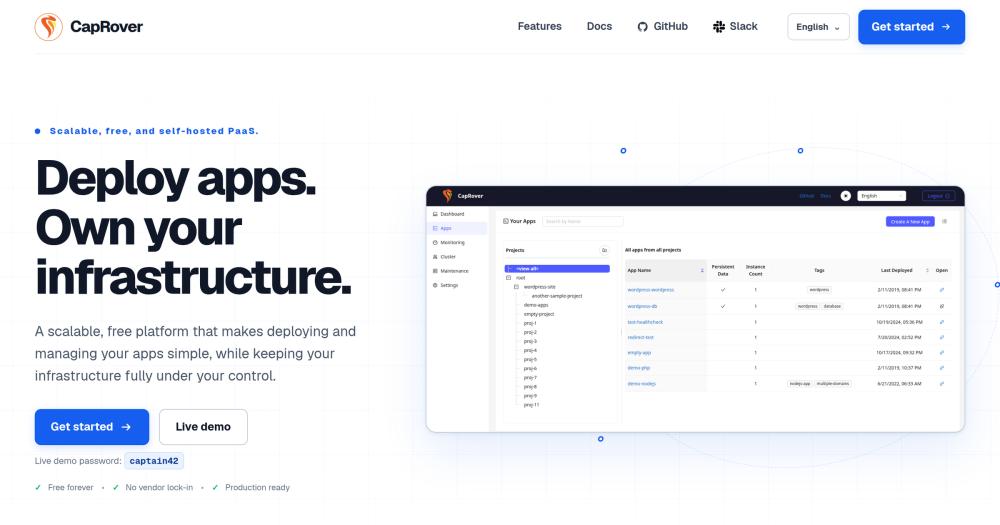
Image for CapRover
TL;DR

CapRover is a self-hosted PaaS built on Docker, nginx, and Let's Encrypt that replaces paid hosting platforms like Heroku, Railway, and Render with a free deploy-from-CLI workflow on hardware you own. A Heroku 2 GB dyno costs around $250 per month; the equivalent server on a VPS provider runs under $10, with CapRover handling Docker, reverse proxy, and TLS configuration. The core platform is free to self-host under Apache 2.0 with additional fair-code terms. Best for developers and small teams currently paying per-dyno fees to commercial PaaS platforms.

Read the full breakdownHide the full breakdownWho it is for, how it works, trade-offs, the quick start and the FAQ
who it's for

Who CapRover is for#

Solo developers hosting personal projects on a budget

CapRover turns a single $5 to $20 VPS into a host for multiple personal projects with separate domains, automatic HTTPS, and persistent databases. The one-click catalog handles PostgreSQL and Redis installs in seconds.

Skip if:

If you need guaranteed uptime SLAs, multi-region failover, or managed database backups, a commercial PaaS or managed database service is the safer choice.

Small teams migrating off Heroku or Render

Teams paying $50 to $200 per month for hosted PaaS infrastructure can move those workloads to a single VPS with CapRover handling HTTPS, routing, and deployments. The `caprover deploy` CLI fits directly into existing CI/CD pipelines.

Skip if:

If your team has no one comfortable managing a Linux server, the ops responsibility shifts to you. CapRover removes deployment complexity but not server administration.

Developers running multiple client projects on one server

CapRover's per-app domain management and one-click installs make it practical to run separate environments for different client projects on the same server. Each app gets its own subdomain and HTTPS certificate automatically.

Skip if:

Client projects with strict uptime requirements or security compliance audits may need dedicated isolated hosting rather than a shared VPS.

Teams self-hosting databases and internal services

The one-click catalog includes PostgreSQL, MySQL, MongoDB, Redis, WordPress, and monitoring tools. Each runs as a persistent Docker container with volume mounts, accessible via the internal Docker network or an exposed port.

Skip if:

For production database workloads at scale, managed database services offer better backup automation and failover than a self-hosted Docker container.

the problem

The problem it solves#

Deploying a production app requires configuring nginx, obtaining SSL certificates, setting up reverse proxies, writing deployment scripts, and maintaining all of it. Commercial PaaS platforms like Heroku, Railway, Render, and DigitalOcean App Platform solve that configuration burden but charge a margin for doing so. A 2 GB production dyno on Heroku costs around $250 per month; the same compute on a VPS provider costs under $10. Most developers do not want to configure servers manually, but they also do not need to pay managed-cloud margins indefinitely.

Three apps each needing a web process, a background worker, and a small database can exceed $100 to $200 per month on hosted PaaS tiers that charge per process or per resource unit. The underlying VPS hardware is cheap; the automation layer is what costs money.

how CapRover solves it

How it solves it#

Docker-native container orchestration

CapRover runs every app inside a Docker container with Docker Swarm managing orchestration across single or multi-node setups. You do not need to write Dockerfiles from scratch for common stacks: CapRover's captain-definition file lets you specify just the runtime and port.

Automatic HTTPS with Let's Encrypt

Every domain added to an app gets a Let's Encrypt certificate issued and renewed automatically. HTTP-to-HTTPS redirects are enabled with a single checkbox in the web GUI. No certbot configuration, no nginx reload scripts.

One-click app catalog

CapRover ships with a catalog of pre-configured one-click installs including PostgreSQL, MySQL, MongoDB, Redis, WordPress, and dozens of other services. Each installs as a persistent Docker container with volume mounts pre-configured.

CLI and webhook deployment

The `caprover deploy` CLI command bundles your source, builds the Docker image, pushes it to the registry, and deploys to the running container in a single command. Webhook-based deploys also work for CI/CD pipelines.

Customizable nginx per app

The nginx reverse proxy is fully configurable per app; you can paste a custom nginx config template that overrides the default. This covers custom headers, rate limiting, WebSocket upgrades, and other scenarios the default proxy cannot handle.

Docker Swarm cluster scaling

Adding a worker node to the cluster runs one SSH command. CapRover then distributes containers across nodes and balances traffic automatically. No Kubernetes or Helm required for horizontal scaling.

strengths · trade-offs

Strengths and trade-offs#

Strengths

  • No per-dyno or per-seat feesYou pay only for the VPS you choose. A single $20 server can host as many apps and processes as its resources allow. Compared to Heroku or Render, which charge per process unit, the cost savings compound with each additional app you deploy.
  • No vendor lock-inCapRover wraps Docker. Remove CapRover and your containers keep running on the same host unchanged. There is no proprietary build system or config format that only works on the CapRover infrastructure.
  • Multi-language support from one hostNode.js, Python, PHP, Ruby, Go, Java, .NET, and any other language that runs in a container deploys through the same CapRover workflow. No separate build packs or runtime installations per language.
  • Actively maintained, 15,000+ GitHub starsThe project has over 15,000 GitHub stars, more than 1,000 forks, and active commits as recently as October 2026. It has been in development since 2017, with ongoing maintenance and community contribution.

Trade-offs

  • -Fair-code license restricts redistributionCapRover uses Apache 2.0 as a base with additional fair-code terms. Self-hosting for any purpose including commercial internal use is permitted. Paid features cannot be modified without a written agreement, and redistribution of a paid version is prohibited without one. Modifications to free features must be released as open-source software. This matters if you plan to build a managed hosting service on top of CapRover.
  • -You own the server, including its maintenanceUnlike Heroku or Render, CapRover has no managed option. You are responsible for the underlying VPS: OS updates, firewall rules, backups, and hardware failure. Teams that need zero-ops infrastructure management should stay with a managed PaaS.
  • -Open issues backlog for edge casesWith 175 open GitHub issues, some configurations are documented but unresolved. Standard deployments work reliably; niche scenarios such as custom TCP proxies or advanced Docker Swarm configurations may require workarounds or self-applied patches.
versus alternatives

CapRover vs alternatives#

CapRover vs Heroku

Both handle HTTPS automatically and support a CLI-based deploy workflow. The difference is hosting model: CapRover runs on a VPS you control, while Heroku is a fully managed cloud service with no self-hosting option.

FeatureCapRoverHeroku
LicenseApache 2.0 + fair-codeProprietary
Self-hostingYesNo
PricingVPS cost only$7+/dyno/month
HTTPSAutomatic (Let's Encrypt)Automatic (included)
Horizontal scalingDocker SwarmHeroku dynos
One-click servicesYes (open source catalog)Yes (Heroku add-ons, paid)

CapRover is the better choice for developers currently paying Heroku for standard web app hosting. A single VPS running CapRover can replace multiple Heroku dynos at a fraction of the cost. The caprover deploy CLI fits into existing pipelines the same way git push heroku does.

Heroku remains a better fit when your team needs Salesforce-tier compliance certifications, the full Heroku add-on ecosystem for managed third-party services, or zero infrastructure responsibility. Heroku's managed database add-ons include automated backups and failover; CapRover's database containers require you to configure backups yourself.

CapRover vs Render

Render is a modern PaaS with managed databases, automatic static site deploys, and preview environments for every pull request. CapRover does not include built-in preview environments and requires managing the underlying server.

FeatureCapRoverRender
LicenseApache 2.0 + fair-codeProprietary
Self-hostingYesNo
PricingVPS cost only$7+/service/month
PR preview environmentsNoYes
Static site hostingYes (via nginx)Yes (built-in CDN)
Managed databasesNo (Docker containers)Yes

Render is the better choice if your workflow depends on per-pull-request preview environments, you need managed PostgreSQL with automated backups, or your team has no one to manage a server. CapRover wins on cost and data control for teams already comfortable with VPS administration who want to host multiple services without per-service billing.

install · quick start

Quick start#

bash
Install the CLI to deploy apps; CapRover's server component runs on your infrastructure via Docker.
```bash
npm install -g caprover
caprover deploy
```
tech stack · detected from GitHub

What it's built on#

Languages
JavaScriptPHPPythonTypeScript
Frameworks
Express
Runtimes
Node.js
Infrastructure
AWSAzureDocker
frequently asked

FAQ#

Is CapRover free to use?

Yes. The core platform is free to self-host on your own server, including for commercial internal use, under an Apache 2.0 base license with additional fair-code terms. You pay only for the VPS you run it on. Paid features exist but are not required for standard deployments.

What languages and frameworks does CapRover support?

CapRover supports any application that runs in a Docker container. The official documentation explicitly names Node.js, Python, PHP, Ruby, Go, Java, and .NET. It also includes a one-click catalog for databases (PostgreSQL, MySQL, MongoDB, Redis) and popular services like WordPress.

How does CapRover compare to Heroku?

CapRover replicates the Heroku deployment experience, including CLI deploy, per-app routing, and automatic HTTPS, on a server you own. Heroku charges per dyno; CapRover charges nothing beyond VPS costs. The trade-off: you manage the server yourself, including OS updates, backups, and handling hardware failure.

Can CapRover scale horizontally?

Yes. CapRover uses Docker Swarm for clustering. Adding a worker node runs one SSH command; CapRover then distributes containers across nodes and load-balances traffic automatically. This covers most small-to-medium workloads without requiring Kubernetes.

What are CapRover's license terms for self-hosters?

CapRover uses Apache 2.0 as its base license with additional fair-code terms. Self-hosting for any purpose including commercial internal use is permitted. Paid features cannot be modified without a written agreement, and redistribution of a paid version requires one. Modifications to free features must be released as free and open-source software.

also worth a look

Similar open-source tools#

Dokploy

Alternative toHeroku

Self-hosted PaaS to deploy apps and databases across multiple servers

  • 37,935 GitHub stars

openship

Alternative toHeroku

Self-hosted deployment platform with built-in CI/CD

  • 14,865 GitHub stars
  • Apache-2.0Licence Apache-2.0

Void Cloud

Alternative toVercel

Full-stack Vite toolkit with one-command Cloudflare deployment

  • 507 GitHub stars
  • MITLicence MIT

Keda

Alternative toKedify

Event-driven Kubernetes autoscaling with 70+ scalers and scale to zero

  • 10,646 GitHub stars
  • Apache-2.0Licence Apache-2.0

Herdr

Alternative toConductor

Agent runtime that keeps terminals alive across machines

  • 44,852 GitHub stars
  • Apache-2.0Licence Apache-2.0

ax

Alternative toGoogle Vertex AI Agent Engine

Declarative runtime for autonomous agent workloads

  • 13,996 GitHub stars
  • Apache-2.0Licence Apache-2.0
by category

Open source tools in these categories#

106

Cloud & Hosting

dify, RuView, rtk
87

DevOps & CI/CD

Nvm, Uptime Kuma, Netdata
462

Developer Tools

REA (Reverse Engineer Anything), superpowers, Skills for Real Engineers
Hostinger

Run CapRover on your own server

Self-host CapRover on a Hostinger VPS.

Deploy on Hostinger

Featured

Inbox Zero

Alternative toSuperhuman

AI email assistant that drafts replies and clears your inbox

  • 12,712 GitHub stars
  • AGPL-3.0Licence AGPL-3.0
  • #Email

rakazo

Alternative toGrok Bot

AI teammates you own: your keys, your model, your machine.

  • 4,904 GitHub stars
  • Apache-2.0Licence Apache-2.0
  • #AI Agents

Omnara

Alternative toCClaude Managed Agents

Open-source agent deployment API. Self-host or use Omnara Cloud.

  • 2,957 GitHub stars
  • Apache-2.0Licence Apache-2.0
  • #AI Agents
Feature your project

New open source projects by email

The projects we add and every new guide. Free, unsubscribe any time.

Find open source alternatives to paid software

/
  • Claude Code to OpenCode
  • Jira to Windshift
  • Notion to AppFlowy
  • Slack to Mattermost
  • Linear to GitLab
  • Wispr Flow to Handy
  • CapCut to Concat
  • Grok Bot to rakazo
  • Superhuman to Inbox Zero
  • Airtable to AITable
  • Muse to OpenClaw
  • GitHub Copilot to Cline
  • Datadog to Netdata
  • Microsoft Teams to Rocket.Chat
  • Pinecone to Qdrant
  • Zapier to n8n
  • Devin AI to OpenHands
  • Firebase to Supabase
  • 1Password to KeePassXC
  • Confluence to Docmost
  • Contentful to Strapi
  • Adobe Premiere Pro to Shotcut
  • ChatGPT to AnythingLLM
  • LangSmith to Langfuse
  • Claude Code to OpenCode
  • Jira to Windshift
  • Notion to AppFlowy
  • Slack to Mattermost
  • Linear to GitLab
  • Wispr Flow to Handy
  • CapCut to Concat
  • Grok Bot to rakazo
  • Superhuman to Inbox Zero
  • Airtable to AITable
  • Muse to OpenClaw
  • GitHub Copilot to Cline
  • Datadog to Netdata
  • Microsoft Teams to Rocket.Chat
  • Pinecone to Qdrant
  • Zapier to n8n
  • Devin AI to OpenHands
  • Firebase to Supabase
  • 1Password to KeePassXC
  • Confluence to Docmost
  • Contentful to Strapi
  • Adobe Premiere Pro to Shotcut
  • ChatGPT to AnythingLLM
  • LangSmith to Langfuse