Open Source Alternatives
  • Alternatives
  • Categories
    Categories by size880 projects
    • Developer Tools459
    • AI & Machine Learning404
    • Web Development196
    • Business & Productivity191
    • Communication & Collaboration126
    • Security & Monitoring125
    • IT Management123
    • Product & Project Management106
    • Data & Analytics104
    • Cloud & Hosting103
    Browse all 21 categoriesLLMOps & AI Tooling, Design & Creative and 9 more
  • Blog
  • Advertise
SearchNotion, Slack, password manager.../
Submit
Open Source Alternatives
  • Alternatives
    • Developer Tools459
    • AI & Machine Learning404
    • Web Development196
    • Business & Productivity191
    • Communication & Collaboration126
    • Security & Monitoring125
    • Browse all 21 categories
  • Blog
  • Advertise
Submit your project

New open source projects by email

The projects we add and every new guide. Free, unsubscribe any time.

Open Source Alternatives LogoOpen Source Alternatives

Handpicked Open Source Alternatives to Paid Softwares

Product

  • Categories
  • Tag
  • Advertise

Resources

  • Blog
  • Collection
  • Submit

Company

  • Privacy Policy
  • Terms of Service
  • Refund Policy
  • Sitemap

Alternatives

  • Claude Code
  • Jira
  • Notion
  • Slack
  • Linear
  • Wispr Flow
  • All alternatives
© 2026 Open Source Alternatives. All rights reserved.
Open SourceAlternatives
Home/Categories/Design & Creative/Openfilm
icon of Openfilm

Openfilm

Open source alternative to Remotion

  • 1.9K stars
  • MIT
  • Active this week
  • Last commit today

Last verified Oct 22, 2026

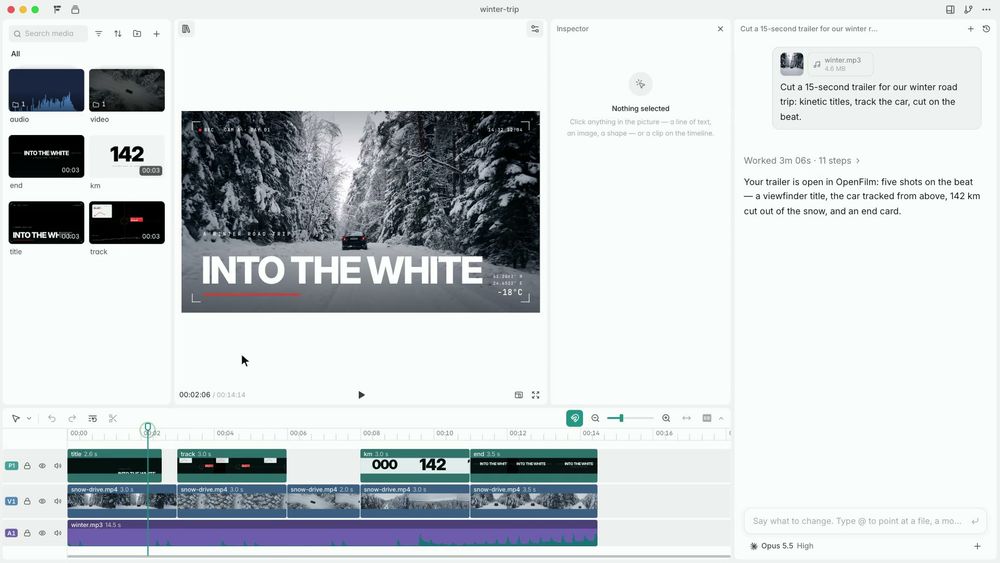
Build AI-generated videos from any coding agent. Films are web pages on your disk, edited live in a local browser studio. MIT licensed, no account required.

Visit websiteGitHub1.9K stars
image of Openfilm
TL;DR

Openfilm is a local-first, MIT-licensed video agent that turns any coding agent into a film director. A film is a folder of web pages on your disk; the agent writes those pages, you watch them take shape in Studio, and you edit anything you like. It requires no cloud account, no subscription, and no proprietary format. Compared to React-based video frameworks, Openfilm uses a single-function web page per shot rather than a component tree, which means coding agents that already know the web can write films without learning a new framework. Best for developers and content creators who use AI coding agents and want to produce video content from the same workflow.

Read the full breakdownHide the full breakdownWho it is for, how it works, trade-offs, the quick start and the FAQ
who it's for

Who Openfilm is for#

Developers creating launch films and product demos with a coding agent

An agent can write a product launch film from a one-sentence prompt, using brand assets and real footage. Studio lets you refine the result by hand without re-prompting the agent or writing any code.

Skip if:

Your video production is already established in a React-based framework and you do not use AI coding agents for initial drafting. Openfilm adds the most value when the agent writes the first draft.

Content creators building motion graphics and music videos

Any shot is a web page, so motion graphics using CSS, GSAP, canvas, or three.js render at up to 4K. Beat-cutting and word-by-word caption tools let an agent produce music videos where every sung word appears on screen and every cut lands on the beat.

Skip if:

Your production needs advanced compositing with per-pixel control or professional VFX pipelines. Openfilm is not a replacement for node-based compositing workflows used in broadcast and film post-production.

Teams automating video production from data or slides

Charts, explainer diagrams, and data animations are drawn in code and cut into a film by the agent. The `openfilm get` command retrieves voice-over, music, and images from connected services, so an agent can produce a finished film from a spreadsheet or a set of slides.

Skip if:

The source data changes so frequently that video production is impractical, or your audience prefers interactive charts over fixed video. Openfilm suits periodic or one-time video outputs rather than live-updating visual content.

the problem

The problem it solves#

Creating video content programmatically involves two persistent problems. The first is tooling complexity. Video editors are designed for manual work, and frameworks like Remotion require a React component model that a coding agent has to learn before producing a single shot. The second is ownership. Paid cloud video tools store your project files on their servers, charge by render time or seat count, and export to formats that only their tools can open.

For developers who already use AI coding agents, the gap appears most sharply when asking an agent to produce a video. The agent knows the web, but standard video tools do not accept web-native output. The result is either significant scaffolding to bridge the two, or a manual workflow that defeats the purpose of having an agent.

how Openfilm solves it

How it solves it#

Agent-first film writing

Any coding agent that can run a command, including Claude Code, Codex, Cursor, GitHub Copilot, and Gemini CLI, can write a film by running `npx openfilm` and following the manual it prints. The agent writes shots as web pages; the CLI provides the tools to check, render, and retrieve media.

Web-native film format

A film is a `film.html` file that cuts animated web pages, footage, pictures, and sound together on tracks using HTML and CSS. Each shot is a plain web page with one function, `frame(t)`, that draws the complete picture at any moment. No framework is needed; any browser technology works, including three.js, WebGL, canvas, SVG, GSAP, and CSS.

Local Studio editor with timeline

Studio runs on your machine in your browser. Move, scale, and rotate any element inside a shot page; change text, color, and style; place, crop, and restyle every video clip; and trim and cut clips on the timeline. Edits are saved to the film's files so the agent sees and keeps them. Named versions let you go back.

Parallel 4K rendering and export

Every frame renders in parallel, up to 4K, with optional motion blur. Export to MP4, GIF, transparent WebM or MOV, audio stems, subtitles, stills, slides, or the timeline as XML for Final Cut Pro, Premiere Pro, and DaVinci Resolve.

Local-first with bring-your-own service keys

Making, editing, and rendering films requires no account and no cloud subscription. For generated voice, music, images, and video, you connect the services you use (ElevenLabs, OpenAI, Google, fal) with your own API keys in Studio's Settings. Those services bill you directly; Openfilm itself is always free.

Film consistency checker via double-draw

The `look` command draws every frame of a film twice in two shuffled orders and names any frames that changed between draws. It also reports page errors, fonts that failed to load, missing sound files, and text cut off by the frame. This catches subtle rendering bugs that AI-generated frames are prone to.

strengths · trade-offs

Strengths and trade-offs#

Strengths

  • MIT license, fully local, no account requiredThe CLI, Studio, and desktop app are all MIT licensed. Making, editing, and rendering films is free and local with no sign-up. You own your project files as ordinary folders and can run them on any machine with Node 22 and ffmpeg.
  • Any coding agent works out of the boxClaude Code, Codex, Cursor, GitHub Copilot, Gemini CLI, OpenCode, Windsurf, Cline, Amp, Devin, and any other agent that can run a shell command works with Openfilm. No vendor commitment on the agent side; switch agents without changing the film format.
  • Films are portable open-spec foldersA film is a folder with a `film.html` and standard web assets, following the published OpenFilm open spec. Any film can be copied, remixed, and rebuilt without proprietary tooling. There is no binary project file and no proprietary container.
  • Desktop app bundles all dependenciesA desktop app for macOS and Windows packages Studio with a chat panel for your coding agent, plus ffmpeg and a headless browser. Nothing additional to install on those platforms: open the app, connect your agent, and ask for a film.

Trade-offs

  • -Requires Node 22.2, ffmpeg, and a Chromium downloadSetup needs Node 22.2 or later and ffmpeg on the PATH. The first run downloads a headless Chromium (about 100 MB). On macOS and Windows the desktop app bundles everything; on Linux you install ffmpeg separately. This is more initial setup than a cloud video tool where you sign in and start.
  • -Very early project with a short release historyThe repository was created in October 2026 and has fewer than 200 forks. While it has 1,860 stars and active daily development, it has not yet accumulated the community tutorials, third-party integrations, and long-term reliability record of more established video tools. Expect API changes and rough edges.
  • -Generated media needs external service accountsGenerating voice, music, images, and AI footage requires connecting third-party services (ElevenLabs, OpenAI, Google, fal) with your own API keys. Openfilm connects them but does not include any generation capability itself. If you want fully AI-produced media without external accounts, Openfilm alone is not sufficient.
versus alternatives

Openfilm vs alternatives#

Openfilm vs Remotion

Remotion is a React-based video framework where every scene is a React component and the video is rendered by driving the timeline with a browser. Openfilm uses a different model. Each shot is a plain HTML page with one function, and any coding agent can write those pages without learning React.

The key practical difference is the first-draft workflow. With Remotion, a developer writes React component code to define each scene, which means an AI agent needs React-specific knowledge to produce useful output. With Openfilm, the agent writes ordinary web pages it already knows, so the first draft comes from a single prompt with no framework overhead.

Openfilm includes a visual Studio editor where you can change any element in a shot, trim clips on the timeline, and adjust text and color without touching code. Changes in Remotion go back through the React components.

For teams building repeatable, data-driven video templates in TypeScript (personalized onboarding clips, weekly report cards, dynamic marketing videos with typed data props), Remotion is the better fit. Its composition model, typed props, and larger community make structured variation easier.

Openfilm is the better fit when you want an AI coding agent to write the initial draft from a plain-language prompt and a human to finish it in a visual editor, with the film stored as portable web files on your own disk.

install · quick start

Quick start#

bash
Install requires Node 22.2 and ffmpeg; the first run downloads a headless Chromium.
```bash
npm install -g openfilm
```
tech stack · detected from GitHub

What it's built on#

Languages
JavaScriptTypeScript
Frameworks
React
frequently asked

FAQ#

How do I install Openfilm and start making films?

Install globally with npm i -g openfilm or add it as a skill to your coding agent with npx skills add openfilm/openfilm. Requires Node 22.2 or later and ffmpeg on your PATH; the first run downloads a headless Chromium. Then ask your agent for a film, or run openfilm open to start Studio yourself. A desktop app for macOS and Windows is available from the GitHub Releases page and bundles all dependencies.

Does Openfilm require an account or cloud subscription?

No. Making, editing, and rendering films is local and free with no account required. For generated voice, music, or images, you connect the services you already use (ElevenLabs, OpenAI, fal, Google) with your own API keys in Studio's Settings. Those services bill you directly, not Openfilm.

How does Openfilm differ from Remotion?

Remotion is a React-based video framework where you write React components for each scene. Openfilm uses plain HTML pages with a single function per shot, which coding agents can write without learning React. Openfilm also includes a visual Studio editor for editing results without re-prompting. Remotion is better for React-heavy teams who need fine-grained programmatic control; Openfilm is better for agent-first production with a visual editing step.

Which coding agents work with Openfilm?

Any agent that can run a shell command: Claude Code, Codex, Cursor, GitHub Copilot, Gemini CLI, OpenCode, Windsurf, Cline, Amp, Devin, and others. Add the skill with npx skills add openfilm/openfilm and ask your agent for a film. Without the skill, tell the agent to run npx -y openfilm@latest and follow the manual it prints.

Can I use my own footage and images in an Openfilm film?

Yes. A film can include any video clip, still image, or audio file as a clip on the timeline. Drop your assets into the film folder and reference them in film.html, or use the Studio editor to place, crop, and trim them. The openfilm get command retrieves AI-generated media when you want it, but your own files work without any external service.

also worth a look

Similar open-source tools#

hyperframes

Alternative toRemotion

Turn HTML and CSS into rendered MP4 videos, built for AI agents.

  • 68,359 GitHub stars
  • Apache-2.0Licence Apache-2.0

SOMA

Alternative toZoo.dev

Parametric 3D modeling via CLI agent: describe, generate, iterate.

  • 162 GitHub stars
  • GPL-3.0Licence GPL-3.0

OpenCreator

Alternative toHeyGen

Local AI workspace for video, image, voice, and translation

  • 13,637 GitHub stars
  • Apache-2.0Licence Apache-2.0

Artcraft

Alternative toRunway

Open source AI studio for artists who want real control

  • 33,842 GitHub stars
  • Apache-2.0Licence Apache-2.0

modly

Alternative toMeshy

Generate 3D models from images or prompts, entirely offline

  • 8,251 GitHub stars
  • CustomLicence MIT with attribution requirement

text-to-cad

Alternative toZoo.dev

AI agent skills for CAD, robotics, and fabrication workflows

  • 21,623 GitHub stars
  • MITLicence MIT
by category

Open source tools in these categories#

97

Design & Creative

ComfyUI, Excalidraw, Godot Engine
404

AI & Machine Learning

freeCodeCamp, OpenClaw, REA (Reverse Engineer Anything)
459

Developer Tools

REA (Reverse Engineer Anything), superpowers, Skills for Real Engineers

Featured

Omnara

Alternative toCClaude Managed Agents

Open-source agent deployment API. Self-host or use Omnara Cloud.

  • 2,957 GitHub stars
  • Apache-2.0Licence Apache-2.0
  • #AI Agents

rakazo

Alternative toGrok Bot

AI teammates you own: your keys, your model, your machine.

  • 4,904 GitHub stars
  • Apache-2.0Licence Apache-2.0
  • #AI Agents

Inbox Zero

Alternative toSuperhuman

AI email assistant that drafts replies and clears your inbox

  • 12,712 GitHub stars
  • AGPL-3.0Licence AGPL-3.0
  • #Email
Feature your project

New open source projects by email

The projects we add and every new guide. Free, unsubscribe any time.

Find open source alternatives to paid software

/
  • Claude Code to OpenCode
  • Jira to Windshift
  • Notion to AppFlowy
  • Slack to Mattermost
  • Linear to GitLab
  • Wispr Flow to Handy
  • CapCut to Concat
  • Grok Bot to rakazo
  • Superhuman to Inbox Zero
  • Airtable to AITable
  • Muse to OpenClaw
  • GitHub Copilot to Cline
  • Datadog to Netdata
  • Microsoft Teams to Rocket.Chat
  • Pinecone to Qdrant
  • Zapier to n8n
  • Devin AI to OpenHands
  • Firebase to Supabase
  • 1Password to KeePassXC
  • Confluence to Docmost
  • Contentful to Strapi
  • Adobe Premiere Pro to Shotcut
  • ChatGPT to AnythingLLM
  • LangSmith to Langfuse
  • Claude Code to OpenCode
  • Jira to Windshift
  • Notion to AppFlowy
  • Slack to Mattermost
  • Linear to GitLab
  • Wispr Flow to Handy
  • CapCut to Concat
  • Grok Bot to rakazo
  • Superhuman to Inbox Zero
  • Airtable to AITable
  • Muse to OpenClaw
  • GitHub Copilot to Cline
  • Datadog to Netdata
  • Microsoft Teams to Rocket.Chat
  • Pinecone to Qdrant
  • Zapier to n8n
  • Devin AI to OpenHands
  • Firebase to Supabase
  • 1Password to KeePassXC
  • Confluence to Docmost
  • Contentful to Strapi
  • Adobe Premiere Pro to Shotcut
  • ChatGPT to AnythingLLM
  • LangSmith to Langfuse