Open Source Alternatives
  • Alternatives
  • Categories
    Categories by size1,010 projects
    • Developer Tools517
    • AI & Machine Learning446
    • Business & Productivity232
    • Web Development203
    • Security & Monitoring150
    • Communication & Collaboration138
    • IT Management135
    • Cloud & Hosting119
    • LLMOps & AI Tooling116
    • Data & Analytics110
    Browse all 21 categoriesProduct & Project Management, Design & Creative and 9 more
  • Blog
  • Advertise
SearchNotion, Slack, password manager.../
Submit
Open Source Alternatives
  • Alternatives
    • Developer Tools517
    • AI & Machine Learning446
    • Business & Productivity232
    • Web Development203
    • Security & Monitoring150
    • Communication & Collaboration138
    • Browse all 21 categories
  • Blog
  • Advertise
Submit your project

New open source projects by email

The projects we add and every new guide. Free, unsubscribe any time.

Open Source Alternatives LogoOpen Source Alternatives

Handpicked Open Source Alternatives to Paid Softwares

Product

  • Categories
  • Tag
  • Advertise

Resources

  • Blog
  • Collection
  • Submit

Company

  • Privacy Policy
  • Terms of Service
  • Refund Policy
  • Sitemap

Alternatives

  • Claude Code
  • Jira
  • Notion
  • Slack
  • Linear
  • Wispr Flow
  • All alternatives
© 2026 Open Source Alternatives. All rights reserved.
Open SourceAlternatives
Home/Categories/Security & Monitoring/Android-DataBackup
icon of Android-DataBackup

Android-DataBackup

Open source alternative to Titanium Backup PRO Key

  • 7.5K stars
  • GPL-3.0
  • Active this week
  • Last commit 7 days ago

Last verified Nov 1, 2026

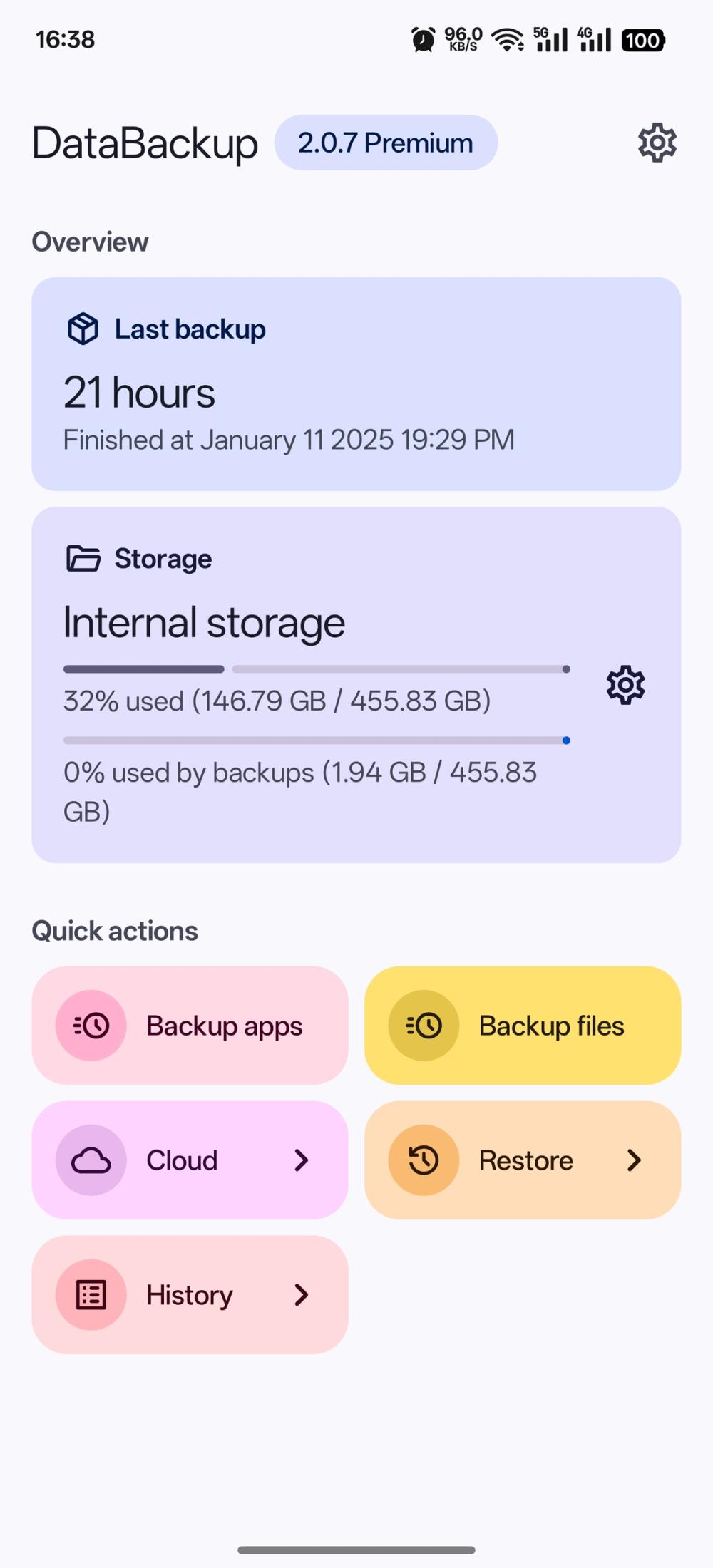
Manage Android app data backups on rooted devices, supporting Magisk, KernelSU, and APatch with claimed 100% data integrity.

Visit websiteGitHub7.5K stars
image of Android-DataBackup
TL;DR

Android-DataBackup is a GPL-3.0 licensed backup app for rooted Android devices that captures full app data with claimed 100% integrity. It replaces Titanium Backup PRO Key, the paid proprietary standard for rooted Android backups, and supports Magisk, KernelSU, and APatch. Available via F-Droid, IzzyOnDroid, and GitHub Releases. Best for ROM flashers and power users who need reliable full app data backups without paying for a proprietary tool.

Read the full breakdownHide the full breakdownWho it is for, how it works, trade-offs, the quick start and the FAQ
who it's for

Who Android-DataBackup is for#

Android ROM flashers before a flash

Back up all installed app data before flashing a new ROM, then restore after. Android-DataBackup captures everything the standard TWRP backup misses: per-app data directories including authentication state and settings.

Skip if:

Your flashing workflow already uses a TWRP full backup that covers app data, or you use only apps that sync state to the cloud and can re-authenticate from scratch.

Users migrating to a new Android device

Transfer full app data to a new device rather than re-setting up each app manually. Root access on both devices lets Android-DataBackup move the complete app state rather than just the APKs.

Skip if:

Both devices use the same Google account and your apps rely on Google's cloud sync for state. Standard Google backup handles that case without root.

Power users wanting reliable local backups

Schedule full app data backups to local storage or cloud for ongoing protection. Unlike cloud-only options, the backup archive is stored on your own storage and accessible without a third-party service.

Skip if:

You don't have a rooted device or prefer not to root. Without root, the app has no function.

Multi-profile Android users

Back up and restore data across Android's multi-user system, including work profiles and secondary user accounts. This covers scenarios where standard backup tools only target the primary user profile.

Skip if:

You use only the primary user account with no work profile or secondary users. The multi-user feature adds no value in a single-profile setup.

the problem

The problem it solves#

Android's standard backup tools skip large portions of app data: authentication state, game saves, and settings that apps store outside Google's sync path. Users discover this only after a factory reset or device swap, when apps restore without their stored state.

The issue is sharper for users who flash ROMs or experiment with custom Android builds. A backup before flashing is the difference between a recoverable experiment and losing weeks of app data. A root-level backup tool that reads data directories directly addresses this, but finding one that supports the current generation of root managers (KernelSU, APatch alongside Magisk) has not always been straightforward.

how Android-DataBackup solves it

How it solves it#

Magisk, KernelSU, and APatch support

Works with all three major Android root managers. Users on any current root implementation can install and run the app without needing a specific root setup; the app handles the access model for each manager.

Full app data backup with claimed 100% integrity

Reads app data directories through root access to capture the full installed state: authentication tokens, game saves, and settings that standard backups skip. The project claims 100% data integrity on restore.

Multi-user Android support

Backs up and restores data across multiple Android user profiles on the same device. Useful on devices set up with work profiles or secondary user accounts where standard backup tools only cover the primary user.

Cloud backup support

Supports off-device cloud storage in addition to local backup. Backup archives can be sent to a cloud destination alongside on-device storage, so data is not limited to the device being backed up.

zstd compression

Uses zstd compression for backup archives, reducing storage requirements compared to uncompressed or zip-based approaches while preserving full data fidelity on restore.

strengths · trade-offs

Strengths and trade-offs#

Strengths

  • GPL-3.0 licensed, free with no paid tierThe full app is GPL-3.0 licensed with no feature unlock or paid version. Unlike Titanium Backup PRO Key, which requires purchasing a separate key app, Android-DataBackup is free to install and use without any payment.
  • Actively maintained for current Android and root managersThe repository was last pushed in October 2026 and explicitly supports Magisk, KernelSU, and APatch. This keeps it current with the root managers most rooted Android users run today.
  • Built on an established backup approachThe app is built on speed-backup, a backup script by YAWAsau that gained community recognition before Android-DataBackup formalized it as an app. The underlying method has been tested in the rooted Android community.
  • Available on F-Droid and IzzyOnDroidThe FOSS variant is distributed through F-Droid and IzzyOnDroid alongside GitHub Releases. F-Droid distribution lets users who prefer a trusted open source repository install it without sideloading from an unknown source.

Trade-offs

  • -Root access is requiredAndroid-DataBackup works only on rooted Android devices. Users without root access cannot use it. Magisk, KernelSU, or APatch must already be set up and functioning before the app can read or write any app data.
  • -189 open GitHub issuesThe repository had 189 open issues as of November 2026. Users encountering edge cases or device-specific behavior may find their situation already reported but not yet resolved.
  • -Documentation lives on a JS-rendered siteThe official documentation at DataBackupOfficial.github.io uses JavaScript rendering, which limits access without a full browser load. The README points to this site for usage details rather than documenting steps inline.
versus alternatives

Android-DataBackup vs alternatives#

Android-DataBackup vs Titanium Backup PRO Key

Both apps target rooted Android users needing full app data backups. The key decision factors are cost, license, and which root managers each supports.

FeatureAndroid-DataBackupTitanium Backup PRO Key
LicenseGPL-3.0Proprietary
CostFreePaid (separate PRO key required)
Root supportMagisk, KernelSU, APatchMagisk and older root methods
DistributionF-Droid, IzzyOnDroid, GitHubGoogle Play

Android-DataBackup is the better choice for users on a modern rooted device running KernelSU or APatch, as it explicitly supports these newer root managers. It is also the right pick for users who prefer GPL-licensed software without paying for a separate unlock key. The FOSS distribution through F-Droid means installation from a trusted open source repository is an option.

Titanium Backup PRO Key remains a known quantity for long-time rooted Android users who already have a library of Titanium-format backups. Migrating away from Titanium is disruptive when existing backup archives are in Titanium's format and you need to restore from them. If you have active archives in Titanium's format, test Android-DataBackup on new backups before fully switching.

install · quick start

Quick start#

bash
Download the Android APK installer from GitHub Releases: https://github.com/XayahSuSuSu/Android-DataBackup/releases/latest
tech stack · detected from GitHub

What it's built on#

Languages
JavaKotlinRust
frequently asked

FAQ#

Does Android-DataBackup require root access?

Yes. Root access through Magisk, KernelSU, or APatch is required before the app can read or write app data. Devices running stock, unrooted Android cannot use this tool. Root is a prerequisite, not an optional feature.

Is Android-DataBackup free to use?

Yes. The app is GPL-3.0 licensed and free to download with no paid tier or feature unlock. Distributions through F-Droid, IzzyOnDroid, and GitHub Releases are all free. The developer accepts optional support through PayPal and Afdian, but the app itself has no paywall.

How does Android-DataBackup compare to Titanium Backup PRO Key?

Both target rooted Android users needing full app data backups. Android-DataBackup is GPL-3.0 licensed and free, while Titanium Backup PRO Key is a paid proprietary app requiring a separate key purchase. Android-DataBackup explicitly supports KernelSU and APatch alongside Magisk, making it the current choice for users on modern root setups.

Where can I download Android-DataBackup?

The FOSS build is available on F-Droid (package: com.xayah.databackup.foss) and on IzzyOnDroid. APKs are also available directly on GitHub Releases at https://github.com/XayahSuSuSu/Android-DataBackup/releases. All three are official distribution channels listed in the README.

Does Android-DataBackup support cloud storage for backups?

Yes. Cloud backup support is listed as a feature in the README. Local on-device storage is the primary path, but backups can also be sent to a cloud destination. This is useful for keeping copies off the device being backed up.

also worth a look

Similar open-source tools#

Kopia

Alternative toVeeam Data Platform

Encrypted, deduplicated backups to any cloud or local storage

  • 14,535 GitHub stars
  • Apache-2.0Licence Apache-2.0

Ente

Alternative toGoogle Photos

E2EE photo backup with face recognition, AI search, and family plans

  • 29,783 GitHub stars
  • AGPL-3.0Licence AGPL-3.0

Gitdrive

Alternative toiCloud Drive

Your GitHub repos as a native drive in macOS Finder

  • 129 GitHub stars
  • MITLicence MIT

Keda

Alternative toKedify

Event-driven Kubernetes autoscaling with 70+ scalers and scale to zero

  • 10,680 GitHub stars
  • Apache-2.0Licence Apache-2.0

Storj

Alternative toAmazon S3

Decentralized S3 storage with end-to-end client-side encryption

  • 3,284 GitHub stars
  • AGPL-3.0Licence AGPL-3.0

REA (Reverse Engineer Anything)

Featured

Alternative toRevEng.AI

AI-powered reverse engineering for binaries, apps, and assemblies.

  • 407,266 GitHub stars
  • MITLicence MIT
by category

Open source tools in these categories#

150

Security & Monitoring

REA (Reverse Engineer Anything), RustDesk, Uptime Kuma
68

Databases & Storage

Immich, Supabase, Redis

Sponsors

Inbox Zero

Alternative toSuperhuman

AI email assistant that drafts replies and clears your inbox

  • 12,855 GitHub stars
  • AGPL-3.0Licence AGPL-3.0
  • #Email

rakazo

Alternative toGrok Bot

AI teammates you own: your keys, your model, your machine.

  • 6,242 GitHub stars
  • Apache-2.0Licence Apache-2.0
  • #AI Agents

SnitchFeed

Live monitoring on LinkedIn, X, Reddit & more. Agentic social listening for startups.

Marketing & Growth

Advertise your product

New open source projects by email

The projects we add and every new guide. Free, unsubscribe any time.

Find open source alternatives to paid software

/
  • Claude Code to OpenCode
  • Jira to Windshift
  • Notion to AppFlowy
  • Slack to Mattermost
  • Linear to GitLab
  • Wispr Flow to Handy
  • Arc to Zen Browser
  • CapCut to Concat
  • Grok Bot to rakazo
  • Superhuman to Inbox Zero
  • Airtable to AITable
  • Muse to OpenClaw
  • Railway to Coolify
  • GitHub Copilot to Cline
  • Datadog to Netdata
  • Microsoft Teams to Rocket.Chat
  • Confluence to Docmost
  • Pinecone to Qdrant
  • Zapier to n8n
  • Devin AI to OpenHands
  • Firebase to Supabase
  • 1Password to KeePassXC
  • Contentful to Strapi
  • Adobe Premiere Pro to Shotcut
  • Claude Code to OpenCode
  • Jira to Windshift
  • Notion to AppFlowy
  • Slack to Mattermost
  • Linear to GitLab
  • Wispr Flow to Handy
  • Arc to Zen Browser
  • CapCut to Concat
  • Grok Bot to rakazo
  • Superhuman to Inbox Zero
  • Airtable to AITable
  • Muse to OpenClaw
  • Railway to Coolify
  • GitHub Copilot to Cline
  • Datadog to Netdata
  • Microsoft Teams to Rocket.Chat
  • Confluence to Docmost
  • Pinecone to Qdrant
  • Zapier to n8n
  • Devin AI to OpenHands
  • Firebase to Supabase
  • 1Password to KeePassXC
  • Contentful to Strapi
  • Adobe Premiere Pro to Shotcut