Open Source Alternatives
  • Alternatives
  • Categories
    Categories by size892 projects
    • Developer Tools463
    • AI & Machine Learning404
    • Web Development196
    • Business & Productivity194
    • Communication & Collaboration128
    • Security & Monitoring128
    • IT Management123
    • Cloud & Hosting108
    • Product & Project Management106
    • Data & Analytics104
    Browse all 21 categoriesLLMOps & AI Tooling, Design & Creative and 9 more
  • Blog
  • Advertise
SearchNotion, Slack, password manager.../
Submit
Open Source Alternatives
  • Alternatives
    • Developer Tools463
    • AI & Machine Learning404
    • Web Development196
    • Business & Productivity194
    • Communication & Collaboration128
    • Security & Monitoring128
    • Browse all 21 categories
  • Blog
  • Advertise
Submit your project

New open source projects by email

The projects we add and every new guide. Free, unsubscribe any time.

Open Source Alternatives LogoOpen Source Alternatives

Handpicked Open Source Alternatives to Paid Softwares

Product

  • Categories
  • Tag
  • Advertise

Resources

  • Blog
  • Collection
  • Submit

Company

  • Privacy Policy
  • Terms of Service
  • Refund Policy
  • Sitemap

Alternatives

  • Claude Code
  • Jira
  • Notion
  • Slack
  • Linear
  • Wispr Flow
  • All alternatives
© 2026 Open Source Alternatives. All rights reserved.
Open SourceAlternatives
Home/Categories/Business & Productivity/BookStack
icon of Bookstack

BookStack

Open source alternative to Confluence, GitBook, Notion, Slab, Tettra, Nuclino and Slite

  • 299 stars
  • MIT
  • Active this week
  • Last commit 3 days ago

Last verified Oct 22, 2026

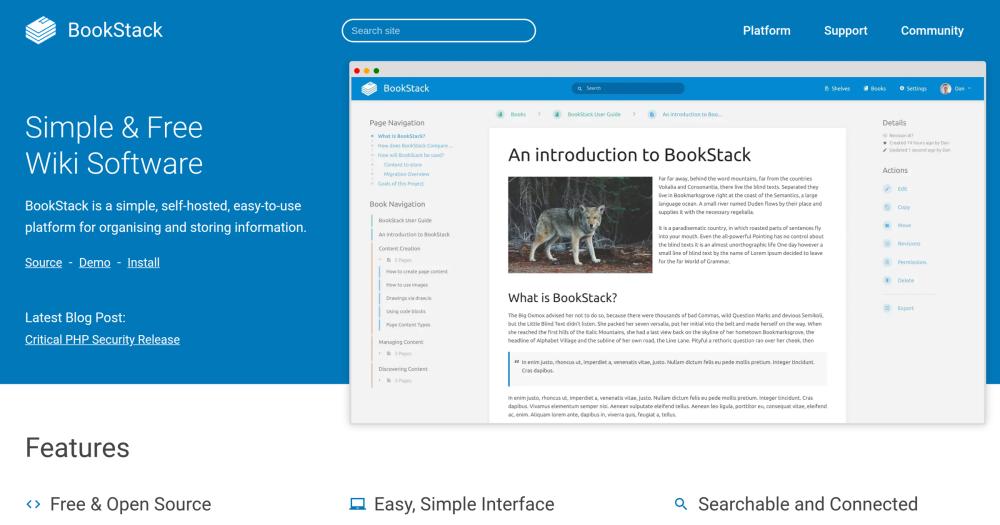
Manage team knowledge with a self-hosted, MIT-licensed wiki built on a Books, Chapters, and Pages hierarchy with WYSIWYG editing and full-text search.

Visit websiteCodeberg299 starsDeploy on Hostinger
Image for BookStack
TL;DR

BookStack is a self-hosted, MIT-licensed wiki built in PHP and Laravel that organizes documentation using a Books, Chapters, and Pages hierarchy. It replaces paid knowledge-base tools like Confluence, GitBook, and Notion for teams that want full ownership of their documentation. Self-hosting requires a PHP and MySQL server; the project notes it performs well on modest, low-cost hardware. A WYSIWYG editor keeps content creation accessible to non-technical contributors.

Read the full breakdownHide the full breakdownWho it is for, how it works, trade-offs and the FAQ
who it's for

Who BookStack is for#

IT and ops teams building internal wikis

Teams that document runbooks, onboarding guides, infrastructure diagrams, and internal policies benefit from BookStack's structured hierarchy and built-in diagrams.net support. Role-based access control lets IT admins restrict sensitive runbooks to specific roles while keeping general documentation accessible to the broader organization.

Skip if:

Skip if your team needs real-time collaborative editing like Google Docs, or if documentation is tightly coupled to a ticketing system where Confluence's Jira integration is a hard requirement.

Organizations with data residency or compliance requirements

Healthcare, finance, and government teams that cannot store documentation on third-party cloud infrastructure use BookStack to keep knowledge on internal servers. SAML2 and LDAP support connects it to existing identity providers, and the MIT license imposes no restrictions on private self-hosted use.

Skip if:

Skip if your compliance requirement includes vendor-supported SLAs or third-party security certifications that a self-hosted open source deployment cannot provide on its own.

Small teams migrating off a paid wiki tool

Teams migrating off Confluence, Slab, or Nuclino to reduce per-seat costs use BookStack as a self-hosted replacement. The WYSIWYG editor requires no technical skill from content authors, and the Books, Chapters, and Pages structure is familiar enough that most wiki users can navigate it without training.

Skip if:

Skip if your team is non-technical and has no one to handle initial server setup and ongoing maintenance. BookStack requires a PHP and MySQL server, and there is no official managed cloud version.

Developers and homelab users organizing project docs

Individual developers and homelab users run BookStack to organize notes, project documentation, and technical references. The low server requirements mean it runs on a Raspberry Pi or an inexpensive VPS, and the MIT license allows any use, including commercial projects, without restriction.

Skip if:

Skip if you need unstructured personal notes rather than a hierarchical wiki. BookStack's Books, Chapters, and Pages model adds organizational overhead that is unnecessary for casual note-taking.

the problem

The problem it solves#

Teams using paid knowledge-base tools like Confluence, Notion, or GitBook face a consistent set of constraints: pricing tied to user count, data stored on vendor infrastructure, and limited ability to customize the tool without paying for higher tiers. For organizations with data residency requirements, compliance obligations, or a preference for controlling where business knowledge lives, these cloud services create a hard trade-off between convenience and data ownership.

The additional challenge is migration cost. Content formats differ across cloud knowledge bases, export options are limited, and re-linking internal references requires manual work once you leave a cloud product. Starting with a self-hosted tool eliminates this vendor dependency before it accumulates.

how BookStack solves it

How it solves it#

WYSIWYG and Markdown page editor

Pages are edited using a WYSIWYG interface built on TinyMCE and Lexical, requiring no technical skill from contributors. Writers who prefer plain text can switch to a per-user Markdown editor with live preview. Both editors store content in the same format, so switching does not affect existing pages.

Built-in diagrams.net integration

The page editor embeds diagrams.net natively, letting editors create flowcharts, network diagrams, and architecture diagrams without leaving the page. Diagrams are stored within the page content and render inline alongside the rest of the documentation.

Full-text search with paragraph linking

All content across books, chapters, and pages is indexed for full-text search. Searches can be scoped to a single book or run across the entire instance. Every paragraph has a stable URL, so editors can link team members directly to a specific section rather than just a page.

OIDC, SAML2, and LDAP enterprise authentication

BookStack supports OIDC and SAML2 for single sign-on with enterprise identity providers, and LDAP for on-premise directory services. Social OAuth login options are available as secondary authentication. MFA is built in and can be enforced at the role level using TOTP authenticator apps or backup codes.

Role-based access control with per-content permissions

A built-in permission system lets admins lock down individual books, chapters, or pages to specific roles. Roles can be granted or restricted at both the system level (create, delete content) and the content level (read, edit). This allows granular control over who can see and modify sensitive documentation.

Multi-language interface

The BookStack interface is available in many languages including English, French, German, Spanish, Italian, Japanese, Dutch, Polish, and Russian, among others contributed through the project's Crowdin translation system. Users set their preferred language independently from the instance default.

strengths · trade-offs

Strengths and trade-offs#

Strengths

  • MIT license with no per-seat pricingBookStack is MIT licensed and free to download and run on your own server. There is no per-user cost, no feature gating by plan tier, and no limits on the number of books, chapters, or pages. For a growing team, the cost difference versus a per-seat paid wiki can be substantial over time.
  • Low server requirementsBookStack runs on a standard PHP and MySQL stack. The project documentation notes it performs well on a £2.50/month VPS, making it accessible to small teams and individual deployments that cannot justify cloud pricing. No containerization or orchestration layer is required for a basic install.
  • Opinionated structure prevents content sprawlThe three-tier Books, Chapters, and Pages hierarchy enforces a consistent organization that prevents the sprawl common in free-form wikis. Because content is always nested at exactly one level, search results are easier to contextualize and content ownership is clearer for editors and admins.
  • Active development with dedicated security releasesThe project shows active development with a last code push in October 2026 and a history of dedicated security releases (e.g., v26.09.2 was a security-only patch). Publishing security fixes separately rather than bundling them with feature releases signals that the maintainer treats vulnerabilities as first-class concerns.

Trade-offs

  • -Self-hosting requires PHP and MySQL server setupBookStack runs on PHP, Laravel, and MySQL, which means self-hosting requires a Linux server with PHP, a database, and a web server configured correctly. This is a standard setup, but teams without server administration experience will need to invest time in the initial install and in ongoing maintenance such as database backups, PHP version upgrades, and security patching.
  • -Not designed for extensibility beyond documentationThe README states explicitly that BookStack is not designed as an extensible platform for purposes that differ from its core documentation use case. If your team needs a tool that doubles as a project tracker, database, or general-purpose workspace like Notion, BookStack is the wrong fit. The maintainers decline feature requests that pull it outside its defined scope.
  • -Large open issue backlogThe Codeberg repository currently carries 710 open issues. While the project is actively maintained, this volume reflects a backlog of feature requests and bug reports that have not been resolved. Teams that depend on a specific missing feature or encounter an existing bug should check the issue tracker before committing to BookStack.
versus alternatives

BookStack vs alternatives#

BookStack vs Confluence

Confluence is the dominant enterprise wiki tool, owned by Atlassian. It integrates tightly with Jira and has an extensive plugin marketplace. BookStack trades that integration depth for zero licensing cost and a simpler interface.

FeatureBookStackConfluence
LicenseMITProprietary
Self-hostingYes (PHP/MySQL)Paid (Data Center tier)
Per-seat pricingNoYes
AuthenticationOIDC, SAML2, LDAPSSO on higher tiers
Plugin marketplaceNoYes (Atlassian Marketplace)

BookStack is the better choice for teams that want a clean knowledge base without Atlassian's per-seat model. Confluence remains the better fit when your team's workflow depends on deep Jira integration or the Atlassian plugin library. Confluence Data Center also supports high-availability clustering that BookStack does not offer.

BookStack vs Notion

Notion is a cloud-only workspace combining documentation, databases, and project tracking. BookStack is documentation-focused and self-hosted.

FeatureBookStackNotion
LicenseMITProprietary
Self-hostingYesNo
Data locationYour serverNotion's cloud
Database viewsNoYes
Per-seat costNoYes

For teams whose primary need is structured documentation with data ownership, BookStack is a direct replacement for Notion. Notion is the better choice when you need its database views, linked properties, and flexible canvas for tasks that go beyond documentation.

BookStack vs GitBook

GitBook is a cloud-hosted documentation product aimed at developer teams publishing external docs. BookStack is designed for internal team wikis.

FeatureBookStackGitBook
LicenseMITProprietary
Self-hostingYesNo
Git syncNoYes
Primary useInternal wikiPublic developer docs
Per-seat costNoYes (paid plans)

BookStack fits internal wikis better; GitBook is built for public-facing developer documentation with Git-based workflows. If your team's documentation must be versioned alongside code or published as a developer portal, GitBook has features BookStack does not.

tech stack · detected from GitHub

What it's built on#

Languages
JavaScriptPHPTypeScript
Frameworks
Laravel
frequently asked

FAQ#

Is BookStack free to use for commercial teams?

Yes. BookStack is MIT licensed, which means you can run it on your own server for any purpose, including internal commercial use, with no licensing fees. There is no per-seat cost, no feature gating by plan tier, and no limit on users or pages. You pay only for the server you host it on.

Does BookStack have a managed or cloud-hosted version?

There is no official managed cloud version from the BookStack project. The project is self-hosted only. Several third-party hosting providers listed on the BookStack website offer managed hosting, but these are noted as not being tested, vetted, or supported by the official project. Self-hosting is the only officially supported deployment path.

How does BookStack compare to Confluence for team documentation?

BookStack is simpler and free to self-host but lacks Confluence's plugin marketplace, Jira integration, and enterprise support tiers. Confluence Data Center supports high-availability clustering for large organizations; BookStack is designed for smaller-scale deployments. BookStack is the better choice for teams that want a clean, searchable internal wiki without Atlassian's per-seat pricing. Confluence remains the better fit when your team's workflow depends on Jira or Atlassian plugins.

What authentication methods does BookStack support?

BookStack supports OIDC and SAML2 for single sign-on with enterprise identity providers, LDAP for on-premise directory services, and social OAuth providers as secondary login options. Email and password login is the default. Multi-factor authentication is built in and can be enforced at the role level, with TOTP authenticator apps and backup codes as MFA options.

What languages is the BookStack interface available in?

BookStack includes translations for many languages including English, French, German, Spanish, Italian, Japanese, Dutch, Polish, and Russian, among others contributed through the project's Crowdin translation system. Users set their preferred language independently in their profile, so different team members can use the interface in their own language on the same instance simultaneously.

Looking for more

Other ways to replace Confluence, GitBook, Notion, Slab, Tettra, Nuclino and Slite#

AppFlowy

#1 in the Notion guide

Full Notion replacement for small teams

77,613 GitHub stars

AFFiNE

#2 in the Notion guide

Docs, whiteboards, and databases in one workspace

73,684 GitHub stars

Outline

#3 in the Notion guide

Polished team wiki and internal knowledge base

40,988 GitHub stars

Macro Docs

#4 in the Notion guide

Markdown-native docs that agents and teammates edit together

4,782 GitHub stars
All 22 Notion alternatives9 open source Notion alternatives, ranked
by category

Open source tools in these categories#

194

Business & Productivity

OpenClaw, Excalidraw, RustDesk
128

Communication & Collaboration

freeCodeCamp, iptv, Excalidraw
Hostinger

Run BookStack on your own server

Self-host BookStack on a Hostinger VPS.

Deploy on Hostinger

Featured

rakazo

Alternative toGrok Bot

AI teammates you own: your keys, your model, your machine.

  • 4,904 GitHub stars
  • Apache-2.0Licence Apache-2.0
  • #AI Agents

Omnara

Alternative toCClaude Managed Agents

Open-source agent deployment API. Self-host or use Omnara Cloud.

  • 2,957 GitHub stars
  • Apache-2.0Licence Apache-2.0
  • #AI Agents

Inbox Zero

Alternative toSuperhuman

AI email assistant that drafts replies and clears your inbox

  • 12,712 GitHub stars
  • AGPL-3.0Licence AGPL-3.0
  • #Email
Feature your project

New open source projects by email

The projects we add and every new guide. Free, unsubscribe any time.

Find open source alternatives to paid software

/
  • Claude Code to OpenCode
  • Jira to Windshift
  • Notion to AppFlowy
  • Slack to Mattermost
  • Linear to GitLab
  • Wispr Flow to Handy
  • CapCut to Concat
  • Grok Bot to rakazo
  • Superhuman to Inbox Zero
  • Airtable to AITable
  • Muse to OpenClaw
  • GitHub Copilot to Cline
  • Datadog to Netdata
  • Microsoft Teams to Rocket.Chat
  • Confluence to Docmost
  • Pinecone to Qdrant
  • Zapier to n8n
  • Devin AI to OpenHands
  • Firebase to Supabase
  • 1Password to KeePassXC
  • Contentful to Strapi
  • Adobe Premiere Pro to Shotcut
  • ChatGPT to AnythingLLM
  • LangSmith to Langfuse
  • Claude Code to OpenCode
  • Jira to Windshift
  • Notion to AppFlowy
  • Slack to Mattermost
  • Linear to GitLab
  • Wispr Flow to Handy
  • CapCut to Concat
  • Grok Bot to rakazo
  • Superhuman to Inbox Zero
  • Airtable to AITable
  • Muse to OpenClaw
  • GitHub Copilot to Cline
  • Datadog to Netdata
  • Microsoft Teams to Rocket.Chat
  • Confluence to Docmost
  • Pinecone to Qdrant
  • Zapier to n8n
  • Devin AI to OpenHands
  • Firebase to Supabase
  • 1Password to KeePassXC
  • Contentful to Strapi
  • Adobe Premiere Pro to Shotcut
  • ChatGPT to AnythingLLM
  • LangSmith to Langfuse